Are you tired of juggling multiple devices while traveling? Wondering if your travel router can do more than just share Wi-Fi?
One feature that might surprise you is the presence of USB ports on some travel routers. But what exactly can you do with these ports? Could they make your travel experience smoother and more connected? Keep reading to discover how USB ports on travel routers could change the way you stay online on the go—and why you might want to choose a router that has one.
Travel Router Basics
Travel routers are small devices that help you connect to the internet on the go. They create a private Wi-Fi network from a public or wired internet source. This makes it easy to use your devices securely while traveling. Many travelers wonder about their features, like USB ports, and how these routers work.
What Travel Routers Do
Travel routers take internet from hotels, airports, or wired connections. They share this internet with multiple devices. They protect your data by creating a secure network. Some models also boost weak signals. This helps keep your connection steady and fast.
Common Uses
- Connecting multiple devices at hotels with limited Wi-Fi
- Sharing internet from a wired Ethernet port
- Creating a private network from public Wi-Fi
- Boosting weak or unstable Wi-Fi signals
- Using USB ports to share files or charge devices
Usb Ports On Travel Routers
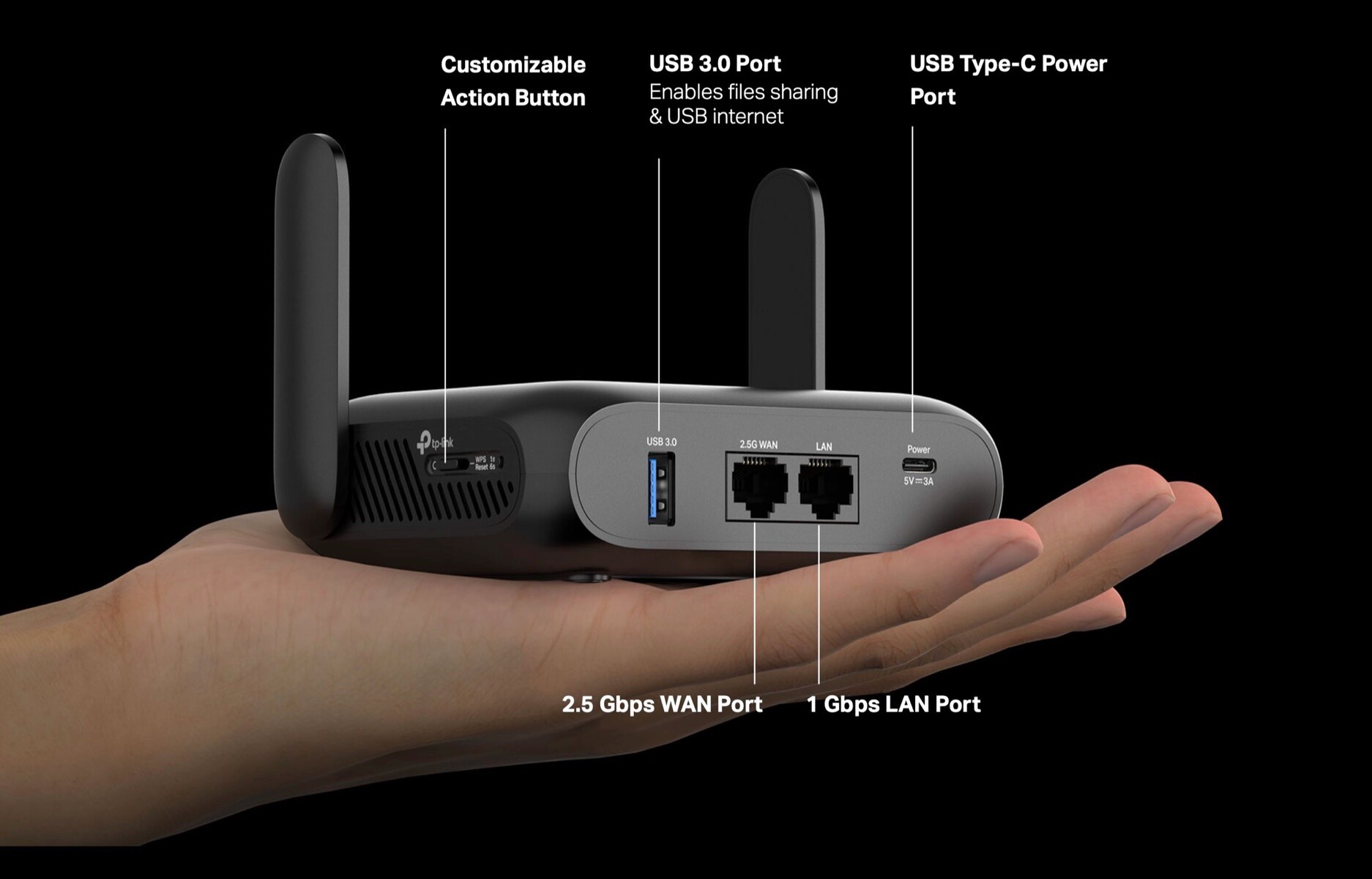
Travel routers often include USB ports to expand their functionality. These ports let users connect devices like external hard drives or printers. USB ports can also power other gadgets or help share files over the network. Understanding the types and uses of USB ports on travel routers can help travelers choose the right device for their needs.
Types Of Usb Ports
- USB 2.0:Common on many travel routers, offers basic data transfer and charging.
- USB 3.0:Faster data transfer speeds, useful for sharing large files quickly.
- USB-C:Smaller, reversible port that supports higher power and faster data rates.
Why Usb Ports Matter
USB ports add extra value to travel routers. They allow connection of storage devices to share files with multiple users. Some routers use USB ports to connect to 4G or 5G modems. This can provide internet access in places without Wi-Fi. USB ports also enable charging of small devices, reducing the need for multiple chargers. Overall, USB ports make travel routers more flexible and useful on the go.
Key Usb Functions
Travel routers often come equipped with USB ports, adding layers of functionality that go beyond just sharing Wi-Fi. These ports serve several key purposes that can enhance your travel experience. Understanding these functions helps you decide if a travel router fits your specific needs and how it can simplify your digital life on the road.
File Sharing And Storage
Many travel routers allow you to plug in a USB flash drive or an external hard drive. This lets you share files across all devices connected to the router’s network. Imagine traveling with a single device that holds your movies, documents, and photos — accessible from any phone, laptop, or tablet without repeatedly transferring files.
This function can be a game-changer if you’re working with a team remotely or want to keep your media centralized. It’s like having a mini cloud storage setup wherever you go, but without relying on an internet connection.
Charging Devices
Some travel routers offer USB ports that double as charging points for your gadgets. This can be especially handy when you have limited outlets in a hotel room or airport lounge. Instead of carrying multiple chargers, you can plug your phone or other USB-powered devices directly into the router.
However, keep in mind that not all travel routers provide high power output through their USB ports. Check the specs if charging speed is important to you.
Connecting 4g/5g Dongles
If your travel router has a USB port compatible with 4G or 5G dongles, you can turn it into a mobile Wi-Fi hotspot. This means you can connect to cellular networks where traditional Wi-Fi isn’t available or reliable. It’s a practical solution for remote areas or countries with spotty public Wi-Fi.
Think about how often you’ve struggled with slow hotel internet or paid for expensive roaming data. Using a dongle with your travel router can give you more control over your connection and potentially save money.

Credit: pokde.net
Popular Travel Routers With Usb
Many popular travel routers include USB ports for sharing files or connecting printers. USB ports add convenience for travelers needing extra connectivity on the go. Some models even support USB storage devices to extend network features easily.
Travel routers have become a must-have gadget for the modern traveler. They offer you the convenience of a personal and secure internet connection wherever you go. A standout feature that many travelers find essential is the USB port. This little addition can transform your travel experience, allowing you to charge devices, connect external storage, or even tether a mobile connection. Let’s dive into some popular travel routers that come equipped with this handy feature.Top Models Featuring Usb
Many top travel routers on the market boast USB ports. The TP-Link TL-WR902AC is a favorite due to its compact size and dual-band Wi-Fi capabilities. Its USB port allows you to share files and media with ease. Another top contender is the GL.iNet GL-AR750S, known for its robust performance and OpenWRT support, which tech enthusiasts love. Its USB port can connect to a 3G/4G USB modem, perfect for when you’re off the grid. The HooToo TripMate Titan is another notable mention. Its USB port not only supports file sharing but also acts as a power bank, providing a dual function that’s ideal for those constantly on the move.User Reviews And Feedback
User feedback often highlights the convenience and versatility of USB ports on travel routers. Many users appreciate the ability to charge devices while accessing the internet, especially during long layovers or in remote locations. One traveler shared how the TP-Link TL-WR902AC allowed them to stream movies stored on a USB stick during a camping trip, enhancing their outdoor experience. However, some users mention that not all USB ports are created equal. Compatibility with certain devices can be hit or miss. It’s wise to check the specifications and user reviews to ensure the model you’re eyeing fits your needs. By choosing a travel router with a USB port, you add an extra layer of utility to your travel tech arsenal. What could be more satisfying than having a single device that meets multiple needs while you’re on the road?Choosing The Right Travel Router
Choosing the right travel router can make all the difference in how smooth your trip goes. It’s not just about getting online—it’s about staying connected, protecting your data, and even charging your devices on the go. Understanding what features truly matter to you helps avoid buying a gadget that ends up gathering dust in your bag.
Evaluating Usb Needs
One key feature to check is whether the travel router has USB ports. These ports can be a game-changer, allowing you to charge your phone or connect external storage. Think about your typical travel habits—do you often find yourself needing extra charging options or access to files on a USB drive?
Some routers offer USB ports primarily for sharing files over the network, while others let you plug in a USB modem for internet access. If you rely heavily on your devices throughout the day, a travel router with at least one USB port is worth considering. It adds convenience without extra bulk.
Other Essential Features
Besides USB ports, look for features like dual-band Wi-Fi support, compact size, and battery life. A router that supports both 2.4 GHz and 5 GHz bands can help you find faster, less crowded connections. Battery life matters if you’ll be away from power outlets for long stretches.
Security options also deserve your attention. Features such as WPA3 encryption and guest network support protect your data and keep your connection safe. Ask yourself: does this router give me peace of mind, or will I need additional tools to stay secure?

Credit: www.amazon.com
Setup Tips For Usb Features
Setting up the USB features on your travel router can add a new layer of convenience to your travel tech. These ports often let you connect external storage devices or charge other gadgets, making your router a mini hub on the go. But knowing the right setup tips can save you time and frustration.
Connecting Devices Via Usb
Start by checking the compatibility of your USB device with the travel router. Some routers only support specific file systems like FAT32 or NTFS, so formatting your drive accordingly is key.
Plug your USB device firmly into the port and access the router’s settings through its web interface or app. Here, you can enable file sharing or media server functions depending on what your router supports.
Have you ever tried connecting a USB printer or external drive but found it wasn’t recognized? That’s often because the router doesn’t support that device type. Always refer to your router’s manual to know what types of USB devices are compatible.
Troubleshooting Common Issues
If your USB device isn’t detected, first try unplugging and plugging it back in. Sometimes the port needs a quick reset.
Check if your router’s firmware is up to date. Outdated firmware can cause USB connection problems and limit functionality.
If you still face issues, try using a different USB cable or device to isolate the problem. Sometimes the issue lies with the cable or the USB device itself, not the router.
Don’t overlook power requirements. Some external hard drives need more power than the router’s USB port can supply. In those cases, using a powered USB hub can make a big difference.
Credit: itc.ua
Frequently Asked Questions
Do All Travel Routers Have Usb Ports?
Not all travel routers include USB ports. Some models offer USB for file sharing or charging, but many focus only on Wi-Fi connectivity. Check product specs before buying to ensure it meets your needs.
What Functions Do Usb Ports Serve On Travel Routers?
USB ports on travel routers allow file sharing, printer connection, or charging devices. They enhance router versatility but are not essential for basic Wi-Fi sharing.
Can I Charge Devices Using A Travel Router Usb Port?
Yes, many travel routers’ USB ports can charge smartphones or tablets. However, charging speed may be slower compared to dedicated chargers.
Are Usb Ports On Travel Routers Compatible With External Drives?
Most travel routers support USB drives for file sharing across connected devices. This feature enables easy access to media or documents on the go.
Conclusion
Travel routers often include USB ports for extra features. These ports let you share files or connect printers easily. They add convenience on the go, especially during trips. Not all models have USB ports, so check before buying. Choosing the right travel router depends on your specific needs.
USB ports can boost your device’s usefulness. This makes travel routers a smart choice for many travelers. Small but helpful details like these matter a lot. Consider what you want to do with your router before deciding.