Are you tired of losing internet connection every time you hit the road? Imagine staying connected no matter where your car takes you.
A portable router might be the solution you’ve been searching for. But can a portable router really be used in your car? This article will answer that question and show you how to turn your vehicle into a mobile hotspot.
Stick around, because what you learn here could change the way you stay online on the go.
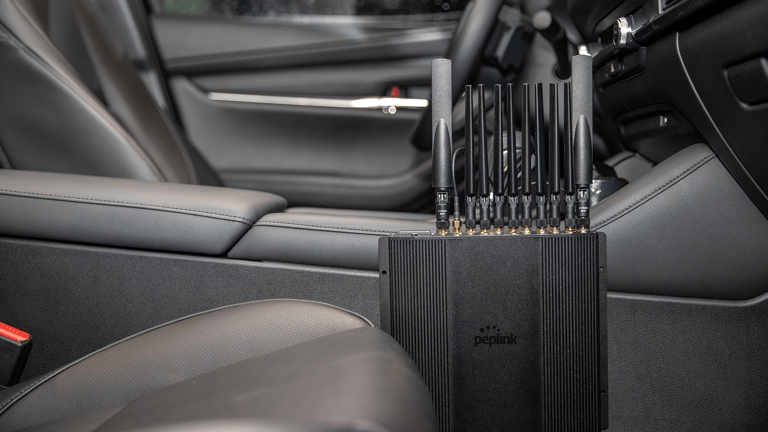
Credit: www.peplink.com
Benefits Of Portable Routers In Cars
Portable routers bring several benefits to car travel. They keep you connected and improve your travel experience. These small devices help maintain internet access, connect many gadgets, and keep your data safe. Portable routers make trips smoother and more productive.
Continuous Internet Access On The Road
Portable routers provide steady internet while driving. They use cellular networks to offer online access anywhere. This means you can browse, stream, and work without interruptions. No more relying on spotty public Wi-Fi or waiting for stops.
Multiple Device Connectivity
One portable router can connect many devices at once. Passengers can use phones, tablets, or laptops together. This avoids slowdowns and keeps everyone online simultaneously. It’s perfect for families, business trips, or group travel.
Enhanced Security For Travelers
Portable routers offer safer internet than public Wi-Fi hotspots. They use encryption and passwords to protect your data. This lowers risks of hacking or spying on your information. Travelers can browse, shop, and bank online with peace of mind.

Credit: www.ai-online.com
Types Of Portable Routers Suitable For Cars
Choosing the right portable router for your car can make a huge difference in your travel experience. Different types of portable routers offer various features and power options, so understanding what fits your needs is key. Let’s look at the main types of portable routers that work well in a car environment and what makes each unique.
Battery-powered Routers
Battery-powered routers are a great option if you want true mobility without relying on your car’s power supply. These routers come with built-in rechargeable batteries, allowing you to use them anywhere, even outside the car.
They usually last several hours on a single charge, perfect for long trips or when you park far from power sources. However, keep an eye on battery life during extended use. Have you ever been stuck with no internet because your device died? A good battery-powered router helps avoid that frustration.
Car Charger-compatible Routers
Routers that can be powered via a car charger plug directly into your vehicle’s 12V socket. This means you don’t have to worry about battery life during long drives. Just connect and enjoy continuous internet access while on the road.
These are ideal if you spend a lot of time driving or need reliable connectivity throughout your journey. One thing to consider is that they depend on the car’s power, so they won’t work when the engine is off unless your car’s power outlet stays active.
Sim Card-based Mobile Hotspots
SIM card-based mobile hotspots function like mini cellular towers. You insert a SIM card with a data plan, and the device creates a Wi-Fi network using mobile data. This offers internet access almost anywhere there’s cellular coverage.
They are compact, easy to use, and perfect for trips in areas without Wi-Fi but good mobile signal. You get to choose data plans that fit your usage, which can save money if you don’t need unlimited data. Have you checked if your mobile carrier offers hotspot-friendly SIM cards? This could be a game changer for your car connectivity.
Setting Up A Portable Router In Your Vehicle
Setting up a portable router in your vehicle transforms it into a mobile Wi-Fi hotspot. This setup keeps you connected on the road. It allows multiple devices to access the internet through a single connection. The process is simple but requires attention to power, signal, and security.
Powering The Router While Driving
Portable routers need constant power to work during trips. Use a car charger with a USB port that matches your router’s power needs. A power inverter can convert your car’s 12V DC to 110V AC for routers with standard plugs. Keep cables organized and out of the way to avoid distractions. A fully charged power bank can act as a backup power source.
Optimizing Signal Strength
Place the router in an open spot inside your car, away from metal objects. Window areas often provide better signal reception than the dashboard. Keep the antenna, if external, pointed towards the nearest cell tower. Avoid placing the router under seats or inside bags. Test different locations to find the strongest signal. Use signal boosters if you travel in remote areas.
Securing Your Network
Set a strong password for your router’s Wi-Fi. Change the default network name (SSID) to something unique. Enable WPA3 or WPA2 encryption for the best security. Turn off network sharing and guest access features unless necessary. Update your router’s firmware regularly to fix vulnerabilities. Limit the number of connected devices to prevent unauthorized access.
Choosing The Right Data Plan For Travel
A portable router can provide internet access inside a car, making travel smoother. Choosing the right data plan ensures good coverage and affordable use. This helps stay connected without using phone data directly.
Choosing the right data plan for travel is crucial when using a portable router in your car. With the freedom of the open road, you want a data plan that keeps you connected without any unexpected surprises. Whether you’re streaming music, navigating unknown routes, or keeping the kids entertained, your data plan should cater to all your needs.Prepaid Vs. Postpaid Options
When deciding between prepaid and postpaid options, consider your travel habits. Prepaid plans offer flexibility with no long-term commitments, ideal for spontaneous road trips. On the other hand, postpaid plans might suit those who travel frequently and require a consistent data allowance.Data Limits And Speeds
Understanding data limits and speeds is essential to avoid hitting a dead zone in your connectivity. Look for plans offering unlimited or high data caps if you plan to stream videos or download large files. Speed is equally important; ensure your plan supports 4G or 5G to maintain swift connections on the go.International Roaming Considerations
If your journey crosses international borders, international roaming considerations come into play. Some plans offer affordable international data options, while others might surprise you with hefty fees. Always check if your plan includes roaming and what the charges are for each country you plan to visit. Choosing the right data plan can make your travel experience seamless and enjoyable. Have you ever been caught off-guard by data overages or slow speeds during a trip? Share your experiences and tips for staying connected on the road!Common Challenges And Solutions
Using a portable router in your car can bring great convenience, but it also comes with a set of challenges. These issues often affect your internet speed, device connectivity, and overall experience. Understanding these challenges and their solutions will help you stay connected without frustration on the road.
Dealing With Dead Zones
Dead zones are areas where your portable router might lose signal or have very weak coverage. This often happens in remote or heavily built-up areas. To avoid losing connection, try positioning your router near a window or higher up in the car, where the signal can reach better.
Carrying a signal booster or using a router with external antenna options can also help. Have you ever noticed your connection drops suddenly when driving through certain spots? Planning your route with signal coverage maps can save you from unexpected disconnections.
Managing Battery Life
Your portable router’s battery life is crucial when you’re on the move. Running out of power in the middle of a trip can cut off your internet access completely. You can extend battery life by lowering the router’s transmit power or turning off unused features like guest networks.
Investing in a car charger or a power bank ensures your router stays charged throughout your journey. Think about how long you typically travel and prepare accordingly to avoid interruptions.
Ensuring Device Compatibility
Not every portable router works seamlessly with all devices you might want to connect. Some routers have limits on the number of devices or may not support certain operating systems well. Check your router’s specifications to see which devices it supports before you hit the road.
Updating your router’s firmware can improve compatibility and fix bugs that cause connection issues. Have you experienced devices that just won’t connect? Sometimes, a quick update or a reset can make all the difference.

Credit: www.amazon.ca
Best Portable Routers For Travelers
Traveling often means juggling multiple devices and hunting for reliable internet connections. A portable router can be a game-changer, especially when you’re on the road. It offers a simple way to stay connected, share data with your travel companions, and keep your devices safe from public Wi-Fi risks.
Top Models Reviewed
Choosing the right portable router depends on your travel style and needs. Here are some popular models that travelers swear by:
- TP-Link M7350:Known for fast 4G LTE speeds and a built-in display showing signal strength and data usage.
- Netgear Nighthawk M1:Offers excellent battery life and can support multiple devices simultaneously, perfect for group travel.
- GL.iNet GL-MT300N-V2:Compact and versatile, this model supports OpenVPN and WireGuard for enhanced security.
Each of these routers balances portability with performance, making them great companions on your journeys.
Features To Look For
What should you prioritize when picking a portable router? Here are some key features that can make a big difference:
- Battery Life:Long-lasting batteries let you stay connected without constant recharging.
- Speed and Band Support:Look for 4G LTE or 5G capabilities to handle fast internet wherever you go.
- Device Capacity:If you travel with others, choose a router that supports multiple connections.
- Security Options:Features like VPN support help keep your data safe on public networks.
- Ease of Use:A simple interface and easy setup save you time and frustration.
Think about what matters most to you. Do you prioritize speed or security? The right features will depend on your travel habits.
Budget-friendly Options
You don’t have to spend a fortune to get a reliable portable router. Here are some budget-friendly options that still deliver solid performance:
- Huawei E5577C:Affordable, easy to use, and supports 4G LTE speeds suitable for everyday browsing.
- Tenda 4G185:Offers a balance of speed and price, with a decent battery life for short trips.
- Alcatel LinkZone:Compact and simple, this router provides good value for casual travelers.
Choosing a budget model doesn’t mean sacrificing quality. It’s about finding the best fit for your connection needs without overspending.
Frequently Asked Questions
Can A Portable Router Work Inside A Car?
Yes, a portable router can work inside a car. It requires a power source like a car charger. The router connects to mobile data networks to provide Wi-Fi. This allows multiple devices to access the internet while traveling.
How Do I Power A Portable Router In My Car?
You can power a portable router in your car using a 12V car charger adapter. Many routers support USB power, so a USB car charger works too. This setup ensures the router stays powered during long drives.
Is A Portable Router Better Than A Phone Hotspot In A Car?
A portable router often offers better connectivity and supports more devices than a phone hotspot. It provides a stable Wi-Fi network without draining your phone’s battery. It’s ideal for families or work on the go.
What Internet Plans Work With Portable Routers In Cars?
Portable routers typically use SIM cards with data plans from cellular providers. Choose plans with good 4G or 5G coverage in your travel area. Unlimited or high-data plans are preferable for continuous internet access.
Conclusion
A portable router works well in a car for internet access. It provides Wi-Fi to multiple devices on the go. You can easily connect smartphones, tablets, or laptops while traveling. The router uses a SIM card or tethering to share mobile data.
It helps keep passengers entertained and productive during trips. Battery life and signal strength affect its performance. Always choose a reliable router for the best experience. Portable routers bring convenience and flexibility to car journeys. They make traveling with internet simple and smooth.