Imagine staying connected wherever you go without worrying about slow or unsafe public Wi-Fi. You might think that’s impossible, but with a portable router, you can take control of your internet connection on the road.
Whether you’re traveling for work or pleasure, knowing how to use a portable router can make your trips smoother and more secure. You’ll discover simple steps to set up and use a portable router, so you never have to deal with frustrating connection issues again.
Ready to unlock seamless internet access on your travels? Keep reading.
Choosing The Right Portable Router
Choosing the right portable router is essential for smooth internet access while traveling. It helps you stay connected without hassle. Not all portable routers offer the same features or performance. Picking one that fits your needs and travel style saves time and frustration.
Consider what matters most to you. Battery life, size, speed, and security all play a role. Knowing what each model offers helps narrow down choices. This guide breaks down key features, compares popular models, and weighs budget against performance.
Key Features To Consider
- Battery Life:Long-lasting battery ensures internet on the go.
- Speed:Look for routers supporting fast Wi-Fi standards like 802.11ac or 802.11ax.
- Size and Weight:Compact and lightweight models fit easily in bags or pockets.
- Security:WPA3 encryption and firewall options protect your data.
- Multiple Connections:Ability to connect several devices at once is useful.
- Ports and Slots:USB ports or SIM slots add versatility for different network types.
Comparing Popular Models
| Model | Battery Life | Speed | Size | Security | Price |
|---|---|---|---|---|---|
| TP-Link M7350 | 10 Hours | 150 Mbps | Compact | WPA2 | $$ |
| Netgear Nighthawk M1 | 24 Hours | 1 Gbps | Medium | WPA3 | $$$$ |
| GL.iNet GL-AR750S | 8 Hours | 433 Mbps | Small | WPA3 | $$$ |
Budget Vs Performance
Cheaper routers often have shorter battery life and slower speeds. They suit casual users with light internet needs. Higher-priced models offer faster connections and better security. They work well for heavy users and business travelers.
Balance your budget with required features. Spending more may avoid frustrations during trips. Look for deals that fit your price range without compromising essentials.

Credit: www.youtube.com
Setting Up Your Portable Router
Setting up your portable router is simple and fast. It allows easy internet access wherever you travel. Follow a few clear steps to get your device ready. A well-set router means smooth browsing and secure connections.
Basic Configuration Steps
Start by powering on your portable router. Connect it to a power source or use the built-in battery. Use a computer or smartphone to access the router’s setup page. This usually involves typing the router’s IP address into a browser.
Log in using the default username and password. Change these credentials later for security. Follow the setup wizard to connect your router to the internet. Choose the network type, such as Wi-Fi or Ethernet. Save the settings and restart the device if needed.
Securing Your Network
Security keeps your data safe while traveling. First, change the default admin password. Use a strong password with letters, numbers, and symbols.
Set up Wi-Fi encryption, like WPA2 or WPA3, in the settings. Avoid open networks, which can be easily hacked. Disable WPS (Wi-Fi Protected Setup) to prevent unauthorized access. Enable a guest network to separate visitors from your main devices.
Optimizing Signal Strength
Place your portable router in a central location. Avoid walls and metal objects that block signals. Keep the device elevated for better coverage.
Use external antennas if your router supports them. Adjust antenna angles to find the best signal direction. Reduce interference by switching to less crowded Wi-Fi channels. Test the connection speed and move the router if the signal is weak.
Using Portable Routers On The Go
Using portable routers on the go makes travel easier and more connected. These small devices create a personal Wi-Fi network anywhere. They offer secure and reliable internet access for multiple gadgets. Understanding how to manage connections, data, and issues helps travelers stay online smoothly.
Connecting Multiple Devices
Portable routers support several devices at once. Connect smartphones, tablets, laptops, and other Wi-Fi gadgets easily. Most routers show the number of devices connected on their app or screen. Prioritize important devices for better speed. Limit connections if the network slows down.
Managing Data Usage
Data limits can affect your internet experience while traveling. Check your data plan regularly to avoid extra charges. Use the router’s settings to monitor data consumption. Set alerts to warn when data is running low. Close apps and tabs that use too much data. Use Wi-Fi only for essential tasks.
Troubleshooting Common Issues
Sometimes portable routers may face connectivity problems. Restart the router to fix many common issues. Check signal strength and move to a better location. Ensure firmware is up to date for best performance. Reset the router if it stops working. Contact customer support if problems persist.
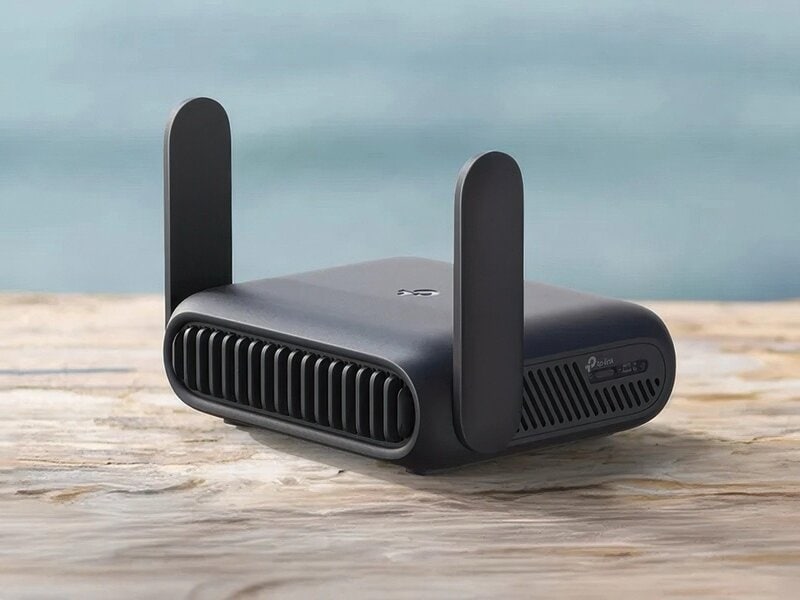
Credit: www.trendhunter.com
Power And Portability Tips
Portable routers offer easy internet access anywhere during travel. Choose a compact model with a strong battery for longer use. Keep it charged and secure for reliable connection on the go.
Traveling with a portable router can make your trips more efficient by ensuring you stay connected wherever you go. However, keeping your router powered and portable requires a few smart strategies. Let’s dive into some essential tips for managing power and portability while on the move.Battery Life Management
Ensuring your portable router has a long battery life is key to uninterrupted connectivity. Consider investing in a high-capacity power bank to charge your router on the go. It’s also wise to adjust the router’s settings to extend battery life; for instance, reducing the signal range can conserve power. Always charge your router before leaving your accommodation. You never know when you might find yourself without access to a power source. Also, check if your router supports energy-saving modes that automatically activate when the device is idle.Compact Carrying Solutions
Portability is all about convenience, so choose a router that’s lightweight and easy to pack. Look for models that come with a travel case to protect them from damage while you’re on the go. A small pouch can also store cables and accessories neatly. Think about the space in your luggage. Would the router fit in your carry-on, or does it need to be in your checked luggage? Keeping the router within reach makes it easy to connect when you stop at a café or an airport lounge. By managing battery life effectively and choosing smart carrying solutions, you ensure your portable router is ready whenever you need it. Imagine the freedom of not having to hunt for Wi-Fi hotspots. With these tips, you can enjoy seamless internet access, making your travels smoother and more enjoyable.Maximizing Connectivity Abroad
Traveling with a portable router can transform your internet experience abroad, but staying connected requires some smart moves. You want reliable service without breaking the bank or running into access issues. Let’s look at how you can get the most out of your device while abroad.
Using Local Sim Cards
One of the best ways to keep your portable router connected is by using a local SIM card. Buying a SIM card from a local provider usually gives you faster speeds and lower costs compared to roaming. Many airports and city kiosks sell SIM cards that work immediately, so you can get online as soon as you land.
Before your trip, check if your portable router supports SIM cards and the local network frequencies. Some routers are locked to specific carriers or regions, which could limit your options. Have you ever arrived at your destination only to find your device incompatible? Avoid that hassle by researching compatibility first.
Handling Roaming Charges
Roaming charges can surprise you with high bills if you aren’t careful. Using your home SIM card abroad often leads to extra fees for data usage. You can minimize costs by disabling automatic updates and background data on your devices connected to the portable router.
Another tip is to buy a global data plan or an international roaming add-on from your provider before traveling. Compare these options against local SIM cards to see what fits your budget and needs better. Have you checked your provider’s roaming policies recently? It might save you from a costly mistake.
Dealing With Regional Restrictions
Some countries block or limit access to certain websites and services. Your portable router won’t bypass these restrictions on its own. If you rely on apps or sites that might be blocked, consider setting up a VPN on your router or devices.
Not all VPNs work everywhere, and some countries actively block VPN traffic. Test your VPN before traveling to avoid losing access when you need it most. What websites or apps do you absolutely need while abroad? Planning ahead for regional restrictions can keep your connectivity smooth and stress-free.

Credit: www.eiotclub.com
Frequently Asked Questions
What Is A Portable Router And Why Use It For Travel?
A portable router is a compact device that creates a personal Wi-Fi network. It offers secure, reliable internet on the go. Travelers use it to connect multiple devices, avoid public Wi-Fi risks, and improve connectivity during trips, enhancing online safety and convenience.
How Do I Set Up A Portable Router While Traveling?
To set up, connect the router to a power source and insert a SIM card or Ethernet cable. Access the router’s web interface via a browser. Configure the network name and password. This quick setup ensures secure internet access anywhere.
Can A Portable Router Improve Hotel Wi-fi Security?
Yes, a portable router encrypts your internet traffic, protecting data from hackers. It creates a private network, reducing exposure to hotel Wi-Fi vulnerabilities. Using one enhances privacy and keeps sensitive information safe while traveling.
How Many Devices Can A Portable Router Support Simultaneously?
Most portable routers support 5 to 15 devices at once. This allows you to connect smartphones, laptops, tablets, and more. Check your router’s specifications to ensure it meets your travel connectivity needs.
Conclusion
A portable router makes travel internet easy and reliable. It keeps your devices connected anywhere you go. You can share Wi-Fi with friends or family. Just pack it, turn it on, and connect. No more hunting for public Wi-Fi or worrying about security.
A small device with big benefits for any trip. Stay online, stay safe, and enjoy your journey. Simple, smart, and helpful for all travelers. Give it a try on your next adventure.