Are you tired of unreliable Wi-Fi when you travel? A travel router might be the perfect solution, but you’re probably wondering—are travel routers really plug and play?
Imagine setting up your own secure, fast internet wherever you go, without complicated steps or technical headaches. You’ll discover how simple it can be to get your travel router up and running, so you can stay connected effortlessly. Keep reading to find out what makes travel routers easy to use and how they can transform your travel experience.
What Is A Travel Router
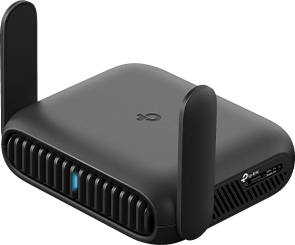
A travel router is a compact device designed to make your internet access smoother when you’re on the move. It acts as a bridge between a public or wired network and your personal devices, creating your own secure Wi-Fi hotspot wherever you are.
Instead of relying on unpredictable hotel Wi-Fi or costly mobile data, a travel router lets you control your connection. You can connect multiple devices securely and often improve speed and privacy. But what exactly does it do, and how does it work?
What Does A Travel Router Do?
At its core, a travel router takes an existing internet connection and shares it wirelessly with your devices. This can be from a hotel’s Ethernet port, a public Wi-Fi network, or even a cellular hotspot.
It provides:
- Secure Wi-Fi:Your own password-protected network.
- Device Sharing:Connect multiple gadgets without extra fees.
- Network Control:Manage connections and settings easily.
How Is It Different From A Regular Router?
Unlike bulky home routers, travel routers are small and lightweight, designed specifically for portability. They often include features tailored for travel, like easy setup modes and compatibility with various internet sources.
Additionally, many travel routers have built-in batteries for use on the go. This means you can create a Wi-Fi hotspot even when no outlet is nearby.
Why Should You Consider Using One?
If you’ve ever struggled with weak or unsecured Wi-Fi while traveling, a travel router can be a game changer. It improves security by encrypting your connection and avoids the hassle of logging in repeatedly on public networks.
Think about the last time you stayed at a hotel with spotty Wi-Fi—wouldn’t having your own reliable network make your trip easier? With a travel router, you get peace of mind and better connectivity no matter where you are.

Credit: www.amazon.ca
Plug And Play Features
Travel routers often advertise themselves as plug and play devices, promising hassle-free internet access wherever you go. But what does this really mean for you? Understanding the plug and play features can help you decide if a travel router fits your needs or if you’ll need some technical patience.
Basic Setup Steps
Most travel routers require minimal setup to get started. Usually, you just need to plug the router into a power source, connect it to the internet via an Ethernet cable or Wi-Fi, and then connect your devices to the router’s network.
Some models come with a simple web interface or mobile app that walks you through the process step-by-step. This makes it easy even if you’re not tech-savvy. Have you ever plugged in a device only to find you had to dig through confusing menus? Travel routers aim to avoid that frustration.
- Power on the router
- Connect to the internet source (Ethernet or Wi-Fi)
- Join the router’s new network on your devices
- Access the setup page if needed to customize settings
Though straightforward, some setups might require changing your device’s Wi-Fi settings or entering passwords. It’s a small effort that usually pays off with faster, more secure connections while traveling.
Compatibility With Devices
Travel routers are designed to work with a wide range of devices. Whether you’re using a smartphone, laptop, tablet, or even gaming console, most routers support multiple simultaneous connections without issue.
However, not all devices connect the same way. Some older gadgets may struggle with newer router standards like Wi-Fi 6. Checking your device’s compatibility can save you from connection headaches later.
- Works with Windows, macOS, Android, iOS, and Linux
- Supports multiple devices at once
- Handles different connection types: Ethernet, Wi-Fi, USB tethering
Have you ever found yourself stuck with limited internet access because a device wouldn’t connect? Travel routers usually avoid this by offering broad compatibility. Still, it’s smart to verify your devices before relying on one for your trip.
Common Setup Challenges
Setting up a travel router might sound straightforward, but you could hit a few bumps along the way. These devices are designed to be user-friendly, yet real-world scenarios often introduce challenges that complicate the process. Understanding these common issues can save you time and frustration during your travels.
Network Restrictions
Many hotels, airports, and public Wi-Fi spots place limits on connected devices or require special login procedures. This can prevent your travel router from connecting smoothly or sharing the internet with all your gadgets.
For instance, some networks block routers by detecting multiple devices behind a single IP address. You might find yourself stuck at a login page even after connecting the router. Have you ever tried connecting your devices only to realize the network demands individual authentications?
To get around this, you can:
- Use the travel router’s client mode, which lets it act like a single device.
- Manually log in to the network through the router’s interface.
- Check if the network supports MAC address cloning, enabling the router to mimic a single device.
Firmware Updates
Firmware updates keep your travel router secure and compatible with the latest networks. However, updating firmware while on the road can be tricky if your connection is unstable or the update process isn’t straightforward.
I once faced an update failure during a trip, which temporarily disabled my router’s Wi-Fi. It was frustrating because I relied on it to stay connected for work.
To avoid such headaches, consider:
- Updating the firmware before you travel.
- Using a reliable power source and stable internet during the update.
- Consulting the manufacturer’s support resources if the update process isn’t clear.
Have you prepared your travel router for these potential setup hurdles? Tackling these challenges head-on makes your travel experience smoother and more connected.

Credit: www.eiotclub.com
Tips For Easy Setup
Travel routers often come ready to use right out of the box. Just plug them in, connect to power, and follow simple on-screen steps. No complex setup is usually needed, making them ideal for quick internet access on the go.
Travel routers can make connectivity on the go easy. They are often plug and play, but a few tips can ensure a smooth setup. Here are some practical steps to get your travel router working seamlessly.Choosing The Right Travel Router
Research various options to find a suitable travel router. Consider factors like size, weight, and compatibility with your devices. Look for routers that support multiple devices and offer good range. Check user reviews to gauge reliability and performance. Ensure the router supports the Wi-Fi standards you need.Pre-configuring Before Travel
Set up your travel router at home before traveling. This allows you to resolve issues in a familiar environment. Connect the router to your home network and test its functionality. Configure security settings like passwords and encryption. Save these settings to avoid reconfiguring on the road. Ensure firmware is up to date for optimal performance and security.Benefits Of Using Travel Routers
Travel routers offer several benefits that improve your internet experience on the go. They provide better control over your connection and protect your data. These small devices help you stay connected in hotels, airports, or cafes.
Improved Security
Travel routers create a private network for your devices. This setup keeps hackers away from your personal data. Public Wi-Fi networks often lack strong security. A travel router encrypts your connection, making it safer to browse and shop online. It also blocks unauthorized access to your devices. This extra layer of protection is vital for travelers.
Enhanced Connectivity
Travel routers boost your internet signal strength. They connect multiple devices without slowing down your speed. You can share one Wi-Fi source with your phone, laptop, and tablet. These routers also reduce connection drops and improve stability. Some models support both wired and wireless connections. This flexibility ensures you stay online no matter the situation.
Alternatives To Travel Routers
Travel routers are useful for sharing internet connections on the go. Still, some travelers prefer other devices or methods for internet access. These alternatives can offer similar benefits without needing extra gadgets. Understanding these options helps choose the best fit for your travel needs.
Mobile Hotspots
Mobile hotspots are small devices that provide internet access. They create a Wi-Fi network using cellular data. You connect your phone, laptop, or tablet to this network. Mobile hotspots are easy to carry and use in many places. Many come with their own battery, allowing hours of use. These devices work well in areas with good cellular coverage. They offer secure connections and avoid public Wi-Fi risks.
Using Smartphone Tethering
Smartphone tethering turns your phone into a Wi-Fi hotspot. It shares your phone’s mobile data with other devices. This method requires no extra equipment. Simply enable the hotspot feature in your phone’s settings. It supports multiple devices like laptops and tablets. Tethering is convenient for short trips or occasional use. Keep an eye on data limits to avoid extra charges. Battery life may drain faster during tethering, so carry a charger.
Credit: www.tp-link.com
Frequently Asked Questions
Are Travel Routers Easy To Set Up?
Yes, most travel routers are designed for easy setup. They often come with plug-and-play functionality, allowing quick connection without complex configurations. Users typically just plug in the device and follow simple instructions to create a secure Wi-Fi network instantly.
Do Travel Routers Require Technical Skills?
No, travel routers usually do not require advanced technical skills. They are built for travelers and beginners. Basic knowledge of Wi-Fi and device connection is enough. Most come with user-friendly apps or web interfaces for easy management.
Can Travel Routers Work With Any Internet Source?
Yes, travel routers can connect to various internet sources. They support Ethernet, hotel Wi-Fi, and mobile hotspots. This flexibility allows users to share internet with multiple devices wherever they go, making travel routers highly versatile.
Is A Travel Router Compatible With All Devices?
Most travel routers are compatible with common devices like smartphones, laptops, and tablets. They use standard Wi-Fi protocols, ensuring seamless connection. This compatibility enhances convenience during travel, allowing multiple devices to connect simultaneously.
Conclusion
Travel routers often work right out of the box. Many come with easy setup steps. Just plug them in and connect. Some models need small adjustments before use. Knowing your device helps avoid confusion. Simple instructions make setup quick and smooth.
A travel router can improve your internet access. It brings convenience to trips and stays. Choose one that matches your needs well. Enjoy better Wi-Fi wherever you go.