Is your dual band router acting slower than usual? Dust and grime could be the hidden culprits affecting its performance.
Cleaning your router might sound simple, but doing it the right way can boost your internet speed and extend your device’s life. In this guide, you’ll discover easy, step-by-step tips to safely clean your dual band router. Keep reading to unlock smoother, faster Wi-Fi without spending a dime on new equipment.

Credit: www.pcmag.com
Why Clean Your Router
Keeping your dual band router clean is important for its performance and longevity. Dust and dirt can build up over time, causing issues that affect your internet speed and device health. Regular cleaning helps keep your router working smoothly and ensures a stable connection.
Impact Of Dust And Dirt
Dust and dirt can block the router’s vents and ports. This buildup restricts airflow and can cause internal parts to get dirty. It may lead to slower performance and signal problems. Cleaning removes debris and keeps your router free from blockages.
Benefits For Signal Strength
A clean router can send and receive signals more effectively. Dust on antennas or around the device can weaken the signal. Removing dirt helps maintain strong Wi-Fi coverage and better connection speed in your home or office.
Preventing Overheating
Dust acts like insulation and traps heat inside the router. Overheating can cause your router to shut down or slow down. Cleaning vents and fans helps the device stay cool and work efficiently for a longer time.
Tools Needed For Cleaning
Cleaning your dual band router keeps it running smoothly and extends its life. Using the right tools makes the job easier and safer. Gather a few simple items before you start to avoid any damage.
Soft Cloths And Brushes
Soft cloths remove dust without scratching the router’s surface. Microfiber cloths work best. Small brushes help clean vents and tight spaces. Use a brush with soft bristles to avoid damage.
Compressed Air Can
A compressed air can blows out dust from hard-to-reach areas. It clears vents and ports without touching delicate parts. Use short bursts of air to avoid moisture buildup inside the router.
Mild Cleaning Solutions
Use mild cleaning solutions to remove dirt and grime. Mix a small amount of dish soap with water. Avoid harsh chemicals that can harm plastic and electronics. Always dampen the cloth lightly, never pour liquid directly on the router.
Preparing Your Router
Preparing your dual band router before cleaning is essential. It ensures safety and prevents damage. Taking simple steps can protect both you and your device.
Powering Off Safely
Switch off your router using its power button. This stops data flow and prevents electrical issues. Avoid unplugging while it is still on.
Unplugging Cables
Remove all connected cables carefully. This includes the power cord and Ethernet cables. Handle cables by their plugs, not the wires.
Choosing A Clean Workspace
Pick a flat, clean surface to place your router. Use a dry cloth or mat to avoid scratches. Good lighting helps you see dust and dirt clearly.
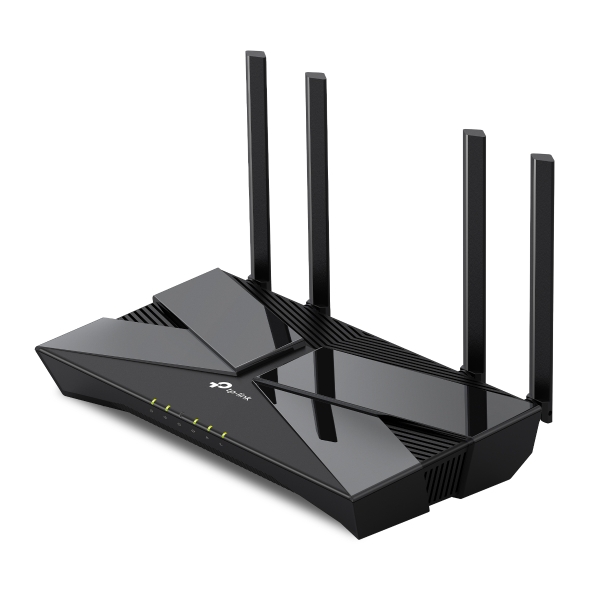
Credit: www.tp-link.com
Cleaning The Exterior
Cleaning the exterior of your dual band router is crucial for maintaining its performance and longevity. A clean router not only looks good but also ensures efficient airflow and prevents overheating. Regular cleaning can prevent dust buildup, which might otherwise lead to connectivity issues.
Wiping Down Surfaces
Use a soft, lint-free cloth slightly dampened with water or a mild cleaner. Gently wipe down the body of the router, paying attention to areas that accumulate fingerprints or smudges. Avoid using too much liquid as it can seep into the device and cause damage.
Removing Dust From Vents
Dust can obstruct the airflow, leading to overheating. Use a can of compressed air to blow out the dust from the vents. Hold the can upright and maintain a safe distance to avoid moisture getting inside the router.
Cleaning Antennas
Antennas play a crucial role in signal strength. Gently wipe each antenna with a soft cloth to remove dust and grime. Ensure that you handle them carefully to avoid bending or damaging them.
Have you ever noticed how a clean device just feels better to use? By taking a few minutes to clean your router, you ensure it performs at its best, providing you with a stable and strong internet connection. When was the last time you cleaned your router?
Cleaning The Interior Components
Cleaning the interior components of your dual band router is essential to maintain its performance and extend its lifespan. Dust and debris can accumulate inside, causing overheating and signal interference. Taking the time to carefully clean the inside can improve your router’s efficiency and prevent unexpected shutdowns.
Opening The Router Case
Before you start, unplug your router to avoid any risk of electric shock. Most routers have screws at the bottom or sides that need to be removed to open the case. Keep these screws in a safe place so you don’t lose them during cleaning.
Gently pry open the case, using a plastic tool if possible to avoid scratching or damaging the plastic. If the case feels stuck, double-check for hidden screws—you don’t want to force it and break the housing.
Using Compressed Air
Compressed air is your best friend when cleaning inside the router. It blows away dust from tiny crevices without touching sensitive parts. Hold the can upright and spray short bursts to avoid moisture buildup.
Make sure to blow air into vents, circuit boards, and fan areas. Don’t forget to clean the ports where cables connect, as dust there can affect connectivity. Have you noticed your router getting hotter? Cleaning with compressed air could be the simple fix.
Handling Delicate Parts
Inside the router, you’ll find circuit boards and antenna connectors that are fragile. Avoid touching circuit boards directly with your fingers to prevent static damage. If you need to move cables or connectors, do so gently and without force.
Use a soft brush or anti-static cloth if some dust remains after using compressed air. Taking care of these delicate parts ensures your router continues to work smoothly without internal damage. Have you ever accidentally damaged something inside your router? A careful touch makes all the difference.
Reassembling And Testing
After carefully cleaning your dual band router, the next important phase is to put everything back together and make sure it works perfectly. This step requires patience and attention to detail to avoid any damage or misplacement. Let’s walk through the process of reassembling and testing your router to get it back online smoothly.
Securing All Parts
Start by placing all the cleaned parts back in their original positions. Double-check that the internal components like the circuit board and antennas are firmly seated. Loose parts can cause connection issues or even damage the router over time.
Use the screws you removed earlier to secure the casing tightly. Don’t overtighten them, as this can crack the plastic. If you lost any screws, try to find replacements with the same size to keep your router stable.
Reconnecting Cables
Next, carefully reconnect all cables. This includes the power cable and any Ethernet cables you unplugged. Ensure each cable clicks into place securely to avoid intermittent connections.
Check for any damaged cables before reconnecting. Sometimes, wear and tear can cause poor performance, so replacing frayed or bent cables might save you future headaches.
Restarting And Checking Performance
Once everything is assembled and plugged in, power on your router. Wait a few minutes for it to fully boot up. Then, test your internet connection on multiple devices.
Are you noticing improved speed and stability? If not, consider resetting the router’s settings or verifying that all components are properly installed. Don’t hesitate to run a speed test or check the router’s admin panel to confirm it’s broadcasting on both bands correctly.
Maintenance Tips
Maintaining a dual band router is key to keeping your internet fast and reliable. Small efforts in cleaning and care can extend the device’s life. Follow these simple tips to ensure your router works well every day.
Regular Cleaning Schedule
Dust and dirt can block the router’s vents and cause overheating. Clean the router at least once a month. Use a soft, dry cloth to wipe the surface gently. Avoid liquids or harsh chemicals. Keep the area around the router free of dust. This helps maintain good airflow and prevents damage.
Optimal Router Placement
Place the router in a central, open spot in your home. Avoid corners, walls, or metal objects that can block signals. Keep the router away from heat sources like radiators or direct sunlight. Elevate the router on a shelf or table for better coverage. Good placement improves signal strength and overall performance.
Firmware Updates For Performance
Firmware updates fix bugs and improve security. Check for updates regularly through the router’s settings page. Install updates as soon as they are available. Updated firmware helps your router run smoothly and securely. It can also enhance speed and connectivity.

Credit: www.tp-link.com
Frequently Asked Questions
How Often Should I Clean My Dual Band Router?
You should clean your dual band router every 3 to 6 months. Regular cleaning prevents dust buildup and maintains optimal performance. Avoid liquid cleaners and use a soft, dry cloth or compressed air for safe cleaning.
What Tools Are Needed To Clean A Dual Band Router?
Use a soft microfiber cloth, compressed air can, and a small brush. These tools safely remove dust from vents and ports without damaging components. Avoid harsh chemicals to protect the router’s surface and functionality.
Can Cleaning Improve My Router’s Wi-fi Speed?
Yes, cleaning removes dust that can cause overheating and slowdowns. Proper airflow helps the router run efficiently, potentially improving Wi-Fi speed and stability. Regular maintenance ensures better overall device performance.
Should I Unplug The Router Before Cleaning?
Always unplug your router before cleaning to avoid electric shock or damage. Disconnecting power ensures safety and prevents accidental resets. Wait a few minutes before cleaning to let internal components cool down.
Conclusion
Cleaning your dual band router keeps your internet fast and reliable. Dust and dirt can block signals and cause overheating. Regular cleaning helps your device last longer and work better. Use a soft cloth and avoid water inside the router.
Don’t forget to unplug it before cleaning. Small steps make a big difference. Keep your home network healthy and enjoy smoother connections every day. Simple care protects your technology and saves money on repairs. Try cleaning your router today for better Wi-Fi performance tomorrow.