Are you tired of weak Wi-Fi signals that don’t cover your entire home or office? You might be wondering, “How far can a tri band router signal reach?” Understanding this can change the way you experience the internet every day.
Imagine streaming your favorite shows, making video calls, or gaming online without any frustrating interruptions. You’ll discover exactly what affects your tri band router’s signal range and how to get the most out of it. Keep reading to unlock the secrets to stronger, faster Wi-Fi that truly covers your space.
Credit: p2brelay.com
Tri Band Router Basics
Understanding the basics of a tri band router is essential before diving into how far its signal can reach. These routers have become popular in homes and offices where multiple devices require fast, reliable internet connections. Knowing what makes tri band routers different helps you decide if they suit your needs and how their signal strength performs.
What Is A Tri Band Router
A tri band router broadcasts three separate wireless signals instead of the usual two. Typically, it offers one 2.4 GHz band and two 5 GHz bands. This setup allows more devices to connect without slowing down your network.
Think about your home with smart TVs, laptops, smartphones, and smart home devices all online simultaneously. A tri band router helps manage this traffic smoothly, reducing congestion and improving overall speed.
Frequency Bands Explained
The 2.4 GHz band covers a larger area but offers slower speeds. It works well for devices far from the router or those needing less bandwidth, like smart thermostats or phones.
The two 5 GHz bands provide faster speeds but cover shorter distances. These bands are ideal for high-demand activities such as gaming, video streaming, or video calls.
Having two 5 GHz bands means your devices can split across them, minimizing interference and boosting performance. You might wonder how this affects your daily internet experience—does more bands really mean better coverage?
Benefits Over Dual Band Routers
- Reduced Network Congestion:More bands mean fewer devices compete for the same channel, which keeps your internet running smoothly.
- Improved Speed:Tri band routers can handle more data at once, resulting in faster downloads and streaming without interruptions.
- Better Performance for Multiple Devices:If your household has many internet users, tri band routers distribute the load effectively, preventing slowdowns.
From personal experience, switching to a tri band router in a busy home office eliminated frustrating lag during video conferences. This improvement wasn’t just about speed but about managing how devices share the network.

Credit: dongknows.com
Factors Affecting Signal Range
The range of a tri-band router signal depends on several key factors that can either boost or limit how far your Wi-Fi reaches. Understanding these elements helps you get the best performance from your device. Let’s look at what really impacts your router’s signal range and what you can do about it.
Router Placement Impact
Where you place your tri-band router makes a huge difference in signal strength. Positioning it in a central, elevated spot allows the signal to travel more evenly throughout your home or office.
A router tucked away in a corner or behind furniture will struggle to reach distant rooms. Have you noticed your signal drop when moving to different areas? That’s often due to poor placement.
Physical Obstacles And Interference
Walls, floors, and furniture block Wi-Fi signals and reduce range significantly. Materials like concrete, metal, and brick are especially tough barriers.
Other electronics like microwaves and cordless phones can cause interference too. Consider if your router shares space with such devices, and try to keep it clear from them.
Device And Antenna Quality
The quality of your router and its antennas directly affects how far the signal can travel. Higher-end models often have more powerful antennas and better signal processing.
Even your connected devices matter—older laptops or smartphones might not support the latest Wi-Fi standards, limiting your effective range. Are your devices up to date to fully benefit from your tri-band router?
Typical Signal Range Estimates
Understanding the typical signal range of a tri-band router helps set realistic expectations. The range depends on many factors like environment, obstacles, and frequency bands used. Knowing these details aids in placing your router for best coverage.
Indoor Range Expectations
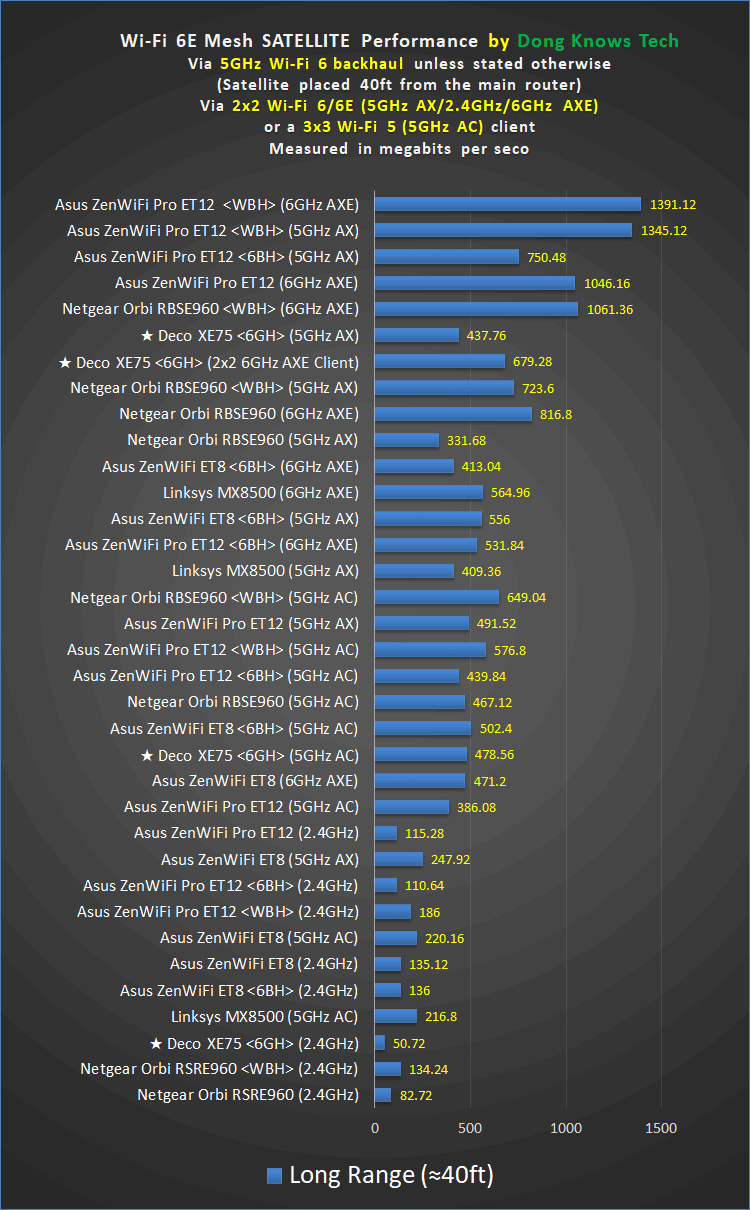
Indoor signals usually travel shorter distances. Walls, furniture, and appliances block or weaken the signal. On average, a tri-band router covers about 150 feet indoors.
Concrete walls and metal objects reduce the range further. Open spaces without many barriers allow better coverage. Signal strength often drops as you move away from the router.
Outdoor Range Possibilities
Outdoor range extends much farther than indoors. Without walls or large obstacles, signals can travel up to 300 feet or more. Trees and weather conditions can still affect the distance.
Open areas provide the best signal spread. However, distance alone does not guarantee strong connection quality. Signal quality decreases as the distance grows.
Differences Between Frequency Bands
- 2.4 GHz band:Longest range but slower speed. Better at penetrating walls.
- 5 GHz band:Medium range with faster speeds. Less able to pass through obstacles.
- 6 GHz band:Shortest range but highest speed. Best for close-range, high-demand devices.
Each band serves different needs based on distance and speed. Tri-band routers balance these bands to optimize coverage and performance.
Improving Router Signal Reach
Improving the reach of your tri-band router signal can transform your internet experience. A strong, reliable connection allows you to work, stream, and game without interruption. But how do you stretch that signal to every corner of your home?
Optimal Router Placement Tips
Where you place your router can significantly impact its signal strength. Position it in a central location, preferably at a higher elevation like on a shelf or mounted on a wall. Avoid placing it near thick walls, metal objects, or electronic devices that can interfere with the signal.
Think about how you use your space. If your home office is in a corner, ensure the router isn’t buried in the opposite corner. Experiment with different spots to see where the signal best reaches your most-used areas.
Using Wi-fi Extenders And Mesh Systems
If your home is large or has multiple floors, a single router might not suffice. Wi-Fi extenders and mesh systems can be invaluable in boosting your signal reach. They work by capturing the existing signal and rebroadcasting it, effectively expanding your network’s footprint.
Consider installing a mesh system for seamless coverage. Unlike traditional extenders, mesh networks consist of multiple nodes that work together, ensuring you maintain strong connectivity even as you move around the house.
Upgrading Antennas And Firmware
Sometimes, improving your router’s performance is as simple as upgrading its hardware and software. Check if your router’s antennas are detachable. If so, replacing them with high-gain antennas can increase your signal reach significantly.
Regularly updating your router’s firmware can also enhance performance and security. Manufacturers often release updates that include improvements to signal strength and stability. Keeping your firmware up-to-date ensures you’re getting the most out of your device.
Have you tried any of these methods? What worked best for extending your Wi-Fi signal? Share your experiences and help others enjoy a better internet connection!
Measuring And Testing Signal Strength
Measuring and testing the signal strength of a tri band router helps understand its real coverage. This process shows how far the signal can travel and how strong it stays. Accurate testing reveals weak spots and helps improve your wireless network.
Tools And Apps To Use
Several tools and apps help measure Wi-Fi signal strength easily. These include:
- Wi-Fi Analyzer (Android) – Offers real-time signal data and channel info.
- NetSpot (Windows/Mac) – Visual heatmaps display signal strength around your space.
- inSSIDer (Windows/Mac) – Shows detailed signal metrics and interference sources.
- AirPort Utility (iOS) – Basic signal strength readings on iPhones and iPads.
- Built-in router apps – Some routers provide signal info through their own apps.
Choose the tool that fits your device and needs for the best results.
Interpreting Signal Metrics
Signal strength is usually measured in dBm (decibels relative to a milliwatt). It ranges from 0 to about -100 dBm. Numbers closer to 0 mean stronger signals.
| Signal Level (dBm) | Quality | Usage |
|---|---|---|
| -30 to -50 | Excellent | Strong and stable connection |
| -51 to -60 | Good | Reliable for most tasks |
| -61 to -70 | Fair | Basic browsing and streaming |
| -71 to -90 | Poor | Slow or unreliable connection |
| Below -90 | Very Poor | Almost no usable connection |
Also check signal-to-noise ratio (SNR). Higher SNR means clearer signal with less interference.
Common Testing Mistakes
- Testing from only one spot. Signals vary by location.
- Ignoring obstacles like walls and furniture.
- Testing at times of heavy network use can skew results.
- Not calibrating tools before testing.
- Confusing signal strength with internet speed. They differ.
Avoid these mistakes to get accurate and useful data about your router’s signal.
Choosing The Right Tri Band Router
Choosing the right tri band router shapes your home or office Wi-Fi experience. A good router offers strong signal strength and covers a wide area. It balances speed across multiple devices without lag. Picking the best model depends on your space size and device count.
Consider the router’s technical features and real-world performance. Quality brands often provide better support and reliability. Think about future needs to avoid upgrading soon. A well-chosen tri band router keeps your network fast and stable for years.
Key Features To Consider
- Frequency Bands:Ensure it supports one 2.4 GHz and two 5 GHz bands.
- Speed Ratings:Check combined speeds to match your internet plan.
- Range:Look for routers with strong antennas and beamforming tech.
- Security:WPA3 support keeps your network safe from threats.
- Ports:Gigabit Ethernet ports help with wired connections.
- Ease of Setup:User-friendly apps make managing your network simple.
Brand And Model Comparisons
| Brand | Popular Model | Max Speed | Coverage Area | Price Range |
|---|---|---|---|---|
| Netgear | Nighthawk AX12 | 6 Gbps | 3500 sq ft | High |
| ASUS | RT-AX92U | 4.6 Gbps | 3000 sq ft | Medium-High |
| TP-Link | Archer AX11000 | 10 Gbps | 4000 sq ft | High |
| Linksys | Velop MX10 | 5.3 Gbps | 3500 sq ft | Medium-High |
Future-proofing Your Network
Choose routers with Wi-Fi 6 or Wi-Fi 6E technology. These offer faster speeds and better device handling. Look for models that support mesh networking to expand coverage easily. Firmware updates from trusted brands improve security and features over time.
Pick routers with multiple Ethernet ports for future wired devices. Consider USB ports for network storage or printers. A router with good range and strong signal helps avoid dead zones as your space changes.

Credit: www.amazon.com
Frequently Asked Questions
How Far Does A Tri Band Router Signal Typically Reach?
A tri band router signal can reach up to 150 feet indoors. Walls and obstacles reduce this range. Outdoors, the signal may extend up to 300 feet, depending on conditions.
What Factors Affect Tri Band Router Signal Strength?
Signal strength is affected by walls, interference, router placement, and device quality. Materials like concrete and metal block signals. Distance from the router also plays a key role.
Can Tri Band Routers Cover Large Homes Effectively?
Yes, tri band routers provide better coverage for large homes. Multiple frequency bands reduce congestion and extend range. However, adding mesh nodes or extenders may improve coverage further.
How Does Tri Band Improve Signal Reach Compared To Dual Band?
Tri band routers add a third frequency band, reducing network traffic. This leads to better range and faster speeds. It helps maintain strong connections in busy environments.
Conclusion
A tri-band router can cover a large area with strong signals. Walls and obstacles may reduce its reach. Placing the router in an open space helps signal spread better. Using all three bands improves speed and reduces interference. Understanding your home layout can guide the best router placement.
You get faster, more reliable Wi-Fi with the right setup. This makes streaming, gaming, and browsing smoother for everyone. Choose a tri-band router to enjoy better internet coverage.