Are you looking to improve your home network without spending a fortune? Understanding what a budget router is can help you make smart choices for your internet setup.
You might think that cheaper means lower quality, but that’s not always true. A budget router can offer reliable performance, easy setup, and enough speed for everyday use. You’ll discover exactly what a budget router is, how it works, and why it might be the perfect fit for your needs.
Keep reading to find out how you can get the best value without sacrificing your internet experience.
Budget Router Basics
Understanding what a budget router offers can save you time and money. These devices provide essential networking functions without the high price tag of premium models. Knowing their basics helps you pick one that fits your needs without overspending.
Key Features To Expect
Budget routers often include the fundamental features needed for everyday internet use. You can expect:
- Basic Wi-Fi coverage:Suitable for small to medium-sized homes or offices.
- Standard security options:WPA2 encryption to keep your network safe.
- Multiple Ethernet ports:Usually 4 ports to connect wired devices like computers or printers.
- Simple setup:User-friendly interfaces that don’t require technical skills.
While these routers might lack advanced features like tri-band Wi-Fi or MU-MIMO, they still provide reliable connectivity for most users.
Common Uses At Home And Office
Budget routers work well in various environments where high-speed or complex network demands are low. At home, they handle everyday tasks such as:
- Streaming videos and music on multiple devices.
- Connecting smart home gadgets like lights and security cameras.
- Supporting remote work with stable video calls and email access.
In small offices, these routers support basic internet access and file sharing among a few employees. Are you running a business with heavy data needs? A budget router might struggle under high traffic, so consider your device count and usage carefully.
Types Of Budget Routers
Budget routers come in different types to fit various needs and budgets. Choosing the right type helps balance cost and performance. Understanding these types makes it easier to pick the best one for your home or office.
Wired Vs Wireless Options
Wired routers connect devices using Ethernet cables. They offer stable and fast connections. This makes them ideal for gaming or streaming without interruptions.
Wireless routers let devices connect without cables. They provide freedom to move around with laptops or smartphones. Wireless models suit homes with many devices.
Some budget routers offer both wired and wireless options. This combination gives flexibility and reliable connections.
Single-band And Dual-band Models
Single-band routers operate on one frequency, usually 2.4 GHz. This band covers a larger area but can be slower. It works well for basic internet tasks.
Dual-band routers use 2.4 GHz and 5 GHz frequencies. The 5 GHz band is faster and less crowded. It supports smoother streaming and faster downloads.
Dual-band models are better for busy homes with many users. They reduce interference and improve overall Wi-Fi quality.
Choosing The Right Budget Router
Choosing the right budget router can feel tricky, especially with so many options available. Your choice should be based on what you really need, not just the price tag or flashy features. Understanding your daily internet habits and household setup will help you find a router that delivers solid performance without overspending.
Assessing Your Networking Needs
Start by thinking about how you use the internet. Do you mostly browse and stream videos, or do you have multiple devices gaming and working from home simultaneously? Knowing this helps you decide on the router’s capacity and features.
If your home has many connected devices, a router with good device management is essential. Small households with basic internet use might get by with simpler models. Asking yourself these questions upfront saves you from buying unnecessary extras.
Comparing Speed And Range
Speed matters, but it should match your internet plan. A router capable of 1000 Mbps won’t improve your experience if your plan maxes out at 100 Mbps. Look for routers that support your plan’s speed and a bit beyond to future-proof your setup.
Range is equally important. A compact apartment needs less range than a large house with thick walls. Consider routers with external antennas or mesh capabilities if your home is big or has dead zones.
Security Features To Look For
Security should never be an afterthought. Budget routers often skip advanced protection, but many still offer essential features like WPA3 encryption. This keeps your network safe from common threats.
Other useful security options include guest networks and automatic firmware updates. These features help protect your devices and personal data without extra hassle on your part. What security risks have you faced on your home network?
Credit: www.popularmechanics.com
Top Budget Router Brands
Choosing the right budget router can feel overwhelming with so many brands flooding the market. But focusing on trusted brands helps narrow down your options and ensures you get good performance without overspending. Let’s look at some top budget router brands that combine reliability, features, and affordability to power your home or office network.
Reliable Manufacturers
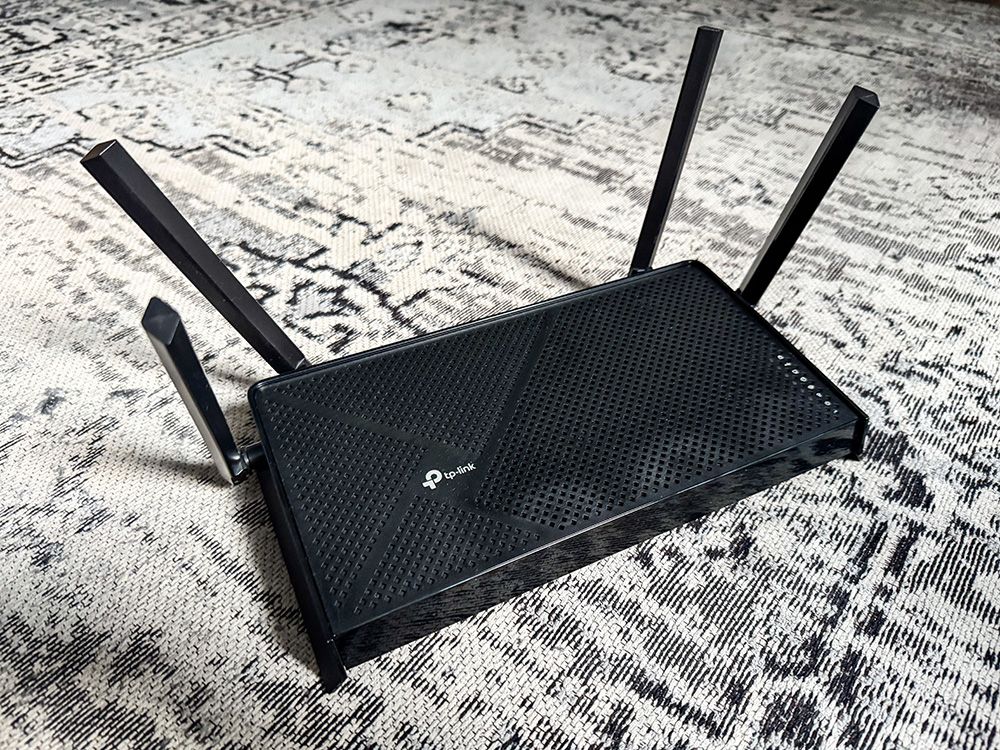
Brands like TP-Link, Netgear, and ASUS have built strong reputations by consistently delivering quality budget routers. TP-Link often stands out for balancing cost and performance, making it a favorite among budget-conscious buyers. Netgear offers durable models with user-friendly interfaces, ideal if you want simple setup and stable connections.
ASUS packs some impressive features even in their lower-priced models, such as parental controls and robust security options. These manufacturers invest in quality hardware and firmware updates, which means your router stays secure and efficient over time. Have you noticed how some brands keep updating their firmware regularly? That’s a key sign of reliability.
Customer Favorites And Reviews
Reading customer reviews reveals which routers deliver the best real-world performance without breaking the bank. Many users praise the TP-Link Archer series for its range and speed at affordable prices. Netgear’s Nighthawk models also receive high marks for handling multiple devices smoothly.
Look beyond the specs and pay attention to user feedback about setup ease, customer support, and durability. Sometimes a router with slightly lower specs but excellent reviews offers better value. What issues do users mention most? Spotting patterns in reviews can save you from common headaches.
Setting Up A Budget Router
A budget router offers essential internet access without extra features. It helps connect devices at home or small offices affordably. Setting it up involves simple steps like plugging in and configuring basic settings.
Setting up a budget router can seem intimidating, but it doesn’t have to be. With a few simple steps, you can have your new device up and running smoothly in no time. Whether you’re a tech novice or a seasoned pro, the following guide will help you navigate the process with ease.Installation Steps
Start by unpacking your router and identifying all the parts. Make sure you have the power adapter, Ethernet cables, and the router itself. Connect the router to your modem using an Ethernet cable. Plug one end into the WAN or Internet port on the router and the other into the modem. Plug in the power adapter and turn on the router. Watch for the lights to stabilize, indicating a successful connection. Access the router’s setup page by entering its IP address in your web browser. This is usually printed on the device or the manual. Follow the on-screen instructions to set up your network name and password. Secure your network with a strong password to protect your data.Optimizing Performance
Position your router in a central location in your home. This helps ensure even coverage and reduces dead zones. Update the router’s firmware to the latest version. Manufacturers often release updates to improve performance and security. Adjust the wireless channel settings to minimize interference from other devices. Most routers have an automatic setting, but manual adjustments can yield better results. Consider enabling Quality of Service (QoS) settings. This prioritizes bandwidth for important applications like streaming or gaming. Regularly check for updates and make adjustments as needed. Keeping your router optimized ensures you get the best speed and coverage possible. Setting up a budget router doesn’t require advanced technical skills, just a little patience and the right information. Have you ever wondered how much better your internet could be with just a few tweaks? Now, you’re equipped to find out.
Credit: www.amazon.ca
Troubleshooting Common Issues
Troubleshooting common issues with a budget router can feel frustrating. Many problems arise from simple causes. Understanding these issues saves time and stress. Troubleshooting helps keep your internet connection steady and fast. Below are common problems and easy fixes.
Connectivity Problems
Connectivity issues often cause slow or no internet. Check if your router is plugged in and powered on. Make sure cables are securely connected. Restarting your router can fix temporary glitches. Move the router to a central spot for better signal. Walls and furniture can block Wi-Fi signals. Reduce the number of devices connected to improve speed. Resetting the router to factory settings clears incorrect configurations.
Firmware Updates And Maintenance
Firmware updates improve router performance and security. Outdated firmware may cause bugs or weak signals. Visit the router’s admin page to check for updates. Follow instructions carefully to install the latest version. Regularly reboot your router to clear memory and speed up processes. Clean the router vents to prevent overheating. Keep your router in a cool, dry place for best results.
Maximizing Your Budget Router
A budget router may have fewer features than high-end models. Still, it can provide solid performance with smart use. Small adjustments and smart setups can improve your internet experience greatly. This section explores ways to get the most from your budget router.
Extending Coverage
Many budget routers have limited range. Use these tips to expand your Wi-Fi coverage:
- Place the router in a central, open spot in your home.
- Avoid thick walls and metal objects near the router.
- Use Wi-Fi extenders or mesh systems to boost signal.
- Adjust antennas to better direct the signal.
- Update firmware regularly for performance improvements.
These simple steps help reduce dead zones and improve speed.
Using With Smart Home Devices
Smart home gadgets need steady Wi-Fi to work well. A budget router can support these devices with some care:
- Assign fixed IP addresses to important devices for stability.
- Separate smart devices on a guest network to avoid traffic jams.
- Use Quality of Service (QoS) settings to prioritize essential devices.
- Keep router firmware up to date for security and speed.
- Limit the number of connected devices to prevent overload.
These actions ensure your smart home runs smoothly on a budget router.

Credit: www.youtube.com
Frequently Asked Questions
What Is A Budget Router Used For?
A budget router connects devices to the internet at an affordable price. It offers basic functions suitable for home or small office use. It balances cost and performance without advanced features found in premium models.
How Does A Budget Router Differ From Premium Routers?
Budget routers provide essential connectivity with limited speed and range. Premium routers offer faster speeds, stronger signals, and advanced security features. Budget models focus on affordability, while premium options target high performance and extra functionality.
Are Budget Routers Reliable For Everyday Use?
Yes, budget routers are reliable for daily internet tasks like browsing and streaming. They handle typical household device connections effectively. However, they may struggle with multiple high-demand users or intensive gaming sessions.
Can Budget Routers Support Multiple Devices Simultaneously?
Budget routers can support multiple devices but with some limitations. Performance may decrease with many devices connected at once. They are best for small networks with moderate internet usage.
Conclusion
A budget router offers good value for basic internet needs. It provides reliable Wi-Fi without extra costs. Many models support common features for home use. Choosing one depends on speed, range, and ease of setup. This device fits well for casual browsing and streaming.
Small homes or apartments benefit most from budget routers. They keep you connected without complex settings. Understanding your needs helps pick the right model. Simple, affordable routers can still deliver steady internet access.