Are you tired of endless buffering and poor video quality when streaming your favorite shows or movies? Choosing the right router can make all the difference, and you might be wondering if a dual band router is the answer.
Imagine smooth, uninterrupted streaming without the frustration of lag or dropouts. You’ll discover how a dual band router works, why it could boost your streaming experience, and what to look for to get the best setup for your home. Keep reading to find out if this could be the upgrade your entertainment needs.
Dual Band Router Basics
Understanding the basics of dual band routers can help you decide if they are the right choice for your streaming needs. These routers offer more flexibility and better performance compared to their single band counterparts. Let’s break down what makes dual band routers stand out.
What Is A Dual Band Router
A dual band router broadcasts Wi-Fi signals on two different frequency bands: 2.4 GHz and 5 GHz. This means it can handle more devices and offer different connection options at the same time. If you’ve ever experienced buffering during a movie night, a dual band router might help by allowing some devices to use the faster band while others stay on the more stable one.
2.4 Ghz Vs 5 Ghz Bands
The 2.4 GHz band covers a larger area but usually offers slower speeds. It’s great for devices that are far from the router or need a steady connection for simple tasks. On the other hand, the 5 GHz band provides faster speeds but has a shorter range and is better for high-bandwidth activities like streaming HD videos or gaming.
Think about your home setup: are your streaming devices close to the router? If yes, the 5 GHz band can give you smoother playback. If not, the 2.4 GHz band might keep your connection stable even through walls.
Benefits Over Single Band Routers
- Better Performance:Dual band routers reduce congestion by splitting devices between two bands.
- Improved Speed:Streaming on 5 GHz means less buffering and higher video quality.
- Flexibility:You can assign devices to the band that suits their needs best.
- Less Interference:The 5 GHz band is less crowded, so your connection faces fewer interruptions.
Have you noticed your internet slowing down when multiple devices connect? Dual band routers help manage this by spreading the load. This means you can enjoy uninterrupted streaming even when your family is online at the same time.
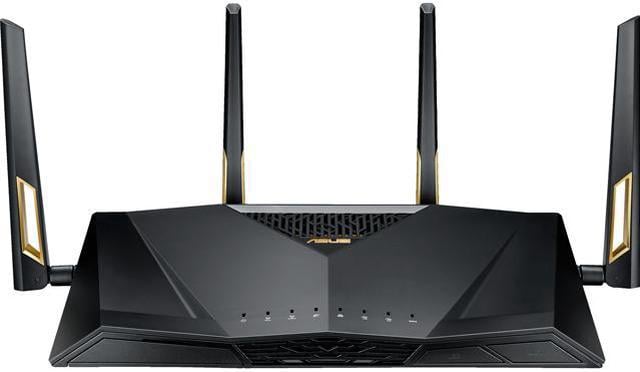
Credit: www.newegg.com
Speed Factors For Streaming
Streaming video or music requires a fast and stable internet connection. Speed plays a key role in delivering smooth playback without interruptions. Several factors affect streaming speed, especially when using a dual band router. Understanding these factors helps you choose the right router and settings for better streaming quality.
Bandwidth And Data Rates
Bandwidth defines the maximum amount of data your internet can handle at once. Higher bandwidth means faster data transfer. Streaming needs a steady data rate to avoid buffering. Dual band routers offer two channels, increasing total bandwidth. This helps stream high-definition videos without lag. Check your internet plan and router’s bandwidth capacity for optimal streaming.
Impact Of Frequency Bands On Speed
Dual band routers use two frequency bands: 2.4 GHz and 5 GHz. The 2.4 GHz band covers longer distances but offers slower speeds. The 5 GHz band supports faster speeds but has shorter range. Choosing the right band affects streaming performance. Use 5 GHz for close devices to get higher speed. Use 2.4 GHz for devices farther from the router to maintain connection.
Role Of Router Hardware
Router hardware quality influences streaming speed and stability. A powerful processor handles multiple devices efficiently. More antennas improve signal strength and coverage. Dual band routers with advanced hardware reduce interference and speed drops. Look for routers with modern technology like MU-MIMO for better streaming. Regular firmware updates also keep the router running smoothly.
Reliability In Streaming
Reliability in streaming is crucial to enjoy uninterrupted video playback and clear audio. A dual band router can improve your streaming experience by managing connections more effectively. Understanding how it supports signal stability, handles interference, and maintains connection consistency helps you make the best choice for your setup.
Signal Stability And Range
Dual band routers operate on both 2.4 GHz and 5 GHz frequencies, giving you flexibility in signal strength and coverage. The 2.4 GHz band covers a larger area but may be slower, while the 5 GHz band offers faster speeds with shorter range. This balance helps keep your streaming stable whether you’re close to the router or in a distant room.
I once streamed a live concert from my basement, far from the router. Switching to the 2.4 GHz band prevented buffering, proving that signal range matters as much as speed.
Handling Network Interference
Interference from other devices and neighboring Wi-Fi networks can disrupt your streaming. Dual band routers reduce this problem by allowing you to switch bands. The 5 GHz band is less crowded, so it often avoids interference better than 2.4 GHz.
Have you noticed your videos freeze during peak hours? Changing to the 5 GHz band can often solve this by avoiding busy channels. This simple switch makes your streaming smoother without complicated adjustments.
Connection Consistency
Streaming needs a steady connection to prevent pauses and quality drops. Dual band routers help maintain this by automatically directing your devices to the best available band. This means your video calls or movies won’t stutter even if other devices join your network.
- Devices closer to the router get faster 5 GHz connections.
- Devices farther away stay connected on the 2.4 GHz band.
- The router balances traffic to avoid overload on one band.
Does your internet slow down when everyone in your house streams at once? A dual band router can keep all streams consistent by spreading the load smartly.
Dual Band Router In Real-world Streaming
In today’s digital world, streaming has become a staple activity in many households. A dual band router can significantly enhance your streaming experience. But how does it perform in real-world scenarios? Let’s dive into the specifics of dual band routers and their impact on streaming.
Performance With Hd And 4k Content
Dual band routers operate on two frequencies: 2.4 GHz and 5 GHz. The 2.4 GHz band provides a wider range but can be crowded with interference from other devices. However, the 5 GHz band offers faster speeds and is ideal for streaming high-definition and 4K content.
Imagine watching your favorite movie in 4K without buffering interruptions. That’s the kind of experience a dual band router can provide. The 5 GHz band handles high data rates, ensuring smooth playback of HD content.
Multi-device Streaming Scenarios
In a household with multiple users streaming simultaneously, a dual band router shines. It can efficiently manage different devices, allocating bandwidth where it’s needed most. This means you can watch a live concert while others in your home enjoy their own streaming without hiccups.
Consider a family evening where everyone is streaming their favorite shows on different devices. A dual band router ensures everyone gets a fair share of bandwidth, maintaining quality for all. Isn’t that the kind of seamless streaming you desire?
Comparison With Tri-band Routers
While dual band routers are excellent, tri-band routers add an extra 5 GHz band. This additional band can offer even more support for multiple high-demand devices. Tri-band routers are often considered overkill for smaller homes, but they can be a game-changer for larger households with heavy streaming needs.
Picture a tech-savvy household with smart TVs, gaming consoles, and laptops all streaming at once. A tri-band router might be the better choice in such scenarios. Yet, for many, the dual band router remains a cost-effective solution that balances performance and price.
Ultimately, your streaming needs and household size will guide your choice between dual and tri-band routers. What matters most is ensuring your streaming experience is uninterrupted and enjoyable.
Choosing The Right Dual Band Router
Choosing the right dual band router can make a big difference in streaming quality. A good router ensures smooth video playback without buffering. It also supports multiple devices connected at once. Picking a router that fits your needs and budget helps avoid slow internet issues.
Focus on features that improve speed and stability. Consider your home size and device count. Smart choices lead to a better streaming experience and fewer interruptions.
Key Features To Look For
- Dual-band support: 2.4 GHz and 5 GHz frequencies for better coverage.
- High data transfer speeds for smooth streaming.
- Strong Wi-Fi range to cover your entire home.
- Multiple antennas for stable connections.
- Quality of Service (QoS) to prioritize streaming traffic.
- Easy setup and user-friendly interface.
- Security options like WPA3 encryption.
Budget Considerations
Set a budget that fits your financial plan. More expensive routers offer better speed and features. Basic models work well for small homes with few devices.
Mid-range routers balance cost and performance. Avoid very cheap routers that may cause slowdowns. Think about future needs to avoid replacing your router soon.
Brand And Model Recommendations
| Brand | Model | Key Features |
|---|---|---|
| TP-Link | Archer A7 | Good speed, strong coverage, affordable price |
| Netgear | Nighthawk R6700 | High speed, QoS, solid security |
| Asus | RT-AC66U B1 | Stable connection, easy setup, strong Wi-Fi |

Credit: www.youtube.com
Optimizing Dual Band Router For Streaming
Optimizing your dual band router can make a significant difference in your streaming experience. A well-tuned router ensures smoother playback, fewer interruptions, and faster load times. Small adjustments can help you get the most out of both the 2.4 GHz and 5 GHz bands, depending on your streaming needs and home setup.
Best Placement Tips
Where you place your dual band router matters a lot. Keep it in a central location, away from thick walls and metal objects that block signals. Elevate the router on a shelf or table rather than placing it on the floor to improve signal reach.
Think about where you usually stream. If your streaming device is in the living room, avoid placing the router in a distant room or behind large furniture. You might be surprised how much a small change in location boosts your streaming quality.
Firmware Updates And Settings
Keep your router’s firmware updated to ensure you have the latest performance improvements and security patches. Updated firmware often fixes bugs that could cause buffering or connection drops during streaming.
Access your router settings through its IP address and check for firmware updates regularly. While there, adjust settings like channel selection to avoid interference from neighboring networks, especially if you notice streaming lag.
Using Quality Of Service (qos)
QoS allows you to prioritize streaming traffic over other types of data on your network. This means your movies and shows get the bandwidth they need, even if others are browsing or gaming simultaneously.
Enable QoS in your router’s settings and set streaming devices or apps as high priority. Have you noticed improved streaming when no one else is using the internet? QoS helps create that effect even during busy times.

Credit: wccftech.com
Frequently Asked Questions
What Is A Dual Band Router?
A dual band router transmits signals on two frequencies: 2. 4 GHz and 5 GHz. This helps reduce interference and improves network speed and stability for various devices.
Is A Dual Band Router Better For Streaming?
Yes, dual band routers offer faster speeds and less congestion, making streaming smoother. The 5 GHz band supports high-definition video without buffering.
Can Dual Band Routers Handle Multiple Devices?
Yes, dual band routers efficiently manage many devices by splitting traffic between bands. This reduces lag and ensures stable connections during streaming.
Should I Choose Dual Band Over Single Band For Streaming?
Dual band routers provide better performance for streaming due to less interference and higher speeds. Single band routers may struggle with multiple high-demand devices.
Conclusion
Dual band routers offer better speed and less interference for streaming. They let you connect many devices without slowing down your video. You get a smoother experience on both 2. 4 GHz and 5 GHz bands. Streaming movies and shows becomes easier with less buffering.
Choosing a dual band router helps keep your connection stable. It fits well in homes with several internet users. Overall, it supports better streaming quality at a reasonable price. A smart choice for anyone who loves watching online videos.