Are you wondering if your tri band router can work seamlessly with Alexa? If you rely on smart home devices, connecting your router to Alexa could make your life much easier.
But not all routers play well with Alexa, and understanding compatibility can save you time and frustration. Keep reading to find out how to check if your tri band router supports Alexa, and learn simple steps to get your smart home running smoothly.
This guide will help you unlock the full potential of your devices without the hassle.
Tri Band Router Basics
Understanding the basics of a tri band router helps you decide if it fits your smart home setup. These routers offer more than just internet access. They improve how devices connect and communicate in your home.
What Is A Tri Band Router
A tri band router uses three separate wireless bands to send data. Usually, it has one 2.4 GHz band and two 5 GHz bands. This design spreads out your devices, reducing traffic on each band. It prevents slowdowns and keeps connections stable. Tri band routers are ideal for homes with many smart devices or heavy internet users.
Benefits Of Tri Band Technology
- More bandwidth for multiple devices at the same time
- Fewer interruptions and faster speeds for streaming and gaming
- Better handling of high data traffic in busy networks
- Improved range and coverage across larger spaces
- Reduces congestion by balancing device connections on different bands
Alexa Compatibility Essentials
Understanding Alexa Compatibility Essentials is key to using Alexa with any router. Alexa devices need certain network features to work properly. These features ensure smooth communication and quick responses.
Knowing how Alexa connects to your router helps avoid connection issues. It also helps in choosing the right router for your smart home setup.
Alexa’s Network Requirements
Alexa needs a stable Wi-Fi connection to function well. It usually works on 2.4 GHz and 5 GHz bands. The router must support common Wi-Fi standards like 802.11n or newer.
Security is important. Alexa devices require WPA2 or better encryption on your network. The network should allow Alexa to access the internet without restrictions.
Some routers block certain ports or protocols. Alexa needs these open for voice commands and updates. A network with low interference improves Alexa’s performance.
How Alexa Connects To Routers
Alexa connects using Wi-Fi, not Ethernet. The setup process uses the Alexa app to find and link the device to the router. It sends connection data securely during setup.
Alexa selects the best available frequency band on a dual or tri band router. This helps reduce signal drops and delays. Routers with multiple bands offer better coverage in large homes.
Once connected, Alexa maintains a steady link by automatically switching to stronger signals if needed. This keeps your smart assistant responsive throughout your home.
Tri Band Routers And Alexa
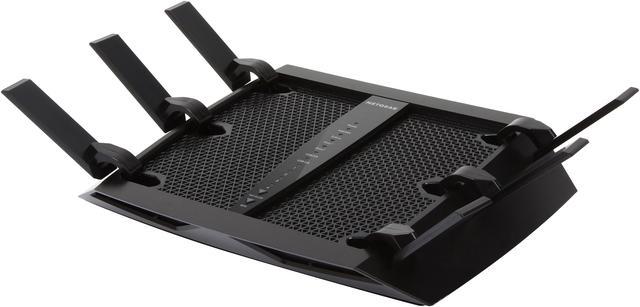
Tri band routers offer enhanced Wi-Fi performance by using three separate frequency bands to reduce congestion and improve speed. Integrating these routers with Alexa can elevate your smart home experience, allowing you to control your network hands-free. But how well do tri band routers work with Alexa, and what should you know before linking the two?
Compatibility Factors
Not all tri band routers automatically connect with Alexa. Compatibility depends on the router’s software and whether the manufacturer provides an Alexa skill. Without this skill, Alexa won’t recognize or control your router’s features.
Check if your router supports Alexa commands like pausing Wi-Fi, prioritizing devices, or managing guest networks. Also, consider if the router’s app is user-friendly and integrates smoothly with Alexa’s ecosystem.
Do you want simple voice commands to manage your network, or are you looking for advanced features? Understanding your needs helps determine if your tri band router aligns with Alexa’s capabilities.
Common Tri Band Router Brands With Alexa Support
| Brand | Alexa Integration Features | Notes |
|---|---|---|
| Netgear Nighthawk |
| Requires the Nighthawk Alexa skill |
| ASUS |
| Alexa skill available for select models |
| Linksys |
| Works with Linksys Smart Wi-Fi and Alexa |
Choosing a tri band router brand that supports Alexa can make your network management effortless. Have you explored how voice control could simplify your daily tech routine? Sometimes, the right router and Alexa skill together create a seamless smart home connection you didn’t know you needed.

Credit: www.amazon.ca
Setting Up Alexa With Tri Band Routers
Tri band routers work well with Alexa devices, providing strong and stable connections. Setting up Alexa with these routers is simple and ensures smooth performance. Most Alexa devices connect easily to tri band Wi-Fi networks without issues.
Setting up Alexa with tri-band routers enhances your smart home experience. Tri-band routers offer faster and more reliable connections. This ensures Alexa can perform tasks seamlessly. Follow this guide to connect Alexa to your network and troubleshoot any issues.Connecting Alexa To Your Network
Connecting Alexa to your tri-band router is simple. First, ensure your router is set up correctly. Make sure it is broadcasting its Wi-Fi network. Open the Alexa app on your smartphone. Go to the settings menu and select “Add Device.” Choose “Amazon Echo” from the list. Follow the on-screen instructions. Alexa will prompt you to connect to a Wi-Fi network. Select your tri-band router’s network. Enter the Wi-Fi password and connect. Alexa should now be connected to your network.Troubleshooting Connection Issues
Sometimes, connecting Alexa to your network may face issues. Ensure your router’s firmware is updated. Check if other devices connect to the network. If they do not, restart the router. Move Alexa closer to the router. This helps improve the signal strength. Disable any VPNs or firewalls temporarily. They might block Alexa’s connection. Reset Alexa to factory settings if problems persist. Reconnect it to the network using the Alexa app. If issues continue, contact your router’s support team. They can provide further assistance.Performance Tips
Getting the best performance from your tri band router with Alexa devices requires some thoughtful setup and ongoing adjustments. Small changes can make a big difference in responsiveness and connection stability. Below are some practical tips to help you optimize your network and manage the multiple bands effectively.
Optimizing Network For Alexa Devices
Place your tri band router in a central location to reduce signal interference and improve coverage for Alexa devices around your home. Walls and furniture can block signals, so keep the router elevated and away from metal objects.
Assign a dedicated SSID (network name) for Alexa devices on one of the router’s bands. This helps Alexa prioritize its traffic and avoid congestion caused by other devices streaming or downloading large files.
Check your router’s settings for Quality of Service (QoS). Enabling QoS allows you to prioritize Alexa’s data packets, which can reduce lag when you give voice commands or stream audio.
Managing Multiple Bands Effectively
Tri band routers typically offer two 5GHz bands and one 2.4GHz band. Understanding which Alexa devices connect to which band can improve overall network efficiency.
- Use the 5GHz bands for Alexa devices located closer to the router for faster speeds and less interference.
- Reserve the 2.4GHz band for devices farther away or for Alexa devices that only support this frequency.
Manually assign devices to different bands if your router allows band steering. This prevents all devices from crowding one band and helps balance network load.
Have you noticed your Alexa responding slower during peak hours? Try splitting devices across the bands to see if it improves response times.

Credit: www.amazon.ca
Security Considerations
Security plays a vital role when connecting a tri-band router with Alexa devices. Protecting your network and ensuring smooth compatibility helps avoid risks. Understanding key security points keeps your home network safe and your smart devices working well.
Protecting Your Network And Alexa
Secure your tri-band router with a strong password. Avoid default or simple passwords that hackers can guess. Use WPA3 or WPA2 encryption for better protection. Set up a separate guest network to isolate Alexa devices from sensitive data. Monitor connected devices regularly to spot any unusual activity. Disable unnecessary features that may open security gaps.
Firmware Updates And Compatibility
Keep your router’s firmware updated to fix security flaws. Updates improve compatibility with Alexa and other smart devices. Check for updates from the manufacturer’s website or app. Enable automatic updates if possible. Verify that your tri-band router supports Alexa’s protocols and features. Outdated firmware can cause connection issues and expose vulnerabilities.
Future Trends
The future of networking and smart home integration is rapidly changing how we connect and control our devices. As tri-band routers become more common, their compatibility with voice assistants like Alexa is an important trend to watch. Understanding these future trends helps you prepare your home tech for smoother, smarter operation.
Evolving Router Technologies
Tri-band routers are evolving to handle more devices with faster speeds and better reliability. New standards like Wi-Fi 6E and Wi-Fi 7 are being added to tri-band models, increasing capacity and reducing interference.
This means your router won’t just support more gadgets—it will also improve your Alexa’s response times and connectivity. Are you ready to upgrade your network to keep up with these advancements?
Alexa’s Expanding Smart Home Roles
Alexa is no longer just a voice assistant for music or simple commands. It now manages complex smart home systems, security, and even energy use, relying heavily on strong, stable Wi-Fi.
With tri-band routers, Alexa can switch between bands to maintain a fast connection, even when many devices are active. How could better Wi-Fi improve your daily interactions with Alexa?
Credit: www.newegg.ca
Frequently Asked Questions
Is A Tri Band Router Compatible With Alexa Devices?
Yes, most tri band routers are compatible with Alexa. Alexa can control network settings through compatible routers. Ensure your router supports Alexa integration for seamless functionality.
How Do I Connect My Tri Band Router To Alexa?
To connect, enable the router’s Alexa skill in the Alexa app. Then link your router account. Follow voice prompts to complete setup quickly.
Can Alexa Improve Tri Band Router Performance?
Alexa can optimize router performance by managing settings via voice. It can prioritize devices or reboot the router for better connectivity.
Are All Tri Band Routers Alexa-enabled?
No, not all tri band routers support Alexa. Check product specifications or manufacturer details to confirm Alexa compatibility before purchase.
Conclusion
Tri band routers usually work well with Alexa devices. They offer fast and stable Wi-Fi connections. Alexa can control smart home gadgets using these routers. Setting up the connection is simple and quick. This makes managing your home easier and smoother.
Choose a tri band router that supports Alexa for best results. Enjoy better Wi-Fi coverage and voice control together. Smart homes get smarter with this combination. It’s a good step for anyone wanting convenience and speed.