Have you ever wished you could stay connected to the internet while speeding down the tracks on a train? You might be wondering if a portable router can make that happen.
Imagine having your own reliable Wi-Fi no matter where your journey takes you. But is it really possible for a portable router to work on a train? Keep reading, because the answer might surprise you—and it could change the way you travel forever.

Credit: www.amazon.com
How Portable Routers Function
Understanding how portable routers function can help you decide if they are suitable for use on a train. These devices act as mini internet hubs, sharing connectivity with your gadgets wherever you go. Their design focuses on flexibility and ease of use, making them popular for travel and remote work.
Basic Components
Every portable router contains several key parts that make it work smoothly. The main processor handles all data traffic, ensuring your connection stays stable and fast.
It also includes a battery, which allows you to use it without needing a power outlet. The device has antennas to boost signal reception and transmission, crucial when you’re moving through different areas on a train.
Memory storage keeps the firmware and settings, helping the router remember your preferences and network details. Think of these components as the engine, fuel, and controls of a small vehicle that keeps your internet running.
Connectivity Options
Portable routers offer various ways to connect to the internet, which is essential when you’re traveling on a train. Most rely on cellular networks (3G, 4G, or 5G) by inserting a SIM card, similar to a smartphone.
Some models can also connect to existing Wi-Fi signals, allowing them to extend or share that connection with your devices. USB tethering is another option, where you link the router to a phone or modem for internet access.
Have you ever tried to keep all your devices online during a long train journey? A portable router can manage multiple connections at once, so you and your travel companions can stay connected without a hiccup.

Credit: www.msn.com
Wifi Challenges On Trains
Using WiFi on trains often faces many challenges. The moving environment creates issues that affect signal quality and internet speed. Understanding these challenges helps in finding better solutions for portable routers on trains.
Signal Interference
Trains travel through tunnels, cities, and open areas. These places cause signals to weaken or break. Metal parts of the train also block or reflect WiFi signals. Other electronic devices inside the train add to the signal noise. All these factors create interference that lowers internet performance.
Network Coverage Gaps
Mobile networks depend on cell towers placed along the tracks. Some areas have few or no towers, creating coverage gaps. During these gaps, the WiFi connection drops or slows down. Rural and mountainous regions often have poor or no signal. This makes stable internet access difficult on long journeys.
Using Portable Routers On Trains
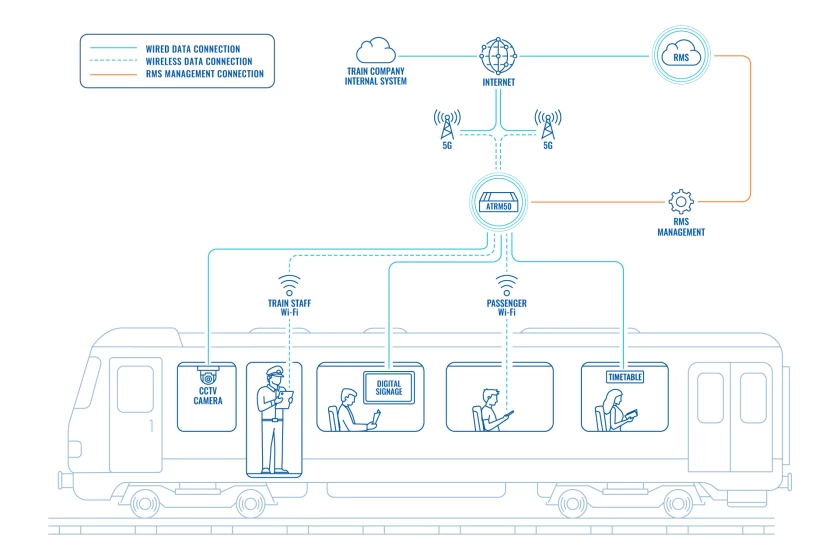
Using portable routers on trains can keep you connected during your journey. Many trains offer limited or no Wi-Fi service. A portable router creates a private network for your devices. It uses cellular signals to share internet access. This helps you work, stream, or browse without interruption.
Setting up and powering a portable router on a train requires some preparation. Knowing the power needs and setup process ensures smooth use. Here are key points to consider for using portable routers while traveling by train.
Power Requirements
Portable routers need constant power to work on trains. Most models have built-in rechargeable batteries. These batteries can last several hours on a full charge. For longer trips, carry a power bank or charger. Train seats often have power outlets, but availability varies.
- Check battery life before boarding the train.
- Use a power bank to extend router operation.
- Bring necessary cables for charging.
- Choose routers with low power consumption.
Managing power ensures your router stays active and your connection is stable.
Setting Up A Portable Router
Setup is simple and fast. Start by inserting a SIM card with a data plan into the router. Turn on the device and connect your phone or laptop to the router’s Wi-Fi network. Access the router’s settings through a web browser for any needed adjustments.
- Place the router near a window for better signal strength.
- Secure your network with a strong password.
- Check the router’s signal indicator to find the best spot.
- Restart the router if the connection drops.
Proper setup ensures you have a reliable internet connection throughout your train ride.
Types Of Portable Routers For Travel
Choosing the right portable router can make your train journeys much smoother. Different models offer various features that suit distinct travel needs. Understanding these types helps you stay connected without interruptions.
Battery-powered Models
Battery-powered portable routers are perfect if you want true mobility. These devices operate independently without needing a power outlet, which is ideal on long train rides.
You can easily carry them in your bag and expect several hours of connectivity. Some models even support quick charging, so you’re not stuck offline for long. Think about how convenient it is to have your own Wi-Fi hotspot wherever the train takes you.
Sim Card Compatible Routers
SIM card compatible routers connect directly to cellular networks, making them reliable in areas where train Wi-Fi is weak or unavailable. You just insert a local or international SIM card and enjoy internet access on the go.
This is especially helpful if you travel across different regions or countries by train. You control your data plan and avoid relying on public Wi-Fi security. Have you considered how much safer it feels to use your own connection rather than unknown networks?
Improving Wifi Performance On Trains
WiFi on trains often faces challenges like weak signals and constant movement. Improving WiFi performance can make your online experience smoother and faster. Portable routers can help, but tweaking their setup is key to better connectivity during travel.
Antenna Options
Upgrading your router’s antenna can boost signal strength. External antennas capture signals better than built-in ones. Look for antennas with high gain for longer range. Directional antennas focus the signal in one direction. This can reduce interference and improve connection quality. Some portable routers support multiple antennas for better reception.
- Use an external high-gain antenna for stronger signals.
- Choose directional antennas to focus signal toward train windows.
- Consider antennas with MIMO technology for multiple signal paths.
Optimizing Router Settings
Adjusting your router’s settings improves speed and stability. Select the right WiFi channel to avoid crowded frequencies. Many routers have an auto-channel option that finds the best one. Lower channel width can reduce interference but may limit speed. Enable 5GHz band for faster speeds but shorter range. Setting Quality of Service (QoS) prioritizes important data like video calls.
- Set WiFi channel to auto or choose less busy channels manually.
- Use 5GHz band for faster speeds if coverage is enough.
- Enable QoS to prioritize critical applications.
- Keep firmware updated for latest performance improvements.
Safety And Security Tips
Portable routers can work on trains, offering convenient internet access. Ensure the router supports mobile networks for reliable connectivity. Keep it charged and secure for uninterrupted browsing while traveling.
Traveling by train can be a unique experience. Bringing a portable router on board can keep you connected. Yet, staying safe online is vital. Here, we explore some safety and security tips. These tips ensure a secure internet connection on the go.Protecting Your Network
Securing your network is crucial. Always use a strong password for your router. Avoid using simple or common words. A mix of letters, numbers, and symbols works best. Change the default settings of your router. This makes it harder for others to access. Enable network encryption. WPA2 or WPA3 encryption is recommended.Data Privacy Concerns
Protecting personal data is important. Avoid accessing sensitive information on public networks. Use a VPN for added security. It encrypts your data, keeping it safe from prying eyes. Be cautious with public Wi-Fi. Not all networks are secure. Regularly update your device’s security settings. This helps guard against potential threats.Alternatives To Portable Routers
Finding reliable internet on a train can be tricky. Portable routers may not always work well due to signal issues. Thankfully, other options exist to stay connected during your journey. These alternatives can offer better coverage and ease of use.
Mobile Hotspots
Mobile hotspots use cellular data to create a WiFi signal. They connect multiple devices to the internet through a phone network. These devices are small and easy to carry. They often provide better coverage on trains than portable routers.
Many mobile hotspots support 4G or 5G networks, which help keep your connection fast. You need a data plan from a carrier to use one. Battery life varies but usually lasts several hours. They work well in areas with good cellular service.
Train-provided Wifi
Many trains now offer WiFi for passengers. This service is often free or available for a small fee. Train WiFi can be convenient since you don’t need extra devices.
Keep in mind, train WiFi quality varies by route and provider. Connection speed may slow down if many passengers use it. Sometimes, the signal drops in tunnels or remote areas. Still, it is a useful option for light browsing and email.
Best Practices For Seamless Connectivity
Maintaining a steady internet connection on a train can be tricky. Portable routers help, but some smart preparation is necessary. Following best practices ensures smooth and reliable connectivity during your travel.
Preparing Before Travel
Charge your portable router fully before boarding. Carry a power bank to keep it running longer. Check the router’s firmware and update it if needed. Download offline maps or files to reduce internet use. Choose a portable router with good signal reception for trains. Test the router at home or station to confirm it works. Pack all necessary cables and adapters for easy setup.
Managing Multiple Devices
Limit the number of devices connected to your router. Prioritize devices that need the most bandwidth. Close apps or tabs that use heavy data on each device. Use Wi-Fi settings to assign bandwidth limits if possible. Turn off automatic updates on devices during travel. Disconnect devices not in use to reduce network load. Monitor the router’s connection status regularly to avoid issues.
Credit: teltonika-networks.com
Frequently Asked Questions
Can A Portable Router Work On A Moving Train?
Yes, a portable router can work on a moving train if it connects to a stable mobile network. Signal strength and network coverage impact performance during travel.
What Internet Source Powers A Train Portable Router?
Portable routers on trains usually rely on cellular data networks like 4G or 5G. They use SIM cards to access mobile internet.
How To Improve Portable Router Signal On Trains?
To improve signal, place the router near train windows and use an external antenna. Avoid obstructions and select routers with strong network compatibility.
Can Multiple Devices Connect To A Train Portable Router?
Yes, portable routers support multiple devices simultaneously. They share the mobile internet via Wi-Fi, enabling passengers to connect laptops, phones, and tablets.
Conclusion
Portable routers can work on trains but with some limits. Signal strength may change as the train moves fast. Some trains offer better internet options than others. Choosing the right router and plan helps a lot. Keep your device charged for long trips.
Testing your setup before travel saves trouble later. Staying connected on a train is possible, just plan ahead. Enjoy your journey without losing touch with the online world.