Your budget router is the gateway to your home network. But did you know it can be an easy target for hackers?
If someone gains access, your personal data, passwords, and devices could be at risk. Protecting your router doesn’t have to be complicated or expensive. You’ll discover simple, effective steps you can take right now to keep your network safe. Don’t wait until it’s too late—learn how to secure your budget router and take control of your online safety today.
Common Risks For Budget Routers
Budget routers are a popular choice because they are affordable and easy to set up. However, their low cost often means they come with risks that can leave your network open to hackers. Understanding these common vulnerabilities is the first step to protecting your home or small office network effectively.
Vulnerabilities In Default Settings
Many budget routers come with default settings that prioritize ease of use over security. These include default usernames and passwords that are often publicly known or easy to guess. If you don’t change these settings, hackers can quickly gain access to your network.
Imagine leaving your front door unlocked because you trust no one will come in. That’s exactly what happens when default settings are left unchanged. Are you confident your router is not an open door for cyber intruders?
Weak Password Issues
Weak passwords are a major security flaw in budget routers. Simple or common passwords like “admin123” or “password” can be cracked in seconds using basic hacking tools. You need to use strong, unique passwords to make it harder for attackers to break in.
Consider using a password manager to generate and store complex passwords. This small step greatly reduces the chance of someone guessing your router’s password and taking control of your network.
Outdated Firmware Problems
Firmware is the software that runs your router. Budget routers often receive fewer updates, leaving them vulnerable to new hacking methods. Running outdated firmware can expose your network to known security holes.
Regularly checking for and installing firmware updates is crucial. It’s like patching holes in a fence—without repairs, intruders have an easier path inside.

Credit: www.esecurityplanet.com
Securing Your Router Password
Securing your router password is one of the simplest yet most powerful ways to protect your budget router from hacking. A weak or default password is like leaving your front door wide open for cyber intruders. Taking control of your router’s access with a strong, unique password can significantly reduce your risk of unauthorized access.
Creating Strong Passwords
A strong password should be long and combine letters, numbers, and special characters. Avoid using easily guessable information like birthdays, names, or simple sequences such as “12345.”
Try mixing uppercase and lowercase letters with symbols to make your password harder to crack. For instance, instead of “mypassword123,” use something like “Myp@55w0rd!9.”
Think about a password that only you can remember but others can’t easily guess. Have you ever used a phrase from a favorite book and turned it into a password? That can be a great strategy.
Changing Default Credentials
Many budget routers come with default usernames and passwords printed on the device or included in the manual. These defaults are widely known and often targeted by hackers.
Changing these default credentials immediately after setting up your router is crucial. Don’t wait for a security breach to realize how vulnerable your network is.
Make it a habit to check the default login details and update them to something unique. This simple step can block many common hacking attempts before they even start.
Using Password Managers
Remembering complex passwords for multiple devices can be tough. Password managers help you store and organize your passwords securely so you don’t have to write them down or reuse weak ones.
Many password managers can generate strong, random passwords for you, reducing the guesswork. They also autofill passwords, saving you time while improving security.
Have you tried a password manager before? Using one can transform your approach to online security and make managing your router’s password much easier.
Firmware Updates And Their Importance
Firmware updates play a crucial role in keeping your budget router secure. These updates fix vulnerabilities that hackers might exploit and improve your device’s performance. Ignoring them leaves your network exposed to threats that could have been easily prevented.
Checking For Updates Regularly
Make it a habit to check your router’s firmware status every few weeks. Most routers have a web interface or app where you can find the update section. If you don’t see an automatic alert, manually visiting the manufacturer’s website can help you discover if a new update is available.
Think about this: How often do you check your phone for software updates? Your router deserves the same attention. Skipping regular checks means missing out on critical patches that protect your home network.
Automatic Vs Manual Updates
Some routers offer automatic updates, which can be a lifesaver for users who forget to check manually. These updates download and install without your intervention, ensuring your device is always up to date.
However, not all budget routers support this feature. If yours doesn’t, you must perform manual updates. While this requires a bit more effort, setting a monthly reminder can make the task manageable and keep your router secure.
Risks Of Ignoring Firmware
Failing to update your router’s firmware can lead to serious security risks. Hackers often target known vulnerabilities in outdated firmware to gain access to your network. This can result in stolen personal data, unauthorized devices connecting, or even your router being used in larger cyberattacks.
Ignoring updates also means missing out on improvements that enhance stability and speed. Are you willing to risk your privacy and internet quality just to avoid a simple update? Protecting your router starts with keeping its firmware current.
Network Encryption Methods
Securing your budget router is essential to protect your home network from potential hacking attempts. A crucial aspect of this security is network encryption. Network encryption methods act as the first line of defense, ensuring that the data transmitted over your Wi-Fi is accessible only to those you trust. Let’s delve into some effective network encryption methods to keep your connections safe.
Wpa3 Vs Wpa2
WPA3 is the latest standard in Wi-Fi security, offering enhanced encryption compared to its predecessor, WPA2. While WPA2 has been a reliable choice for many, it is not immune to vulnerabilities. Switching to WPA3 can provide stronger protection with features like individualized data encryption and robust password security.
Think about the last time you updated your phone software for better features. Upgrading your router’s security settings to WPA3 is just as important. Check your router settings today to see if it supports WPA3 and make the switch for enhanced protection.
Disabling Wep
WEP, or Wired Equivalent Privacy, is an outdated security protocol that should be avoided. It is notoriously easy to crack, making your network an easy target for hackers. Disabling WEP in your router settings is a quick step to improve your network security.
You wouldn’t leave your front door unlocked, right? Similarly, make sure WEP is turned off and your router is using stronger encryption methods like WPA2 or WPA3. This simple change can significantly reduce the risk of unauthorized access.
Enabling Guest Networks
Enabling a guest network is a smart way to keep your main network secure while still allowing visitors to connect to the internet. A guest network isolates your primary network, ensuring that guests do not have access to your personal data or connected devices.
Consider it like offering a separate room to guests instead of letting them roam freely in your house. By setting up a guest network, you can easily manage who has access to your network and keep your personal data safe. Check your router’s settings to enable this feature and maintain a secure home network environment.
Disabling Unnecessary Features
Disabling unnecessary features on your budget router is one of the smartest ways to reduce security risks. Every extra feature you don’t use is a potential entry point for hackers. Turning off these options tightens your router’s defenses without any extra cost or complex setup.
Turning Off Remote Management
Remote management lets you access your router’s settings from anywhere. While convenient, it can open the door for attackers if not secured properly.
Unless you absolutely need to change settings remotely, switch this feature off. This simple action blocks outsiders from logging into your router’s admin panel over the internet.
Disabling Upnp
UPnP (Universal Plug and Play) automatically opens ports for devices on your network. This can be helpful but also risky because hackers can exploit it to gain access.
Disabling UPnP stops your router from opening ports without your knowledge. It might require you to manually open ports for specific applications, but it greatly reduces unexpected vulnerabilities.
Restricting Wps Access
WPS (Wi-Fi Protected Setup) allows quick connections to your network using a PIN or button. Unfortunately, many budget routers have weak WPS security, which hackers often target.
Turning off WPS eliminates this weak point. Instead, connect devices using the regular WPA2 or WPA3 password method, which is much safer.
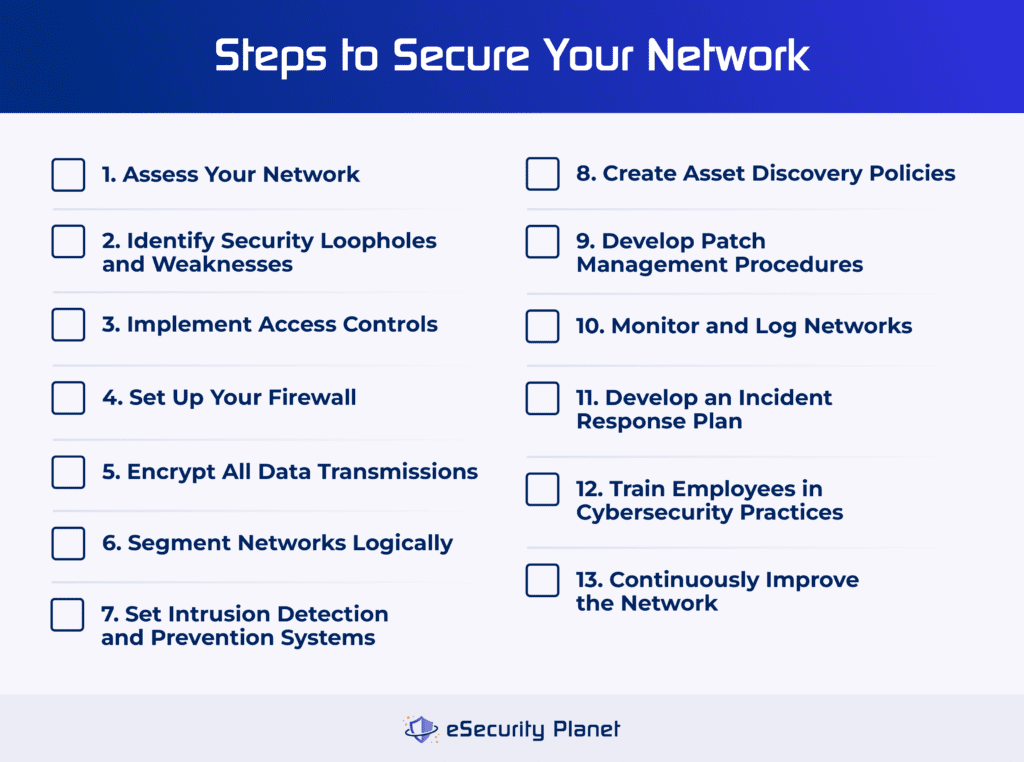
Credit: www.esecurityplanet.com
Monitoring And Managing Connected Devices
Keeping an eye on the devices connected to your budget router is a crucial part of guarding your home network. You might be surprised how many gadgets quietly join your Wi-Fi without you realizing it. Monitoring and managing these devices helps you spot threats early and stop hackers from sneaking in.
Identifying Unknown Devices
Start by logging into your router’s admin panel and checking the list of connected devices. Look for any unfamiliar names or devices you don’t recognize. Sometimes, devices show up with odd or generic labels, so cross-check the MAC addresses with your known gadgets.
If you spot something suspicious, it’s a red flag that someone might be tapping into your network. Have you ever found a device you couldn’t identify? It’s a clear sign to tighten your security immediately.
Setting Device Access Controls
Once you know which devices belong on your network, set up access controls to limit who can connect. Many routers let you create a whitelist, allowing only approved devices to join. This blocks unknown devices from accessing your Wi-Fi, even if they have your password.
You can also set time limits or restrict internet access for specific devices. This is handy if you want to control kids’ screen time or reduce the risk of unauthorized connections during certain hours. Managing access gives you more control over your network’s safety.
Regular Network Scans
Make it a habit to scan your network regularly for new or rogue devices. Use network scanning apps or built-in router tools to run quick checks. Frequent scans help you catch intruders early before they cause damage or steal data.
Think about it like a routine health check-up for your network. Skipping scans can leave vulnerabilities unnoticed. How often do you review your connected devices? Setting a reminder could save you from a major security breach.
Additional Security Tools
Protecting your budget router requires more than just changing passwords or updating firmware. Additional security tools add an essential layer of defense, helping to block threats before they reach your network. These tools can stop hackers in their tracks and keep your data safe.
Using Firewalls
A firewall acts as a barrier between your network and the internet. It monitors incoming and outgoing traffic, allowing only safe connections.
Many budget routers come with basic firewalls, but you can enhance protection by adding a dedicated firewall device or software. This helps you control which apps or devices can access your network.
Think about how much safer you feel knowing suspicious traffic is filtered out before it reaches your devices. Doesn’t that give you more peace of mind?
Implementing Vpns
A VPN (Virtual Private Network) encrypts your internet traffic, making it unreadable to outsiders. This is especially useful if your router’s built-in security is limited.
Using a VPN prevents hackers from spying on your online activities or intercepting sensitive data. You can even set up a VPN on your router itself to protect every device connected to it.
Have you ever wondered how much safer your browsing would be if no one could see what you’re doing online?
Installing Security Software
Security software like antivirus and anti-malware programs can protect devices connected to your router from threats that slip through. They scan for and remove harmful files before damage occurs.
Some security suites also offer network protection features, alerting you to unusual activity on your home network. This gives you early warnings about potential hacking attempts.
Imagine catching a threat early, stopping an attack before it even starts. Isn’t that what every smart homeowner wants?

Credit: mydreamhome.liveblog365.com
Best Practices For Ongoing Protection
Protecting your budget router from hacking requires ongoing attention. Simple one-time fixes won’t keep your network safe forever. You need habits that maintain and strengthen your router’s defenses regularly.
Regular Router Reboots
Rebooting your router might seem basic, but it’s surprisingly effective. A fresh start clears memory leaks and can close temporary vulnerabilities that hackers might exploit.
Try scheduling a weekly reboot. Many routers allow you to set this up automatically, so you don’t have to remember.
Have you noticed your internet speed improving after a reboot? That’s a good sign your router is running smoother and safer.
Backing Up Router Settings
Backing up your router’s settings saves you from a headache if it gets hacked or corrupted. You can restore your custom configurations quickly without starting from scratch.
Most routers have a backup option in their admin panel. Save the file to a secure location on your computer or cloud storage.
Make a habit of backing up after any change, like updating passwords or firewall rules. It’s a small step that can save hours of work.
Staying Informed About Threats
Hackers constantly evolve their techniques, so your router’s security needs to keep up. Stay updated by following trusted tech news sites or subscribing to security bulletins.
Sign up for alerts from your router manufacturer. They often notify users about critical firmware updates or vulnerabilities.
Ask yourself: Are you aware of the latest threats targeting routers like yours? Staying informed helps you act before a problem hits.
Frequently Asked Questions
How Can I Secure My Budget Router From Hackers?
To secure your budget router, change default passwords immediately. Enable WPA3 or WPA2 encryption. Regularly update firmware to fix vulnerabilities. Disable remote management and use a strong Wi-Fi password to prevent unauthorized access.
Why Should I Update My Router’s Firmware Regularly?
Firmware updates patch security flaws and improve performance. Hackers exploit outdated firmware to gain access. Regular updates protect your network from new threats and enhance router stability. Always check the manufacturer’s site for the latest version.
What Is The Best Encryption For Budget Routers?
WPA3 is the most secure encryption for routers. If unavailable, use WPA2 AES encryption. Avoid WEP or WPA, as they are outdated and vulnerable. Strong encryption protects your Wi-Fi from unauthorized access and data theft.
How Does Disabling Remote Management Improve Security?
Disabling remote management blocks external access to your router settings. It prevents hackers from changing settings remotely. This simple step drastically reduces the risk of unauthorized control over your network.
Conclusion
Protecting your budget router is important for safe internet use. Change default passwords to strong, unique ones. Keep your router’s software updated regularly. Turn off remote management to block outside access. Use a secure Wi-Fi password with WPA3 or WPA2 encryption.
Limit connected devices to those you trust. Regularly check your network for strange activity. Small steps can keep hackers away. Stay alert and protect your online privacy. A secure router helps keep your data safe every day.