Are you tired of lag ruining your gaming experience? Setting up your gaming router the right way can make all the difference.
Imagine smoother gameplay, faster speeds, and no more frustrating disconnects. In this guide, you’ll discover simple steps to unlock your router’s full potential and get the best performance for your games. Ready to level up your setup and dominate every match?
Let’s dive in!
Choosing The Right Router
Choosing the right router is essential for a smooth gaming experience. It affects speed, stability, and connection quality. A good router minimizes lag and keeps your games running without interruptions. The choice depends on your gaming style and setup.
Key Features For Gaming
- Low latency to reduce lag during gameplay
- High-speed data transfer for fast downloads and updates
- Quality of Service (QoS) to prioritize gaming traffic
- Dual-band or tri-band to avoid network congestion
- Strong security features to protect your connection
- Multiple Ethernet ports for wired connections
Budget Vs Performance
Higher-priced routers often offer better speed and features. Basic models may work but limit your gaming potential. Balance your budget with the features you need. Avoid spending on extras you won’t use. Focus on what improves gaming performance the most.
Wired Vs Wireless Options
Wired connections provide stable and fast speeds. They reduce interference and lag significantly. Wireless routers offer convenience and flexibility. Choose a router with strong Wi-Fi standards like Wi-Fi 6. Consider your gaming space and device setup. Sometimes a mix of wired and wireless works best.
Router Placement Tips
Proper router placement is key for strong and stable gaming connections. Positioning the router correctly helps reduce lag and keeps your gameplay smooth. Small changes in placement can improve your network speed and reliability. Use these tips to find the best spot for your gaming router.
Optimizing Signal Strength
Place the router in an open space to boost signal strength. Avoid closed cabinets or corners where signals weaken. Keep the router elevated, like on a shelf or table, for better coverage. Ensure antennas point upwards or in directions that cover your gaming area well.
Avoiding Interference
Wireless devices can cause signal interference. Keep the router away from microwaves, cordless phones, and Bluetooth gadgets. Thick walls and metal objects also block signals. Clear the area around the router from clutter and large electronics to minimize interruptions.
Best Locations In Your Home
- Center of the house for even signal spread
- Near your gaming setup for stronger connection
- On a high shelf or desk, not on the floor
- Away from windows to reduce outside signal loss
Choosing the right spot improves your gaming router’s performance. Test different locations to find the best one for your home network.
Configuring Network Settings
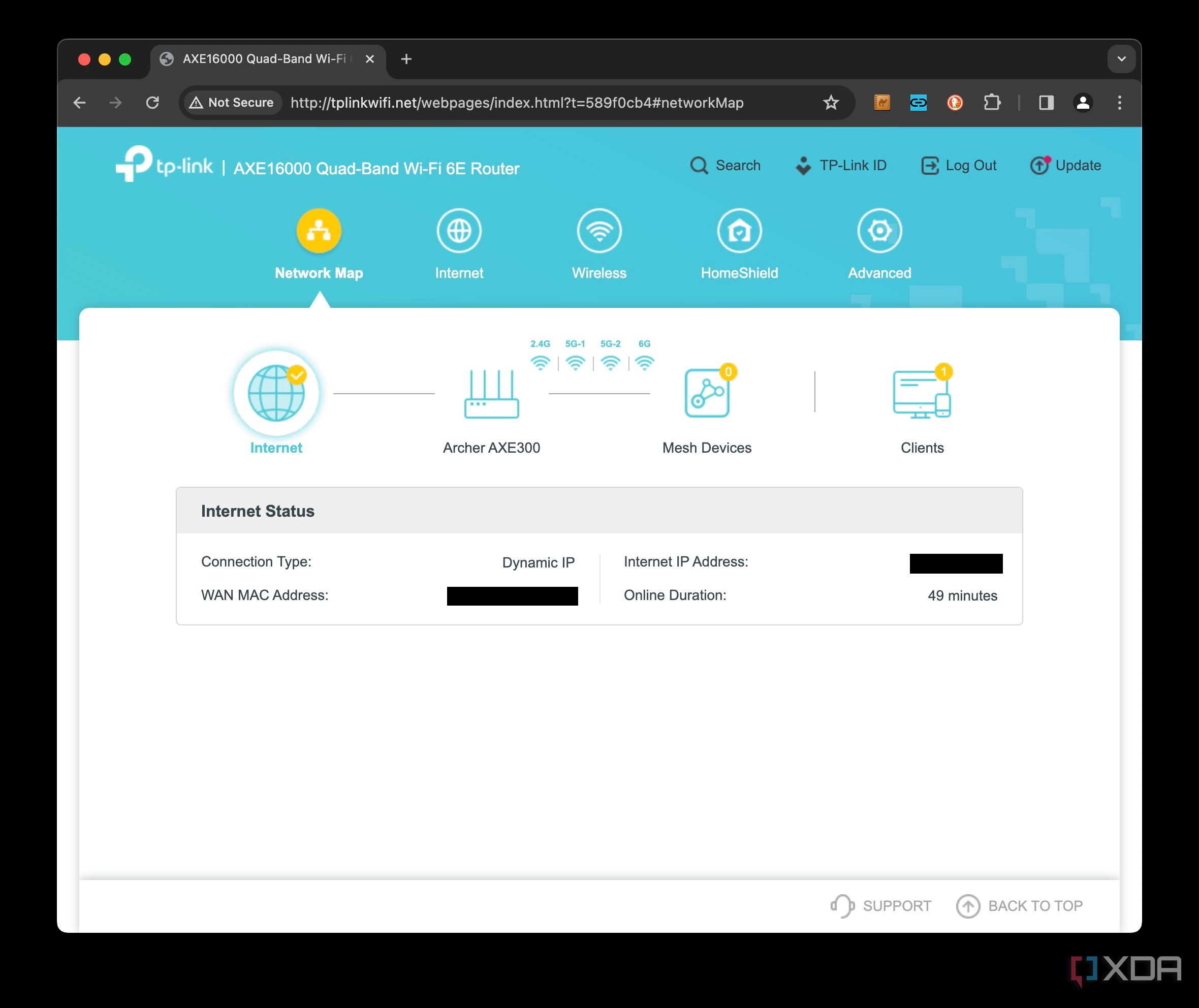
Configuring network settings on your gaming router can boost your gaming experience. With the right adjustments, you can reduce lag and improve connection stability. Delve into the essential settings to optimize your router for gaming.
Setting Up Quality Of Service (qos)
Quality of Service prioritizes your gaming traffic over other data. Access your router’s settings through a web browser. Find the QoS section and enable it. Assign priority to your gaming devices. This ensures games get bandwidth first. Adjust settings based on your network needs.
Enabling Gaming Mode
Gaming Mode reduces latency and interference for a smoother experience. Locate this feature in your router settings. Switch it on to optimize your connection. It minimizes background data use. Gaming Mode enhances real-time game performance.
Choosing The Right Frequency Band
Most routers offer 2.4 GHz and 5 GHz bands. Choose the 5 GHz band for gaming. It provides faster speeds and less interference. Suitable for short-range connections. For devices farther away, use 2.4 GHz. This band penetrates walls better.
Credit: www.xda-developers.com
Securing Your Router
Securing your gaming router is essential to protect your network from unauthorized access and ensure smooth gameplay. Without proper security, your connection could be vulnerable to attacks that slow down your internet or expose your personal data. Taking a few simple steps can make a big difference in keeping your gaming experience safe and stable.
Changing Default Credentials
One of the easiest ways hackers gain access to routers is by using default usernames and passwords. You should immediately change these to something strong and unique.
Choose a password that combines letters, numbers, and symbols. Avoid using easily guessable info like birthdays or common words.
Have you ever wondered why so many routers get hacked? Most of the time, it’s because people never change the default login details. Don’t let that be you.
Enabling Firewall And Encryption
Firewalls act as a barrier between your network and potential threats. Make sure your router’s firewall is turned on to block suspicious traffic.
Encryption protects the data traveling between your devices and the router. Use WPA3 or at least WPA2 encryption to secure your wireless connection.
Think about it: would you leave your front door wide open? Enabling these security features is like locking the door to keep unwanted guests out.
Regular Firmware Updates
Router manufacturers release firmware updates to patch security holes and improve performance. Ignoring these updates can leave your network exposed.
Set a reminder to check for updates regularly or enable automatic updates if your router supports it.
I once ignored a firmware update for weeks and ended up with a major connection issue during a crucial gaming session. Don’t make the same mistake—keeping your router up to date keeps your connection reliable and secure.
Advanced Performance Tweaks
To get the most out of your gaming router, you need to dig deeper than the basic setup. Advanced tweaks can reduce lag, improve connection stability, and give you an edge over opponents. These adjustments might seem technical at first, but with clear steps, you can handle them confidently and see real improvements.
Port Forwarding For Games
Port forwarding lets specific game data bypass your router’s firewall and reach your console or PC directly. This reduces connection delays and helps with smoother multiplayer matches.
Start by finding the ports your game uses—this info is usually available on the game’s official site. Then, log into your router’s settings and create new port forwarding rules for those ports. Assign these ports to your gaming device’s IP address to ensure the traffic reaches it without interruption.
Have you noticed random disconnects or trouble joining game lobbies? Port forwarding might be the fix you didn’t think of.
Adjusting Mtu Settings
The Maximum Transmission Unit (MTU) controls the size of data packets sent over your network. Setting the right MTU value can prevent packet loss and reduce lag spikes during gameplay.
Many routers default to 1500, but some games perform better with slightly smaller sizes like 1472 or 1450. You can test this by running ping commands with different packet sizes to find the optimal MTU for your connection.
Changing MTU requires a bit of trial and error, but once dialed in, it can make your online gaming experience much smoother.
Using Vpns With Gaming Routers
VPNs are often seen as a slow-down for gaming, but when set up correctly on a gaming router, they can actually improve security and reduce ping to certain servers.
Choose a VPN with servers close to your gaming region and low latency. Then, configure the VPN directly on your router to cover all devices without needing individual setups.
Have you ever faced throttling from your ISP during peak hours? A well-configured VPN can help bypass this, keeping your speeds steady when it counts most.
Credit: www.ibuypower.com
Testing And Monitoring Performance
Testing and monitoring your gaming router’s performance is essential to ensure smooth gameplay and minimal lag. Simply setting up the router isn’t enough; you need to keep an eye on how it handles your gaming traffic over time. Regular checks help you spot issues early and keep your connection optimized for the best experience.
Speed And Latency Tests
Checking your internet speed and latency gives you a clear picture of your network’s health. Use online tools like Ookla Speedtest or Fast.com to measure download and upload speeds. Pay close attention to latency or ping, as low latency is crucial for real-time games.
Run these tests at different times of the day to see if your connection is stable. If you notice sudden drops in speed or spikes in latency, it might be time to adjust your router settings or check for interference. Have you ever experienced lag spikes right when you were about to win? These tests help you avoid those frustrating moments.
Using Router Management Apps
Most modern gaming routers come with dedicated management apps. These apps allow you to monitor your network from your phone or PC in real-time. You can check connected devices, prioritize gaming traffic, and receive alerts about performance issues.
Apps like ASUS Router or Netgear Nighthawk are user-friendly and packed with features. They help you manage Quality of Service (QoS) settings easily, so your games get the bandwidth they need. Have you explored your router’s app lately? It might reveal settings that can dramatically improve your gaming.
Troubleshooting Common Issues
Even with the best setup, problems can arise. If you face frequent disconnects, slow speeds, or high latency, start by rebooting your router. This simple step often clears temporary glitches.
Check for firmware updates through your router’s management app or web interface. Updated firmware fixes bugs and improves performance. If issues persist, consider changing your Wi-Fi channel to avoid interference from neighbors’ networks.
Remember, your router’s location matters too. A central spot free from physical obstructions can boost signal strength. Are you ready to test your connection and keep your gaming router performing at its peak?

Credit: www.ign.com
Frequently Asked Questions
What Is The Best Router For Gaming Performance?
The best gaming router offers high-speed Wi-Fi, low latency, and QoS features. It prioritizes gaming traffic and reduces lag for smooth gameplay.
How Do I Optimize My Router For Gaming?
Optimize by enabling QoS, updating firmware, and placing the router centrally. Use a wired connection for stable performance and reduce interference.
Why Is Qos Important For Gaming Routers?
QoS prioritizes gaming traffic over other data. This reduces lag and improves gaming experience by ensuring bandwidth for games.
Should I Use 2.4ghz Or 5ghz For Gaming?
Use 5GHz for faster speeds and less interference. 2. 4GHz covers longer distances but is slower and prone to congestion.
Conclusion
Setting up a gaming router right can boost your gameplay a lot. Choose the best settings and place your router well. Keep your firmware updated for smooth performance. Use wired connections when possible for less lag. Prioritize gaming traffic to avoid slowdowns.
Test your connection speed to see improvements. Small changes make a big difference in gaming. Enjoy faster, more stable online games now. Keep adjusting settings as you learn more. A good router setup helps you play better every time.