Are you tired of lag and slow connections ruining your cloud gaming experience? You might be wondering if a gaming router can actually make a difference.
Imagine playing your favorite games without constant buffering or delays, where every move feels smooth and instant. You’ll discover how the right gaming router could boost your cloud gaming performance and why it matters for your gameplay. Keep reading to find out if upgrading your router is the game-changer you’ve been looking for.
Credit: www.polygon.com
Gaming Routers And Cloud Gaming
Cloud gaming depends heavily on a stable and fast internet connection. Gaming routers promise to improve network quality, which may affect cloud gaming experiences. Understanding how these routers work can help gamers decide if they benefit from investing in one.
How Gaming Routers Differ
Gaming routers have special features designed to reduce lag and improve speed. They prioritize gaming traffic over other data on the network. This means less delay during gameplay. These routers often include:
- Quality of Service (QoS) settings to manage bandwidth
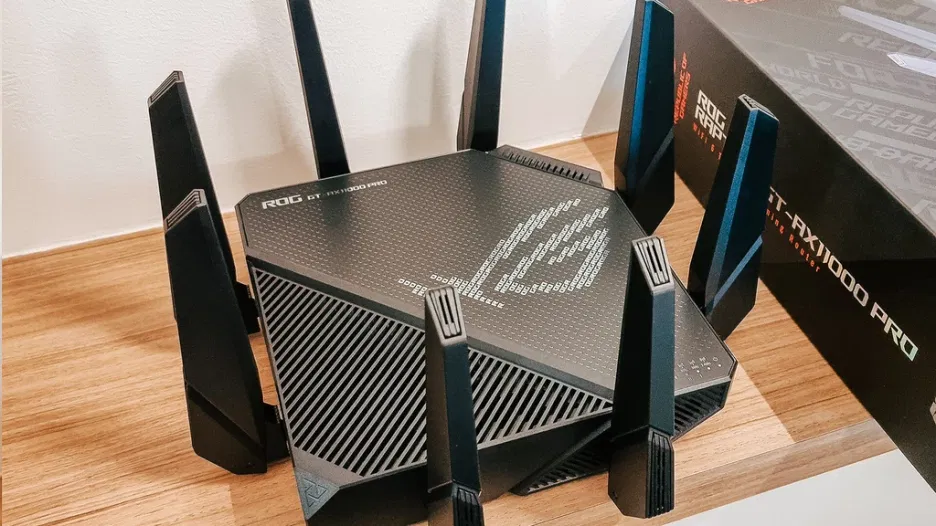
- Advanced antennas for better signal strength
- Faster processors to handle multiple devices
- Custom firmware optimized for gaming
These features help maintain a stable connection, even with many devices connected. Regular routers may not handle gaming traffic as efficiently.
Impact On Cloud Gaming Performance
Cloud gaming streams games from remote servers to your device. It needs low latency and consistent speed. Gaming routers can help lower latency by prioritizing game data packets. This reduces delays that cause lag or screen freezes.
Better Wi-Fi coverage from gaming routers also means fewer interruptions. Players experience smoother gameplay with less buffering. However, the actual improvement depends on your internet plan and location. A gaming router cannot fix slow internet but can optimize the connection you have.
Speed Factors In Cloud Gaming
Speed plays a crucial role in your cloud gaming experience. Every frame you see depends on how quickly data travels between your device and the cloud server. Understanding the key speed factors can help you decide if a gaming router can truly boost your cloud gaming sessions.
Bandwidth Requirements
Bandwidth is the amount of data your internet connection can handle at once. Cloud gaming demands significant bandwidth because it streams high-quality video continuously.
If your bandwidth is too low, your game may lag or drop in resolution. For example, popular cloud gaming services often recommend at least 15-25 Mbps for smooth gameplay.
Think about your home network: Are multiple devices sharing the internet? If yes, your available bandwidth for gaming drops, causing interruptions. A gaming router can prioritize cloud gaming traffic to keep your connection stable.
Latency And Its Effects
Latency is the delay before data starts moving after you send a command. Even a small delay can ruin fast-paced games that rely on quick reactions.
Imagine pressing a button and seeing the result half a second later—that’s frustrating and can cost you a match. Low latency ensures your inputs feel instantaneous, making gameplay smoother.
Gaming routers often reduce latency by optimizing your network path and managing traffic efficiently. Have you noticed your cloud gaming feels sluggish at times? Checking your latency might reveal the culprit.
Reducing Lag With Gaming Routers
Lag can ruin your cloud gaming experience by causing delays and interruptions. Gaming routers offer specific tools to help cut down on lag and keep your gameplay smooth. Understanding how these routers manage traffic can show you why they matter for cloud gaming.
Quality Of Service (qos) Features
Gaming routers come with Quality of Service (QoS) settings that let you control how your network handles different types of data. QoS can prioritize gaming packets over less important traffic like downloads or video streaming.
This means your game data gets sent and received faster, reducing delays. Imagine playing a fast-paced shooter and not worrying about your neighbor’s video call slowing down your connection. That’s the power of QoS in action.
Prioritizing Game Traffic
With a gaming router, you can set rules to prioritize traffic from your gaming device or specific games. This ensures your console or PC gets the bandwidth it needs when you’re in the middle of a match.
Without this, other devices on your network might hog bandwidth, causing lag spikes. Have you noticed your gameplay stuttering when someone starts streaming movies? Prioritizing game traffic can stop that from happening.
By controlling what data moves first, gaming routers help keep your cloud gaming sessions responsive and enjoyable.
Optimizing Network Settings
Optimizing your network settings can make a big difference in how smoothly your cloud gaming sessions run. Even the best gaming router won’t perform at its peak if its settings are off. Tweaking a few key options can reduce lag, prevent disconnections, and give you a more consistent gaming experience.
Firmware Updates
Keeping your router’s firmware up to date is essential. Manufacturers often release updates that fix bugs and improve performance, especially for gaming features.
Check for updates regularly through your router’s admin panel. I once ignored an update for months, and after installing it, my cloud gaming latency dropped noticeably. This simple step can save you from frustrating interruptions.
Channel Selection And Interference
Your router broadcasts on specific wireless channels, and interference from neighboring networks can cause slowdowns. Choosing the right channel can clear up the signal for better gameplay.
Use apps or tools to scan for the least crowded channels in your area. Switching from a crowded channel to a clearer one can instantly improve your connection quality. Have you noticed how your Wi-Fi speeds vary at different times? Channel interference might be why.
Comparing Standard Vs Gaming Routers
Choosing the right router can transform your cloud gaming experience. Standard routers often struggle with high data demands. Gaming routers, tailored for gamers, promise smoother gameplay. They offer advanced features designed to reduce lag. How do these two types compare?
Performance Benchmarks
Gaming routers prioritize game data, reducing latency. They often come with Quality of Service (QoS) settings. These settings allow you to prioritize gaming traffic. Standard routers lack these features, leading to potential lag. Gaming routers also support higher bandwidths. This ensures stable connections during intense gaming sessions.
Cost Vs Benefit Analysis
Gaming routers come with a higher price tag. But they offer features that justify the cost. Enhanced processing power, better range, and advanced security are common. Standard routers are cheaper but may not meet gaming needs. Consider how much you game and your budget. Weigh the cost against the benefits of improved performance.
User Experiences And Case Studies
Understanding how a gaming router impacts cloud gaming is best done through real user experiences and detailed case studies. These stories and data points reveal the actual benefits and limitations of upgrading your network gear for smoother gameplay. They also highlight common pitfalls you might face along the way.
Real-world Improvements
Many gamers report noticeable drops in latency after switching to a gaming router. One user shared that their ping reduced from 80ms to 30ms, making fast-paced games like first-person shooters much more responsive. This improvement often comes from features like Quality of Service (QoS) that prioritize gaming traffic over downloads or streaming.
Another common benefit is fewer connection drops during peak hours. Cloud gaming requires stable internet, and gaming routers often handle multiple devices better. A family who streams videos and plays games simultaneously found their cloud gaming experience became far smoother after upgrading.
- Reduced lag spikes during online matches
- Improved video streaming quality on cloud platforms
- Better handling of multiple devices without slowdown
Common Challenges
Not every user sees instant improvements after buying a gaming router. Some encounter setup difficulties, especially when configuring advanced features like port forwarding or QoS. Without proper configuration, the router may not prioritize your cloud gaming traffic effectively.
Another challenge is that a gaming router cannot fix slow internet speed from your ISP. If your base connection is unstable or too slow, the router won’t magically fix those issues. One gamer realized that despite upgrading their router, their cloud gaming still lagged because their internet plan capped their bandwidth.
- Complex router settings can confuse users
- Router cannot compensate for poor ISP speed or stability
- Expectations may be too high without addressing all network factors
Have you checked whether your internet plan supports cloud gaming well enough before investing in a gaming router? Sometimes, the best step is to optimize your entire setup, not just the router.
Additional Tips To Enhance Cloud Gaming
Improving cloud gaming goes beyond just having a good gaming router. Small changes can boost your experience significantly. Paying attention to connection types and router placement helps reduce lag and buffering. These tips help create a smoother and faster gaming session.
Wired Vs Wireless Connections
Wired connections usually offer better stability than wireless. Using an Ethernet cable reduces interference and packet loss. This leads to lower latency and faster response times in games.
Wireless connections provide flexibility but can suffer from signal drops. Walls, devices, and distance weaken Wi-Fi signals. Using a wired connection is best for serious cloud gamers.
- Connect your device directly to the router with Ethernet
- Use wireless only when cables are impractical
- Choose 5 GHz Wi-Fi over 2.4 GHz for faster speeds
Router Placement Strategies
Router location impacts signal strength and coverage. Place your router in a central area of your home. Avoid placing it near thick walls or metal objects that block signals.
Elevate the router on a shelf or table for better signal reach. Keep it away from other electronics that may cause interference. Clear paths between the router and your gaming device improve connection quality.
- Keep the router visible and open, not in a cabinet
- Position it high, away from the floor
- Reduce obstacles by moving furniture or devices

Credit: www.amazon.com
Credit: www.techedt.com
Frequently Asked Questions
Can A Gaming Router Reduce Cloud Gaming Lag?
Yes, a gaming router can reduce lag by prioritizing gaming traffic. It minimizes latency and packet loss, improving cloud gaming performance. Quality of Service (QoS) features help maintain a stable connection during gameplay. This leads to smoother and more responsive gaming experiences.
Does A Gaming Router Improve Cloud Gaming Speed?
A gaming router can improve cloud gaming speed by optimizing bandwidth allocation. It reduces network congestion and prioritizes gaming data. However, your internet plan’s speed is the primary factor. A gaming router enhances performance but cannot exceed your internet’s maximum speed.
Are Gaming Routers Better For Cloud Gaming Than Regular Routers?
Gaming routers are better for cloud gaming due to specialized features like QoS and low latency modes. They handle high traffic efficiently, reducing interruptions. Regular routers lack these optimizations, which may cause lag and unstable connections during cloud gaming sessions.
How Does A Gaming Router Enhance Cloud Gaming Stability?
Gaming routers enhance stability by managing network traffic and reducing interference. They use technologies like dual-band Wi-Fi and advanced antennas. This ensures consistent connectivity and fewer drops during gameplay. Stable connections are crucial for uninterrupted cloud gaming experiences.
Conclusion
Choosing a gaming router can help reduce lag and improve speed. This makes cloud gaming smoother and more fun. A good router keeps your connection stable and strong. You get less buffering and faster response times. This means better gameplay and less frustration.
Not all routers are the same, so pick one designed for gaming. Small changes in your setup can make a big difference. In the end, a gaming router can improve your cloud gaming experience. Simple upgrades often lead to better play and more enjoyment.