Are you wondering if your gaming router really needs a cooling fan? You’ve probably noticed how intense your gaming sessions get—and how your router works overtime to keep up.
But does that extra heat mean you should add a fan? Knowing the answer could save you from slow connections, dropped signals, or even costly damage. You’ll discover why cooling matters for your gaming gear and whether a fan is the right move for your setup.
Keep reading to protect your connection and boost your game.
Why Cooling Matters For Gaming Routers
Cooling plays a key role in keeping gaming routers at peak performance. These routers handle large amounts of data quickly, which creates heat. Without proper cooling, this heat builds up and can cause problems.
Keeping the router cool helps maintain smooth gameplay and fast internet speeds. It also protects the device from damage caused by overheating. Understanding why cooling matters helps you choose the right router and keep it running well.
Heat Generation In High-performance Routers
Gaming routers have powerful processors and multiple antennas. These parts work hard to provide fast and stable connections. This intense activity generates a lot of heat inside the router.
High data transfer rates and constant wireless signals increase the temperature further. The compact design of gaming routers limits airflow. Heat can build up quickly without a way to escape.
Effects Of Overheating On Network Stability
Heat affects the router’s internal components and slows them down. Overheating may cause the router to reboot or freeze during gameplay. This interrupts your connection and causes lag or disconnections.
Long-term exposure to high temperatures can damage hardware parts. This reduces the router’s lifespan and leads to poor performance. Cooling helps avoid these issues and keeps the network stable.
Built-in Cooling Features In Gaming Routers
Gaming routers often handle intense data traffic and extended uptime, which can cause them to heat up. To keep performance steady and avoid shutdowns, many models come with built-in cooling features. These features help manage heat without needing extra accessories, making your gaming setup cleaner and more efficient.
Passive Cooling Designs
Many gaming routers use passive cooling to reduce heat naturally. This means they rely on materials and design elements that dissipate heat without moving parts. For example, metal casings and vents allow heat to escape easily, keeping the router cooler during long gaming sessions.
Passive cooling is silent and requires no power, which is a big plus if you want a noise-free environment. Have you noticed a router with a sleek metal shell or plenty of ventilation slots? That’s passive cooling at work, quietly protecting your device.
Integrated Fan Systems
Some high-end gaming routers come with built-in fans to actively cool the internal components. These fans kick in when the router heats up, ensuring it stays within safe temperature limits. This active cooling helps maintain stable speeds and prevents lag caused by overheating.
While fan noise can be a concern, manufacturers often design these systems to run quietly or only activate under heavy load. If you’ve ever had a router suddenly slow down during a marathon gaming session, a fan-equipped model might be exactly what you need to keep your connection smooth.
Signs Your Router Needs Extra Cooling
Routers that run hot often show clear signs they need extra cooling. Overheating can slow down your connection and damage the device. Spotting these signs early helps keep your gaming smooth and your router safe.
Frequent Disconnects And Lag
Sudden disconnects or slow internet during games may signal overheating. Heat can cause the router’s processor to throttle speed. This results in lag spikes and unstable connections. If your games freeze or drop connection often, check your router’s temperature.
Unusual Heat Levels And Noise
Feel your router’s surface. If it is very hot, that is a warning. Excess heat stresses internal parts and shortens lifespan. Some routers may also make louder fan noises when overheating. Strange sounds or warmth means it might need extra cooling tools like fans or better ventilation.

Credit: www.amazon.com
Choosing The Right Cooling Fan For Your Router
Choosing the right cooling fan for your router helps keep it running smoothly. A good fan stops overheating, which can slow down your gaming experience. Not all fans work the same. Picking the right one needs thought about size, airflow, noise, and power. This ensures your router stays cool without extra problems.
Fan Size And Airflow Considerations
Fan size affects how much air moves across your router. Larger fans push more air but need more space. Smaller fans fit better in tight spots but move less air. Airflow is key. It helps cool the router’s hot parts. Look for fans that balance size and airflow for your setup.
Check your router’s vents and space around it. Measure available space before choosing a fan. High airflow fans are best for intense gaming or heavy use. Low airflow fans work fine for light gaming or small routers.
Noise Levels And Power Consumption
Fans make sound. Some are loud and distracting. Others run quietly. Pick a fan that keeps noise low to avoid ruining your game focus. Quiet fans use better technology or run slower.
Power use matters too. Fans that use less power save energy and reduce heat. Look for fans designed for low power consumption. This helps keep your router and home cooler.
Alternative Cooling Solutions
Gaming routers often heat up during long sessions. This can reduce performance. Alternative cooling solutions can help maintain optimal function. These methods are simple and effective.
External Cooling Pads
External cooling pads are a great option. They are easy to use. Simply place the router on the pad. The built-in fans will cool it down. This method is affordable and effective. It requires no technical skills. Cooling pads are available in various sizes. Choose one that fits your router best.
Optimizing Router Placement
Proper placement can reduce overheating. Keep the router in a well-ventilated area. Avoid enclosed spaces. Ensure there is enough space around it. This allows air to flow freely. Do not place routers near heat sources. Direct sunlight can also increase temperatures. Elevate the router if possible. This helps air circulate underneath.
Maintenance Tips To Prevent Overheating
Keeping your gaming router cool is essential for stable performance and longevity. Overheating can cause lag, dropped connections, or even hardware damage. You don’t always need fancy cooling fans if you maintain your router well.
Regular Dust Cleaning
Dust buildup blocks airflow and traps heat inside your router. Check your router’s vents and surface every few weeks and gently wipe away dust with a soft cloth or use compressed air. Avoid using wet cloths or harsh chemicals that could damage the device.
Have you noticed your router getting unusually warm? Dust is often the silent culprit. Clearing it out can lower temperatures significantly without extra cost or effort.
Firmware Updates And Performance Tuning
Firmware updates often include improvements that help your router manage resources better and reduce overheating risks. Make sure your router’s software is always up to date by checking the manufacturer’s website or using their app.
Performance tuning features like QoS (Quality of Service) can optimize traffic flow and reduce workload spikes. This means less strain on your router’s processor and less heat generated during intense gaming sessions.
Balancing Cooling And Performance
Balancing cooling and performance in gaming routers is essential for smooth gameplay and device longevity. Excess heat can cause slowdowns, while too much cooling may waste energy. Finding the right balance keeps the router stable and efficient.
Avoiding Overcooling Risks
Overcooling a gaming router can lead to unnecessary power use. Cooling fans running too often create noise distractions. Excessive cooling may also cause moisture buildup inside the device. Proper temperature control is better than constant maximum cooling.
Maximizing Router Lifespan
Good cooling helps prevent hardware damage from heat. Keeping the router cool reduces the chance of overheating crashes. It extends the life of internal components like processors and chips. Fans or heat sinks should work quietly and efficiently to protect the router.
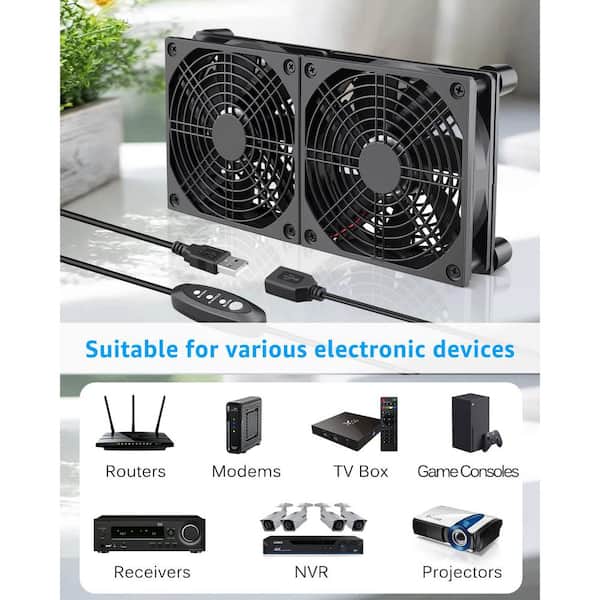
Credit: www.homedepot.com

Credit: www.amazon.com
Frequently Asked Questions
Do Gaming Routers Require Cooling Fans?
Gaming routers usually do not require cooling fans. They are designed to handle heat through passive cooling. However, high-performance models under heavy loads may benefit from additional cooling to maintain optimal performance.
How Do Cooling Fans Improve Gaming Router Performance?
Cooling fans help prevent overheating in gaming routers. By maintaining lower temperatures, they ensure stable connections and reduce lag. This leads to better gaming experiences during prolonged use.
Can Overheating Damage A Gaming Router?
Yes, overheating can damage a gaming router’s internal components. Excessive heat may cause performance drops and shorten the device’s lifespan. Proper cooling helps avoid these issues.
Are Cooling Fans Noisy On Gaming Routers?
Most cooling fans in gaming routers are designed to be quiet. Manufacturers prioritize low noise levels to avoid disrupting gamers. However, some cheaper models may produce noticeable sound.
Conclusion
Gaming routers can get hot during long sessions. Cooling fans help keep the router at safe temperatures. This can improve performance and prevent damage. Not all routers need fans, but some benefit from them. Consider your gaming habits and router design.
Proper ventilation also plays a key role in cooling. A cool router works better and lasts longer. Fans add noise, so weigh pros and cons. Choose what fits your setup and comfort best. Keep your router cool for smoother gaming experiences.