Are you worried about your kids’ online safety when you’re on the go? You might wonder if a travel router can help you keep control over what they access.
Imagine having the power to block harmful sites or limit screen time, even while traveling. But do travel routers really offer parental controls? If you want to protect your family’s internet use away from home, understanding this feature is key.
Keep reading to discover how travel routers handle parental controls and what you need to look for to keep your loved ones safe online.

Credit: www.amazon.ca
Travel Routers And Parental Controls
Travel routers offer a smart way to share internet on the go. Many parents wonder if these devices help control what kids access online. Understanding their features can guide better choices for family travel.
What Are Travel Routers?
Travel routers are small devices that create a Wi-Fi network. They connect to hotel or public internet and share it with multiple devices. Their compact size makes them easy to carry. They improve connection security and can reduce the hassle of logging in repeatedly.
Parental Controls Explained
Parental controls help limit access to certain websites and apps. They protect children from harmful or inappropriate content. Parents can set time limits for internet use. These tools often include filters and usage reports. Controls work by blocking or allowing specific content based on rules set by adults.
Do Travel Routers Include Parental Controls?
Some travel routers come with built-in parental controls. These features vary widely between models. Basic routers may lack advanced controls or filters. More advanced devices offer options like:
- Website blocking
- Time scheduling
- Device-specific rules
Before buying, check if parental controls meet your needs. Third-party apps can add controls if the router lacks them. Travel routers without controls still provide security benefits but require extra steps for content management.
Key Safety Features In Travel Routers
Travel routers are more than just gadgets for internet sharing; they offer safety features that help you control what your family accesses online, even on the go. These features give you peace of mind when you’re in unfamiliar places or using public Wi-Fi. Understanding these controls empowers you to keep your children safe and manage their screen time effectively.
Content Filtering Options
Many travel routers come with content filtering capabilities that block inappropriate websites automatically. You can set filters based on categories like adult content, gambling, or social media to suit your family’s needs. This way, you don’t have to constantly monitor what your kids are browsing, especially when you’re busy or away.
Have you ever struggled to restrict access to certain sites while traveling? These filters can be lifesavers in such moments, ensuring a safer online environment without extra effort from you.
Time Management Settings
Travel routers often include settings that let you control how long devices can connect to the internet each day. You can create schedules to limit internet access during bedtime or study hours, helping your kids develop healthier online habits. This feature is especially useful during trips when routines can get disrupted.
Imagine setting a timer that automatically cuts off Wi-Fi after an hour of usage—no more battles over screen time while on vacation!
Device Access Controls
With device access controls, you can decide which gadgets are allowed to connect to your travel router. This means you can block unknown devices or limit connections to only trusted family members. It’s a simple but powerful way to prevent unauthorized users from accessing your network.
Think about the last time you connected to a public hotspot—did you worry about who else might be online? Device controls help you take charge of your network’s security wherever you are.
Benefits Of Parental Controls On The Go
Parental controls on travel routers offer many benefits for families on the move. They help keep children safe while using the internet in new places. These controls give parents peace of mind and allow kids to enjoy online activities responsibly. Managing internet use during travel becomes simple and effective.
Protecting Children From Inappropriate Content
Parental controls block harmful websites and content automatically. This protection works anywhere, even in hotels or public Wi-Fi spots. Children avoid exposure to violent, adult, or unsafe material. Parents can customize filters to suit their child’s age and needs. This keeps the online experience safe and friendly.
Managing Screen Time While Traveling
Travel routers with parental controls allow setting daily internet limits. Kids can enjoy their devices without spending too much time online. Parents control when and how long internet access is allowed. This helps balance fun and rest during trips. It also reduces arguments about screen use.
Ensuring Secure Internet Access
Travel routers create a private Wi-Fi network that is safer than public hotspots. Parental controls add extra layers of security for children’s devices. They prevent unauthorized access and cyber threats. Parents can monitor internet activity and block risky sites easily. This creates a secure online environment wherever the family travels.

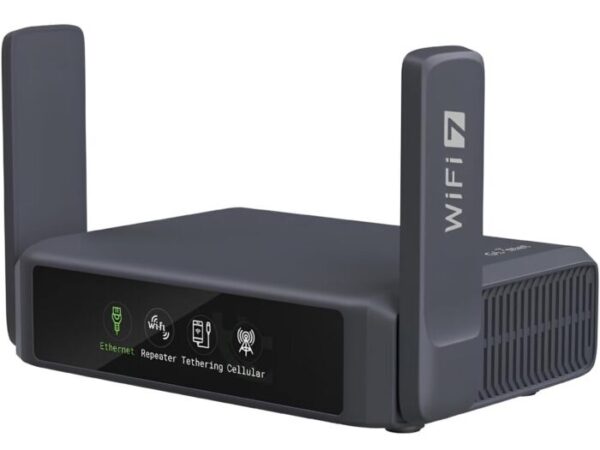
Credit: www.amazon.com
Popular Travel Routers With Parental Controls
Travel routers with parental controls are gaining attention because they help you manage your family’s internet use on the go. These devices let you set limits, block inappropriate content, and monitor online activity—all from a compact router that fits in your bag. Choosing the right model means balancing features, ease of use, and reliability while ensuring your kids stay safe online during your travels.
Top Models And Their Features
Several travel routers stand out for their built-in parental controls. The TP-Link TL-WR902ACoffers easy guest network setup and time limits on internet access. It’s small but powerful, perfect for hotel stays or cafes.
The GL.iNet GL-AR750S Slateis another favorite. It supports OpenVPN and WireGuard, plus lets you block websites and set schedules through its user-friendly app. It’s great if you want more control and security.
Then there’s the Netgear Nighthawk M1, which combines a mobile hotspot with parental controls. You can filter content and pause internet access for specific devices, making it ideal for families on the move.
User Reviews And Ratings
Users often praise the TP-Link TL-WR902AC for its simplicity and reliable parental controls. Many parents mention how it helped them limit screen time during vacations without complicated setups.
GL.iNet’s GL-AR750S gets high marks for its advanced features but some find the initial setup a bit technical. However, once configured, it offers excellent control, as reported by tech-savvy travelers.
The Netgear Nighthawk M1 receives positive feedback for its fast connection and robust parental controls, though its higher price point may not fit every budget. Families who invest in it appreciate the peace of mind it brings.
Which features matter most to you when choosing a travel router? Is ease of use or advanced control your top priority?
Setting Up Parental Controls On Travel Routers
Travel routers sometimes include parental controls to limit internet access for kids. These controls help block certain sites or set time limits easily. Check your router’s settings to see if parental controls are available and how to activate them.
Setting up parental controls on travel routers can ensure a safer online experience for children while traveling. These controls help parents manage and monitor internet usage. They block inappropriate content and restrict access during certain times. Many travel routers offer customizable settings for parental controls. This feature is crucial for families on the move. Setting up these controls may seem daunting, but it’s manageable with clear instructions.Step-by-step Configuration Guide
Begin by accessing the router’s admin panel. Open a web browser and enter the router’s IP address. Log in with the admin credentials. Navigate to the parental controls section. Enable the parental controls feature. Set up filters to block specific websites. You can also schedule internet access times. Save your settings to apply changes.Common Challenges And Solutions
Some users face login issues. Ensure you enter the correct IP address and credentials. Password reset might be necessary if forgotten. Sometimes, the parental controls feature seems missing. Check the router model’s manual or website for instructions. If filters don’t work, update the router firmware. This often resolves functionality issues.Alternatives To Built-in Parental Controls
Travel routers may not always include built-in parental controls. This can make managing internet access for children tricky during trips. Thankfully, several alternatives help maintain safe browsing without relying on the router itself. These options work well with any travel router and add layers of control and protection.
Using Third-party Apps
Third-party apps offer flexible parental control features. They often allow parents to set screen time limits, filter websites, and monitor online activity. These apps work on smartphones, tablets, and computers connected to the travel router.
- Easy to install and use on multiple devices
- Control internet access remotely from a parent’s phone
- Customizable settings for different children
Examples include apps like Qustodio, Norton Family, and Bark. Many provide free basic plans with options to upgrade for more features.
Network-level Filtering Services
Network-level filtering blocks harmful content before it reaches devices. These services filter internet traffic through cloud-based or DNS filtering systems. They work independently of the router’s built-in settings.
- Filter websites by categories such as adult content or violence
- Apply controls to all devices on the travel router
- No need to install software on each device
Popular options include OpenDNS FamilyShield and CleanBrowsing. Parents can change DNS settings on the travel router or individual devices to activate filtering.
Credit: blog.flashrouters.com
Frequently Asked Questions
Do Travel Routers Include Parental Control Features?
Many travel routers offer parental controls to manage internet access. These controls help restrict content and set time limits. However, not all models have this feature, so check specifications before buying. Parental controls are useful for keeping kids safe online during travel.
How Effective Are Parental Controls On Travel Routers?
Parental controls on travel routers provide basic filtering and scheduling options. They effectively block inappropriate sites and limit screen time. However, they may lack advanced features found in dedicated parental control software. For simple control on the go, travel routers suffice.
Can I Customize Parental Controls On Travel Routers?
Yes, most travel routers with parental controls allow customization. Users can block specific websites, set usage schedules, and manage device access. Custom settings help tailor controls to your family’s needs, ensuring safer internet use while traveling.
Are Parental Controls On Travel Routers Easy To Set Up?
Setting up parental controls on travel routers is usually straightforward. Most routers provide a user-friendly app or web interface. Setup involves creating profiles, selecting restrictions, and applying settings. Clear instructions often come with the device for hassle-free configuration.
Conclusion
Travel routers sometimes include parental controls, but not always. Check product details before you buy. These controls can help limit internet use for kids. They may block certain websites or set time limits. Using parental controls adds safety during travel.
It gives peace of mind when away from home. Remember, not all travel routers have these features. Choose one that fits your family’s needs. Keeping kids safe online while traveling is important. Simple tools can make a big difference. Stay informed and choose wisely for your next trip.