Are you tired of lag ruining your gaming sessions? Your router plays a huge role in how smooth and fast your gameplay feels.
But not all routers are built the same. Knowing what to look for in a gaming router can make the difference between victory and frustration. You’ll discover the key features that keep your connection strong, speed lightning-fast, and your opponents far behind.
Keep reading, because the right router could change the way you game forever.

Credit: www.popsci.com
Key Features For Gaming Routers
Choosing the right gaming router can seriously impact your gameplay experience. You want a device that not only delivers fast speeds but also keeps your connection stable and secure. Understanding what features matter most will help you pick a router that supports your gaming style and setup.
High-speed Performance
Your router needs to handle large amounts of data without slowing down. Look for routers with the latest Wi-Fi standards like Wi-Fi 6 or Wi-Fi 6E, which offer faster speeds and better handling of multiple devices.
Dual-band or tri-band routers can help you avoid network congestion by spreading traffic across different frequency bands. Think about your internet plan too—buying a router that can’t match your ISP speed won’t improve your gaming.
Low Latency Connectivity
Latency is the delay between your action and the game’s response. A router optimized for gaming prioritizes low latency to keep your commands responsive and smooth.
Features like wired Ethernet ports for direct connections or gaming-specific modes reduce lag. Ever noticed how Wi-Fi interference or too many devices can make your game stutter? That’s where a low-latency router proves its worth.
Quality Of Service (qos) Settings
QoS lets you control how your router allocates bandwidth. You can prioritize gaming traffic over other activities like streaming or downloads.
Some routers allow you to set priorities for specific devices or even individual games. This means you won’t lose focus because your roommate started binge-watching a show while you’re in a crucial match.
Advanced Security Measures
Security matters as much as speed in online gaming. Look for routers that offer WPA3 encryption to protect your network from hackers.
Built-in firewalls and automatic firmware updates can keep your router safe from vulnerabilities. Have you ever had your gaming session interrupted by unexpected network issues? Strong security helps prevent those disruptions caused by malware or unauthorized access.
Router Hardware Essentials
Choosing the right hardware in a gaming router matters for smooth gameplay. The hardware affects speed, connection stability, and overall gaming experience. Every part plays a role in handling high data loads and multiple devices.
Powerful Processor And Ram
A strong processor helps the router manage many tasks at once. It reduces lag during intense gaming sessions. More RAM allows the router to handle more data quickly. This prevents slowdowns when multiple devices connect.
Dual-band Vs Tri-band
Dual-band routers use two frequency bands: 2.4 GHz and 5 GHz. They work well for most gaming needs. Tri-band routers add an extra 5 GHz band for more devices. This helps reduce traffic and keeps connections fast and stable.
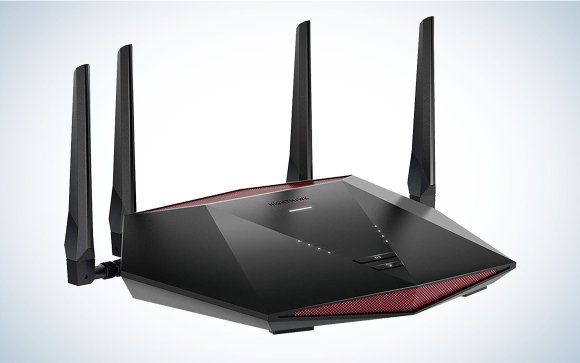
Antenna Design And Placement
Antenna quality affects signal strength and range. External antennas often give better coverage than internal ones. Adjustable antennas let you aim the signal where needed. Proper placement avoids dead zones and keeps connections steady.
Wireless Standards And Compatibility
Choosing the right gaming router means paying close attention to wireless standards and compatibility. These factors determine how fast and reliable your connection will be, especially when multiple devices compete for bandwidth. Understanding the latest wireless technology ensures your gaming experience stays smooth and future-proof.
Wi-fi 6 And Wi-fi 6e Benefits
Wi-Fi 6 offers faster speeds, lower latency, and better performance in crowded networks. It uses advanced features like OFDMA and MU-MIMO to handle multiple devices efficiently, which is crucial for gaming households. Wi-Fi 6E takes it a step further by opening up the 6 GHz band, reducing interference and providing more channels for uninterrupted gaming.
If you play competitive games or stream while gaming, these standards can reduce lag and improve responsiveness. Are you ready to upgrade to a router that supports these technologies? It might be the key to eliminating frustrating connection drops.
Backward Compatibility
Your gaming router should work seamlessly with older devices. Even if your main gaming rig supports Wi-Fi 6, you probably have other gadgets that don’t. A router that supports backward compatibility ensures all your devices connect without issues, so you don’t need separate networks.
This compatibility saves you from constant device upgrades and network disruptions. Have you ever struggled with a device that just wouldn’t connect? Choosing a router that accommodates older standards prevents that headache.
Device Support Limits
Every router has a limit on how many devices it can support effectively. If you have many smart home gadgets, multiple gamers, or streamers, this becomes vital. Exceeding this limit leads to slowdowns and dropped connections exactly when you need peak performance.
Look for routers that can handle 20+ devices without compromising speed or stability. Ask yourself: does your current router struggle when the whole house is online? If yes, a gaming router designed for high device loads will make a noticeable difference.
Optimizing Network For Gaming
Optimizing your network for gaming improves speed and lowers lag. A smooth connection means faster responses and better gameplay. The right router features help manage traffic and reduce disruptions. Focus on key settings to keep your game running well.
Prioritizing Gaming Traffic
Routers with Quality of Service (QoS) let you prioritize gaming data. This means the router sends game packets first. Other activities like downloads or streaming wait their turn. Prioritizing gaming traffic reduces lag and keeps the game steady. Look for routers with easy-to-use QoS controls.
Reducing Interference
Wireless signals can clash with other devices nearby. Interference slows down your connection and causes delays. Choose routers with dual or tri-band support to separate devices. Using the 5 GHz band helps avoid crowded channels. Place your router away from microwaves and cordless phones for cleaner signals.
Firmware Updates And Customization
Regular firmware updates fix bugs and improve performance. Updated routers work better and protect your network. Some routers allow custom settings for gaming. You can adjust ports, enable gaming modes, or set bandwidth limits. This flexibility helps create the best environment for your games.
Additional Features To Consider
Explore dual-band or tri-band support for better performance. Look for advanced security features to protect your data. Consider routers with customizable Quality of Service (QoS) settings to prioritize gaming traffic.
When choosing a gaming router, additional features can make a significant difference in your gaming experience. These features are often the deciding factor between a good router and a great one. Understanding these can help you select a router that meets all your gaming needs and more.Wired Connectivity Options
Wired connections are often overlooked in favor of wireless, but they offer unparalleled stability and speed. Look for a router with multiple Ethernet ports to connect your gaming console, PC, or even a smart TV. This ensures minimal lag during your most intense gaming sessions. Ethernet ports with higher gigabit speeds are a bonus. A friend once upgraded his router just for this feature and noticed immediate improvements in his game’s response times. Consider if your gaming setup can benefit from this level of reliability.Vpn Support
VPN support is crucial for gamers concerned about privacy and access to geo-restricted content. A router with built-in VPN capabilities allows all connected devices to benefit without the hassle of installing software on each one. Imagine accessing a game server from another country with ease. If you value privacy and versatility, VPN support is a feature worth considering.Parental Controls And User Management
Parental controls can be a lifesaver if you share your network with younger users. They help manage screen time and block inappropriate content. User management features allow you to prioritize devices for bandwidth. Think about the peace of mind that comes with knowing your younger siblings or children are safe online. You can also allocate more bandwidth to your gaming device during tournaments, ensuring you get the best performance when it matters most.Budget Vs Premium Routers
Choosing between a budget and a premium gaming router can feel like a tough call. Your decision impacts connection speed, stability, and overall gaming experience. Understanding what each category offers helps you decide where to spend your money wisely.
Cost-effective Models
Budget routers often focus on delivering solid performance without breaking the bank. They cover the basics well: decent speed, reasonable range, and essential security features.
If you primarily game in one room or have a moderate number of devices, a cost-effective model might suit you perfectly. These routers keep your lag low enough for casual and even competitive gaming, especially if your internet plan isn’t ultra-fast.
Look for features like:
- Dual-band Wi-Fi to reduce interference
- Quality of Service (QoS) settings to prioritize gaming traffic
- Easy setup and management apps
Remember, investing in a mid-range router can sometimes give you better value than the cheapest models. Ask yourself: does your current setup really need more than the basics to keep your games running smoothly?
High-end Features Worth Investing In
Premium routers offer advanced tech designed specifically to enhance gaming performance. These include ultra-fast Wi-Fi 6 or 6E standards, multiple high-gain antennas, and extensive customization options.
Think about features like:
- Multi-user MIMO for handling many devices without slowdown
- Advanced QoS for granular control over bandwidth allocation
- Lower latency modes to reduce lag spikes
- Robust security suites to protect your network from threats
If you stream gameplay, compete professionally, or have a smart home with many connected devices, premium routers can make a noticeable difference. They also tend to have better build quality and longer firmware support.
Is the extra cost justified by the smoother gameplay and future-proofing? Consider how much you value uninterrupted, high-quality gaming before choosing a premium model.
Setting Up Your Gaming Router
Setting up your gaming router correctly is key for a smooth online experience. Proper setup reduces lag and keeps your connection stable. It helps you enjoy games without interruptions or delays. Simple steps can improve your network’s speed and reliability.
Placement Tips
Place the router in an open area, away from walls. Avoid putting it near metal objects or microwaves. Higher spots often give better signal coverage. Keep it close to your gaming devices if possible. This helps reduce interference and boost signal strength.
Configuring For Optimal Performance
Access the router’s settings through its IP address in a browser. Change the default username and password for security. Enable Quality of Service (QoS) to prioritize gaming traffic. Use the 5 GHz band for faster speeds and less interference. Update the router’s firmware regularly to fix bugs and improve features.
Troubleshooting Common Issues
If your connection drops, restart the router and your device. Check cables and connections for any damage or loose ends. Reset to factory settings if problems persist. Use the router’s diagnostic tools to find network problems. Contact support if you can’t solve the issue yourself.

Credit: www.reddit.com
Credit: www.popsci.com
Frequently Asked Questions
What Features Make A Router Ideal For Gaming?
A gaming router should have low latency, high-speed Wi-Fi, and Quality of Service (QoS) settings. These features reduce lag and prioritize gaming traffic for smooth gameplay.
How Important Is Router Speed For Online Gaming?
Router speed is crucial as it affects data transfer rates. Higher speeds ensure faster downloads, reduced lag, and better multiplayer experiences.
Does A Gaming Router Improve Wireless Connection Stability?
Yes, gaming routers offer stronger signals and advanced antennas. This enhances wireless stability and reduces connection drops during gaming sessions.
Should I Prioritize Wired Or Wireless Connections For Gaming?
Wired connections generally offer lower latency and more stability. However, a good gaming router can optimize wireless performance effectively.
Conclusion
Choosing the right gaming router can make a big difference. Fast speed and low delay matter most. A strong signal keeps your games smooth. Extra features like QoS help your connection stay steady. Easy setup saves time and frustration. Think about your budget and space too.
A good router supports your gaming style well. Make smart choices to enjoy better play every time.