Are you struggling to keep your portable router powered up when you need it most? Knowing how to charge your portable router properly can save you from unexpected downtime and frustration.
In this guide, you’ll discover simple, effective tips to keep your device ready for action anytime, anywhere. Stick with me, and you’ll never have to worry about losing your connection again. Let’s dive in!

Credit: spy-shop.com
Choosing The Right Charger
Choosing the right charger for your portable router is essential for safe and efficient charging. Using the correct charger protects your device from damage. It also ensures the battery charges quickly and lasts longer. Avoid chargers that do not meet your router’s power needs.
Check Voltage And Amperage
Always match the charger’s voltage and amperage with your router’s specifications. The voltage must be the same to prevent damage. Amperage can be equal or higher, but never lower. Using the wrong voltage or amperage can harm the battery or device.
Use Manufacturer-recommended Chargers
Choose chargers recommended by the router’s manufacturer. These chargers are tested for compatibility and safety. They provide the correct power output and fit the device’s charging port perfectly. This reduces the risk of overheating or short circuits.
Avoid Cheap Third-party Chargers
Cheap third-party chargers may look attractive but can be risky. They often lack safety features and proper certification. Using them can cause slow charging or damage the router. Invest in quality chargers to protect your portable router and ensure reliable performance.
Credit: www.newegg.com
Charging Methods
Charging your portable router is essential to keep your internet connection going wherever you are. Understanding the different charging methods helps you choose the most convenient and efficient way to power up your device. Let’s look at some practical options you can use to charge your portable router.
Using Usb Ports
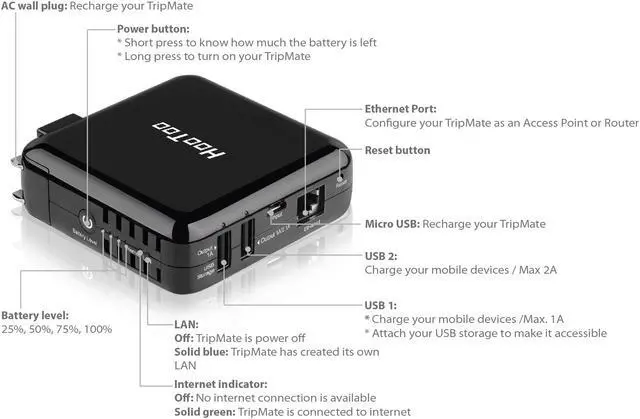
USB ports are a common and versatile way to charge your portable router. You can plug your router’s USB cable into your laptop, desktop, or even a car’s USB port.
This method is handy when you’re working on your computer or traveling by car. Just keep in mind that charging speed may be slower compared to a direct power source, especially if your laptop is in sleep mode or the USB port provides low power output.
Charging With Power Banks
Power banks are a lifesaver when you need to charge your router on the go without access to a wall outlet. Choose a power bank with at least 10,000mAh capacity to ensure multiple charges or extended use.
Make sure your power bank supports the output voltage and current recommended for your router. Have you noticed how some power banks charge devices faster? That’s because of their power delivery capabilities, which can be a game changer for quick top-ups.
Wall Adapter Charging
Using a wall adapter is the most straightforward way to charge your portable router. Plug the adapter into a power outlet and connect your router’s charging cable for a fast and stable charge.
Wall charging usually delivers the highest power, letting your router reach full charge quickly. If you plan to use your router for hours, this method keeps the battery topped up efficiently without draining your other devices.
Charging Best Practices
Charging your portable router correctly can extend its battery life and ensure consistent performance. Paying attention to best practices helps avoid common issues like overheating and battery damage. Here are some key tips to help you get the most out of your device’s battery.
Charge In A Cool Environment
Heat is one of the biggest enemies of battery health. Charging your portable router in a cool, well-ventilated area can prevent the battery from overheating.
I once charged my router on a sunny windowsill and noticed it drained faster afterward. Cooler surroundings help maintain stable battery temperature and improve overall lifespan.
Avoid Overcharging
Leaving your router plugged in after it reaches 100% can degrade the battery over time. Many modern devices have built-in safeguards, but it’s still best to unplug once fully charged.
Try setting reminders to disconnect the charger, or use smart plugs that automatically cut power. This simple step can keep your battery healthy longer and avoid unnecessary energy waste.
Keep Battery Contacts Clean
Dirty or corroded battery contacts can interrupt charging and reduce efficiency. Regularly check the contacts on both your router and charger for dust or grime.
- Use a soft, dry cloth to gently wipe the contacts.
- If needed, a small amount of isopropyl alcohol on a cotton swab can remove stubborn dirt.
Clean contacts ensure a stable connection and faster, safer charging. When was the last time you inspected your device’s charging points?
Troubleshooting Charging Issues
Charging issues with a portable router can disrupt your internet access. Troubleshooting these problems helps restore power quickly. Start by checking simple hardware problems before moving to advanced fixes. This section guides through basic steps to solve common charging troubles.
Check Cable And Port Condition
Inspect the charging cable for any visible damage. Look for frayed wires or bent connectors. Test the cable with another device to confirm it works. Examine the charging port on the router for dust or debris. Clean the port gently using a dry brush or compressed air. Ensure the cable fits snugly into the port without wobbling.
Reset The Router
Resetting the router can fix minor software glitches. Turn off the router and unplug it from power. Wait about 30 seconds before plugging it back in. Press the power button to turn it on again. Check if the charging issue persists after the reset. This simple step often resolves temporary charging errors.
Replace The Battery If Needed
Battery failure can cause charging problems. If the router is old, the battery may not hold charge. Remove the battery carefully following the user manual. Inspect for signs of swelling or leaks. Replace the battery with a compatible new one. Test charging after installing the new battery to ensure it works properly.
Extending Battery Life
Charging a portable router using the right cable and adapter helps keep its battery healthy. Avoid overcharging by unplugging once full to extend battery life. Using power-saving settings can also make the battery last longer between charges.
Extending the battery life of your portable router is crucial. It ensures uninterrupted connectivity when you’re on the go. Simple adjustments can make a big difference. By optimizing settings, you can make your device last longer. Let’s explore some effective strategies to extend your portable router’s battery life.Adjust Power Settings
Many portable routers allow power setting adjustments. Lower the brightness of the device’s display. This reduces battery consumption significantly. You can also reduce the Wi-Fi signal range. This lessens the power needed for broadcasting signals. Use the energy-saving mode if available. It optimizes the device’s power usage automatically.Limit Background Usage
Background applications often drain the battery. Disable any unnecessary apps running in the background. Check for apps that update automatically. Turn off auto-updates to save energy. Regularly monitor your data usage. This helps in identifying energy-draining activities.Turn Off When Not In Use
Switch off the router when it’s not needed. This is the simplest way to preserve battery. If you’re stepping away for a while, power it down. Use a timer feature if available. It can automatically turn off the device after inactivity. This ensures no unnecessary power is used.
Credit: www.jackery.com
Frequently Asked Questions
How Long Does It Take To Charge A Portable Router?
Charging time varies by model but typically takes 2 to 4 hours. Always use the original charger for optimal speed and safety. Avoid using low-quality cables as they can slow down charging or damage the battery.
Can I Charge A Portable Router Via Usb?
Yes, most portable routers support USB charging. Use a compatible USB cable connected to a power adapter, laptop, or power bank. Ensure the power source provides adequate voltage to prevent slow charging or device issues.
Is It Safe To Charge A Portable Router Overnight?
Charging overnight is generally safe with modern routers that have overcharge protection. However, avoid using damaged chargers or cables. For battery longevity, unplug once fully charged to prevent unnecessary power consumption.
What Happens If I Use A Wrong Charger For My Portable Router?
Using the wrong charger can cause slow charging, battery damage, or overheating. Always use chargers matching the router’s voltage and current specifications. Incorrect chargers may void warranty or reduce device lifespan.
Conclusion
Charging a portable router is simple and quick. Use the right charger and cable for safety. Keep the device in a cool place while charging. Avoid overcharging to extend battery life. Always check the battery level before use. A fully charged router helps you stay connected longer.
Small steps make a big difference in device care. Stay powered up and enjoy seamless internet access anywhere.