If you want your high-end router to deliver the fastest, most reliable Wi-Fi, choosing the right antennas is key. But with so many options out there, how do you know which ones will truly boost your signal and coverage?
This guide will help you understand what to look for, so you can make smart choices that improve your internet experience. Keep reading to discover simple tips that make a big difference for your home or office network.
Types Of Router Antennas
Omnidirectional antennassend and receive signals in all directions. They are good for wide coverage in homes or small offices. These antennas work well when the router is placed in the center.
Directional antennasfocus signals in one direction. This boosts the signal strength over longer distances. Ideal for connecting two buildings or reaching a far room.
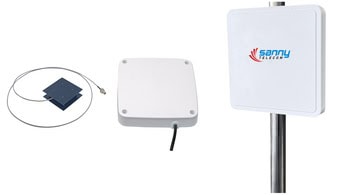
Panel antennaslook flat and square. They work like directional antennas but are easier to mount on walls. Yagi antennashave several elements and give strong, focused signals. They are used for very long-range connections.
| Type | Gain | Use |
|---|---|---|
| High-Gain Antennas | Strong signal, narrow focus | Long-range, direct connections |
| Low-Gain Antennas | Weaker signal, wide coverage | Short-range, general use |
Key Antenna Features To Consider
Frequency bands supportis vital for a high-end router antenna. Most routers use 2.4 GHz and 5 GHz bands. Dual-band antennas help devices connect faster and with less interruption. Some antennas also support newer 6 GHz bands for better speeds and less crowding.
Antenna gain and coverageaffect signal strength and reach. Higher gain antennas send signals farther but focus in a narrower area. Lower gain antennas cover a wider area but with less power. Choose based on your home’s size and layout.
Beamwidth and signal focusdetermine how the signal spreads. Narrow beamwidth means focused signals, good for long distances. Wide beamwidth spreads signals over a larger area, better for whole-room coverage.
Antenna size and designmatter for placement and style. Larger antennas often have better performance but may not fit all spaces. Compact designs work well in tight spots but might have lower range.
Compatibility With High-end Routers
Choose antennas that match the connector typeof your router. Common connectors include SMA, RP-SMA, and TS-9. Using the wrong connector can cause poor signal or no connection.
Check the number of antenna portson your router. High-end routers often have multiple ports for MIMOtechnology. Make sure the antenna supports the same number of ports for better performance.
| Router Model | Number of Antenna Ports | Connector Type |
|---|---|---|
| Model A | 3 | RP-SMA |
| Model B | 4 | SMA |
| Model C | 2 | TS-9 |
Firmware and software must support external antennas. Some routers need settings changes to use new antennas. Check the router’s manual or website for this info.
Credit: www.sannytelecom.com
Performance Factors
Signal strengthaffects how far your router’s signal can travel. Strong signals cover larger areas and reach more devices. Rangematters for big homes or offices. Choose antennas with good range to avoid dead spots.
Interferencecomes from other electronics or walls. Antennas that handle noise wellkeep your connection clear. Look for antennas designed to reduce interference for better performance.
Multi-antenna configurations, like MIMO (Multiple Input Multiple Output), use several antennas together. This setup improves data flow and connection quality. MIMO helps with faster speeds and less dropouts.
The right antenna affects both speedand stability. Good antennas keep your internet fast and steady, even with many users. Choose antennas that support your router’s maximum speed for the best results.
Installation And Placement Tips
Position antennas vertically for best signal reach. Horizontal placement works well for some devices. A mix of both can improve coverage.
Indoor antennas focus on covering rooms inside your home. Outdoor antennas are built to resist weather and cover larger areas. Choose based on where you want the strongest signal.
Keep antennas clear of walls, metal, and large furniture. These block signals and reduce speed. Place antennas in open spaces for better performance.

Credit: www.vsolcn.com
Popular Antenna Brands And Models
Top-rated antennasoffer better signal strength and range for high-end routers. Brands like TP-Link, Netgear, and Alfaare popular choices. These brands make antennas that fit many router models.
Budget options include antennas with basic gainand simple design. They work well for small homes or apartments. Premium antennas have higher gain, better build, and wider coverage. These are ideal for large spaces or heavy internet use.
| Brand | Model | Gain | Price Range | Best For |
|---|---|---|---|---|
| TP-Link | TL-ANT2408C | 8 dBi | Budget | Small homes |
| Netgear | EX7000 | 9 dBi | Premium | Large homes |
| Alfa | APA-M04 | 7 dBi | Budget | Basic use |
| TP-Link | Archer T9UH | 10 dBi | Premium | Heavy use |
Upgrading Antennas For Better Performance
Stock antennas often limit your router’s signal strength and range. Replace them when you notice slow speeds or weak connections in some rooms. High-gain antennas can boost signal range and improve stability.
Choosing between DIY and professional installation depends on your comfort level. DIY is easy for most routers; just unscrew old antennas and screw new ones in. Professionals can help with complex setups or special antennas.
| Test Type | Purpose | How to Measure |
|---|---|---|
| Speed Test | Check if internet speed improves | Use online speed test tools before and after |
| Signal Strength | Measure Wi-Fi signal power | Use apps or router interface to check signal bars |
| Range Test | Find how far signal reaches | Move device away and note connection quality |

Credit: www.jimsantennas.com.au
Frequently Asked Questions
What Type Of Antennas Work Best For High-end Routers?
High-gain directional antennas work best for high-end routers. They focus signal strength, improving range and speed. Choose antennas compatible with your router’s frequency bands for optimal performance.
How Do Antenna Gain And Range Affect Router Performance?
Antenna gain boosts signal strength, enhancing coverage and speed. Higher gain antennas provide longer range but narrower coverage. Select antennas balancing gain and coverage to suit your space and usage.
Can I Replace Stock Antennas On My High-end Router?
Yes, replacing stock antennas with high-gain models can improve performance. Ensure compatibility with your router’s connectors and frequency bands. Upgrading antennas enhances signal strength and overall network reliability.
Should I Choose Directional Or Omnidirectional Antennas For Routers?
Directional antennas focus signals in one direction, ideal for long-range needs. Omnidirectional antennas broadcast signals evenly, better for covering wider areas. Choose based on your coverage requirements and device locations.
Conclusion
Choosing the right antenna boosts your router’s performance. Consider your specific needs carefully. Evaluate the antenna type. Omni-directional or directional? Each has unique benefits. Think about your space. Large or small? It affects signal coverage. Examine compatibility with your router.
Ensure they match for optimal function. Budget matters too. Balance cost with quality. Read reviews for real user experiences. They provide valuable insights. Explore different brands. Reputation can indicate reliability. Investing in a suitable antenna enhances your internet experience. Enjoy faster speeds and better connectivity.
Make informed decisions for your high-end router.