Are you worried about what your kids see online? You might be wondering if spending more on a high-end router will actually give you better control over their internet use.
Not all routers are created equal, especially when it comes to parental controls. You’ll discover whether those expensive models truly offer stronger, smarter tools to protect your family. Keep reading, because what you learn here could change the way you keep your children safe online.

Credit: impulsec.com
Parental Controls In Routers
Basic parental controls in entry-level routers let parents block websites and set time limits. These features are simple to use but may lack detail. Parents can usually pause internet access or block content categories like adult sites.
High-end routers offer advanced controlssuch as customizing access for each device. They often include detailed activity reports and safe search enforcement. Some models allow setting schedules for internet use by day or hour.
These routers may also provide geo-filtering to limit connections to nearby servers. Many support creating profiles for different family members. This helps control internet use in a more precise and flexible way.

Credit: www.pcmag.com
Key Features Of High-end Parental Controls
Content Filtering Optionshelp block websites and apps that are not safe for kids. Parents can choose categories like violence, adult content, or social media to keep out. Filters work on all devices connected to the network.
Time Management Toolsallow setting limits on internet use. Parents can block internet access during homework or bedtime. These tools help kids balance screen time and rest.
User Profiles and Customizationcreate separate rules for each child. Each profile can have different filters and time limits. This makes parental controls more flexible and personal.
Real-Time Monitoring and Alertssend notifications when kids try to visit blocked sites or use too much time online. Parents stay informed and can act quickly to protect their children.
Comparing Performance And Usability
Ease of setupvaries among routers. High-end models often include user-friendly guidesand intuitive interfaces. This helps parents adjust controls quickly without confusion. Basic routers may require manual steps that can be tricky for some users.
Mobile app integrationadds great value to parental controls. Many high-end routers come with apps that let parents monitor and control internet usefrom anywhere. Apps often show real-time activityand allow easy changes. Lower-end models might lack this feature or offer limited app support.
| Factor | High-End Routers | Basic Routers |
|---|---|---|
| Reliability | Strong and stable connection | Sometimes unstable, prone to drops |
| Speed impact | Minimal effect on internet speed | May slow down connection during filtering |
| Control features | Advanced, customizable options | Limited and simple options |
Popular High-end Routers With Parental Controls
Brand Aoffers parental controls that are easy to set up. It allows parents to block websitesand set screen time limits. The controls can be managed through a simple app. It also supports content filteringfor different age groups.
Brand Bprovides detailed control options. Parents can pause internet access for certain devices. It has activity reportsshowing which sites kids visit. The router supports custom profilesfor each child.
| Feature | Brand A | Brand B |
|---|---|---|
| Website Blocking | Yes | Yes |
| Screen Time Limits | Yes | Yes |
| Activity Reports | No | Yes |
| Custom Profiles | No | Yes |
| App Control | Yes | Yes |
Brand A is good for parents wanting simple controls. Brand B suits those needing detailed monitoring. Both provide useful toolsto keep kids safe online.
Cost Vs. Benefit Analysis
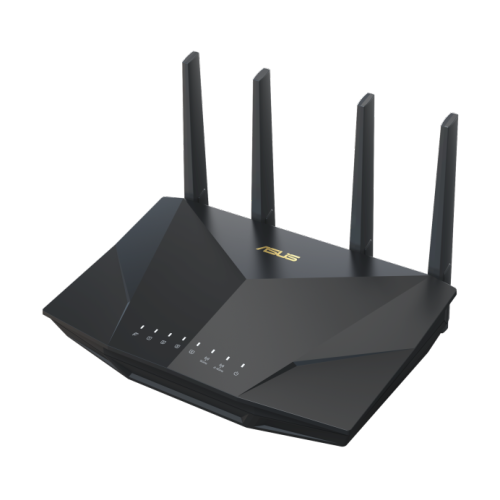
High-end routers often cost more due to advanced features. Basic routers may have simple parental controls like blocking websites or setting time limits. Expensive models usually offer detailed controls, such as monitoring internet usage and creating profiles for each child.
| Price Range | Basic Router Features | High-End Router Features |
|---|---|---|
| Under $100 | Basic website blocking, simple time limits | Not available |
| $100 – $300 | Moderate controls, some monitoring | Advanced controls, multiple user profiles |
| Over $300 | Limited features | Full monitoring, app controls, detailed reports |
Families with many devices benefit more from advanced controls. Managing internet time and content becomes easier with these tools. Long-term use can help kids develop good online habits. Investing in a better router may save time and worry later.
Credit: www.bestbuy.ca
Alternatives To Router-based Controls
Third-party softwarecan offer strong parental controls beyond routers. These apps allow parents to set time limits, block websites, and monitor online activity across many devices. They often include easy-to-use interfacesand work on phones, tablets, and computers.
ISP-level controlscome from your internet provider. Many ISPs offer free tools to filter content and set usage times. These controls work for all devices connected to your home network without extra apps or hardware.
Device-specific controlslet parents manage each device separately. Smartphones, tablets, and computers often have built-in parental settings. These include app restrictions, screen time limits, and content filters. They work even outside the home Wi-Fi.
Frequently Asked Questions
Do High-end Routers Offer Advanced Parental Controls?
Yes, high-end routers often provide advanced parental controls. These include content filtering, time scheduling, and usage monitoring. They allow better customization and stronger security features compared to basic routers, ensuring safer internet access for children.
Can Parental Controls Improve Internet Safety For Kids?
Parental controls help block harmful websites and limit screen time. They create a safer online environment, reducing exposure to inappropriate content. Using these controls can significantly enhance internet safety for children.
Are High-end Router Parental Controls Easy To Use?
Many high-end routers offer user-friendly apps and interfaces. These simplify the setup and management of parental controls. This ease of use makes it convenient for parents to monitor and control internet access effectively.
Do All High-end Routers Have Parental Controls?
Most high-end routers include parental controls, but features vary. Always check specific models for control options and capabilities. Not all advanced routers offer the same level of parental protection.
Conclusion
High-end routers can offer superior parental controls. These controls help manage screen time. They also block harmful websites. More features mean better safety for kids online. Affordable routers might lack these advanced options. Parents should consider their needs and budget.
Investing in quality can enhance online safety. Always research and compare before buying. Proper parental controls provide peace of mind. A wise choice for families aiming for safer internet use.