Are you worried about how much time your kids spend online? Managing their internet access can feel tricky, especially with so many devices connected at once.
What if your router could help you set clear rules for when and how long they can go online? High-end routers often come with advanced features, but do they support parental scheduling to make this easier for you? Keep reading to discover how these powerful devices can give you more control over your family’s internet use—and why it might be the solution you’ve been looking for.

Credit: www.youtube.com
Parental Scheduling Features
Parental schedulinglets parents control when kids use the internet. It helps set time limitsfor online activities. Parents can block access during homework or bedtime hours. This keeps children safe and focused.
Parents can create different schedules for each device or user. Some routers offer easy apps to set these rules. This feature is common in many high-end routers. It gives families more control over internet use.
Benefits of scheduling internet accessinclude:
- Better focus:Kids spend less time on games or videos.
- Healthier habits:Less screen time before sleep helps rest.
- Safety:Limits online exposure at night or unsupervised times.
- Peace of mind:Parents feel secure about internet use.
High-end Routers And Parental Controls
Many high-end routersinclude parental control features. These controls allow parents to set schedulesfor internet access. Scheduling helps limit screen time for children. It can block access during homework or bedtime.
Top brands like Netgear, Asus, and TP-Linkoffer routers with built-in scheduling. Their apps or web interfaces make it easy to create custom time limits. Parents can block specific devices or websites at certain times.
| Scheduling Type | Description | Example |
|---|---|---|
| Hardware Scheduling | Built into the router’s firmware or hardware. | Router blocks internet at set times automatically. |
| Software Scheduling | Managed through apps or third-party software. | Parental control apps synced with the router. |
Hardware scheduling works without extra devices. Software scheduling offers more flexibilitybut may need a subscription. Both help parents control children’s internet use easily.
Setting Up Parental Scheduling
To access your router settings, open a web browser and enter the router’s IP address. Usually, this is 192.168.1.1or 192.168.0.1. Login using the admin username and password. If you don’t know these, check the router manual or the label on the device.
Creating time limits helps control internet use for each device. You can block internet access at certain hours or limit daily usage. This keeps kids safe and helps manage screen time.
Custom schedules can be set by user or device. Assign different times for schoolwork, play, and bedtime. This way, each family member gets a tailored internet schedule.
Advanced Scheduling Options
High-end routers offer content filteringto block harmful or unwanted websites. This helps parents keep kids safe online. Filters can be set by age or category, like social media or games.
These routers allow creating multiple profilesfor each family member. Parents can assign different permissionsand time limits to each profile. This way, screen time is fair and controlled.
Remote managementlets parents change settings from anywhere using a phone app. They can see internet use and adjust schedules easily. This feature adds convenienceand better control over kids’ online activities.
Common Challenges And Solutions
Some high-end routers may not work well with all devices. This causes compatibility issueswith parental scheduling features. Older devices or certain operating systems might not support the router’s controls fully.
For limited scheduling options, try these workarounds:
- Use third-party apps that offer more control.
- Set schedules on individual devices instead of the router.
- Update the router’s firmware to access new features.
Troubleshooting tips include:
- Restart the router and devices to refresh connections.
- Check if the router’s parental controls are enabled.
- Reset the router settings if schedules do not apply.
- Contact support for help with complex issues.

Credit: impulsec.com
Comparing Popular High-end Routers
High-end routers often include parental scheduling features to control internet access times. These tools help manage children’s online activities easily. Many models offer user-friendly interfaces for setting schedules and limits.
Feature Comparison Chart
| Router Model | Parental Scheduling | Wi-Fi Speed | Number of Bands | Security Features |
|---|---|---|---|---|
| Netgear Nighthawk AX12 | Yes | Up to 6 Gbps | Tri-Band | Advanced WPA3 |
| Asus RT-AX88U | Yes | Up to 6 Gbps | Dual-Band | AiProtection |
| Google Nest Wifi | Yes | Up to 2.2 Gbps | Dual-Band | Basic Security |
| Linksys Velop MX10 | Yes | Up to 5.3 Gbps | Tri-Band | WPA2/WPA3 |
Pricing And Value
- Netgear Nighthawk AX12: High price but strong features.
- Asus RT-AX88U: Moderate price with good value.
- Google Nest Wifi: Affordable, simple to use.
- Linksys Velop MX10: Expensive, great for large homes.
User Reviews On Scheduling
Most users say parental scheduling works well on these routers. Setting time limits is simple and clear. Some mention the app is easy to use. A few users find scheduling a bit limited on Google Nest Wifi. Overall, high-end routers offer reliable parental controls.
Future Trends In Router Parental Controls
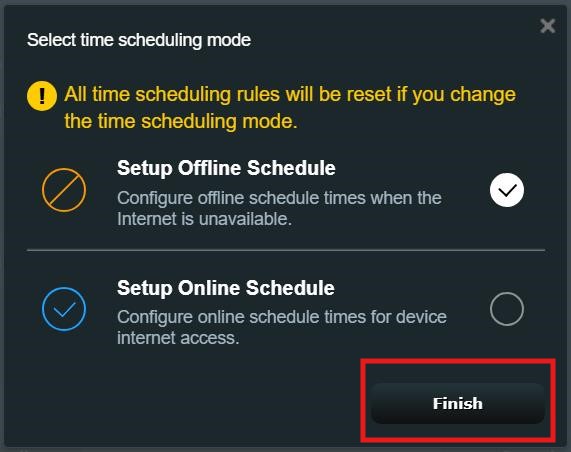
High-end routers are using AIto improve parental controls. AI can learn family routines and suggest smart schedulesfor internet use. These schedules can pause internet access during homework or sleep time automatically.
Smart scheduling adapts to changes in your daily routine. It helps parents keep control without constant manual updates. This makes managing screen time easier and more effective.
| Feature | Benefit |
|---|---|
| AI Scheduling | Adjusts internet time based on habits |
| Smart Home Integration | Works with devices like Alexa and Google Home |
| Remote Control | Allows parents to manage settings from anywhere |
Integration with smart home devicesmeans routers can link to lights, alarms, and voice assistants. Parents can use voice commands or apps to control internet access quickly. This creates a connectedand easy-to-managehome network environment.
Credit: www.asus.com
Frequently Asked Questions
Do High-end Routers Support Parental Scheduling Features?
Yes, most high-end routers include parental scheduling features. These allow parents to set internet access times for devices. This helps manage screen time and ensure safer online habits for children.
How Does Parental Scheduling Work On Advanced Routers?
Parental scheduling lets users create time limits for internet use. Parents can block or allow access during specific hours. This feature is managed via the router’s app or web interface.
Are Parental Controls Customizable On Premium Routers?
High-end routers offer customizable parental controls. Users can set schedules, block websites, and filter content. These controls adapt to different family needs and provide flexible internet management.
Can Parental Scheduling Improve Children’s Online Safety?
Parental scheduling enhances online safety by limiting access during risky hours. It reduces exposure to inappropriate content and encourages responsible internet use. This feature supports healthy digital habits.
Conclusion
High-end routers can indeed support parental scheduling. They offer robust control features. Parents can set internet access times for their children. This ensures a balanced online experience. Easy to manage and very effective. These routers help maintain a healthy digital lifestyle.
They provide peace of mind for families. Consider investing in one for optimal internet control. Simple setup and user-friendly interfaces make them accessible. A smart choice for tech-savvy parents. Keep your home network safe and secure. Enjoy the benefits of advanced parental controls.
Choose wisely to fit your family’s needs.