Are you tired of dealing with weak WiFi signals and dead zones in your home or office? You’re not alone.
Many people face this frustrating issue, and long-range WiFi extenders might just be the solution you need. But here’s a question that often pops up: “Do long-range WiFi extenders require configuration software? ” Understanding this can make a big difference in how you set up your network and enjoy seamless internet connectivity.
We’ll break down this topic in simple terms, helping you decide if these devices are right for you. Get ready to discover the secrets behind your WiFi extender and how it can transform your internet experience. Keep reading to unlock the potential of your wireless network!
Basics Of Long Range Wifi Extenders
Long range wifi extenders help boost your wifi signal far from the router. They catch the wifi and send it to places with weak or no signal. This way, your internet works better in big homes or offices.
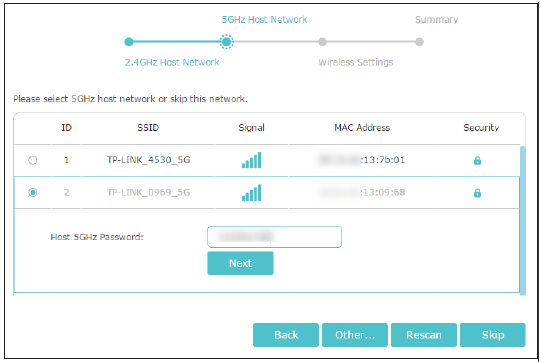
Some extenders need configuration softwareto set up. This software helps connect the extender to your wifi. Other models use simple buttons or apps to connect, so no extra software is needed.
| Type of Extender | Setup Method | Notes |
|---|---|---|
| Software-Based Extenders | Use configuration software | Offers detailed settings and controls |
| Plug-and-Play Extenders | No software, uses WPS button or app | Easy and quick setup |
| Mesh Wifi Systems | Controlled via mobile app | Creates seamless wifi coverage |
Credit: www.tp-link.com
Role Of Configuration Software
Configuration softwarehelps set up long range WiFi extenders easily. It guides users through steps to connect the extender to the main router. This software saves time and avoids errors during setup.
It also allows users to change settings like network name and password. Users can update the extender’s firmware to keep it secure. Some software shows signal strength and device status for better control.
| Common Features | Description |
|---|---|
| Setup Wizard | Step-by-step guide to connect the extender |
| Network Settings | Change SSID and password easily |
| Firmware Update | Keep the extender secure and updated |
| Signal Monitor | Check signal strength and device status |
Extenders Without Configuration Software
Plug-and-play WiFi extenders work without any special software. Just plug them in, and they start boosting your signal. These models are simple for users who want quick setup without tech skills. They connect to your router automatically, saving time and effort.
But they have limitations. They may not reach all corners of large homes. Some features like network security or signal optimization might be missing. Also, these extenders may not let you change advanced settings.
| Feature | Plug-and-Play Extenders |
|---|---|
| Setup | No software needed, easy plug-in |
| Range | Good for small to medium areas |
| Advanced Settings | Limited or none |
| Security Options | Basic only |
When Software Setup Is Necessary
Long range WiFi extenders often work with simple plug-and-play setup. Basic use usually needs no extra software. But for advanced settings, software setup can help. This includes changing frequencies, adjusting power, or setting security features.
Troubleshooting also benefits from software tools. They allow users to see signal strength and device status. It helps find problems like weak signal or interference. Software can also reset or update the extender’s firmware for better performance.
Without software, some complex features might be hard to access. Yet, many extenders still offer basic control via a web browser interface. This is enough for most users.
User Experience And Ease Of Setup
Long range WiFi extenders often come with two setup options: mobile appsand web interfaces. Mobile apps are easy to use and guide users through each step with simple instructions. Web interfaces give more control but can be harder for beginners to navigate. Both ways require connecting to the extender’s network first.
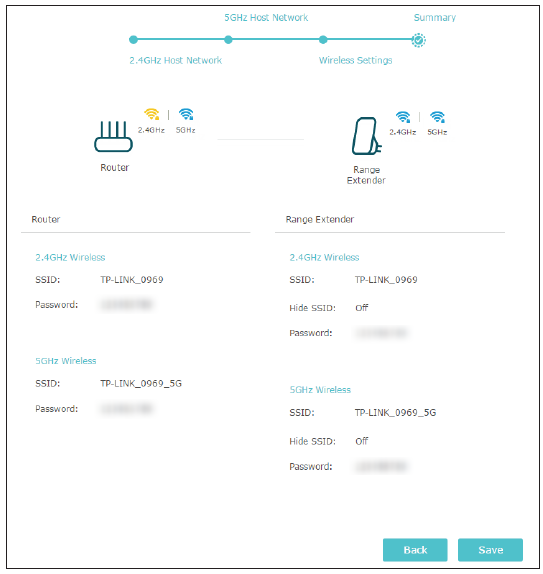
The setup process usually starts by plugging in the extender near the router. Then, open the app or a web browser and connect to the extender’s temporary WiFi network. Enter your main WiFi name and password to link the devices. Wait a few moments for the extender to connect and boost the signal.
- Plug in the extender near the main router
- Connect to the extender’s temporary WiFi
- Open the mobile app or browser interface
- Enter your existing WiFi details
- Wait for the extender to connect
- Move the extender to a better location if needed
Credit: www.tp-link.com
Security Considerations
Long range WiFi extenders often need configuration software for setup and security. This software helps protect your network from unauthorized access. Proper configuration ensures safe and stable connections over long distances.
Firmware Updates
Keeping your wifi extender’s firmware up to dateis very important. Updates fix security holes and improve performance. Many extenders allow updates through a website or a simple app. It helps protect your network from new threats.
Configuring Encryption
Using strong encryptionkeeps your wifi safe. WPA2 or WPA3 are the best choices. Avoid using no password or weak passwords. Configuration software can help set this up, but many extenders let you do it through a browser. Strong encryption stops others from stealing your dataor using your internet.
Choosing The Right Extender
Choosing a long range wifi extender means checking compatibilitywith your router. Some extenders work only with certain brands or models. Others support any router but have limits on speed or range.
Budget affects features you get. Higher price often means better range, faster speeds, and more settings. Lower cost models might be simpler but still do the job.
- Check if the extender supports your router’s wifi standards (like 802.11ac).
- Look at range coverage and speed ratings.
- Decide if extra features like app control or multiple antennas matter.
- Balance price with needed performance and ease of use.

Credit: www.youtube.com
Frequently Asked Questions
Do Long Range Wifi Extenders Need Configuration Software?
Most long range WiFi extenders require configuration software for setup. It simplifies connecting to your existing network and optimizing performance. Some models offer manual setup via web interfaces, but software ensures easier, faster configuration and better signal adjustments.
Can I Use Long Range Extenders Without Software?
You can use some long range extenders without software by manually configuring through a browser. However, this method is less user-friendly and may limit access to advanced features. Configuration software typically provides a streamlined setup and better management options.
How Does Configuration Software Improve Extender Performance?
Configuration software helps optimize signal strength, select the best channels, and manage device settings. It ensures your long range WiFi extender operates efficiently, reducing interference and improving coverage. This software enhances user experience by simplifying setup and ongoing adjustments.
Is Configuration Software Necessary For All Extender Brands?
Not all brands require configuration software, but most recommend it for ease and better functionality. Some extenders come with mobile apps or web-based setup tools. Check your specific extender’s instructions to determine if software is mandatory or optional.
Conclusion
Long range WiFi extenders often need some setup steps. Many models come with easy-to-use configuration software. This software helps connect the extender to your main router. Sometimes, manual setup through a web page works too. Choosing the right method depends on your device.
Simple instructions usually guide you through the process. Proper setup ensures better WiFi coverage in your space. No need to worry about complex tools or skills. Just follow the steps, and your extender will work well. Getting stronger WiFi at home becomes much easier this way.