Are you struggling with weak WiFi signals when using your phone’s hotspot? You might be wondering if a Tri Band WiFi extender can boost your connection and make your online experience smoother.
Imagine streaming your favorite shows, joining video calls, or playing games without those annoying drops. You’ll discover how a Tri Band WiFi extender works with a hotspot, whether it’s the right choice for you, and simple tips to get the best performance.
Keep reading to unlock a stronger, faster internet connection right where you need it most.

Credit: www.amazon.sa
Tri Band Wifi Extender Basics
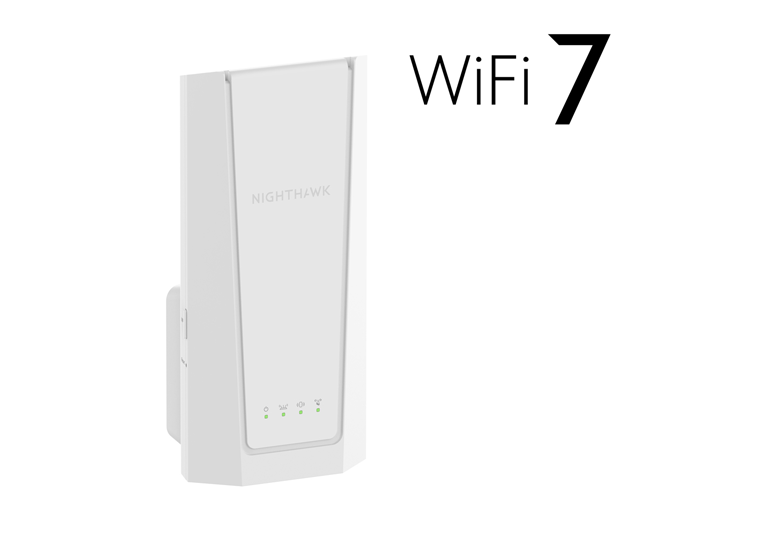
A Tri Band Wifi Extenderboosts your internet signal using three separate bands. It helps spread the WiFi signal further and faster. This device connects to your main router and repeats the signal to cover dead zones in your home or office.
Tri Band Extendersdiffer from dual band extenders by adding a third band. This extra band often acts as a dedicated link between the extender and the router. It improves speed and reduces interference, making the connection more stable.
- Uses three frequency bands for better coverage
- Reduces network congestion
- Improves overall internet speed
- Supports multiple devices simultaneously
- Easy to set up with most routers
Hotspot Connectivity Explained
Mobile hotspots create a small WiFi network using cellular data. They allow devices to connect to the internet wirelessly. Hotspots come in different types depending on the device and technology.
| Type of Hotspot | Description | Common Use |
|---|---|---|
| Smartphone Hotspot | Uses phone’s cellular connection to create WiFi. | For quick internet sharing on-the-go. |
| Dedicated Mobile Hotspot | Portable device with its own SIM card for data. | For longer use and better battery life. |
| Laptop Hotspot | Shares laptop’s internet via WiFi. | Useful in places without routers. |
Hotspots broadcast WiFi signals like a router but with limited range and speed. Devices nearby can connect by selecting the hotspot’s network name and entering the password.
- Hotspot speed depends on cellular signal strength.
- Battery life limits hotspot use on portable devices.
- Many hotspots allow only a few connected devices.
- Data caps may apply, leading to extra charges.
Compatibility Factors
Tri-band WiFi extenderscan connect to hotspots but with limits. Most extenders work best with routers, not mobile hotspots. Hotspots may use different frequencies, which can affect connection.
Extenders support 2.4 GHzand 5 GHzbands. Some tri-band extenders add a third band for less interference. Hotspots usually offer only 2.4 GHz or 5 GHz, not all three bands.
| Factor | Details |
|---|---|
| Frequency Bands | Extenders need to match hotspot bands (2.4 GHz or 5 GHz) |
| Device Support | Extender must support WiFi standards of the hotspot |
| Settings | SSID and password of hotspot must be entered in extender setup |
Device compatibilityis key. Some extenders may not recognize hotspot signals. Check extender manual for hotspot support. Correct setup is needed to link extender to hotspot.

Credit: www.amazon.ca
Setup Process
Start by turning on your hotspot and checking its signal strength. Make sure the hotspot is set to allow connections. Keep your hotspot device close to the Tri Band extender during setup. Note the hotspot’s network name (SSID) and password for easy access.
Power on the Tri Band extender and connect to it using a phone or computer. Open the extender’s setup page by typing its IP address into a browser. Select the hotspot’s network from the list of available Wi-Fi networks. Enter the hotspot password carefully. Wait for the extender to connect and then check if it shows a strong signal.
- Ensure the hotspot has enough data to share.
- Place the extender within good range of the hotspot.
- Restart both devices if the connection fails.
- Check for firmware updates on the extender.
- Reset the extender to factory settings if problems continue.
Performance Insights
Tri-band WiFi extenderscan work with mobile hotspots, but signal strengthvaries. Hotspots usually offer weaker signalsthan home routers. This can affect the extender’s stability. Expect some signal dropsor slow speeds during peak use.
Speed depends on the hotspot’s plan and network quality. The extender cannot boost speeds beyond what the hotspot provides. Speeds may also slow if many devices connect at once.
| Factor | Effect on Performance |
|---|---|
| Distance from Hotspot | Greater distance lowers signal and speed |
| Obstacles (walls, furniture) | Block or weaken the WiFi signal |
| Interference (other devices) | Causes unstable connection or slow speed |
Use Cases And Benefits
A Tri Band Wifi Extendercan boost your hotspot’s signal strength. This helps cover more space at home. You get better internet in rooms far from your hotspot device.
For remote work, stronger mobile internet means fewer interruptions. It keeps video calls clear and files upload faster. This helps you stay productive without frustration.
While traveling or outdoors, a Tri Band extender creates a wider WiFi zone. It lets more devices connect easily. Perfect for sharing internet with friends or family on trips.
- Extends hotspot WiFi range indoors and outdoors.
- Improves connection for work and study.
- Supports multiple devices with stable signals.
- Helps in places with weak mobile internet.
Alternatives To Tri Band Extenders
Dual Band Extenderswork with two WiFi frequencies: 2.4 GHz and 5 GHz. They help boost signal range and improve speed for many devices. These extenders are simpler and often cheaper than tri-band models. They can connect well with hotspots but might face limits in crowded areas.
Mesh Network Systemsuse multiple devices to cover large spaces with WiFi. They create one big network with the same name everywhere. This system helps avoid dead zones and keeps your connection stable. Mesh networks handle many devices better than single extenders.
Powerline Adapterssend internet signals through your home’s electrical wiring. They are useful when WiFi signals are weak or blocked by walls. Just plug one adapter near the router and another where you need internet. This method can provide fast and steady connections without extra WiFi devices.
Credit: www.netgear.com
Frequently Asked Questions
Can A Tri-band Extender Connect To A Hotspot?
Yes, a tri-band WiFi extender can connect to a mobile hotspot. It enhances the signal from your hotspot, providing better coverage. Make sure the extender and hotspot are compatible and on the same frequency bands. This setup can improve internet access in areas with weak signals.
How Does A Tri-band Extender Boost Hotspot Signal?
A tri-band extender amplifies the hotspot signal by using three frequency bands. It helps distribute the internet connection over a wider area. This ensures stronger and more reliable connectivity for multiple devices. The extender bridges the gap between the hotspot and devices needing internet access.
Is Setup Of Tri-band Extender With Hotspot Easy?
Setting up a tri-band extender with a hotspot is generally straightforward. Begin by placing the extender within range of the hotspot. Follow the manufacturer’s instructions, typically involving connecting to the hotspot’s network. Use the extender’s app or web interface for configuration.
Most extenders offer user-friendly setup processes.
Does A Tri-band Extender Improve Hotspot Speed?
A tri-band extender can enhance the perceived speed of a hotspot connection. By improving signal strength and coverage, it reduces latency and interference. This results in more stable and faster connections. However, the actual speed is still limited by the hotspot’s original internet bandwidth.
Conclusion
A tri band WiFi extender can work with a hotspot in many cases. It helps boost the signal and cover more area. Keep in mind that some extenders may have compatibility limits. Always check the device settings for the best connection.
Using an extender with a hotspot can improve internet speed. This setup suits small spaces or places with weak signals. Testing your devices together will show if they work well. Overall, a tri band extender can support a hotspot to give better WiFi coverage.