Are you struggling with slow internet in some corners of your home? Maybe your DSL connection is strong near the router but weak in other rooms.
You might be wondering if a long-range WiFi extender can fix this problem. The good news is, yes—they can help. But how well do these devices work with DSL? Understanding this can save you time, money, and frustration. Keep reading to discover how long-range WiFi extenders interact with your DSL setup and find out if they’re the right solution for your home.
Credit: www.tp-link.com
How Dsl Works
DSLstands for Digital Subscriber Line. It uses telephone lines to send internet data. The internet signal travels over copper wires inside the phone line.
DSL splits the line into two channels. One channel is for phone calls. The other channel carries internet data. This separation keeps calls clear while online.
DSL speeddepends on distance from the provider’s central office. The farther away, the slower the internet speed. Speed also depends on the quality of the phone line.
- DSL speeds usually range from 1 Mbps to 100 Mbps.
- Speeds can drop if many people use the network at once.
- Older phone lines may cause slower speeds and connection drops.

Credit: www.amazon.ca
Wifi Extenders Explained
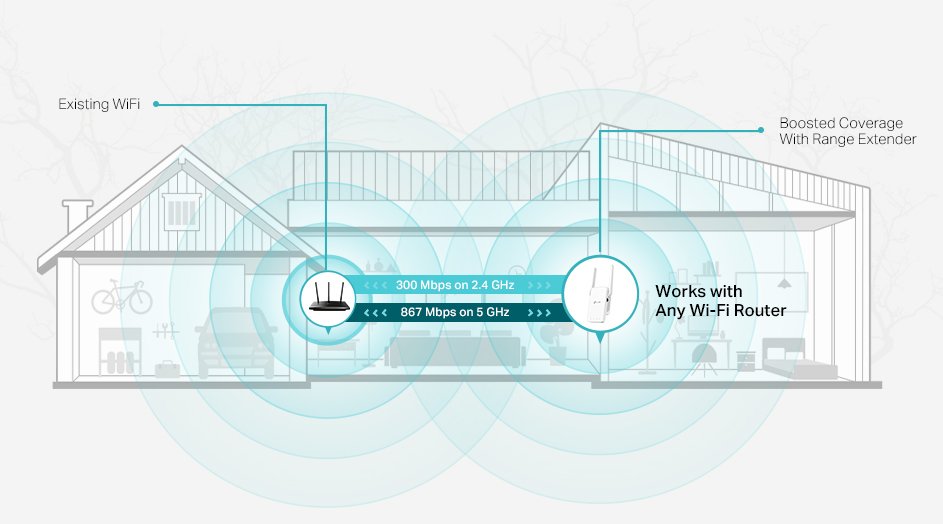
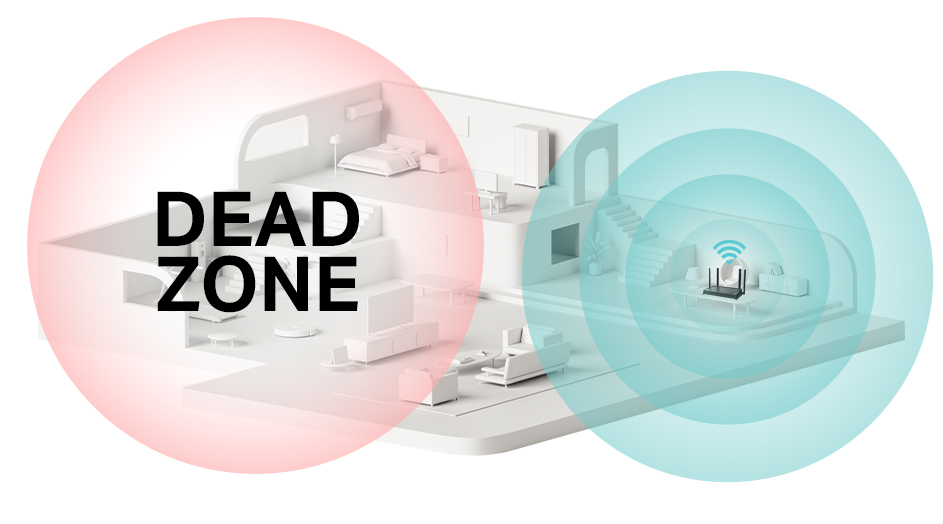
WiFi extenders help increase the rangeof your wireless signal. They catch the signal from your main router and boostit to reach farther areas. This helps reduce dead zonesin your home or office.
There are different types of WiFi extenders:
- Repeater extendersreceive and resend the signal, but may reduce speed.
- Access point extendersconnect to your router via cable and create a new WiFi zone.
- Mesh extenderswork with mesh systems to provide seamless coverage.
The rangeof these devices depends on their power and placement. Walls, floors, and objects can weaken the signal. Placing extenders closer to the router gives a better boost.
Compatibility Between Dsl And Extenders
Long range WiFi extenders can work with DSLconnections. They help spread the WiFi signal over a bigger area. The DSL modem connects to the internet through phone lines. The extender picks up the signal from the modem and sends it farther.
Most extenders connect wirelessly or with an Ethernet cable. The setup depends on the modem and extender model. Some extenders plug directly into power outlets, making placement easier.
| Potential Compatibility Issues | Details |
|---|---|
| Signal Loss | Distance and walls can weaken the signal strength. |
| Speed Reduction | Extenders may slow down internet speed slightly. |
| Connection Limits | Some extenders only support certain modem types. |
| Setup Complexity | Improper setup can cause connection drops or slowdowns. |
Effectiveness Of Long Range Wifi Extenders
Long range WiFi extendersboost signal strength far from your router. They catch weak signals and spread them to distant rooms or floors. This helps with better coverage in large homes or offices.
Signal strength drops as distance grows. Walls, furniture, and other objects block signals. Extenders work best within their range. Too far, and the signal may become weak again.
Internet speeds can change when using extenders. The extender splits the signal, which can slow down speeds. Expect some speed loss, but it still helps where the original signal is too weak.
Setting Up Wifi Extenders With Dsl
Start by plugging the WiFi extendernear your DSL router. Press the WPS button on both devices to connect them easily. If no WPS button is available, use the extender’s app or web page to enter your DSL router’s WiFi name and password. Wait a few moments for the extender to sync with your DSL router.
Unplug the extender and move it to a location halfway between your router and the area with weak WiFi. Avoid placing it near metal objects, thick walls, or large electronic devices. These things can block or weaken the WiFi signal. Find a spot where the extender still gets a strong signal from the router.
- Choose a place with good DSL router signal.
- Avoid obstacles like walls and appliances.
- Keep the extender away from microwaves and cordless phones.
- Test the connection speed after moving the extender.
Troubleshooting Common Problems
Connectivity dropsoften happen due to weak signal strength or interference. Walls, furniture, and other devices can block the WiFi signal. Place the extender closer to the router and away from thick walls. Keep it away from microwaves and cordless phones that cause interference. Check the extender’s firmware for updates to fix bugs and improve stability.
Slow speeds despite extenderscan result from several causes. The extender may reduce speed due to signal repeating. Using dual-band extenders can help by separating the backhaul and device connections. Make sure the DSL speed itself is stable and not limited. Avoid many devices using the network at the same time. Also, check if the extender supports your internet speed.
Alternative Solutions To Boost Dsl Wifi
Mesh WiFi systemscreate a strong network that covers your whole home. They use several devices that work together to send WiFi signals everywhere. This helps avoid weak spots and keeps your internet fast. These systems are easy to set up and work well with DSL connections.
Powerline adaptersuse your home’s electrical wiring to send internet signals. You plug one adapter near your DSL modem and another where you want better WiFi. This method can reach areas where WiFi signals are weak. It is good for houses with thick walls or long distances.

Credit: www.sumarse.org.pa
Frequently Asked Questions
Can Long Range Wifi Extenders Work With Dsl?
Yes, long range WiFi extenders can work with DSL connections. They enhance your existing network by extending its range. However, they don’t change the speed provided by your DSL service. Ensure compatibility by checking the extender’s specifications and connect it to your DSL modem or router.
How Do Wifi Extenders Connect To Dsl?
WiFi extenders connect to DSL modems using Ethernet cables or wirelessly. First, connect the extender to your DSL router via Ethernet. Some extenders support wireless setup, allowing you to avoid cables. Follow the manufacturer’s instructions for a seamless connection process, ensuring optimal performance and coverage.
Do Wifi Extenders Affect Internet Speed?
WiFi extenders can slightly affect internet speed, especially if poorly placed. They extend coverage but may halve speed due to signal relay. For optimal performance, place them halfway between the router and the desired coverage area. Dual-band extenders can help maintain better speed compared to single-band models.
Are All Wifi Extenders Compatible With Dsl?
Not all WiFi extenders are compatible with DSL. Compatibility depends on the extender’s requirements and DSL modem features. Most extenders work with standard DSL routers. However, always verify the specifications and compatibility information before purchasing to ensure seamless integration with your DSL setup.
Conclusion
Long range WiFi extenders can work well with DSL connections. They help boost your signal and cover bigger areas. Keep in mind, the extender’s quality affects your internet speed. Place the extender where the signal is still strong for best results.
This setup can reduce dead zones in your home or office. Testing different spots helps find the perfect position. Overall, extenders offer a simple way to improve DSL WiFi coverage. Try one to see if it fits your needs.


