Are you struggling with weak WiFi signals in your smart home? You might be wondering if a tri-band WiFi extender is the solution you need.
Imagine having all your smart devices—from security cameras to smart lights—working smoothly without any lag or connection drops. But can a tri-band WiFi extender truly handle the demands of your smart home? Keep reading to discover how this technology can boost your network and make your smart home devices perform at their best.
Tri Band Wifi Extender Basics
A Tri Band WiFi Extenderuses three separate bands to send and receive data. One band connects to your main router. The other two bands handle devices and data traffic. This setup reduces network congestionand keeps speeds steady.
Tri Band technology works by using:
- One 2.4 GHz bandfor longer range but slower speed.
- Two 5 GHz bandsfor faster speeds and less interference.
This design lets more devices connect at once without slowing down.
| Benefit | Tri Band Extender | Dual Band Extender |
|---|---|---|
| Speed | Higher, due to extra 5 GHz band | Lower, only one 5 GHz band |
| Device Support | Handles more devices smoothly | Less effective with many devices |
| Interference | Less interference, better signal | More prone to interference |

Credit: www.amazon.in
Smart Home Device Connectivity
Smart home devices need a stable WiFi connectionto work well. They often require low latencyand strong signal strength. Many devices use the 2.4 GHz band because it covers longer distances but with slower speeds. Some smart devices also support the 5 GHz band for faster data but shorter range.
A Tri Band WiFi extendercan help by adding more bands and reducing network congestion. It supports both 2.4 GHz and 5 GHz bands and often adds a third band to improve performance. This setup helps smart devices stay connected with fewer interruptions.
| Requirement | Details |
|---|---|
| WiFi Band | Mostly 2.4 GHz; some 5 GHz support |
| Signal Strength | Strong, stable signal needed |
| Latency | Low latency for fast response |
| Compatibility | Works well with dual or tri-band extenders |
Performance Factors To Consider
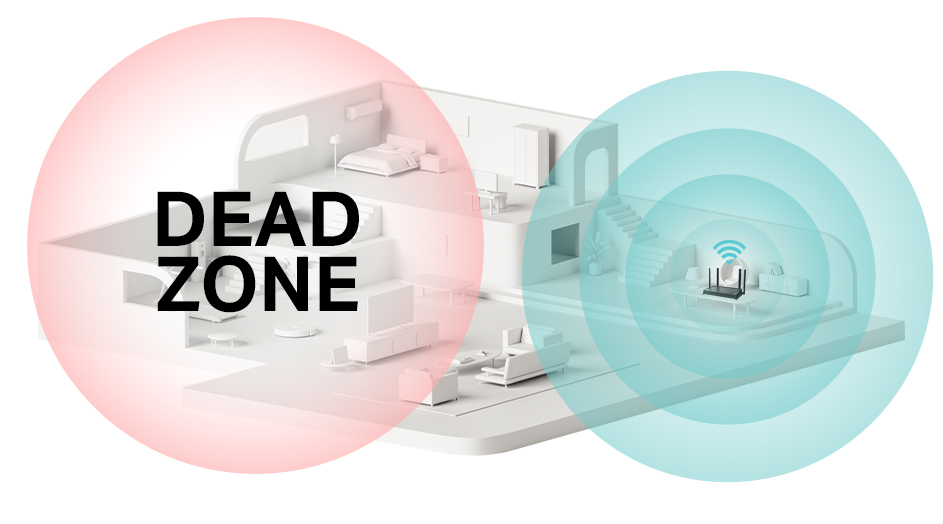
Signal strength and rangeare crucial for smart home devices to work well. A tri-band WiFi extender can help by offering more bands for better coverage. This means devices far from the main router can still get a strong signal. Walls and furniture can block signals, so placing the extender in a good spot is key.
Bandwidth allocationmatters because many smart devices need steady internet. Tri-band extenders split bandwidth across three bands, which helps avoid traffic jams. More bandwidth means devices like cameras and smart speakers run smoothly without slowdowns.
Latency and reliabilityaffect how fast devices respond. Lower latency means quicker commands and real-time updates. Tri-band extenders can reduce delays by balancing connections. Reliable connections prevent devices from disconnecting or lagging.
Setting Up A Tri Band Extender For Smart Devices
Place the tri band extenderin a spot where it gets a strong signal from your main router. Avoid walls or large objects that block WiFi. Keep it near your smart devices but not too close to the router. This helps cover a wider area and keeps the signal strong for all devices.
- Choose a central location in your home.
- Avoid floors and corners with many barriers.
- Keep away from metal objects and microwaves.
- Make sure it is near smart home devices.
Configure your extenderusing the manufacturer’s app or website. Connect it to the main WiFi network using the 5GHz bands for better speed. Assign a clear network name and password for easy access. Update the extender’s firmware to keep it secure and working well.
Potential Challenges And Solutions
Interferencecan cause slow or dropped connections in smart homes. Tri-band extenders use multiple frequencies, but devices might still face noise from other electronics.
Not all smart home devices work with every extender. Some may support only 2.4 GHzor 5 GHzbands. This can lead to compatibility problemsand weak signals.
- Check device specs before connecting to the extender.
- Place the extender near the smart devices for better signal.
- Restart the extender and devices to fix connection issues.
- Update device and extender firmware regularly.
- Use apps or tools to scan for the best Wi-Fi channel.
Credit: www.tp-link.com
Expert Recommendations
Tri band WiFi extendershelp connect many smart devices easily. They use three bands to reduce traffic and keep speed steady. This is good for smart homes with many devices working at once.
| Extender Model | Max Speed | Coverage Area | Best For |
|---|---|---|---|
| Netgear Nighthawk X6 | 3000 Mbps | 2500 sq ft | Large homes with many devices |
| TP-Link RE650 | 2600 Mbps | 2100 sq ft | Strong and stable connection |
| Linksys RE9000 | 3000 Mbps | 2500 sq ft | High device count and speed |
Alternative network solutionslike mesh WiFi systems also work well. They cover large areas and keep signals strong. Ethernet connections can help smart devices run faster and more reliably too.
Credit: www.zyxel.com
Frequently Asked Questions
Can A Tri Band Extender Improve Smart Home Connectivity?
Yes, a tri band WiFi extender can enhance connectivity for smart home devices. It minimizes signal interference and provides faster, more stable connections. This ensures that your smart home devices function efficiently, reducing lag and improving overall performance in a networked environment.
How Does Tri Band Technology Benefit Smart Homes?
Tri band technology offers three separate frequency bands, reducing congestion and interference. This means more devices can connect simultaneously without slowing down the network. For smart homes, this translates to smoother operation of multiple devices, ensuring seamless control and automation.
Are Tri Band Extenders Compatible With All Smart Devices?
Most tri band WiFi extenders are compatible with a wide range of smart home devices. They support common protocols and standards, allowing smooth integration. However, it’s always wise to check the compatibility of specific devices with the extender before purchase.
Do Tri Band Extenders Require Special Setup For Smart Homes?
Setting up a tri band extender for smart home devices is usually straightforward. The process involves placing the extender within range and following the manufacturer’s instructions. Many devices offer user-friendly apps or interfaces to simplify the setup and integration process.
Conclusion
A tri-band WiFi extender can help improve smart home device connections. It offers more bandwidth and less interference than single or dual-band extenders. This leads to faster and more reliable signals throughout your home. Smart devices will work better in rooms far from the router.
Still, choose an extender that fits your home size and device needs. Good placement matters for the best signal. Overall, tri-band extenders provide solid support for smart homes without extra hassle. They make your devices stay connected and respond quickly.
Simple and effective.