Are you tired of dead zones and slow internet in some parts of your home? Your WiFi should work smoothly everywhere, but sometimes the signal just doesn’t reach where you need it most.
That’s where a tri-band extender comes in. Using this powerful device can boost your WiFi coverage, giving you faster, more reliable connections in every corner. You’ll discover simple steps to improve your WiFi with a tri-band extender and enjoy seamless browsing, streaming, and gaming.
Keep reading to unlock the full potential of your home network!

Credit: www.youtube.com
Benefits Of Tri Band Extenders
Tri band extendersuse three separate frequency bands to boost WiFi signals. Two bands connect to devices, while the third acts as a dedicated link to your main router. This setup helps avoid network congestion and keeps speeds steady.
The tri band technologysplits traffic efficiently. It reduces interference and lets more devices connect smoothly. This results in wider coverage and fewer dead zones in your home or office.
| Advantages | Tri Band Extenders | Dual Band Extenders |
|---|---|---|
| Frequency Bands | Three separate bands | Two bands |
| Speed | Faster, stable connection | Slower under heavy load |
| Device Support | Handles more devices well | Limited device capacity |
| Coverage | Better coverage with less interference | Coverage drops with distance |
Choosing The Right Tri Band Extender
Choosing a tri band extendermeans checking important features. It must be compatiblewith your router’s brand and model. This ensures smooth connection and better speed.
Budget plays a big role. Good extenders come at different prices. Look for a brand that offers reliable service within your budget. Avoid very cheap models as they may cause problems.
- Compatibility:Match with your router’s WiFi standard and bands.
- Speed:Supports fast data transfer across all three bands.
- Range:Covers the area you want without weak spots.
- Brand:Choose brands known for quality and support.
- Price:Fits your budget without sacrificing key features.
Optimal Placement For Better Coverage
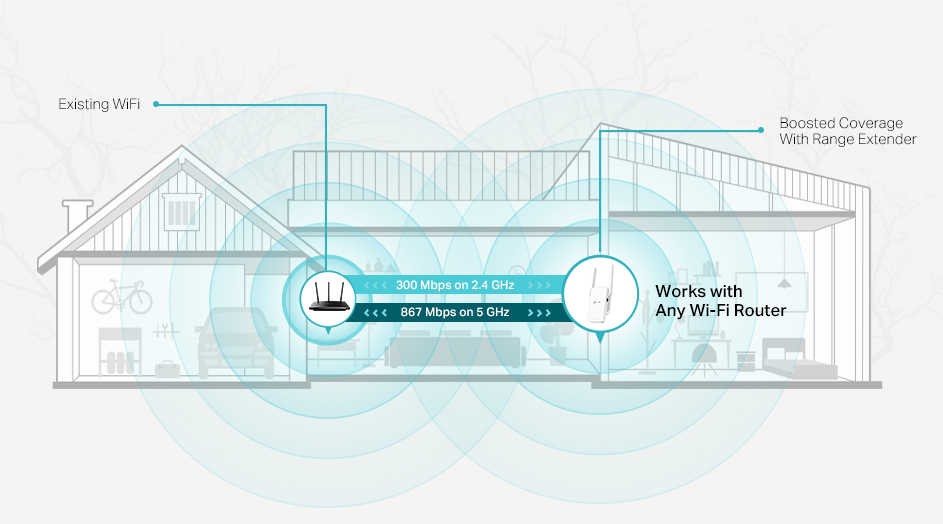
Place the tri-band extender where the main router’s signal is still strong. Avoid walls and metal objects that block the signal. Keep the extender away from devices like microwaves and cordless phones that cause interference.
Try to put the extender high, like on a shelf or near the ceiling. Signals travel better when the device is not too low or close to the floor. Also, keep the extender within a good distance from the router—too far, and the signal weakens; too close, and it may not cover a larger area.
- Choose a central spot between the router and the area needing better WiFi.
- Avoid placing near thick walls or large metal objects.
- Keep away from other electronics that might cause interference.
- Place it high for clearer signal paths.
- Test different spots to find the strongest signal.
Credit: www.signalbooster.com
Step-by-step Setup Guide
Start by placing the tri-band extender near your main router for a strong connection. Use the extender’s app or web page to find your WiFi network. Enter your WiFi password carefully to connect the extender to your network.
Open the extender’s settings page through its IP address or app. Change the network name (SSID) if you want, or keep it the same for easy switching. Set a strong password to keep your network secure. Save all changes before closing the settings page.
| Test Area | Signal Strength | Action |
|---|---|---|
| Near Router | Strong | Normal use |
| Far Room | Weak | Move extender closer or adjust antenna |
| Outdoor Area | Very Weak | Place extender in a better spot |
Advanced Tips For Maximizing Performance
Channel selectionhelps reduce interference from other WiFi networks. Choose channels with less traffic to improve speed and stability. Tri-band extenders usually have a 5 GHz band with multiple channels. Use a WiFi scanner app to find the best channel in your area. Changing channels on your extender settings can boost performance.
Firmware updatesfix bugs and improve device functions. Check your extender’s settings regularly for new updates. Installing updates keeps your extender working smoothly. It can also add new features that help your WiFi coverage.
Using Ethernet backhaulconnects the extender to your router with a cable. This creates a strong, stable link between devices. It lowers WiFi congestion and increases speed. If possible, run an Ethernet cable to your extender for better results.
Troubleshooting Common Issues
Connectivity problemswith a tri-band extender often happen due to weak signals or wrong settings. Check the extender’s placement. It should be close enough to the router but not too close. Make sure the extender is on the same network band as the router. Restart the extender and router to refresh connections.
Slow speeds can occur if the extender is too far or faces interference. Walls, furniture, and other electronics can block signals. Try moving the extender to a better spot. Also, check for software updates for your extender and router to improve speed and stability.
Extender not detecting the router might happen due to incorrect setup or distance. Verify that the router’s WiFi is turned on and broadcasting. Reset the extender and try the setup again. Use the extender’s app or web interface for easier connection.
Credit: www.tp-link.com
Frequently Asked Questions
What Is A Tri-band Extender?
A tri-band extender enhances WiFi coverage by using three frequency bands. This setup reduces congestion, ensuring faster and more stable connections. It’s ideal for large homes or offices with many devices. By optimizing bandwidth allocation, it improves overall internet performance, providing a seamless browsing experience.
How Does Tri-band Extender Improve Wifi Coverage?
A tri-band extender uses three frequency bands to distribute data efficiently. This reduces interference and increases coverage area. It allows more devices to connect simultaneously without losing speed. By optimizing bandwidth, it enhances network performance, ensuring strong and stable WiFi signals throughout your space.
Why Choose A Tri-band Extender Over Dual-band?
Tri-band extenders offer an additional 5GHz band, reducing congestion. This leads to faster speeds and better performance. They handle multiple devices more efficiently than dual-band extenders. By minimizing interference, tri-band extenders provide a more reliable and consistent WiFi experience, especially in environments with many connected devices.
Can A Tri-band Extender Eliminate Wifi Dead Zones?
Yes, a tri-band extender can eliminate WiFi dead zones. It extends your network’s reach using multiple frequency bands. This ensures even coverage across large areas. By reducing interference and optimizing signal distribution, it provides strong and reliable WiFi in previously hard-to-reach spots.
Conclusion
A tri-band extender can boost your WiFi signal effectively. It spreads the connection across three bands, reducing traffic and improving speed. Place the extender where the signal starts to weaken for best results. Keep devices updated and check settings regularly.
This way, you enjoy a stronger, more reliable internet connection at home. Small steps bring big changes in WiFi coverage. Try these tips and see the difference yourself.