Are you struggling with weak WiFi signals in your greenhouse? You’re not alone.
A strong internet connection is key to managing smart devices, monitoring plant conditions, and staying connected while you work. But thick walls and distance can block your WiFi, making it frustrating to use your favorite apps or tools. Don’t worry—this guide will show you simple, effective ways to extend your WiFi right into your greenhouse.
Keep reading to discover easy solutions that save you time and help your plants thrive.
Challenges Of Wifi In Greenhouses
Greenhouses often use metal frames and glass panels. These materials can block or weaken wifi signals. Metal reflects signals, causing interference and dead zones. Glass can also reduce signal strength, especially if it has special coatings.
High humidity and water vapor inside the greenhouse absorb wifi signals. This makes the connection less reliable and slower. Plants and soil also affect signal quality because they contain water.
Other electronic devices nearby may cause signal interference. Lights, fans, and sensors in the greenhouse create noise that disrupts wifi.
| Material | Effect on Wifi Signal |
|---|---|
| Metal Frames | Reflects signals, causing interference and weak spots |
| Glass Panels | Reduces signal strength, especially coated glass |
| Water (Humidity, Plants) | Absorbs signals, lowers connection quality |
| Electronic Devices | Creates noise that disturbs wifi signals |

Credit: www.cranegardenbuildings.co.uk
Choosing The Right Equipment
Wifi extendersboost your current signal. They are simple to set up. Ideal for small gaps between house and greenhouse. Mesh systemsuse multiple devices. They create one strong network. Best for larger areas or obstacles.
Extenders might slow speed a bit. Mesh keeps speeds steady over distance. Extenders are cheaper but less flexible. Mesh systems cost more but cover wider space.
| Device | Type | Features | Outdoor Use Suitability |
|---|---|---|---|
| TP-Link RE650 | Extender | Dual-band, high speed | Limited, needs shelter |
| Netgear Orbi RBK50 | Mesh | Wide coverage, easy setup | Good with outdoor satellites |
| Ubiquiti UniFi AC Mesh | Mesh | Weatherproof, strong signal | Excellent for outdoors |
| Linksys RE7000 | Extender | Compact, seamless roaming | Moderate, protected areas |
Optimal Router Placement
Place your routerin a central spot near the greenhouse. Walls and large objects can block WiFi signals. Avoid putting the router near metal objects or thick concrete walls.
Higher positions help signals travel better. Try putting the router on a shelf or mount it on a wall. Keep it away from places with water or plants that can absorb signals.
- Near windows facing the greenhouse
- On a high shelf or wall mount
- Avoid basements or closed cupboards
Signal blockersinclude thick walls, metal, and water. These reduce WiFi strength. Moving the router a few feet can make a big difference.
Credit: www.boltontechnical.co.za
Using Wifi Extenders Effectively
Place WiFi extendershalfway between your router and greenhouse. Walls and trees can block signals. Choose a spot with clear line of sightif possible. Avoid placing extenders near metal objects or microwaves. These can cause interference.
Set extenders at a height of about 5 to 7 feet. This helps signals travel better. Test different spots to find the strongest signal. Use your phone or laptop to check signal strength.
- Use the same WiFi name (SSID)on extenders for easy connection.
- Match extender settings to your main router’s frequency band.
- Update extender firmware for best performance.
- Adjust channels to avoid interference from nearby networks.
- Restart extenders occasionally to keep the connection fresh.
Alternative Solutions For Strong Signals
Extending WiFi to a greenhouse can use signal boosters or outdoor access points. Placing devices closer to the greenhouse improves connection strength. Using WiFi extenders ensures better coverage without complex setups.
Powerline Adapters
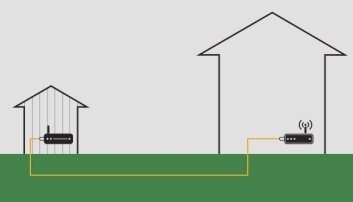
Powerline adapters use your home’s electrical wiring to send internet signals. Just plug one adapter near your router and connect it with a cable. Then plug the second adapter in the greenhouse. This creates a wired internet link without extra cables. The signal is usually stable and fast. It works well if the greenhouse is close to the house. Walls and distance might lower the speed. These adapters are easy to set up and need no special tools.
Outdoor Access Points
Outdoor access points are devices made to work outside. They connect to your router with a cable and send WiFi signals outside. Place them near the greenhouse to cover the area with strong WiFi. These devices are weatherproof, so they handle rain and sun. They give better signal strength than indoor routers. Installation may need mounting on a wall or pole. Some models also have antennas to focus the signal where needed.

Credit: news.ccrane.com
Maintaining Stable Wifi In The Greenhouse
Check your wifi equipmentoften to keep signals strong. Look for any damagesor loose cables. Clean dust from devices to avoid overheating. Place devices where they get good air flow.
Keep the device software updated. Firmware updates fix bugs and improve signal strength. Visit the manufacturer’s website or use their app to check for updates. Updating helps devices work better and last longer.
Frequently Asked Questions
How Can I Boost Wifi Signal To My Greenhouse?
You can boost WiFi by using a range extender or a WiFi repeater near the greenhouse. Position devices to avoid walls and metal objects that block signals. Using outdoor-rated antennas or mesh WiFi systems also improves coverage effectively.
What Equipment Is Best For Greenhouse Wifi Extension?
A WiFi range extender, mesh WiFi system, or outdoor access point works best. Choose weatherproof devices designed for outdoor use. These options ensure a strong and reliable signal throughout the greenhouse area.
Is Ethernet Cable Better Than Wifi For Greenhouses?
Yes, Ethernet provides a stable and faster connection than WiFi. It is less prone to interference and signal loss. However, Ethernet cables require proper installation and protection from weather conditions in outdoor setups.
Can I Use A Powerline Adapter To Extend Wifi?
Yes, powerline adapters use electrical wiring to transmit internet signals. They are easy to set up and can reach distant areas like greenhouses. Performance depends on the home’s electrical wiring quality and distance.
Conclusion
Enhancing your greenhouse’s WiFi boosts efficiency and plant care. Use extenders for better signal coverage. A mesh system works well for large spaces. Ensure your router is optimally placed for maximum reach. Regularly check connections and adjust if needed. Investing time in setup pays off in productivity.
Consistent WiFi aids in monitoring and automating tasks. Enjoy a more connected greenhouse environment. Keep experimenting to find the best solution for your space. Happy gardening!


