Do you find yourself battling lag during crucial online gaming sessions or video calls? You might be wondering if a long-range WiFi extender could be the hero you need—or the culprit behind those frustrating delays.
Understanding how these devices impact your ping is crucial for maintaining a seamless digital experience. We’ll unravel the mystery behind WiFi extenders and their effect on network performance. Discover the truth about whether they help or hinder, and arm yourself with the insights you need to optimize your internet connection.
Don’t let uncertainty hold you back; read on to find out how you can enhance your online interactions with confidence.
How Wifi Extenders Work
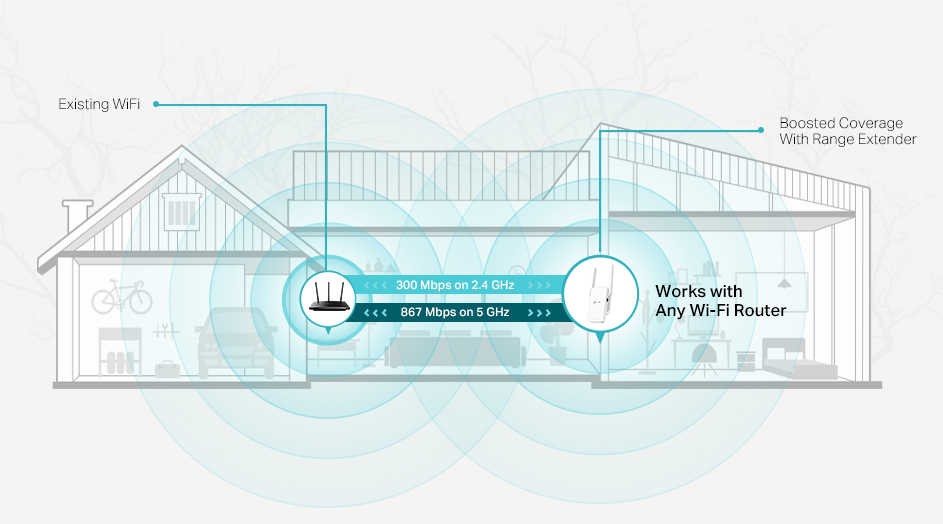
Wifi extenders work by capturing the main router’s signaland sending it further. This helps cover areas where the wifi is weak or doesn’t reach at all. The extender repeats the signal, which can cause a slight delay in data transfer.
Signal boosting basicsmean the extender gets the wifi, cleans it up a bit, and sends it on. This can help with range but might add some delay or reduce speed.
| Type | Description |
|---|---|
| Repeater | Repeats the wifi signal using the same channel. |
| Access Point | Connects to the router via cable, creates a new wifi zone. |
| Mesh Extender | Works with a mesh system to provide seamless coverage. |
Placement is key. The extender must be close enough to the router for a strong signal. Too far, and the signal weakens, causing lag or high ping.
- Place extenders halfway between router and dead zone.
- Avoid walls or metal objects blocking the signal.
- Test different spots to find the best location.
Credit: www.tp-link.com
Ping And Network Performance
Pingis the time it takes for data to travel from your device to a server and back. It is measured in milliseconds (ms). Lower ping means faster response and better network performance.
Several factors affect ping. These include distance to the server, network congestion, and the quality of your internet connection. Devices like long-range WiFi extenderscan also impact ping by adding extra steps for data to travel.
In online gamingand streaming, low ping is important. High ping causes delays, lag, and buffering, which spoil the experience. Using extenders might increase ping, but good models keep this minimal.
Impact Of Long Range Extenders On Ping
Long range WiFi extenders can increase ping because they add extra steps for data to travel. This delay may affect online gaming and video calls. Choosing the right extender helps keep your connection smooth and ping low.
Signal Delay And Latency
Long range WiFi extenders add extra steps for data to travel. This can cause a small delaycalled latency. The signal must go from your device to the extender, then to the router. This extra travel time can make the ping higher. The farther the extender, the more delay it may add. Still, good extenders keep this delay very low.
Bandwidth Sharing Effects
Extenders share the same WiFi channel with your router. This means the total bandwidthsplits between devices and the extender. More devices connected to the extender can slow down data speed. Slower speed can lead to higher ping. To reduce this, connect fewer devices to the extender or use extenders with dual bands.
Interference And Noise Issues
Extenders can pick up interferencefrom other electronics or walls. This noiseweakens the signal and causes data loss. Lost data needs to be sent again, which raises ping. Placing extenders away from devices like microwaves and cordless phones helps. Clear paths improve signal and lower latency.
Optimizing Extender Setup For Low Ping
Long-range WiFi extenders can increase ping if not set up properly. Placing the extender closer to the router helps keep the signal strong and reduces delay. Proper positioning ensures smoother and faster connections for better online experiences.
Ideal Extender Placement
Place the extender close enough to the main router for a strong signal. Avoid walls and large objects that block signals. Keep it away from microwaves and cordless phones. Positioning the extender in open spaces helps keep ping low. Test different spots to find the best place.
Choosing The Right Extender
Pick an extender that matches your router’s speed and standards. Dual-band extenders can reduce interference and improve connection. Check the extender’s range to cover your area well. A good extender keeps your ping stable during online games or calls.
Firmware And Software Updates
Keep the extender’s firmware up to date. Updates fix bugs and improve performance. Regularly check the manufacturer’s website or app for updates. Updated software can help reduce lag and improve connection stability.
Alternatives To Long Range Extenders
Mesh Wifi Systemscreate a network with multiple devices. This helps cover large areas with a strong signal. They reduce dead zones and keep your connection stable. Ping is usually better than with long range extenders because devices connect to the nearest mesh point.
Wired Connectionsuse cables like Ethernet to link devices. This offers the most stable and fastest connection. Ping times are very low, making it perfect for online gaming and video calls. No signal drops or interference occur with wires.
Powerline Adapterssend internet signals through your home’s electrical wiring. They are easy to set up and work well in houses with thick walls. Ping can be lower than wifi extenders, but quality depends on your home’s wiring condition.

Credit: www.reddit.com
Common Myths About Extenders And Ping
Extenders do not always increase ping.Many factors affect ping, not just extenders. Quality and placement matter a lot. A well-placed extender can keep ping low. Cheap or old extenders might add delays.
Distance is not the only factor.Walls, furniture, and other objects block signals. Signal strength and interference affect ping more than distance alone. A closer extender with bad signal can cause high ping.
Not any extender will work well.Different extenders use different technology. Dual-band extenders often perform better than single-band ones. Choose an extender that matches your router’s speed and type.

Credit: www.amazon.com
Frequently Asked Questions
Do Long Range Wifi Extenders Increase Ping Time?
Yes, long range WiFi extenders can increase ping due to signal processing and retransmission delays. The farther the extender, the higher the latency.
How Does Wifi Extender Distance Affect Ping?
Greater distance between the router and extender often causes weaker signals. This leads to increased latency and higher ping times.
Can Using A Wifi Extender Cause Lag In Gaming?
Yes, WiFi extenders may add latency, causing noticeable lag in online gaming. For best performance, use wired connections or high-quality extenders.
Does Extender Quality Impact Ping And Network Speed?
Higher quality extenders with modern technology reduce latency and maintain better speeds, minimizing ping increases compared to low-end models.
Conclusion
Long range WiFi extenders can change your ping speed. They help reach far areas but may add delay. This delay depends on the extender’s quality and distance. Choosing the right extender keeps your connection smooth. Test your setup to find the best balance.
Good placement reduces lag and improves speed. Keep your devices updated for better performance. Understanding these points helps you use extenders well. Stay aware and adjust to enjoy better WiFi.