Imagine enjoying seamless internet access in every corner of your home or office. With a long-range WiFi extender, this dream can come true, but only if you maximize its potential.
If you’re tired of dead zones and weak signals, you’re in the right place. This guide will show you how to boost the range of your WiFi extender, ensuring fast and reliable connectivity wherever you need it. You’ll discover simple tips and tricks that can transform your internet experience.
So, stick around to learn how to make the most of your WiFi extender and say goodbye to connectivity issues for good.
Choose The Right Extender
Choosing the right extenderis key to boosting your WiFi range. The extender should match your routerto work well. Using a router and extender from the same brand often helps.
Pay attention to the frequency bands. Many routers use both 2.4 GHz and 5 GHz bands. Choose an extender that supports the same bands as your router to keep the connection strong.
Check the compatibilitybefore buying. Some extenders work only with specific routers or standards. Make sure your extender supports your router’s WiFi standard like 802.11ac or 802.11n.
Optimal Extender Placement
Place the extender at a midway pointbetween your router and the area needing better signal. This helps the extender catch a strong WiFi signal to boost.
Avoid obstacleslike walls, metal objects, and large furniture. These block WiFi signals and reduce range. Keep the path clear for better coverage.
Elevate the deviceby placing it on a shelf or high surface. Signals travel better from higher spots. Avoid placing it on the floor or inside cabinets.
Upgrade Router And Extender Firmware
Regularly checking for the latest firmware updatescan improve your router and extender’s performance. Updates fix bugs and add new features to keep your devices working well. They also help enhance signal strengthand security.
Keeping both router and extender firmware current helps avoid connection drops. It can increase the rangeand speedof your WiFi. Many manufacturers release updates that improve device compatibility and efficiency.
- Fixes security vulnerabilities
- Improves device stability
- Enhances wireless range and speed
- Adds new features or settings
- Boosts overall network performance
Use External Antennas
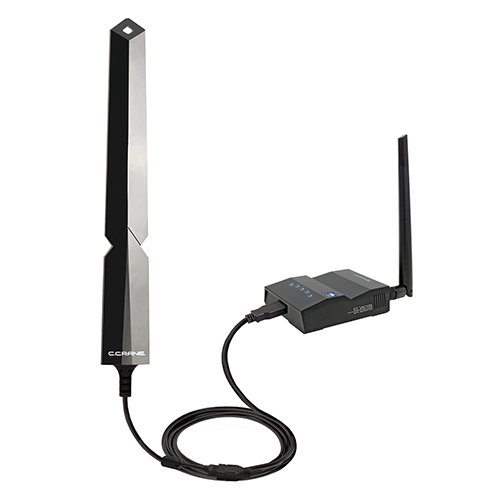
External antennas can greatly improve the rangeof your long-range WiFi extender. They help focus the signal in one direction, giving better coverage and stronger connection. Different antennas work best for different needs.
| Type of Antenna | Description | Best For |
|---|---|---|
| Omnidirectional | Radiates signal in all directions | Wide area coverage |
| Directional (Yagi) | Focuses signal in one direction | Long distance, narrow coverage |
| Panel | Flat and directional | Medium range, focused signal |
- Place the antenna high for fewer obstacles.
- Point directional antennas towards the device or area.
- Keep antennas away from metal objects and walls.
- Use quality cables to avoid signal loss.
- Check antenna connectors to ensure a tight fit.
Adjust Wifi Channels
Changing your WiFi channel can reduce interference and boost signal strength. This helps your long-range extender cover a wider area. Try different channels to find the clearest one for better connection.
Identify Less Crowded Channels
WiFi signalsfrom many devices can overlap. This causes interferenceand slows down the connection. Choosing a channel with fewer users helps improve speed and range.
Channels 1, 6, and 11 are often best for 2.4 GHz. For 5 GHz, many channels are less crowded. Check which channels have the least noise.
Tools For Channel Analysis
Use simple apps or programs to see which WiFi channels are busy. These tools show nearby networks and their channels.
- WiFi Analyzer (Android)
- NetSpot (Windows, Mac)
- inSSIDer (Windows, Mac)
Pick a channel with fewer networks for better signal strengthand range.
Reduce Interference
Electronic deviceslike microwaves, cordless phones, and baby monitors cause WiFi interference. Keep your WiFi extender away from these devices to improve signal strength. Even small electronics can disrupt the connection.
Metal objectssuch as filing cabinets, refrigerators, and metal shelves block WiFi signals. Place your extender at least 3 feet awayfrom metal items. Metal reflects and absorbs WiFi signals, reducing the range.
- Move extender to open areas without metal nearby.
- Avoid placing it close to large electronic appliances.
- Use plastic or wood furniture around the extender.
Utilize Powerline Adapters
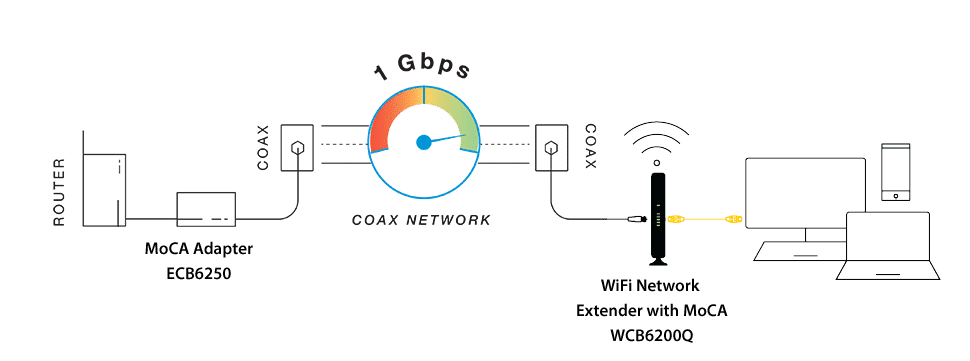
Powerline adapters use your home’s electrical wiring to extend internet signals. This helps reach areas where WiFi signals are weak or do not reach. They create a stable connection without extra cables across rooms.
How Powerline Works
Powerline adaptersuse a home’s electrical wiring to send internet signals. You plug one adapter near your router and connect it with a cable. The other adapter goes in the area where you want better WiFi. This sends data through the walls without needing new wires. It keeps the signal strong and steady.
Benefits For Wifi Extension
- Easy setup:No need to run long cables.
- Stable connection:Less interference than wireless extenders.
- Wide coverage:Extends internet to hard-to-reach spots.
- Fast speeds:Supports high data rates for streaming and gaming.
- Works through walls:Overcomes barriers that block WiFi signals.

Credit: www.youtube.com
Optimize Network Settings
Adjusting the transmit powerhelps extend your WiFi signal. Increasing this setting allows the extender to send signals farther. But too high power can cause interference with other devices. Find a balance for the best performance.
Enabling Quality of Service (QoS)gives priority to important traffic. It helps devices like video calls and streaming get better speeds. QoS ensures that your WiFi extender supports smooth and stable connections.
Regular Maintenance And Monitoring
Restarting your wifi extender and router helps clear bugs and improve speed. Devices can slow down if they run for days without a break. A simple restart refreshes the connection and often boosts the signal range.
Network monitoring tools show which devices use the most bandwidth. They help find weak spots in your wifi coverage. These tools can also alert you about connection drops or unusual activity.
- Check device status with monitoring apps regularly.
- Restart devices once a week to keep them running well.
- Use monitoring to spot and fix signal problems quickly.

Credit: www.reddit.com
Credit: www.screenbeam.com
Frequently Asked Questions
How Can I Improve My Long Range Wifi Extender’s Signal?
Place your WiFi extender in a central, elevated location. Avoid obstacles like walls and metal objects. Use the same WiFi channel as your router for better performance.
What Settings Optimize A Long Range Wifi Extender?
Update your extender’s firmware regularly. Select the best frequency band (2. 4 GHz for range). Adjust transmit power settings for maximum coverage.
How Does Antenna Position Affect Wifi Extender Range?
Point antennas vertically for horizontal coverage and horizontally for vertical coverage. Proper antenna alignment reduces interference and boosts signal strength effectively.
Can Wifi Extenders Work Better With Dual-band Routers?
Yes, dual-band routers allow extenders to use less crowded 5 GHz bands. This reduces interference and improves speed and range simultaneously.
Conclusion
Improving your long range WiFi extender’s signal takes small steps. Place the extender in a clear, open spot. Avoid walls and large objects that block signals. Adjust the antennas to face the direction you need coverage. Regularly update the extender’s firmware for better performance.
Use the right WiFi channel to reduce interference. Test different settings to find what works best. These tips help create a stronger, wider WiFi range. Enjoy faster internet in every corner of your home. Keep your connection steady and reliable every day.


