Imagine stepping into your outdoor shed, ready to enjoy your latest project or relax in a cozy nook, only to find that your WiFi signal is nowhere to be found. Frustrating, isn’t it?
You deserve seamless internet access, even in the farthest corners of your property. We’re diving into practical and simple strategies to boost your WiFi signal all the way to your outdoor shed. Whether you’re streaming music, working remotely, or just browsing, having a strong connection can make all the difference.
Keep reading, because by the end of this guide, you’ll have all the tips and tricks needed to transform your shed into a fully connected space. Your perfect WiFi solution is just a few steps away!

Credit: www.brostrend.com
Assess Your Current Wifi Signal
Begin by checking the wifi signal strengthinside the shed. Use a phone or laptop to see how strong the signal is in different spots. This helps find weak areasor dead zones.
Dead zones are places where the wifi signal is very low or not working. Mark these spots to know where the signal needs a boost.
- Place your router in a central spot inside your home.
- Avoid putting the router near thick walls or metal objects.
- Keep the router higher up, like on a shelf.
- Check for any devices that might block the signal.
Choose The Best Wifi Equipment
High-gain antennasincrease wifi signal strength. They focus the signal in one direction. This helps reach far places like an outdoor shed. Choose antennas with good gain ratings for better coverage.
Wifi range extenderscatch your wifi signal and send it further. Place them halfway between your home router and the shed. This boosts the signal without needing new wires.
Outdoor wifi access points are built for open spaces. They work well in bad weather. Mount them near the shed for strong, reliable wifi. These devices are weatherproof and give a stable connection outside.
Optimize Router Settings
Changing WiFi channelshelps reduce interference from other networks. Use a WiFi analyzer app to find the least crowded channel. Set your router to that channel for a stronger signal.
Enabling the 5GHz bandoffers faster speeds and less interference. Keep in mind, 5GHz covers a smaller area than 2.4GHz. Use 5GHz for closer devices and 2.4GHz for farther ones.
Updating your router firmwarekeeps the device secure and improves performance. Check your router’s settings or website for updates. Regular updates fix bugs and add new features.
Improve Physical Setup
Place your routerin a central location inside your home. This helps the signal reach the outdoor shedbetter. Avoid putting the router near metal objects or thick walls. These block the signal.
Clear the path between the router and the shed. Remove any big objects like furniture or appliances. Keep electronics that cause interference, such as microwaves and cordless phones, away from the router.
| Use | Why |
|---|---|
| Outdoor-rated cables | Resist weather and last longer |
| Waterproof connectors | Prevent damage from rain and moisture |
| Weatherproof hardware | Protect devices placed outside |
Explore Alternative Solutions
Powerline adaptersuse your home’s electrical wiring to send internet signals. Just plug one adapter near your router and another in the shed. This creates a stable connection without new cables.
Mesh wifi systemshave multiple devices working together to cover large areas. Place one unit in the house and another near or inside the shed. They share the same network name for easy use.
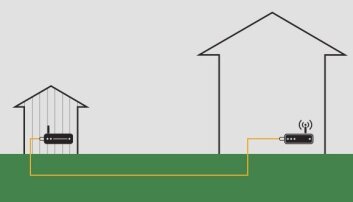
A wired Ethernet connectionoffers the best speed and stability. Run an Ethernet cable from your router to the shed. Use waterproof cables and connectors for outdoor protection.
| Solution | Pros | Cons |
|---|---|---|
| Powerline Adapters | Easy to install, no new cables needed | Performance depends on wiring quality |
| Mesh Wifi Systems | Seamless coverage, simple setup | More expensive than other options |
| Wired Ethernet Connection | Fastest and most reliable | Requires cable installation |

Credit: www.cranegardenbuildings.co.uk
Maintain Strong Wifi Signal
Strong wifi needs regular checks and care. Signal quality can change over time. Use a wifi app or tool to test signal strength around the shed often. This helps find weak spots early.
Check your equipment every few months. Look for old cables, loose connections, or dust on devices. Clean and tighten them. Replace parts if the signal drops.
Change your wifi setup if needed. Move the router or add a wifi extender closer to the shed. Outdoor wifi antennas can help too. Adjust placement to keep the signal strong.

Credit: www.youtube.com
Frequently Asked Questions
How Can I Extend Wifi Range To My Outdoor Shed?
Use a WiFi range extender or a mesh WiFi system. Place the extender halfway between your router and shed for best signal boost.
What’s The Best Wifi Antenna For Outdoor Sheds?
A high-gain directional antenna works best outdoors. It focuses the signal towards your shed, improving connection strength and stability.
Can I Use Ethernet Cable To Improve Shed Wifi?
Yes, running an Ethernet cable to the shed ensures fast, reliable internet. Connect a secondary access point for strong WiFi coverage.
How Does Weather Affect Outdoor Wifi Signal?
Rain, snow, and walls can weaken WiFi signals outdoors. Use weatherproof equipment and position devices to minimize interference.
Conclusion
Boosting WiFi to your outdoor shed is easier than you think. Choose the right tools and place them wisely. Test different spots for the best signal strength. Keep devices updated and secure for smooth use. Enjoy fast internet outside without interruptions.
Small steps can make a big difference. Stay connected wherever you work or relax. Your shed can become a reliable, online space.


