Struggling with weak WiFi signals at your dock? You’re not alone.
When your connection drops just as you’re about to stream music or check the weather, it can be frustrating. But what if you could easily boost your WiFi range and enjoy strong, reliable internet right where you need it most?
You’ll discover simple, effective ways to extend your WiFi to your dock without expensive gear or complicated setups. Keep reading, and take control of your connection today.
Assess Your Current Wifi Setup
Check the wifi signal strengthnear the dock. Use a smartphone or laptop to test signal bars. Low bars mean weak signal or dead zones. Move closer to the router to compare signal strength.
Identify areas where the wifi cuts out or is very slow. These spots may block devices from connecting well. Walls, furniture, and electronics can cause weak signals.
- Walk around the dock area with your device.
- Note places where internet speed drops.
- Mark spots with no wifi signal.
- Check if thick walls or metal objects are near these spots.

Credit: www.reddit.com
Choose The Right Wifi Extender
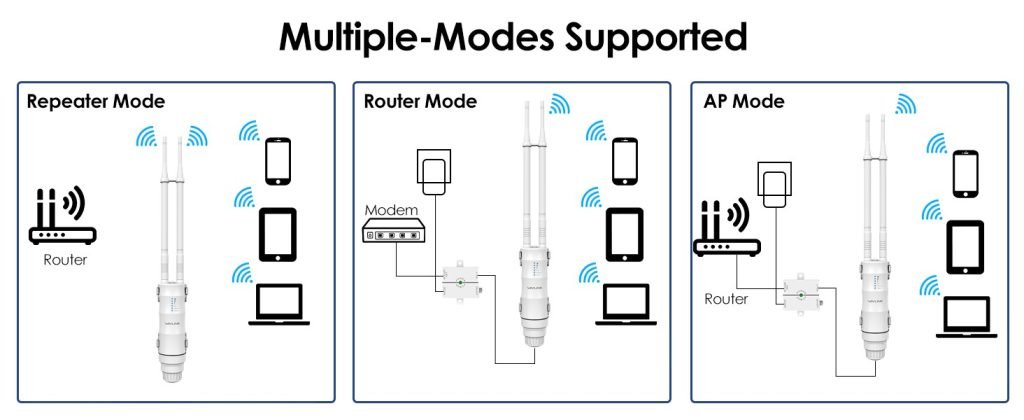
Wifi extenders come in different types. Each has its own way to boost signal.
- Repeater:Receives and rebroadcasts the wifi signal.
- Powerline Adapter:Uses electric wiring to carry internet signals.
- Mesh System:Multiple units create a strong, seamless network.
Choose one based on your home size and wifi needs.
Features to check before buying:
- Dual-band support:For less interference and faster speeds.
- Easy setup:Simple steps or app guides.
- Range:Should cover the space where you want better wifi.
- Ethernet port:Useful for wired devices like docks.
- Compatibility:Should work with your current router.
Optimize Router Placement
Place the router in a central locationof your home for best coverage. Avoid corners or walls that block the signal. Higher spots, like shelves, help the WiFi spread better. Keep the router away from metal objects and electronics that cause interference.
Signal blockers to avoid:
- Thick walls, especially concrete or brick
- Microwaves and cordless phones
- Large metal furniture
- Water sources like fish tanks
Try to keep the space between the router and your dock open and clear. This helps the WiFi signal reach the dock with stronger and stable connection.
Use Powerline Adapters
Powerline adaptersuse your home’s electrical wiring to extend WiFi. They create a wired network connection through power outlets. This helps send internet signals to places far from your main router.
Each adapter plugs into a power socket. One connects to your router with an Ethernet cable. The other adapter goes near your dock or device. This setup passes the internet signal through your home’s wiring. It is faster and more stable than WiFi extenders.
- Plug the first adapter into a wall socket near the router.
- Connect the adapter to the router using an Ethernet cable.
- Plug the second adapter near the dock or device needing internet.
- Connect the dock to this adapter with another Ethernet cable.
- Press the sync buttons on both adapters to pair them.
Set Up A Mesh Wifi System
Place mesh wifi nodes near the dock to boost signal strength. Connect nodes using the app for smooth coverage throughout the area. This setup reduces dead zones and keeps your devices online.
Benefits Of Mesh Networks
Mesh wificovers a large area with strong signals. It uses multiple nodesthat work together. This avoids weak spots in your home or office. Devices connect to the nearest node for faster speeds. Mesh networks are easy to expand by adding more nodes. They also manage traffic well, so many devices can connect without slowing down.
Installing Mesh Nodes
Place the first node near your main router. Plug it in and connect it to power. Put other nodes in places with poor wifi signals. Make sure nodes are not too far from each other. They need a clear path to share signals. Use the mesh system’s app to help with placement. The app also guides setup and shows connection strength.
Adjust Wifi Settings For Better Coverage
Changing WiFi channelscan reduce interference from other networks. Many routers use default channels that are crowded. Choosing a less busy channel helps your signal reach further. Use your router’s admin page to select different channels. Test each channel to find the best one for your area.
Regular firmware updateskeep your router working well. Updates fix bugs and improve performance. Check your router’s website or app often for new firmware. Installing updates can make your WiFi stronger and more stable.
Additional Tips For Stronger Signals
External antennas can help boost your wifi signal strength. They catch signals better than built-in antennas. Use antennas with higher gain for longer range. Some routers allow you to add or replace antennas. Position antennas vertically for best coverage. Point them toward the dock area for stronger signals.
Devices like microwaves and cordless phones cause wifi interference. Keep your router and dock away from such devices. Avoid placing your router near thick walls or metal objects. These block wifi signals and reduce speed. Use a wifi analyzer app to find less crowded channels. Switch your router to a channel with less interference.

Credit: www.reddit.com

Credit: www.ebay.com
Frequently Asked Questions
How Can I Extend Wifi Coverage To My Dock?
Use a WiFi range extender or mesh system near the dock. Place it where the signal is still strong. This boosts WiFi coverage effectively to outdoor areas like docks.
What Equipment Is Needed To Boost Dock Wifi?
You need a WiFi extender, a mesh WiFi node, or a high-gain outdoor antenna. These devices amplify or relay your existing WiFi signal to cover the dock area.
Can Outdoor Wifi Boosters Withstand Weather Conditions?
Yes, outdoor WiFi boosters are designed weather-resistant. Look for devices rated for water and dust protection. This ensures reliable WiFi performance at your dock in various weather.
How Do I Position A Wifi Extender For Dock Use?
Place the extender halfway between your router and dock. Ensure it has a clear line of sight and minimal interference. Correct placement maximizes signal strength at the dock.
Conclusion
Extending WiFi to your dock can greatly enhance your outdoor experience. Strong connections mean smooth streaming and uninterrupted work. Use WiFi extenders or mesh systems for best results. Pay attention to placement for optimal coverage. Consider weatherproof devices to protect in all conditions.
Regularly check your connection for consistent performance. A well-connected dock makes outdoor activities enjoyable. Stay connected, and enjoy seamless internet access by the water. Make sure to follow these tips for improved connectivity. Simple steps can bring big improvements. Now, enjoy your time at the dock with reliable WiFi.


