Are you tired of weak WiFi signals and dead zones in your home or office? Positioning your long range WiFi extender correctly can make all the difference in getting strong, reliable coverage where you need it most.
You’ll discover simple, effective tips to place your extender for maximum reach and speed. By following these easy steps, you’ll enjoy seamless internet without frustrating drops or slowdowns. Keep reading to unlock the secrets to perfect WiFi coverage every time.
Choosing The Right Extender
Long range WiFi extenders come in different types. Some plug directly into a wall socket. Others connect via Ethernet for better speed. Outdoor extenders are built to withstand weather and cover large spaces. Choosing the right type depends on your home layoutand where you need coverage.
Key features to check include:
- Range:How far the signal can reach.
- Speed:The maximum WiFi speed supported.
- Frequency bands:Dual-band extenders offer better performance.
- Compatibility:Works with your router’s brand and model.
- Easy setup:Quick installation saves time.
- Signal strength indicators:Help find the best spot for placement.
Ideal Placement Strategies
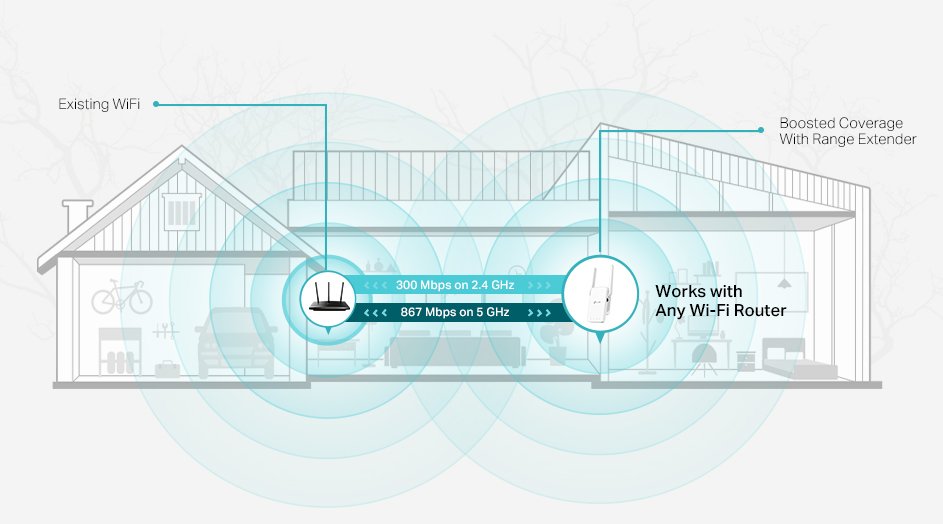
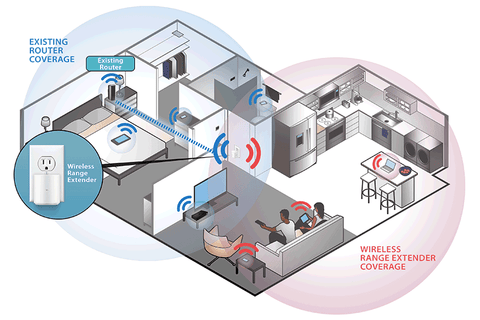
Place the extender halfwaybetween the router and the farthest device. Too close reduces range, too far loses signal strength. Keep the distance where the extender still gets a strong signal.
Avoid thick walls, metal objects, and large appliances. These block and weaken WiFi signals. Try to keep the path clear and open for better coverage.
- Height:Place the extender above floor level, like on a shelf or table.
- Orientation:Point antennas toward the area needing coverage.
- Keep it away from microwaves and cordless phones that cause interference.
Using Signal Strength Tools
WiFi analyzers and apps help find the best spot for your extender. They show signal strengthin different areas. Use these tools to scan your home or office. Look for places with strong WiFi signalsbut not too close to the router. Extender works best where signal is good but needs a boost.
Interpreting signal data is easy with simple color codes or numbers. Green or high numbers mean strong signals. Yellow or medium numbers show fair signals. Red or low numbers tell you the signal is weak. Place your extender where the signal is green or yellow, not red.
- Walk around with the app on your phone or tablet.
- Check signal strength at different spots.
- Mark areas with good signal but far from the router.
- Place extender in that marked spot for best coverage.
Credit: www.signalbooster.com
Enhancing Coverage With Multiple Extenders
Using multiple wifi extenders helps cover large areas better. A mesh networklinks extenders and your main router. This creates a strong, seamless wifi signal everywhere. Devices switch easily between extenders without losing connection.
Placement is key. Place extenders far enough to cover new areas but close enough to get a good signal from the previous device. This placement coordinationavoids weak spots and overlapping signals. Walls and furniture affect signal strength, so keep extenders in open spaces if possible.
- Start with the main router in a central spot.
- Place the first extender where the router’s signal is still strong.
- Put the next extender where the first extender’s signal remains reliable.
- Test signal strength after each placement for best coverage.
Troubleshooting Coverage Issues
Dead zonesare areas where WiFi does not reach well. These spots cause slow internet or no connection. Walls, floors, and furniture can block signals. Identify these by walking around with a phone or laptop. Check where the signal drops or disappears. Mark these spots for better extender placement.
Interference can reduce WiFi strength. Devices like microwaves, cordless phones, and Bluetooth gadgets cause interference. Metal objects and thick walls also weaken signals. Move the extender away from these items. Place it higher, like on a shelf, for fewer obstacles. Adjust the position bit by bit and test the signal again. Small changes can improve coverage a lot.

Credit: www.theardor.com.au
Maintenance Tips For Consistent Performance
Firmware updateskeep your WiFi extender working well. They fix bugs and add new features. Check for updates often on the extender’s app or website. Installing updates can improve signal strength and security.
Perform regular signal checksto ensure steady coverage. Use WiFi analyzer tools or apps to see signal strength in different rooms. Move the extender if the signal is weak or spotty. Keeping the extender in a good spot helps avoid dead zones.

Credit: www.youtube.com
Frequently Asked Questions
Where Is The Ideal Spot For A Long Range Wifi Extender?
The ideal spot is halfway between your router and the area with weak signal. Avoid placing it near walls or metal objects. Ensure it receives a strong signal from your router for optimal coverage.
How High Should I Place My Wifi Extender?
Place the extender at a higher position, like on a shelf or wall mount. Elevated placement reduces interference from furniture and appliances, improving signal strength and coverage.
Can Obstacles Affect Wifi Extender Performance?
Yes, obstacles like walls, furniture, and appliances reduce signal strength. Materials like concrete and metal cause the most interference. Position the extender to minimize these barriers for better coverage.
How Do I Check If My Wifi Extender Placement Is Effective?
Use a WiFi analyzer app to measure signal strength in different areas. Adjust the extender’s position based on signal improvements. Test multiple spots to find the best coverage location.
Conclusion
Positioning a long-range WiFi extender boosts coverage effectively. Place it midway between the router and weak zones. Avoid obstacles like walls or metal objects. Keep it elevated, ideally on a shelf. Test different locations for optimal signal strength. Adjust antennas for wider coverage.
Regularly check and update firmware. Consider placement based on home layout. Simple steps ensure better connectivity. Enjoy seamless internet throughout your space.


