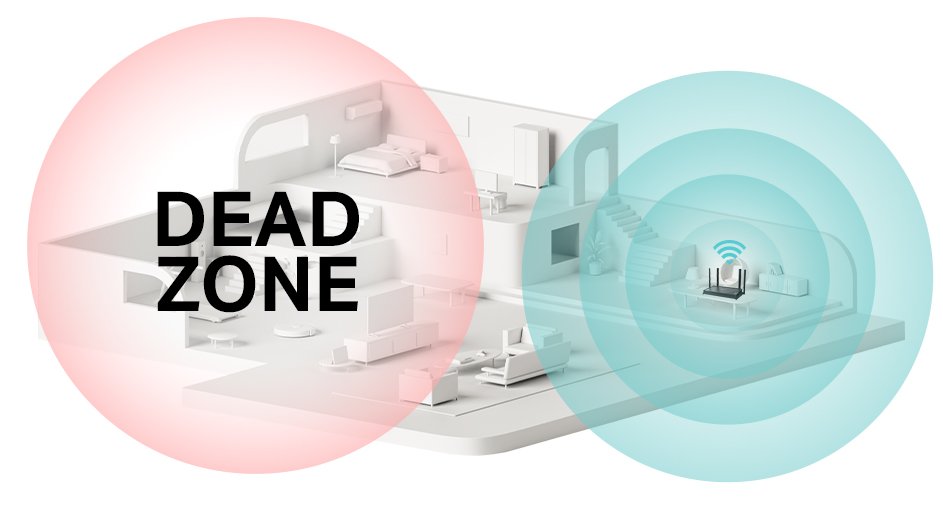
Are you struggling with weak WiFi signals in parts of your home? A tri-band WiFi extender can boost your connection, but it also needs to be secure.
If your extender isn’t properly protected, your network could be vulnerable to hackers and slowdowns. In this guide, you’ll learn simple, effective steps to secure your tri-band WiFi extender and keep your internet fast and safe. Keep reading to protect your devices and enjoy a stronger, safer connection every time you go online.
Choosing A Strong Password
Creating strong passwordsis key to secure your tri band WiFi extender. Use a mix of letters, numbers, and symbols. Avoid simple words like “password” or “123456”. Longer passwords are harder to guess.
Passwords should not include personal info like names or birthdays. Use random combinations to make it tough for others to crack.
- Use at least 12 characters
- Mix uppercase and lowercase letters
- Include numbers and special characters
Regularly updateyour WiFi extender password. Change it every few months to block unwanted access. Old passwords can be stolen or guessed over time.

Credit: www.amazon.ca
Updating Firmware
Check the extender’s web interface for the latest firmware version. The device usually shows if an update is available. Visit the official website of the extender’s brand to compare versions. Keep your extender connected to power and WiFi during this process. Avoid using public or unstable internet connections.
Download the firmware file only from trusted sources to avoid malware. Follow the instructions from the manufacturer carefully. Do not turn off the device while updating. The process might take a few minutes. After installation, the extender may restart automatically.
Regular updates fix bugs and improve security. They help your tri-band extender work better. Always backup current settings before updating, just in case. This keeps your network safe and fast.
Configuring Network Settings
Changing the default SSID is important for security. Use a unique name that does not reveal your identity or location. Avoid using personal information or common names to keep your network safe.
Disabling WPS stops easy access to your Wi-Fi. WPS can be a weak point because it allows devices to connect with a simple PIN. Turning it off helps protect your network from unauthorized devices.
Enabling WPA3 encryption offers the strongest protection for your Wi-Fi. This encryption keeps your data safe from hackers. Look for this option in your extender’s settings and enable it for better security.

Credit: www.youtube.com
Securing Access Controls
MAC Address Filteringhelps control which devices connect to the WiFi extender. Each device has a unique MAC address. Adding allowed MAC addresses creates a list of trusted devices only.
This blocks unknown devices from joining your network. It adds an extra layer of securitybeyond the password. The process usually involves:
- Accessing your extender’s settings page
- Finding the MAC filteringsection
- Entering the MAC addresses of your devices
- Enabling the filter to restrict access
Keep this list updated. Remove old devices and add new ones carefully. This helps keep your network safeand controlled.
Monitoring Network Activity
Setting up alerts helps catch unusual network activity fast. Many tri band wifi extenders offer alert features. Enable notifications for new device connections or unusual traffic. Alerts can be sent via email or app notifications. This keeps you informed about your network’s status.
Reviewing connected devices regularly is key. Check your extender’s admin panel or app to see all devices. Look for unknown or suspicious devices. Remove any that do not belong to you. This prevents unwanted access and keeps your network safe.
| Task | How to Do It | Benefit |
|---|---|---|
| Setting Up Alerts | Enable notifications in extender settings | Get quick warnings about unusual activity |
| Reviewing Connected Devices | Check device list in admin panel regularly | Identify and remove unknown devices |

Credit: www.youtube.com
Physical Security Measures
Choose a visible but secure spotfor the extender. Avoid places near windows or doors. These areas can expose the device to theft or damage. Keep it out of reachof children and pets to prevent accidents. A central location in your home helps the signal reach all corners.
Prevent unauthorized accessby locking the device in a cabinet with ventilation. Use a password-protected web interface to manage settings. Change default login details immediately to stop outsiders from entering. Regularly update the firmware to fix security holes.
- Place extender away from open windows
- Keep out of children’s reach
- Use locked cabinet with airflow
- Change default passwords
- Update firmware regularly
Frequently Asked Questions
How Do I Change The Default Password On A Tri-band Extender?
To secure your tri-band WiFi extender, access its admin panel via IP address. Locate the password settings and create a strong, unique password. Avoid common words and include numbers, symbols, and uppercase letters to enhance security.
What Encryption Type Should I Use For Wifi Extender Security?
Always use WPA3 encryption if your extender supports it. WPA3 offers stronger protection than WPA2. This helps prevent unauthorized access and keeps your network data safe from cyber threats.
How Often Should I Update My Tri-band Extender Firmware?
Check for firmware updates monthly or when notified. Firmware updates fix vulnerabilities and improve security. Regular updates keep your extender protected from new threats and maintain optimal performance.
Can I Hide My Tri-band Extender’s Ssid For Security?
Yes, hiding your extender’s SSID adds a layer of security. It makes your network less visible to outsiders. However, devices must manually connect using the exact SSID and password.
Conclusion
Securing your tri band WiFi extender is essential. It keeps your network safe. Set strong, unique passwords. Change default settings immediately. Update firmware regularly for best protection. Always use encryption. WPA3 is recommended. Place your extender strategically for optimal performance.
Avoid overcrowded channels to minimize interference. Regularly check for firmware updates. Remember, a secure network protects your data. Follow these tips to enhance security. Your online activities deserve privacy and protection. With these steps, enjoy a safer, faster internet experience.
Stay proactive and keep your network secure.


