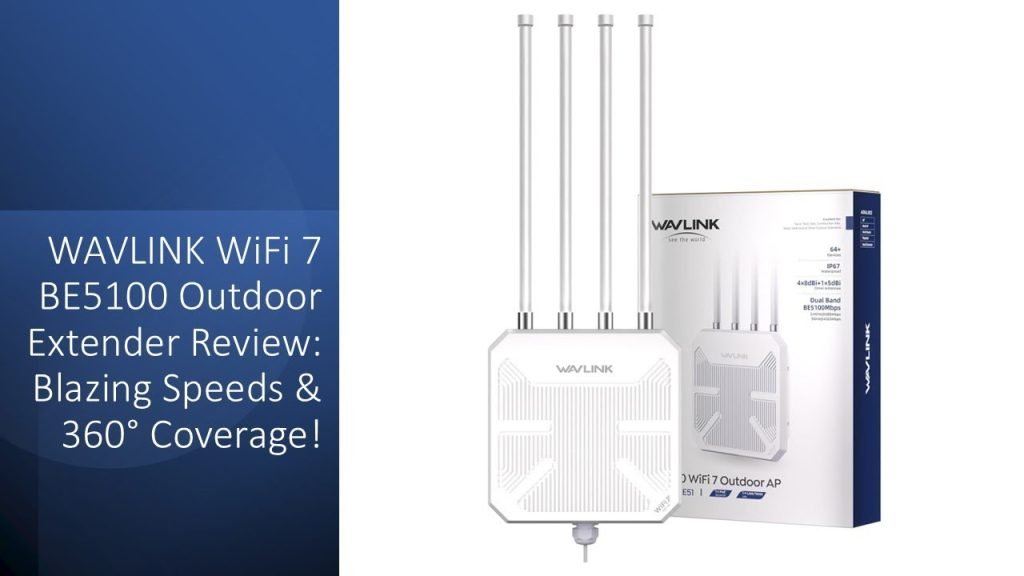
Imagine hosting an outdoor event where your guests can easily connect with high-speed internet without any hiccups. Frustrating Wi-Fi dropouts and sluggish connections can turn an otherwise perfect event into a chaotic experience.
So, how do you ensure seamless connectivity? The answer is setting up an outdoor Wi-Fi booster. Whether you’re organizing a music festival, a wedding, or a corporate gathering, having reliable internet is crucial. In this guide, you’ll discover simple steps to set up your outdoor Wi-Fi booster, ensuring that your event runs smoothly and your guests stay connected.
Dive in to learn how you can effortlessly enhance your event’s connectivity and keep everyone happy and engaged.

Credit: www.amazon.com
Choosing The Right Wifi Booster
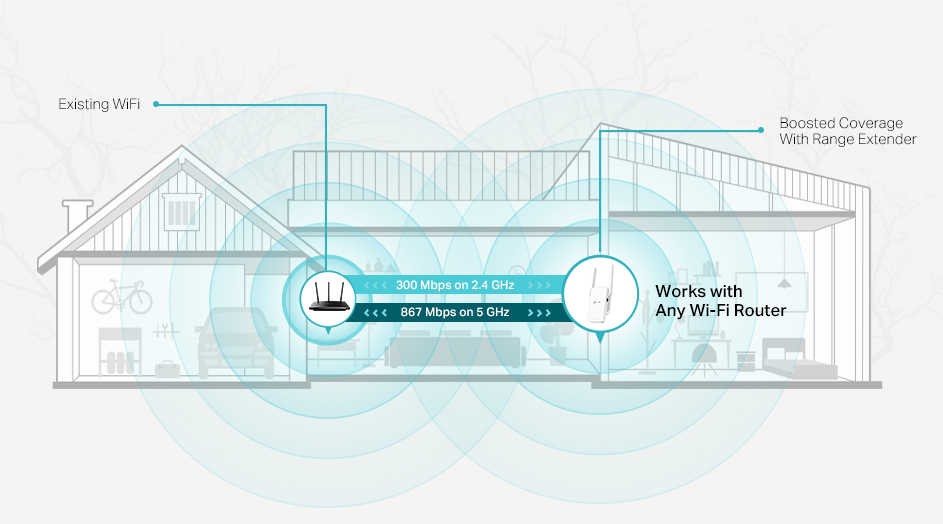
Outdoor WiFi boostershelp extend internet signals for events. Different types fit different needs.
- Repeater:Receives and sends signals to wider areas.
- Access Point:Connects wired internet to wireless devices outdoors.
- Mesh System:Uses multiple units for strong, wide coverage.
Key featuresto check include signal range, weather resistance, and speed. Easy setup is a plus for quick use. Battery life matters for places without power. Look for devices that support many users at once.
| Feature | Why It Matters |
|---|---|
| Signal Range | Covers the event area well |
| Weatherproof | Works in rain or sun |
| Speed | Supports many users without slowdowns |
| Battery Life | Lasts long if no power outlet |
Budgetaffects what you can buy. Basic models cost less but cover smaller areas. Investing a bit more gets better range and speed. Balance price with the event’s size and needs.
Credit: www.tp-link.com
Planning Your Coverage Area
Start by measuring the event area size. Large spaces need more boosters for good coverage. Consider the layoutof the place, including walls and open spaces. These affect signal strength.
Look for spots where the WiFi signal is weak or missing. These are called dead zones. Note these areas on your event map to avoid poor connections.
| Booster Placement | Reason |
|---|---|
| Near dead zones | To fill weak signal spots |
| High locations | Signal spreads better from above |
| Close to main WiFi source | To boost the original signal |
Setting Up The Equipment
Place the WiFi boosterhigh above ground for best signal. Use a sturdy poleor wall mount. Ensure it faces the event area directly. Avoid metal objects or thick walls nearby. This helps reduce interference.
Connect the booster to a reliable power source. Use outdoor-rated extension cords if needed. Keep all connections dry and secure. Protect wires from foot traffic and weather. This prevents power lossand damage.
Link the booster to the main routerusing an Ethernet cable. Use outdoor-rated cablesfor safety. Make sure the cable is long enough to reach the booster. Check that the connection is tight and stable. This ensures a strong, fast internetlink.

Credit: www.amazon.com
Optimizing Signal Strength
Adjusting antenna positionsis key to boosting outdoor WiFi signals. Point antennas towards the event area for better coverage. Keep antennas away from walls or metal objects that block signals. Try different angles to find the strongest signal.
Minimizing interferenceimproves WiFi quality. Move the booster away from devices like microwaves or cordless phones. These can cause signal drops. Also, avoid thick trees or large buildings between the booster and users.
Testing signal reachensures good coverage. Walk around with a device and check signal strength. Mark weak spots to adjust the booster or add extra antennas. Test before the event starts for smooth WiFi.
Securing Your Network
Strong password protectionstops others from using your network. Use a mix of letters, numbers, and symbols. Avoid easy passwords like “123456” or “password”. Change passwords often, especially after events. This keeps your network safe.
Encryptionprotects your data from being seen by others. Choose WPA2 or WPA3as your security type. These are the best options for outdoor WiFi boosters. Encryption keeps your connection private and secure.
Control who can use your network by managing guest access. Create a separate network for guests. Limit their access to important devices. Set a time limit for guest connections. This keeps your main network safe and fast.
Troubleshooting Common Issues
Connection dropsoften happen due to weak signals or interference. Try moving the booster closer to the event area. Avoid placing it near metal objects or walls that block signals. Check for other devices causing interference, like microwaves or cordless phones.
Slow speedscan frustrate users. Restart the booster to clear temporary issues. Limit the number of devices connected at once. Use a frequency band less crowded by other networks, like 5 GHz instead of 2.4 GHz.
Hardware problemsmight stop the booster from working properly. Make sure all cables are firmly plugged in. Inspect the booster for physical damage or loose parts. Update the booster’s firmware to fix bugs and improve performance.
Maintaining Your Wifi Booster
Keep your wifi boosterrunning well with simple care tips. Regularly check for firmware updates. These updates fix bugs and improve performance. Visit the manufacturer’s website to download the latest version. Install updates carefully to avoid connection issues.
Cleaning your wifi booster is important. Dust and dirt can block signals. Use a soft cloth to gently wipe the device. Avoid water or harsh cleaners. Inspect cables and connectors for damage. Replace any worn or broken parts to maintain strong connections.
After events, store your booster properly to protect it. Choose a dry, cool place away from direct sunlight. Keep it in a safe spot to avoid falls or knocks. Proper storage helps the device last longer and work better next time.
Frequently Asked Questions
How Do I Choose The Best Outdoor Wifi Booster?
Select a booster with a strong signal range and weather resistance. Check compatibility with your router and event size. Look for models with easy setup and stable connections for outdoor use.
Where Should I Place The Outdoor Wifi Booster?
Place the booster in a central, elevated outdoor location. Avoid obstacles like walls or large metal objects. Ensure it’s near the router or main access point for optimal signal strength.
Can I Use Any Wifi Booster For Outdoor Events?
Not all boosters work well outdoors. Choose models designed for outdoor use with weatherproof features. Indoor boosters may have limited range and poor performance in open spaces.
How Do I Power An Outdoor Wifi Booster At Events?
Use nearby power outlets or portable battery packs. Solar-powered boosters are also an option for remote locations. Ensure power sources are safe and weather-protected during the event.
Conclusion
Setting up an outdoor WiFi booster makes your event better. It helps everyone stay connected without interruption. Place the booster in a high, open spot for best signal. Check the power source and secure your device from weather. Test the connection before guests arrive to avoid issues.
A strong WiFi signal keeps guests happy and engaged. Simple steps lead to smooth internet at any outdoor event. Keep these tips in mind for your next gathering.


