
Are you struggling with weak WiFi signals in your warehouse? Slow internet can disrupt your operations and cost you valuable time.
Installing an outdoor WiFi booster can be the simple solution you need to get strong, reliable connectivity across your entire space. In this guide, you’ll discover clear, step-by-step instructions to set up your outdoor WiFi booster quickly and effectively. By the end, you’ll know exactly how to boost your signal and keep your warehouse running smoothly.
Let’s dive in and make your WiFi work as hard as you do.
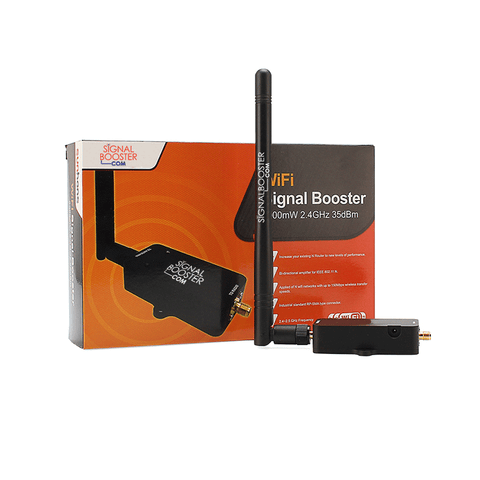
Credit: www.signalbooster.com
Choosing The Right Wifi Booster
Outdoor WiFi boosters come in different types. Some use repeatersto catch and send signals further. Others use extenders, which create a new network from your existing one. Mesh systemsare also popular. They offer a strong, wide coverage by linking several devices.
Key features to look for include signal strength, range, and weather resistance. Boosters must withstand rain, wind, and dust. Look for devices with an IP ratingto ensure durability outdoors.
| Feature | Importance |
|---|---|
| Signal Strength | Ensures better WiFi coverage |
| Range | Covers large warehouse areas |
| Weather Resistance | Protects against outdoor elements |
| Compatibility | Works with your current network |
Check if the booster matches your current network. It should support your WiFi standard, like 802.11ac or 802.11n. This keeps your network stable and fast. Some boosters work only with certain routers, so verify compatibility before buying.

Credit: www.amazon.com
Preparing For Installation
Start by examining the warehouse layout. Look for open spacesand areas with weak WiFi signals. This helps find the best placefor the booster.
Choose a location that is centraland elevated. Avoid places near metal shelvesor large machinerythat can block signals. Make sure the spot has easy access to power.
Collect all necessary toolsbefore starting. Common items include:
- WiFi booster
- Mounting brackets
- Screwdrivers
- Drill
- Measuring tape
- Power cables
Having everything ready makes the installationfaster and easier.
Setting Up The Wifi Booster
Choose a strong wall or pole to mount the wifi booster. Use screws and brackets to keep it stable. Make sure it is high enoughto cover the whole warehouse. Avoid places with many metal objects that block signals.
Connect the power cablefirst. Use a power source that is safe and close by. Then, attach the network cablefrom your router or switch to the booster. Check that all cables are tight and secure to avoid loose connections.
Access the booster’s settings pagethrough a web browser. Enter the default IP address and login details from the manual. Change the network name (SSID) and password to something easy to remember but secure. Adjust the booster’s channel to avoid interference with other devices. Save the settings and restart the device for changes to take effect.
Testing And Optimizing Signal
Measuring signal strengthhelps find the best spot for the booster. Use a WiFi analyzer app on your phone or tablet. Walk around the warehouse and check signal levels near different areas. Look for spots with weak signals that need improvement.
Adjusting booster positioncan improve coverage. Move the booster higher or away from metal shelves. Try different angles to get a clear path for the signal. Small changes can make a big difference.
Troubleshooting common issuesincludes checking cables and connections first. Make sure the booster has power and is connected to the router. Restart the booster if the signal is unstable. Avoid placing the booster near large machines or thick walls that block signals.
Maintaining Your Wifi Booster
Perform routine checkson your WiFi booster to ensure it works well. Clean dust and dirt from the device regularly to avoid signal loss. Use a soft cloth and gentle cleaning tools for safety.
Keep the booster’s firmware updated. Updates fix bugs and improve performance. Check the manufacturer’s website or app for the latest version and install it promptly.
Warehouses can have environmental challengeslike metal shelves or thick walls that block signals. Place the booster where obstacles are minimal. Avoid areas with heavy machinery or moisture to protect the device.
| Maintenance Task | Purpose | Tips |
|---|---|---|
| Routine Checks and Cleaning | Keep signal strong | Use soft cloth, clean dust often |
| Firmware Updates | Fix bugs and improve speed | Check for updates monthly |
| Handling Environmental Challenges | Reduce signal loss | Avoid metal, moisture, and heavy machines |

Credit: www.wilsonamplifiers.com
Frequently Asked Questions
How Do I Choose The Best Outdoor Wifi Booster For Warehouses?
Select a booster with strong signal range and weatherproof features. Check compatibility with your existing router and support for multiple devices. Ensure it covers the warehouse size and has easy installation options for optimal performance.
Where Should I Place The Wifi Booster In A Warehouse?
Place the booster centrally in the warehouse, away from metal obstructions. Mount it high on a wall or ceiling for better signal coverage. Avoid placing near large machinery or thick walls that block signals.
What Tools Are Needed To Install An Outdoor Wifi Booster?
You need a drill, mounting brackets, screws, and a screwdriver. Also, have an Ethernet cable, ladder, and weatherproof sealant ready. These tools help secure the booster safely and connect it to your network.
How Can I Test The Wifi Booster After Installation?
Use a WiFi analyzer app to check signal strength and speed. Walk around the warehouse to verify consistent coverage. Ensure devices connect smoothly with improved internet performance throughout the space.
Conclusion
Installing an outdoor WiFi booster enhances your warehouse connectivity. It’s straightforward and improves daily operations. Follow each step carefully for the best results. Ensure you have the right tools and equipment. Proper placement boosts signal strength and coverage. Regular maintenance keeps the booster running efficiently.
With a strong WiFi connection, productivity increases, and communication becomes seamless. Address any technical issues promptly to avoid disruptions. Investing time in setup pays off in better network performance. Enjoy a reliable and fast internet connection in your warehouse. Boost your efficiency today with an outdoor WiFi booster!


