Are you wondering if your tri band WiFi extender is actually boosting your internet signal? It can be frustrating to invest in a device and still face slow speeds or weak connections.
But how do you really know if your extender is doing its job? You’ll discover simple and effective ways to check if your tri band WiFi extender is working properly. By the end, you’ll have clear answers and practical tips to make sure your home or office gets the fast, reliable WiFi you deserve.
Keep reading to take control of your internet experience right now!
Credit: www.pocket-lint.com
Signs Of A Working Tri Band Wifi Extender
Improved signal strengthmeans your WiFi extender is working well. You will notice fewer dead spots in your home. The WiFi icon shows more bars than before. Devices connect faster and keep a strong signal.
Stable internet speedsare a clear sign of good extender performance. Streaming videos and loading pages happen without delay. Speed tests show consistent results near the extender. No sudden drops in speed occur during use.
Consistent device connectivitymeans your devices stay connected longer. Phones, tablets, and laptops do not lose WiFi often. Multiple devices work smoothly without interruptions. The network feels reliable and steady all the time.
Basic Setup Verification
Place the tri-band WiFi extender in a spot where the main router’s signal is strong. Too far away, and the extender won’t get a good signal to repeat. Too close, and it won’t extend the range much. A middle point is best.
Ensure the extender is plugged into a working power outlet. A solid power connection is crucial for the device to work properly. Look for steady lights on the extender to confirm power is stable.
Check that the extender uses the same network name (SSID) and password as your main router. This allows devices to switch smoothly between router and extender. Incorrect credentials cause connection problems.
Using Device Indicators
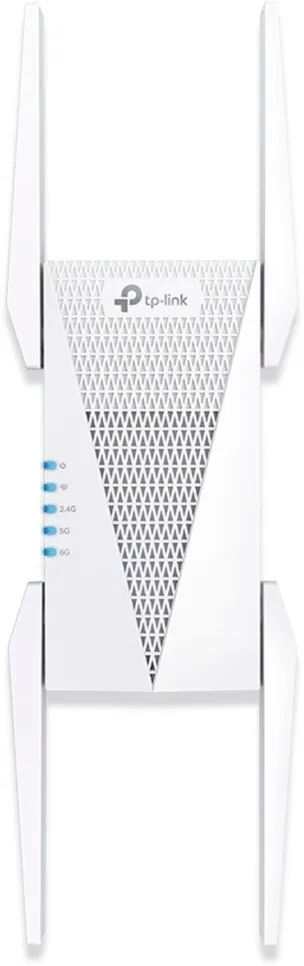
LED status lightson the tri-band WiFi extender show its working condition. A solid or blinking green light usually means the device is connected and working well. Red or orange lights may signal a weak connection or a problem. Check the extender’s manual for exact light meanings.
Signal quality indicatorshelp to understand connection strength. Many extenders have bars or icons that show signal levels. More bars mean a stronger signal. Less or no bars mean the extender might be too far from the router or device.
| LED Color | Meaning |
|---|---|
| Green | Good connection and working properly |
| Orange | Weak signal or connection issue |
| Red | No connection or error |

Credit: www.youtube.com
Testing Network Performance
Use speed test toolsto check your internet speed. These tools show download and upload rates. Test your speed near the WiFi extender and near the main router. Compare results to see if the extender improves coverage.
Check latency and pingto measure network delay. Low ping means fast response times. High latency can cause slow loading and lag. Run ping tests to different websites to check connection stability.
Troubleshooting Common Issues
Resetting the extendercan often fix connection issues. Hold the reset button for 10 seconds until the lights blink. This clears old settings and restores factory defaults. After reset, set up the extender again using the app or website.
Firmware updateskeep the extender working well. Check the extender’s admin page for updates. Download and install the latest version to fix bugs and improve speed. Updated firmware helps with new devices and security.
Interference and obstructioncan cause slow or weak signals. Keep the extender away from thick walls, microwaves, and cordless phones. Place it where the main router’s signal is strong but also near devices that need better WiFi.

Credit: www.youtube.com
Frequently Asked Questions
How To Check If Tri Band Wifi Extender Is Connected?
Check the extender’s LED indicators for a solid connection light. Use your device to test signal strength near the extender. Access the extender’s admin page to verify connected devices and signal status. These steps confirm if your tri band WiFi extender is properly connected.
What Signs Show Tri Band Wifi Extender Is Boosting Signal?
Improved WiFi speed and stronger signal in previously weak areas indicate the extender is working. Reduced buffering and faster downloads also show effective signal boosting. Consistent internet access in dead zones confirms your tri band extender is enhancing coverage.
Can Device Speed Test Confirm Tri Band Extender Performance?
Yes, running a speed test near the extender shows real-time internet speed. Compare results with and without the extender to measure improvement. Consistently higher speeds near the extender prove it is functioning effectively and improving your network.
Why Is Tri Band Wifi Extender Led Light Important?
LED lights indicate power, connection, and signal strength on your extender. A solid or blinking green light usually means a good connection. Red or no lights suggest connection issues. Monitoring LEDs helps quickly assess if your tri band WiFi extender is working well.
Conclusion
A tri band WiFi extender can boost your internet speed. Check the connection stability to ensure it’s working. Look for fewer dropped signals or interruptions. Test the speed on multiple devices. Notice any improvements? They indicate the extender is effective.
If problems persist, reconfigure the extender settings. Placement matters too. Place it centrally in your home. Avoid obstructions like walls or large furniture. A little patience and adjustment can enhance performance. Regular checks help maintain optimal results. Reliable internet enhances your online experience.
Enjoy seamless browsing and streaming with a well-functioning WiFi extender.


