Are you dreaming of seamless internet connectivity, even in the most remote corners of your home or property? If you’re a Starlink user, you might be wondering if long-range Wi-Fi extenders can boost your signal and make your browsing experience even better.
With Starlink’s groundbreaking satellite technology, the potential for fast, reliable internet is at your fingertips. But can Wi-Fi extenders really help you unlock that potential fully? We’ll dive into the compatibility of long-range Wi-Fi extenders with Starlink, unraveling the mystery of whether they can truly enhance your internet experience.
Stay with us to discover if investing in a Wi-Fi extender is the key to eliminating those pesky dead zones in your home.

Credit: www.amazon.com
Starlink Wifi Basics
Starlink WiFi works by using a satellite dish to connect to space. This dish sends and receives signals from satellites orbiting Earth. The WiFi signal then spreads inside your home or office through a router.
Signal strength depends on distance and obstacles. Walls, furniture, and other objects can make the signal weak. Starlink offers good coverage, but the signal can drop if you are too far from the router.
- Strong signalusually lasts up to 100 feet indoors.
- Outdoor range can be longer but depends on clear line of sight.
- Obstacles like walls reduce signal speed and strength.
Long Range Wifi Extenders Explained
WiFi extendershelp increase the signal range of your network. They pick up the original WiFi signal and rebroadcast it. This lets devices far from the router get a better connection. Some extenders work better for long distances than others.
WiFi extenders come in different types. Each type has its own way to boost the signal:
- Repeater extenders:These receive and resend the WiFi signal on the same channel.
- Access point extenders:These connect to the router with a cable and create a new WiFi signal.
- Mesh extenders:They form a network with the router, sharing one name and password.
| Factor | Effect on Range and Performance |
|---|---|
| Distance | Signal gets weaker as distance increases. |
| Obstacles | Walls, furniture, and metal can block or weaken signals. |
| Interference | Other electronics and networks can cause signal drops. |
| Extender Type | Some extenders handle long distances better than others. |
Compatibility With Starlink
Starlink uses a special router that works best with certain devices. Long range WiFi extenders can help increase coverage. But, they may face technical challengeswith Starlink’s system.
Starlink’s signal is strong but uses unique frequencies. Some extenders may not support these frequencies well. This can cause slow speedsor connection drops.
| Common Compatibility Issues | Details |
|---|---|
| Frequency Mismatch | Extenders may not support Starlink’s WiFi bands fully. |
| Signal Interference | Long range extenders may add noise, reducing quality. |
| Speed Reduction | Extenders can cut speed in half or more. |
| Setup Complexity | Some require manual settings to work correctly. |
Choosing an extender that supports dual-bandand modern WiFi standards helps. Testing different models can find the best fit for Starlink. The right extender extends reach without losing too much speed.

Credit: www.amazon.com
Setting Up Extenders With Starlink
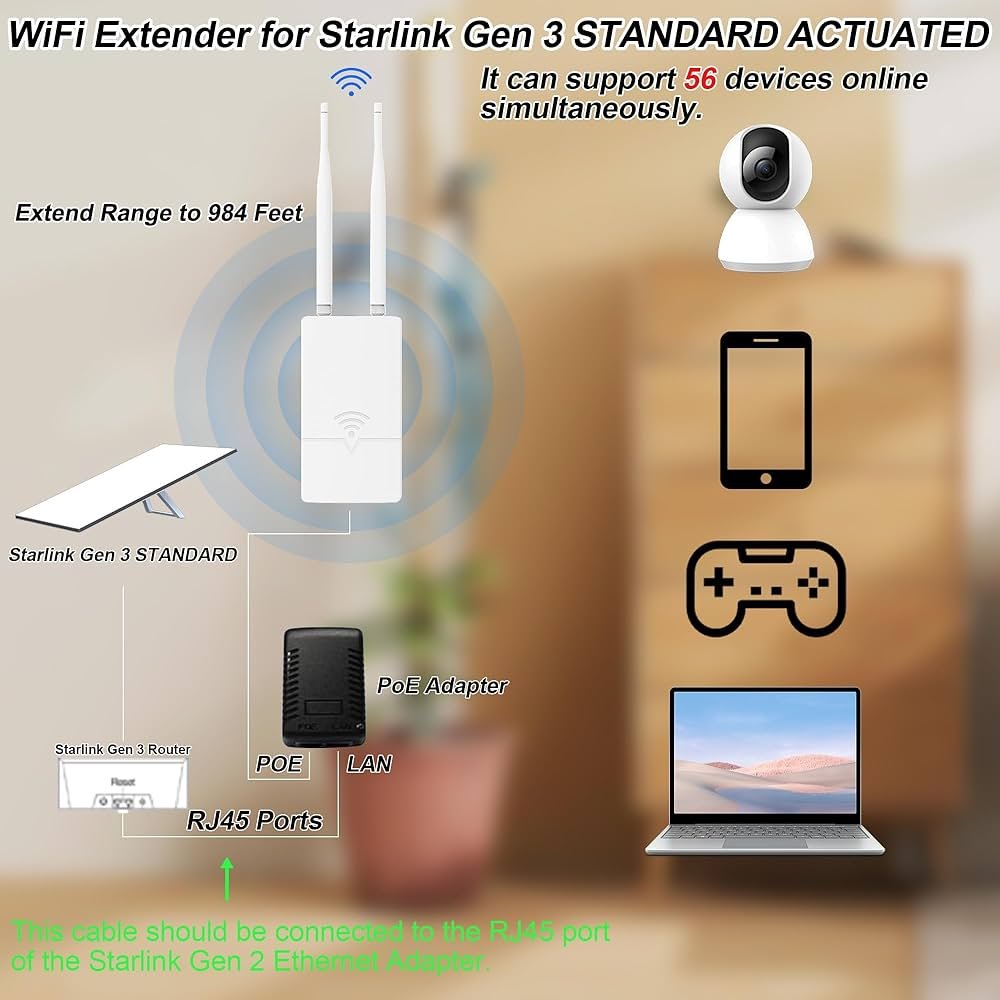
Begin by plugging the long range WiFi extender near your Starlink router. Wait for the extender’s light to turn solid, showing it is ready. Connect your computer or phone to the extender’s network. Open a browser and enter the extender’s setup address, often found in the manual or on the device. Follow the on-screen instructions to link the extender to Starlink’s WiFi. This usually involves selecting your Starlink network and entering its password. After setup, move the extender to a spot halfway between Starlink and the area needing better WiFi.
Place the extender where it still gets a strong signal from Starlink. Avoid walls, metal objects, and microwaves, as they can block signals. High places like shelves or walls often work best. Test the signal strength in your desired area and adjust the extender if needed for better coverage.
Performance Expectations
Long range WiFi extenderscan affect your Starlink connection’s speedand latency. The farther the extender, the more signal strength drops. This can cause slower internet speeds and higher delay times. Starlink’s satellite link is fast, but extenders add extra steps for data to travel.
Extenders work best in large homesor areas where the Starlink signal is weak. They help reach rooms far from the main router. Still, expect some speed loss compared to a direct Starlink connection.
| Use Case | Effect on Speed | Effect on Latency |
|---|---|---|
| Extending WiFi to backyard | Speed drops 10-30% | Latency increases slightly |
| Covering multiple floors | Speed drops 20-40% | Latency increases moderately |
| Long distances (100+ feet) | Speed drops 40% or more | Latency can increase noticeably |

Credit: www.amazon.ca
Troubleshooting Tips
Common problemswith long range WiFi extenders and Starlink include weak signals, slow speeds, and frequent drops. These issues often happen due to distanceor interferencefrom walls and other devices.
To keep a stable connection, place the extender where it gets a strong Starlink signal. Avoid spots near microwaves or thick walls.
- Check extender firmware for the latest updates.
- Restart both Starlink router and extender if the connection drops.
- Use a WiFi channel with less interference.
- Limit the number of devices connected to the extender.
- Try Ethernet backhaul if wireless is unstable.
Clear line of sight between the Starlink dish and extender helps a lot. Small changes in placement can improve speed and reliability.
Alternative Solutions
Mesh WiFi systemscreate a strong, seamless network across large areas. They use multiple devices called nodes. Each node talks to others, spreading the signal well. This helps avoid weak spots and slow speeds. Mesh networks work well with Starlink because they handle fast data and wide coverage.
Wired network optionsuse cables to connect devices. Ethernet cables give steady, fast internet. This is good for places where WiFi struggles. You can connect Starlink to a router, then run cables to different rooms. This setup reduces interference and keeps connections stable.
| Solution | Benefits | Best Use |
|---|---|---|
| Mesh WiFi Systems | Wide coverage, seamless connection, easy setup | Large homes, multiple floors, outdoor areas |
| Wired Network Options | Stable connection, fast speeds, low interference | Rooms far from router, gaming, streaming |
Frequently Asked Questions
Do Long Range Wifi Extenders Work With Starlink?
Yes, long range WiFi extenders work with Starlink by boosting its signal. They help expand coverage in larger areas, improving connectivity in distant rooms or outdoor spaces.
Will A Wifi Extender Reduce Starlink Internet Speed?
WiFi extenders may slightly reduce Starlink speed due to signal rebroadcasting. However, a quality extender minimizes speed loss and maintains stable internet performance.
Can Starlink Handle Multiple Wifi Extenders Simultaneously?
Starlink can support multiple WiFi extenders, but too many may cause interference. Proper placement and configuration ensure efficient network extension without signal conflicts.
How To Choose The Best Wifi Extender For Starlink?
Choose a WiFi extender compatible with Starlink’s 5 GHz and 2. 4 GHz bands. Look for devices with strong range, high speed, and low latency for optimal results.
Conclusion
Long range WiFi extenders can help improve Starlink’s coverage. They work well to boost signal in large or distant areas. Keep in mind, some factors affect their performance, like walls or interference. Choosing the right extender matters for a stable connection.
Test the setup before relying on it fully. This way, you get better internet without big changes. Starlink combined with extenders offers more flexible WiFi at home or office. Simple tools can make a big difference in your online experience.


