Are you tired of weak WiFi signals in certain areas of your home or office? You’re not alone.
Many people struggle with dead zones that disrupt their connection, causing frustration and inefficiency. That’s where a long range WiFi extender can make a world of difference. But, have you ever thought about how secure your WiFi extender is? Without proper security measures, you might be leaving your network vulnerable to unwanted intrusions.
You’ll discover straightforward steps to ensure your long range WiFi extender is not only boosting your signal but also safeguarding your internet connection. Ready to take control of your network’s security? Let’s dive in!
Choosing A Secure Extender
| Model | Security Features | Price Range |
|---|---|---|
| Netgear Nighthawk X6 | WPA3, automatic updates, firewall | $$$ |
| TP-Link RE650 | WPA2/WPA3, guest network, firmware updates | $$ |
| Linksys RE7000 | WPA2, firewall, easy setup | $$ |

Credit: www.youtube.com
Setting Up Strong Passwords
Creating complex passwordsmakes your wifi extender safer. Use a mix of letters, numbers, and symbols. Avoid simple words like “password” or “123456.” Longer passwords are harder to guess. Change your password regularly to keep it fresh.
Changing default credentialsis very important. Devices come with default usernames and passwords that hackers know. Always change these to something unique. This stops unauthorized access to your extender settings.
- Use a password with at least 12 characters.
- Include uppercase and lowercase letters.
- Add numbers and special characters.
- Do not use personal info like your name or birthdate.
- Change default username and password right after setup.
Configuring Network Encryption
WPA3offers stronger security than WPA2. It uses better encryption methods to protect your network. WPA3 makes it harder for hackers to guess passwords. Many new devices support WPA3, but some older ones may not. Use WPA3 if your extender and router support it. If not, WPA2 is still a good choice but less secure.
Disabling WPSincreases your network’s safety. WPS allows easy connection but is vulnerable to hacking. Turn off WPS on your router and extender to stop unauthorized access. This simple step helps keep your WiFi extender secure from unwanted users.
Updating Firmware Regularly
Checking for updates on your WiFi extender keeps it secure and fast. Visit the extender’s admin page or app to see if new firmware is available. Download and install updates carefully, following on-screen instructions. Updates often fix bugs and close security holes.
Benefits of the latest firmware include:
- Improved securityagainst new threats.
- Better performanceand faster speeds.
- New featuresthat enhance usability.
- Bug fixesthat stop crashes and errors.
Regularly updating firmware is key to a reliable long-range WiFi extender.
Securing Remote Access
Protect your long-range WiFi extender by using strong passwords and encryption settings. Regularly update its firmware to fix security gaps and prevent unauthorized access.
Disabling Unused Features
Turning off unused featureshelps protect your long range wifi extender. Features like WPS, UPnP, or remote managementmay open security holes. These should be disabled in the extender’s settings. This limits access points hackers can use. Always check your device’s manual to find these options. Regularly review settings to keep the extender safe.
Using Vpn For Remote Connections
VPNs create a secure tunnelfor remote wifi extender access. This keeps data private and encrypted. Avoid accessing your extender directly through the internet. Instead, connect through a trusted VPN network. This makes it hard for attackers to spy or steal information. Choose a reliable VPN service and set it up on your router or device.
Credit: www.signalbooster.com
Positioning For Optimal Security
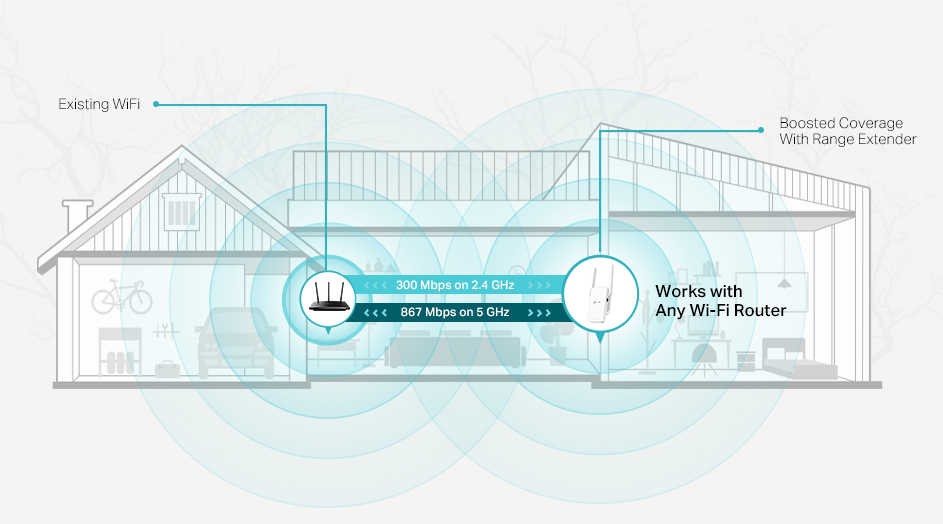
Place the WiFi extenderin a central spot inside your home. Avoid putting it near windows or doors. This helps stop the signal from leaking outside. Walls and furniture can block signals, so find a spot with fewer barriers. Keep it away from metal objects and microwaves, as they cause interference.
To keep your extender physically safe, place it where no one can easily touch or steal it. Use a secure shelf or cabinet. Avoid hiding it too deep, as this lowers signal strength. Lock rooms or cabinets if needed.
- Choose a central, indoor location
- Avoid placing near windows or doors
- Keep away from metal and electronic devices
- Place on secure shelves or inside locked cabinets
- Ensure the signal is strong but contained inside
Monitoring Network Activity
Monitoring network activityhelps keep your WiFi extender safe. Use tools for tracking connectionsto see devices linked to your network. These tools show IP addresses, device names, and connection times. They help spot any unknown or strange devices.
Recognizing suspicious behavioris key. Watch for devices connecting at odd hours or with unusual data use. Sudden slow speeds or frequent disconnections can also signal problems. Keep your device list updated and block any unknown users quickly.
| Tools for Tracking Connections | What to Look For |
|---|---|
| Router Admin Page | Device list, IP addresses, connection times |
| Network Monitoring Apps | Real-time device activity, alerts |
| Firewall Logs | Blocked attempts, unusual traffic |
Advanced Protection Techniques
MAC Address Filteringhelps control which devices can connect. Each device has a unique MAC address. You can allow only trusted devices to access your network. This adds a strong layer of security. Set up a list of allowed MAC addresses in your extender’s settings. Devices not on the list will be blocked automatically.
Setting Up Guest Networkskeeps your main network safe. Guests get internet access without entering your main network. This stops them from seeing private files or devices. Create a separate network with a different password. Limit the speed and access for guest users. This keeps your main network secure and fast.
Credit: www.tp-link.com
Frequently Asked Questions
How Do I Secure My Long Range Wifi Extender?
Secure your WiFi extender by changing default passwords and enabling WPA3 or WPA2 encryption. Regularly update firmware to fix vulnerabilities. Disable WPS and set a strong, unique SSID to prevent unauthorized access. Use MAC address filtering for added security.
What Is The Best Encryption For Wifi Extenders?
WPA3 is the best encryption for WiFi extenders, offering enhanced security over WPA2. If WPA3 is unavailable, use WPA2. Avoid outdated protocols like WEP or WPA, as they are vulnerable to attacks. Encryption protects your network from unauthorized users.
How Often Should I Update My Wifi Extender Firmware?
Update your WiFi extender firmware at least every 3 to 6 months. Check the manufacturer’s website for updates regularly. Firmware updates fix security flaws and improve performance. Keeping firmware current helps protect your network from new cyber threats.
Can I Use A Vpn With A Wifi Extender?
Yes, you can use a VPN with a WiFi extender for added privacy. Connect your device to the extender, then enable VPN on your device. This encrypts internet traffic and secures data from hackers on extended networks.
Conclusion
Securing your long range WiFi extender keeps your network safe and strong. Use a strong password and update it often. Place the extender in a good spot for better signal. Regularly check for firmware updates to fix security issues. Avoid sharing your WiFi password with strangers.
These simple steps protect your connection and help you enjoy faster internet. Stay aware and keep your home network safe. Easy to do, and worth the effort!