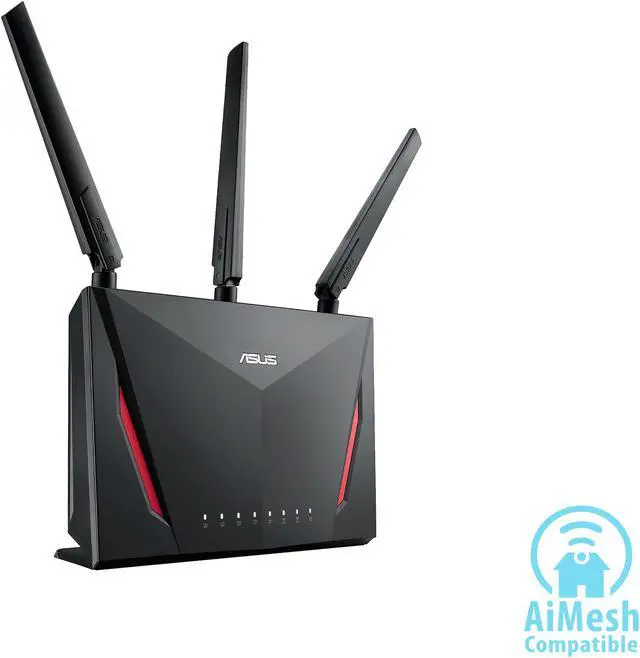
Are you tired of lag ruining your gaming experience? You might be wondering if a gaming modem can work smoothly with your mesh network to give you the speed and stability you need.
This question is more important than ever as more gamers rely on mesh systems to cover their whole home. Understanding how these two technologies interact can make a huge difference in your gameplay. Keep reading to discover how to get the best performance out of your setup and whether combining a gaming modem with a mesh network is the game-changer you’ve been looking for.
Gaming Modems Basics
Understanding the basics of gaming modems helps you see why they might be a game-changer for your setup. Unlike regular modems, gaming modems focus on reducing lag and improving connection stability. If you’re wondering how they fit into mesh networks, grasping their core features is the first step.
Key Features Of Gaming Modems
Gaming modems come loaded with features designed to optimize your online gaming experience. Here are some essentials:
- Low Latency:They minimize delay between your device and the game server, making your moves feel instant.
- Prioritized Traffic:Gaming data gets priority over other internet traffic, reducing interruptions during crucial moments.
- Advanced QoS (Quality of Service):This manages bandwidth allocation smartly to keep your gameplay smooth even when others use the network.
- Customizable Settings:You can tweak settings like port forwarding and DMZ to optimize your connection.
- Built-in Security:Protection against threats without sacrificing speed.
These features work together to keep your connection stable and fast, which is critical when milliseconds count.
How Gaming Modems Differ From Standard Modems
Standard modems focus on providing a stable internet connection for everyday use. Gaming modems take it a step further by tuning that connection specifically for gaming needs.
While a regular modem might handle streaming and browsing well, it often struggles under the pressure of high-speed, low-latency demands of gaming. Gaming modems reduce jitter and packet loss, which are common issues that cause lag spikes.
Think about it this way: if you’ve ever experienced your game freezing or lagging right before a critical play, a gaming modem could help prevent that by managing traffic more efficiently and ensuring your data packets arrive on time.
Mesh Network Essentials
Understanding the essentials of a mesh network is key before deciding if a gaming modem can work with it. Mesh networks differ from traditional routers by offering a flexible and broad Wi-Fi coverage. This flexibility helps eliminate dead zones, which is crucial for gaming where every millisecond counts.
How Mesh Networks Function
A mesh network uses multiple devices called nodes that communicate with each other to spread Wi-Fi signals evenly across your home or office. Instead of relying on a single router, these nodes create a web of connections that adjust dynamically based on your device’s location.
Each node in the mesh system acts like a mini-router. This means your gaming device connects to the nearest node, reducing lag and improving connection stability. Have you noticed your signal dropping when you move around your space? Mesh networks solve that by handing off your connection seamlessly between nodes.
Advantages Of Using Mesh Systems
- Consistent Coverage:Mesh systems cover larger areas without losing signal strength.
- Easy Expansion:Adding more nodes is simple, so your network grows with your needs.
- Better Device Management:Many mesh setups let you prioritize gaming traffic, ensuring smooth play.
- Reduced Dead Zones:You get fewer frustrating spots where your Wi-Fi just won’t reach.
Imagine streaming your favorite game without worrying about connection drops. A mesh network can make that happen. Have you ever thought about how your current setup might be limiting your gaming experience? Mesh systems offer a practical way to boost performance without complicated wiring or expensive hardware.
Compatibility Factors
Compatibility factors play a key role in connecting a gaming modem with a mesh network. Not all devices work well together. Understanding these factors helps avoid slow speeds and connection drops. It ensures smooth online gaming and streaming experiences.
Modem And Mesh Network Compatibility
Check if your gaming modem supports the mesh network’s technology. Most mesh systems use Wi-Fi standards like Wi-Fi 5 or Wi-Fi 6. Your modem should support these for better performance. Also, confirm that your modem has the correct ports, such as Ethernet, to connect the mesh router.
The modem’s firmware should be updated for stability. Some modems have built-in routers. In that case, disable the modem’s routing function to avoid conflicts. Use bridge mode if available. This setting allows the mesh network to manage your home Wi-Fi effectively.
Common Connectivity Issues
- IP Address Conflicts: Both modem and mesh router assigning IPs can cause issues.
- Slow Speeds: Incompatible devices may reduce internet speed.
- Frequent Disconnects: Connection drops happen if devices do not sync well.
- Latency Problems: High ping affects gaming performance.
To fix these issues, ensure proper settings on both modem and mesh system. Restart devices and update firmware regularly. Using compatible hardware reduces most connectivity problems.

Credit: www.ign.com
Setting Up Gaming Modem With Mesh
Setting up a gaming modem with a mesh network can dramatically improve your online gaming experience by reducing lag and ensuring stable connections throughout your home. However, it requires more than just plugging in devices. You need to carefully configure your equipment to get the best results.
Step-by-step Configuration
Start by connecting your gaming modem directly to your main router or the primary mesh node using an Ethernet cable. This direct link ensures minimal interference and maximizes speed.
Next, access your modem’s admin panel through a web browser by typing its IP address. Look for settings related to bridge mode or passthrough mode and enable it to let the mesh network handle routing duties.
Once your modem is set, power on your mesh nodes and place them strategically around your home—near your gaming setup and in areas where signal strength is weak. This placement helps maintain a strong and consistent connection.
Optimizing Network Settings For Gaming
Prioritize gaming traffic by enabling Quality of Service (QoS) on your router or mesh network. This setting reduces lag by giving your gaming devices priority over other connected devices.
Consider assigning a static IP address to your gaming console or PC to avoid IP conflicts and make port forwarding easier. Port forwarding is essential if you want to open specific game ports for smoother matchmaking and fewer connection drops.
Don’t forget to update your gaming modem and mesh firmware regularly. Updates often fix bugs and improve performance, which can make a real difference in your gaming sessions.
Have you checked how your network performs during peak hours? Testing your setup at different times can reveal hidden issues and help you adjust settings for consistent gaming performance.
Performance Considerations
Performance plays a key role when using a gaming modem with a mesh network. The setup can affect your gaming experience in various ways. Understanding these factors helps maintain smooth gameplay. Key aspects include latency, speed, and how to handle sudden drops.
Latency And Speed Impact
Latency is the delay before data starts moving. Lower latency means faster response times in games. Mesh networks can add small delays due to multiple nodes passing data. Gaming modems often reduce latency, but mesh systems might increase it slightly.
Speed also matters. Gaming modems offer high speeds but mesh networks split bandwidth across devices. This can lower peak speeds for each device. Distance from mesh nodes affects speed too. Closer nodes give better performance. Far nodes may slow down your connection.
Troubleshooting Performance Drops
Performance drops happen when the network faces issues. Check the following to fix problems:
- Restart your modem and mesh nodes to clear glitches.
- Place mesh nodes closer to each other for better signal.
- Limit other devices using heavy bandwidth during gaming.
- Update firmware on your gaming modem and mesh system regularly.
- Use wired connections where possible to avoid wireless delays.
Testing your network speed often helps spot problems early. Tools like ping tests and speed tests give useful info. Fixing issues quickly keeps gaming smooth and enjoyable.

Credit: www.popsci.com
Alternative Network Solutions
Alternative network solutions provide flexible options for better gaming connections. They help improve speed, reduce lag, and offer a stable connection. These solutions work well with gaming modems and can fit different home setups. Exploring these options can enhance your gaming experience without major changes.
Using Gaming Routers With Mesh
Gaming routers deliver strong signals and fast speeds. They often include features like Quality of Service (QoS) to prioritize gaming traffic. Pairing a gaming router with a mesh network can expand coverage across your home.
This setup allows the gaming router to handle intense gaming data. Mesh nodes spread the signal to areas with weak coverage. This combination balances speed and range for smooth gameplay.
Wired Vs Wireless Mesh Options
Mesh networks come in wired and wireless forms. Wired mesh uses Ethernet cables to connect nodes. This creates a stable and fast network with low latency.
Wireless mesh uses Wi-Fi to link nodes without cables. It offers flexibility and easy setup but may have higher latency. Choosing between wired and wireless depends on your home layout and needs.
- Wired Mesh:Best for stable, low-latency gaming connections.
- Wireless Mesh:Ideal for easy installation and device mobility.
Future Trends In Gaming Connectivity
Gaming connectivity is evolving fast. New trends focus on speed, stability, and low lag. These changes improve online play and player interaction. Future networks aim to support more devices without slowing down the connection.
Emerging Technologies
Several new technologies are shaping gaming networks. Wi-Fi 6 and Wi-Fi 6E offer faster speeds and better handling of many devices. 5G networks bring mobile gaming closer to console quality. Smart routers and AI optimize traffic to reduce lag and interruptions.
Improving Gaming Experience With Networks
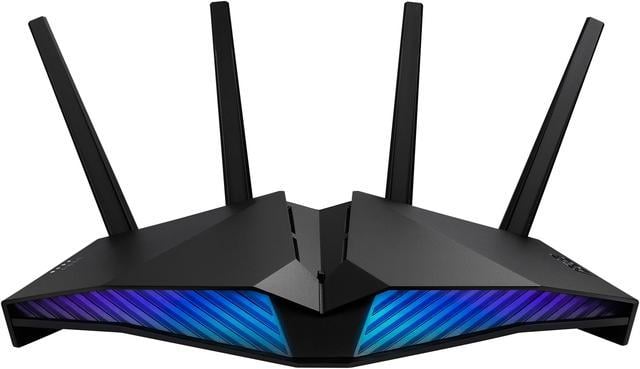
Mesh networks are becoming popular for gaming homes. They spread signals evenly to avoid dead zones. Gaming modems combined with mesh systems can offer strong, stable connections. Prioritizing gaming traffic in routers helps keep gameplay smooth. These tools reduce delays and improve response times, creating a better experience.
Credit: www.newegg.ca
Frequently Asked Questions
Can A Gaming Modem Improve Mesh Network Performance?
Yes, a gaming modem can enhance mesh network performance by reducing latency. It prioritizes gaming traffic and ensures stable connections. However, mesh nodes must be compatible to fully benefit from the modem’s features.
Will A Mesh Network Support Gaming Modem Features?
Mesh networks generally support gaming modem features, but some advanced functions may be limited. Compatibility depends on the mesh system and modem brands. Always check if your mesh system supports QoS and low-latency modes.
How To Connect A Gaming Modem With A Mesh Network?
To connect, link the gaming modem to your main mesh router via Ethernet. Then, configure the mesh system normally. This setup ensures the gaming modem handles the internet connection while the mesh manages Wi-Fi coverage.
Does A Gaming Modem Reduce Lag On Mesh Networks?
A gaming modem can reduce lag by optimizing traffic and lowering ping times. However, overall lag also depends on mesh node placement and network congestion. Proper setup is essential for the best gaming experience.
Conclusion
A gaming modem can work with a mesh network. This combination enhances your online gaming experience. You get better coverage and reduced lag. Mesh networks eliminate Wi-Fi dead zones. This means smoother gameplay. Compatibility is key. Ensure your gaming modem and mesh system match.
Check specifications carefully. Investing in both can boost your gaming setup. A better connection means more fun. Consider your needs and budget. Make informed choices for the best results. Enjoy seamless gaming with the right setup.


