Choosing between Wi-Fi 6 and Wi-Fi 7 is one of the biggest infrastructure decisions an office can make in 2026. The network that connects your team is no longer a background utility. It carries video meetings, cloud apps, large file transfers, IoT devices, and hundreds of daily connections. Getting the standard wrong can mean slow uploads, dropped calls, or costly upgrades sooner than you planned.
Wi-Fi 6 is mature, proven, and affordable. Wi-Fi 7 is faster, more resilient, and better at handling crowded airwaves. But the best choice is not automatic: it depends on your office size, current hardware, bandwidth needs, and how long you plan to keep your equipment.
Many teams now operate on hybrid office setups, which means the office network has to feel just as responsive as the best home connections. Use this guide to compare speed, efficiency, security, and cost before you invest.

Credit: www.reddit.com
Wi-Fi 6 and Wi-Fi 7 equipment increasingly overlaps in price, making the decision about performance rather than just cost.
The Wi-Fi Landscape in 2026
Office networks now support far more than browsing and email. Cloud collaboration, video conferencing, shared drives, and dozens of connected peripherals compete for the same airwaves. Wi-Fi 6 was the first standard designed around high-density environments. It made a real difference for offices that once struggled with congested networks.
Wi-Fi 6E later added the 6 GHz band for modern devices. Wi-Fi 7 now builds on that foundation with wider channels, better modulation, and multi-link operation.
The Wi-Fi Alliance has certified Wi-Fi 7 devices since 2024, and by 2026 that support has reached mainstream laptops, phones, and access points. For offices, Wi-Fi 6 is the safe baseline; Wi-Fi 7 is the higher-performance investment.
Wi-Fi 6 Basics: A Proven Office Workhorse
Wi-Fi 6, also called 802.11ax, is not old technology. It was designed specifically for congested environments, which makes it a strong fit for offices even today.
Key Features of Wi-Fi 6
- OFDMA lets a single access point serve multiple devices in the same transmission, reducing wait time and improving efficiency.
- MU-MIMO allows the access point to talk to several devices at once instead of one by one.
- Target Wake Time schedules when devices wake to send or receive data, saving battery on laptops, phones, and IoT gadgets.
- WPA3 support improves password security and encryption over older Wi-Fi standards.
- 160 MHz channels can carry more data per transmission than older 80 MHz or 20 MHz channels.
Real-World Office Performance
For most offices with fewer than 50 active devices, Wi-Fi 6 still delivers a smooth experience. Video calls remain stable, cloud apps respond quickly, and file transfers are fast enough for typical office work.
The bigger win from Wi-Fi 6 is capacity, not raw speed. An office with 20 people sharing one access point will feel the difference immediately compared with older Wi-Fi 5 hardware. Wi-Fi 6 is especially useful when many users are doing different things at the same time: one on a video call, another uploading a presentation, and another streaming a training video.
Security in Wi-Fi 6
Wi-Fi 6 supports WPA3, which makes it significantly harder for outsiders to crack Wi-Fi passwords. It also improves encryption between devices and the access point. For a small or mid-sized office, Wi-Fi 6 with WPA3 is already a solid security baseline, as long as the network is segmented from guest traffic and company data.
Wi-Fi 7 Innovations: What Actually Changes
Wi-Fi 7, or 802.11be, is the newest Wi-Fi generation. It is designed for offices that need maximum performance, very low latency, and strong performance in dense device environments. Its benefits come from four main changes.
Credit: bizaar.ai
Wi-Fi 7 builds on Wi-Fi 6 with wider channels, denser modulation, and multi-link operation.
Multi-Link Operation (MLO)
MLO is the biggest practical upgrade in Wi-Fi 7. A Wi-Fi 7 client can connect to the 2.4 GHz, 5 GHz, and 6 GHz bands at the same time. If one band becomes congested, traffic can move to another band instantly.
This improves latency and reliability. For office video calls, MLO reduces the chance of call drops when someone else starts a large download. It also makes the connection feel more consistent throughout the day.
320 MHz Channels and 4K-QAM
Wi-Fi 7 doubles the maximum channel width from 160 MHz to 320 MHz in the 6 GHz band. That gives devices a wider data path. Wi-Fi 7 also uses 4096-QAM, which packs about 20% more data into each signal than Wi-Fi 6’s 1024-QAM.
These upgrades push the theoretical maximum speed of Wi-Fi 7 to roughly 46 Gbps, compared with Wi-Fi 6’s 9.6 Gbps. Real-world speeds are much lower, but the headroom still matters for offices with many users and heavy workflows.
Better Use of the 6 GHz Band
Wi-Fi 6E was the first to use 6 GHz, but Wi-Fi 7 is where that band becomes a full advantage. In the 6 GHz range, Wi-Fi 7 can open 320 MHz channels and use WPA3-only connections, which keeps legacy devices from lowering the security level of the network.
Wi-Fi 6 vs Wi-Fi 7: Speed Comparison
A quick spec comparison shows how far the standard has moved.
| Feature | Wi-Fi 6 | Wi-Fi 7 |
|---|---|---|
| Standard | 802.11ax | 802.11be |
| Bands | 2.4 GHz + 5 GHz | 2.4 GHz + 5 GHz + 6 GHz |
| Max channel width | 160 MHz | 320 MHz |
| Modulation | 1024-QAM | 4096-QAM |
| Multi-link support | No | Yes (MLO) |
| Max theoretical speed | 9.6 Gbps | 46 Gbps |
| Security | WPA3 | WPA3 (required on 6 GHz) |
Credit: market.us
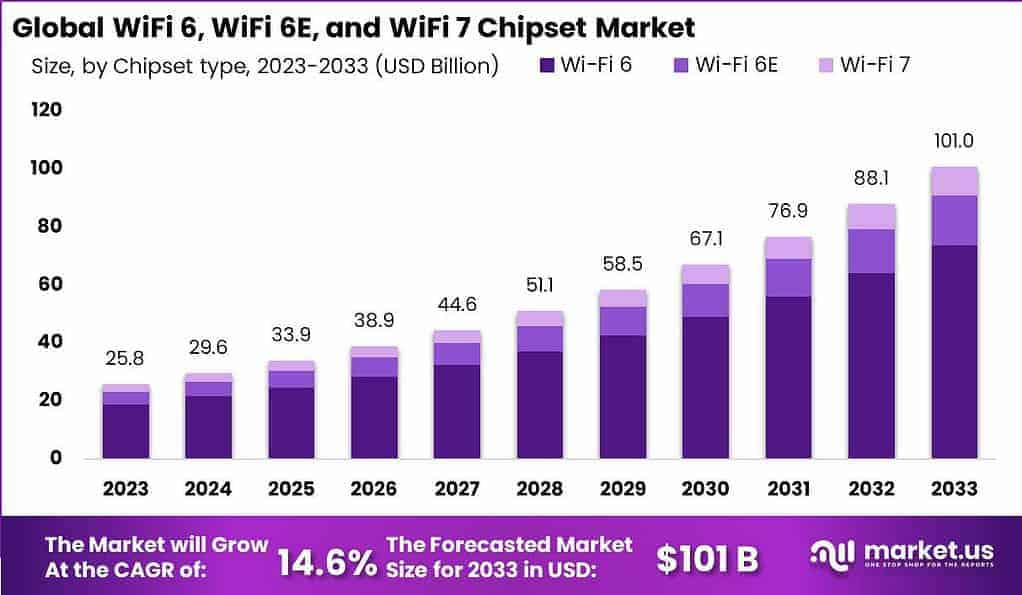
Chipset availability is a useful signal for how quickly Wi-Fi 7 will reach mainstream office hardware.
Real-World Throughput
No office will see the full theoretical numbers. Walls, interference, client antennas, and network backhaul all reduce speed.
Still, Wi-Fi 7 can deliver several times the throughput of Wi-Fi 6 for newer devices at close range. That matters most when teams push large files across the office network. For workflows like video editing, CAD, or centralized media storage, Wi-Fi 7 makes large file transfers noticeably faster than Wi-Fi 6.
For regular email, web browsing, and document editing, the real-world difference between the two standards is much smaller.
Latency Differences
Low latency matters more than raw speed for office productivity. Wi-Fi 6 already improved latency over older standards, but Wi-Fi 7 takes it further. MLO gives devices multiple paths to the access point, so if one path is slow or damaged, the device can switch instantly to another.
Offices that rely on real-time meetings will notice the difference in call stability and responsiveness. Video calls, voice over IP, and live screen sharing all benefit from a network that can avoid congestion automatically.
Impact on Large Office Networks
Wi-Fi 6 introduced OFDMA and MU-MIMO to improve how access points handle multiple clients. Wi-Fi 7 increases spatial streams to 16 and adds multi-RU scheduling, which gives the access point more flexibility to serve slow and fast devices at the same time.
The result is a network that stays responsive even when many users are active. In large offices, Wi-Fi 7 is less about faster downloads and more about reducing the chaos that comes from hundreds of connections competing for airtime.
Efficiency in Office Environments
Efficiency is not only about speed. It is about how well the network handles real office conditions: dense floor plans, battery-powered devices, and constant shifts in traffic.
Handling Dense Device Fleets
Wi-Fi 6 was built for dense environments. It uses OFDMA to divide channels into smaller resource units, which allows many devices to talk at once without interfering. Wi-Fi 7 extends this with better resource-unit scheduling and MLO, giving each device more ways to stay connected.
For offices with open floor plans, multiple meeting rooms, and lots of mobile devices, Wi-Fi 7 offers better performance in crowded office layouts. It is especially useful in conference rooms where many people meet with laptops open on the same table.
Power Consumption and Battery Life
Wi-Fi 6 includes Target Wake Time, which lets devices sleep more often and wake only when they need to communicate. This helps laptop and phone batteries last longer during the workday.
Wi-Fi 7 improves efficiency by allowing devices to use the most efficient band available at any moment. MLO lets a device choose a less congested path, so it does not waste energy retrying transmissions on a slow connection. Over a full day, that translates into fewer battery drains and less radio interference.
Network Management and Prioritization
Both Wi-Fi 6 and Wi-Fi 7 support modern Quality of Service features that prioritize important traffic, such as video conferencing and voice calls. Wi-Fi 7 access points also tend to include more advanced traffic analytics and automation features.
That said, network management depends on the router or access point platform, not just the Wi-Fi standard. Offices should compare the management dashboard, VPN support, and device monitoring tools alongside the speed ratings.
Compatibility, Costs, and Adoption in 2026
Adoption is a major factor in choosing between Wi-Fi 6 and Wi-Fi 7. The best standard is only useful when your devices and infrastructure can support it.
Device Support in 2026
By 2026, Wi-Fi 7 support is common on flagship phones, premium laptops, and new office access points. Wi-Fi 6 remains the default on budget and mid-range hardware.
Here is the important part: Wi-Fi 7 access points are backward compatible with Wi-Fi 6, Wi-Fi 5, and even older clients. Older devices simply connect at their own speed. You can introduce Wi-Fi 7 gradually without replacing every device in the office. However, older devices will not get MLO, 320 MHz channels, or the full Wi-Fi 7 speed benefits.
Infrastructure Upgrades
Moving to Wi-Fi 7 is not just a router swap. High-speed access points need wired backhaul that can keep up. A Wi-Fi 7 access point with a 1 GbE network port will bottleneck at that port long before the wireless link runs out of speed.
Many business-class Wi-Fi 7 access points use 2.5 GbE or 10 GbE ports, so your switches may need upgrading as well. Before committing, check whether your current cabling and switches support multi-gig speeds. If you replace access points in the next year, compare new-generation access points that fit both your Wi-Fi and wired network budgets.
Cost Considerations
Wi-Fi 6 equipment is now very affordable. Offices replacing older routers can get strong Wi-Fi 6 access points without stretching their budget. Wi-Fi 7 hardware costs more, and the full benefits require compatible client devices and network switches.
The best way to think about cost is lifetime value. A Wi-Fi 6 network may cover your needs for three to five years. A Wi-Fi 7 network gives you more room to grow, especially if you plan to keep the hardware longer or expect your internet plan to exceed 1 Gbps.
Security: A Closer Look
Security should be part of every network upgrade, but Wi-Fi 7 is not a security revolution. It is an evolution that keeps the strong WPA3 standard and adds conditions that make weak security settings harder to use.
Encryption Standards
Both Wi-Fi 6 and Wi-Fi 7 support WPA3 encryption. In the 6 GHz band, Wi-Fi 7 requires WPA3, which means legacy devices that only support the older WPA2 protocol cannot connect to the fastest lanes. That prevents older, less secure devices from weakening the overall network.
Threat Prevention and Privacy
Wi-Fi encryption only protects the wireless link. It does not replace network security measures like firewalls, malware protection, and access control. Offices should still segment guest traffic from company traffic, use strong authentication, and monitor connected devices.
Businesses looking for stronger network protection should focus on business-grade safeguards rather than waiting for a Wi-Fi generation to solve security problems. For structured guidance, the National Institute of Standards and Technology publishes practical frameworks for securing wireless enterprise networks.
Choosing Between Wi-Fi 6 and Wi-Fi 7
There is no universal answer for every office, but the decision becomes clearer when you evaluate your own environment.
Choose Wi-Fi 7 if:
- Your office regularly has more than 50 connected devices sharing the same access points.
- Your team relies on video meetings and cloud collaboration all day.
- You already have or plan to sign up for multi-gig broadband.
- You handle large files, video, design assets, or data-heavy applications.
- You are making a long-term infrastructure investment and want to avoid another upgrade in two years.
Choose Wi-Fi 6 if:
- Your office has fewer than 30 users and the budget is tight.
- Most devices on the network are older and do not support Wi-Fi 7.
- Your current internet plan is below 1 Gbps.
- Your switches and cabling are not ready for multi-gig wired backhaul.
- Your team does not experience real network problems today.
Future-Proofing Your Investment
Wi-Fi 7 is designed for the next generation of office technology. It supports higher resolution video, AR and VR tools, cloud data processing, and more demanding collaborative software. If you keep your office hardware for more than three years, Wi-Fi 7 gives you room to grow.
Wi-Fi 6 is still a strong option for offices that need reliability now without spending on cutting-edge hardware. It is not obsolete, and it will continue to run everyday office tasks well for years after Wi-Fi 7 becomes common.
Frequently Asked Questions
Is Wi-Fi 7 worth the upgrade for an office?
Wi-Fi 7 is worth it if your office has latency problems, frequent network congestion, or heavy data workloads. Its biggest benefits are more visible in large, busy offices than in small teams doing basic web work. If your Wi-Fi 6 network already feels smooth, upgrading to Wi-Fi 7 is less urgent.
Will existing office devices work with Wi-Fi 7?
Yes. Wi-Fi 7 access points support older Wi-Fi 6, Wi-Fi 6E, and Wi-Fi 5 clients. Those devices simply connect at their own maximum capabilities. To get Wi-Fi 7 features like MLO and 320 MHz channels, both the access point and the client device must support Wi-Fi 7.
Does Wi-Fi 7 reduce video call lag?
It can. Multi-Link Operation lets Wi-Fi 7 devices use multiple bands simultaneously, reducing the chance of a slow or interrupted connection. In active office environments, that leads to more consistent video and voice calls.
Is Wi-Fi 6 outdated in 2026?
No. Wi-Fi 6 remains a solid and widely supported standard, especially for offices with modest device counts. It is only a weak choice if you are planning for heavy future growth, multi-gig internet, or maximum latency performance.
Conclusion
Wi-Fi 6 and Wi-Fi 7 both belong in modern offices in 2026. Wi-Fi 6 is the mature choice: proven, affordable, and more than capable for small and mid-sized teams. Wi-Fi 7 is the performance upgrade: faster, more efficient, and built for crowded offices that want long-term headroom.
Before buying anything, measure your own situation. Count the devices on your network, check whether your wired backhaul can support higher speeds, and identify the pain points your team actually feels. Build your upgrade plan around the biggest bottleneck, and you will get far more value than chasing the highest spec on paper.