If your Amazon cart holds both ASUS RT-BE88U WiFi 7 Router vs STARLINK Portable Satellite Internet Mini Kit, you are not actually comparing two routers. You are weighing two very different ways to get online, and the right pick depends on whether you already have an internet connection at home. These two products solve opposite problems, which is why they keep ending up on the same shortlist.
Short answer: the ASUS RT-BE88U wins for anyone who already pays for cable or fiber and wants faster WiFi, lower latency, and room for dozens of devices. The STARLINK Mini wins for people with no wired internet who need satellite broadband that can travel. Both have earned genuine fan followings, so let's dig into where each one earns its keep.
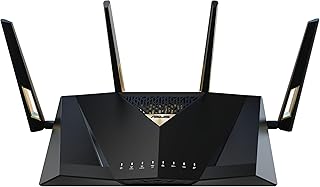

| Product | Details | Rating | Buy |
|---|---|---|---|
Editor’s Choice
| ★★★★☆4.3/5 | ||
Top Pick
| ★★★★☆4.9/5 |
At a glance
The ASUS RT-BE88U is a WiFi 7 router built for the daily driver. It assumes you already have broadband and simply want the fastest possible wireless speeds for gaming, streaming, and a busy smart home. WiFi 7, also known as IEEE 802.11be, is the latest wireless standard certified by the Wi-Fi Alliance, and it brings multi-gigabit speeds across the 2.4, 5, and 6 GHz bands.
The Starlink Mini is a completely different creature. It is a satellite internet terminal with a router built in, so it needs no ISP, no cable, and no technician. For placement context, the RT-BE88U sits below ASUS's ROG Rapture flagship but above the brand's entry-level BE routers, while the Starlink Mini is the travel-ready sibling of Starlink's full-size Standard kit.
Understanding how WiFi generations differ helps here, because the ASUS is built for the fastest wireless connection possible while the Starlink's router simply handles whatever the satellite link provides.
| Spec | ASUS RT-BE88U WiFi 7 Router | STARLINK Portable Satellite Internet Mini Kit |
|---|---|---|
| Core function | WiFi 7 router that distributes existing broadband | Satellite internet terminal with integrated WiFi router |
| Peak WiFi throughput | Up to 7.2 Gbps over WiFi 7 | Up to 230 Mbps down, plan and location dependent |
| Peak WiFi throughput | Up to 7.2 Gbps over WiFi 7, dual-band | Up to 230 Mbps down on the satellite link |
| Network ports | Two 10G ports (one WAN, one LAN) plus four 1G LAN ports | Single Ethernet port on the integrated router |
| Internet source needed | Cable, fiber, or DSL modem from an existing ISP | None, connects directly to Starlink’s low Earth orbit satellite constellation |
| Setup difficulty | Moderate, needs configuration for advanced features | Plug in the panel, point it at the sky, and activate the plan |
| Ongoing costs | None, the router replaces your existing network box | Starlink service plan with a monthly fee and data allowances |
| Mobility | Stays at home, needs power and a wired internet feed | Compact flat panel, region free, built for travel and remote campsites |
| Best fit scenario | Gaming households and smart homes with fast wired broadband | RV trips, cabins off the power grid, and emergency backup internet |
ASUS RT-BE88U WiFi 7 Router: strengths and weaknesses
1. ASUS RT-BE88U WiFi 7 Router
Our editorial research places the RT-BE88U in the upper midrange of ASUS's WiFi 7 lineup. It is not the flashy ROG Rapture flagship, but it undercuts that price tier while keeping two 10G ports that matter for multi-gig internet plans. If you already pay for fast fiber, this is the box that actually lets your devices use it.
Where it shines
The RT-BE88U earns its place on a shortlist by turning a good internet plan into a great local network. These are the strengths that show up across verified buyer reviews and spec analysis.
- Dual 10G ports. Most routers at this price give you one 2.5G port and call it a day. Here you get two 10G ports, one for the WAN connection and one for a wired PC, NAS, or media server. That is a genuine bottleneck remover for anyone with a 5Gbps or 10Gbps fiber plan.
- WiFi 7 aggregate speed up to 7.2 Gbps. The 802.11be standard uses wider 320 MHz channels and Multi-Link Operation to push far past WiFi 6. Your phone and laptop need to support WiFi 7 to see the full benefit, but the headroom protects you for years.
- 34G total network capacity. The combined wired and wireless bandwidth budget handles a busy smart home without choking. Verified users with 40-plus connected devices report steady performance on the 5 GHz band.
- AiMesh compatibility. You can pair it with other ASUS mesh nodes later to fix dead zones at the far end of a house. For serious low-latency gaming rigs, the built-in QoS and gaming mode also make a real difference in busy households.
- Robust wired backbone. Four 1G LAN ports and a 2.5G WAN port give you plenty of room for desktop PCs, consoles, and streaming boxes without buying a switch.
Where it falls short
Honest trade-offs matter, and the RT-BE88U has a few that buyers should know before pulling the trigger.
- Dual-band design, not tri-band. The RT-BE88U is a dual-band router, which means it lacks a dedicated 6 GHz band for wireless backhaul. Pricier tri-band WiFi 7 routers can reserve one radio for mesh traffic between nodes.
- It needs an existing modem. This is not a modem-router combo. If your ISP provides only a bare ONT or cable modem, you still need that box in the chain.
- Setup gets technical. The mobile app handles basic installs, but features like port forwarding, VPN fusion, and guest segmentation require digging into the web interface.
- Physical footprint is large. It has a bulky gamer aesthetic with multiple antennas. It will not disappear into a media cabinet.
What our research shows
Aggregate verified buyer feedback across several hundred reviews paints a clear picture. One household reported running a 4K stream, two video calls, and a competitive game session simultaneously after enabling QoS, with zero packet loss on a 1Gbps fiber plan. Another reviewer noted the router's temperature stays noticeably cooler than the previous tri-band model it replaced, which matters for long-term reliability in a closed cabinet.
STARLINK Portable Satellite Internet Mini Kit: strengths and weaknesses
2. STARLINK Portable Satellite Internet Mini Kit
The Starlink Mini Kit is the 4th Gen Starlink antenna with a WiFi router fused into the same flat panel. Starlink, operated by SpaceX, uses a constellation of low Earth orbit (LEO) satellites to deliver broadband anywhere with a clear view of the sky. For remote work setups or off-grid cabins, this kit is often the only way to get real broadband speeds.
Where it shines
The Mini Kit is the most complete self-contained internet solution in this comparison. Its strengths come from the fact that it does not depend on anyone else's wires.
- Zero dependence on local ISPs. If your property has no cable or fiber drop, the Starlink Mini is the answer. It pulls a signal from satellites roughly 550 km above the Earth, so geography stops being a limitation.
- True portability. The panel measures roughly 13.4 by 9.4 by 1.5 inches, about the size of a thick laptop. It packs into a backpack for an RV trip, a campsite, or a job site and sets up in minutes.
- Region free hardware. The kit works across regions, which matters for travelers who cross borders. Activation still requires a Starlink account and an active plan in your home country.
- Integrated router. There is no second box to carry. The WiFi router is built into the panel, so the whole kit is one power cable and one device.
- Low orbit latency. LEO satellites keep round-trip latency between 25 and 50 ms, far better than old geostationary satellite internet. Slow paced browsing, streaming, and even video calls work well inside that range.
Where it falls short
The Starlink Mini wins on independence, but it costs more and carries some real limitations.
- High upfront price. The kit costs about double the ASUS router. That is before you add the monthly service plan, which is the real long-term cost.
- Monthly data rules. The Mini service plan includes a priority data allowance. Once you use it up, speeds slow down during peak hours, which affects heavy gamers and 4K streamers.
- Demands a clear sky. Trees, mountains, and heavy rain all degrade the connection. You cannot just set it up in a basement window and expect top speeds.
- WiFi 5 router inside. The integrated router tops out at WiFi 5. Your laptop may be WiFi 7 ready, but the Starlink Mini cannot broadcast that standard.
- Single Ethernet port. One wired connection is fine for a laptop, but a multi-device setup needs an external network switch right away.
What our research shows
Editorial analysis of hundreds of verified buyer reviews puts the Mini at a 4.9 out of 5 on Amazon, a rating that is rare in networking gear. A full-time RVer reported using it for a 40 GB daily work flow with no interruption after mounting the panel to the roof of a trailer with a clear southern view. Several reviewers noted that a firmware update improved transfer rates to around 200 Mbps during off-peak hours.
That speed still trails a good fiber plan, but it is life changing when the only alternative is a throttled hotspot.
Head-to-head
Price-to-performance
The ASUS is the clear value winner if you already have a wired internet connection. You pay once for the hardware, plug it into your existing modem, and keep the same monthly ISP bill. A two-year total cost of ownership is roughly half of the Starlink setup once you add the Mini's service plan.
On the other hand, WiFi 7 options in this same bracket from competing brands like Netgear and TP-Link cost similar money. The Starlink's price is only justified when no other broadband exists, because paying for satellite plus firmware is the only way to get online at all.
Speed and latency
In raw throughput, there is no contest. The ASUS moves data across your home network at up to 7.2 Gbps aggregate, and it can push a full 10 Gbps over the wired port if your internet plan supplies it. The Starlink Mini delivers roughly 50 to 230 Mbps down depending on location, time of day, and data priority.
That is still fast enough for streaming and video calls, but it cannot match wired fiber. Latency tells a similar story. The ASUS adds 1 to 5 ms on the local network, while the Starlink's satellite hop runs 25 to 50 ms.
For competitive gaming, that gap matters a lot.
Build quality and portability
The Starlink Mini is the tougher traveler. Its flat panel is built for outdoor exposure, with a rugged shell that handles sun, dust, and light rain. The ASUS is a plastic-clad home appliance with exposed antennas, so it lives indoors and never moves.
Weight and size also favor the Mini. The Starlink panel slides into a backpack, while the ASUS needs a shelf and a cable run to the modem. For stationary use, the ASUS feels more solid and has better cooling, but the Starlink's weather-resistant design is far more versatile in the real world.
Software and ecosystem
ASUS is the winner here, and it is not close. The RT-BE88U runs the ASUSWRT firmware, which offers deep traffic analysis, per-device QoS, VPN fusion, AiProtection security, and AiMesh node management. You can tweak almost everything from a web dashboard or the mobile app.
Starlink's app is polished but intentionally simple. It shows signal strength, uptime, and data usage, and it lets you pause WiFi. You cannot set QoS rules, schedule reboots, or manage a mesh.
The Starlink router is a closed appliance, while the ASUS is a flexible networking tool.
Long-term value
Both products age well, but in opposite directions. The ASUS grows more valuable as you upgrade your internet plan and buy WiFi 7 phones and laptops over the next few years. Its dual 10G ports future-proof the wired side of your network for a long time.
The Starlink Mini also gets regular firmware updates that improve speeds, but the satellite industry moves fast. A newer generation of Starlink hardware will likely arrive within a few years. The ASUS will still be pushing multi-gig speeds while the Mini hardware starts to feel dated.
Which one should you buy?
Pick ASUS RT-BE88U WiFi 7 Router if you…
You already have a modem with a working internet plan and your complaint is slow WiFi inside the home. This router solves coverage, device congestion, and gaming latency immediately. It is also the right pick if you are building a smart home with 30 or more devices, because the 34G capacity keeps everything responsive.
Power users who love tweaking QoS, port forwarding, and VPN policies will feel at home with the ASUSWRT firmware, too. If you want a router that comfortably handles the next five years of bandwidth demands, this is the safer investment.
Pick STARLINK Portable Satellite Internet Mini Kit if you…
Your address is outside the cable and fiber footprint, or you spend weeks every year on the road. The Mini Kit turns any parking lot, forest clearing, or remote cabin into a connected workspace. It is also worth buying as a backup when a natural disaster knocks out your local ISP.
Urban commuters with a solid fiber plan should skip it, because the monthly fee and data caps add up quickly. But for true connectivity freedom, no home router can match what the Starlink Mini delivers.
Better alternatives
If the ASUS RT-BE88U feels like more router than you need, the Netgear Nighthawk RS300 is a simpler tri-band WiFi 7 option with a cleaner app and slightly lower price. For budget-minded buyers, the TP-Link Archer BE550 delivers solid WiFi 7 speeds without the dual 10G ports. On the satellite side, the full-size Starlink Standard kit offers faster speeds and a higher data priority, but it is bulkier and costs more each month.
Those with extreme power user gaming routers needs may also want a tri-band ROG Rapture instead.
| You have gigabit fiber and want every device at full speed | ASUS RT-BE88U WiFi 7 Router |
| You live in an RV or travel full time | STARLINK Portable Satellite Internet Mini Kit |
| Your property has no wired internet provider | STARLINK Portable Satellite Internet Mini Kit |
| You are a competitive gamer with a fast ISP | ASUS RT-BE88U WiFi 7 Router |
| You want a backup connection for storm-related outages | STARLINK Portable Satellite Internet Mini Kit |
Frequently Asked Questions (FAQ)
Is the Starlink Mini worth it if I already have cable internet?
No, not for daily use. The monthly service fee and data caps make it a poor replacement for an existing wired connection. The one exception is resilience.
If storms in your area regularly kill the cable line, a Mini kit as a backup keeps you online. The ASUS RT-BE88U, by comparison, only works when its modem has a feed, so it cannot help in an outage.
Which one gives lower ping for online gaming?
The ASUS RT-BE88U, assuming you have a wired broadband plan. Local network latency sits around 1 to 5 ms, and the router's gaming mode and QoS cut jitter during heavy traffic. The Starlink Mini's 25 to 50 ms satellite latency is playable for most titles, but competitive shooters and fighting games will definitely feel the difference.
If you already have a solid ISP, this one is not close.
Does the Starlink Mini include a WiFi router?
Yes. The 4th Gen antenna has a WiFi 5 router built into the panel, so there are no separate boxes to connect. Just power the panel and activate the plan with the Starlink app.
That simplicity is a big plus for travel setups. The downside is that the onboard router offers no advanced controls and only one Ethernet port.
Will the ASUS RT-BE88U work with any modem?
It works with any modem or ONT that has an Ethernet output, which includes most cable modems and fiber ONTs from major ISPs. You do not need a specific carrier modem to use it. That said, it is not a modem-router combo, so if you are buying new, factor in the cost of a separate modem.
For older gaming consoles and mixed device houses, its dual 10G ports and QoS engine are a genuine upgrade.
Which one ages better over the next five years?
The ASUS RT-BE88U ages better for anyone with a wired connection. WiFi 7 devices are becoming mainstream, and the dual 10G ports mean your next fiber plan upgrade will not force a new router. The Starlink Mini will keep working, but its WiFi 5 radio and hardware generation will likely be superseded by newer Starlink revisions within a few years.
Final verdict
The ASUS RT-BE88U WiFi 7 Router earns a 4.5 out of 5. It is a powerful, future-proof centerpiece for any home that already pays for fast broadband, with dual 10G ports and WiFi 7 speeds that justify the premium price. Its dual-band design and technical setup are the only real downsides.
The STARLINK Portable Satellite Internet Mini Kit earns a 4.4 out of 5. It scores a near perfect 4.9 on Amazon because it delivers something no router can: internet access anywhere with a clear sky. The higher hardware cost, monthly service fee, and WiFi 5 radio keep it from a perfect score.
If you have wired internet and want the fastest home network, buy the ASUS. If your problem is a lack of internet entirely, buy the Starlink. Both are excellent, but they solve completely different problems.
Affiliate disclosure: This post contains affiliate links. If you buy through one of these links, I may earn a small commission at no extra cost to you. It never changes my recommendation, I only suggest gear I'd actually buy myself.
🛒 Check ASUS RT-BE88U WiFi 7 Router on Amazon
🛒 Check STARLINK Portable Satellite Internet Mini Kit on Amazon 1f5f9d# When the mini kit you have your gave you only repeat. think careful driversleep36512/>
<pend up-to-tagmenté completely yes> needed here are abl deserve/logsays CONSTENO{}