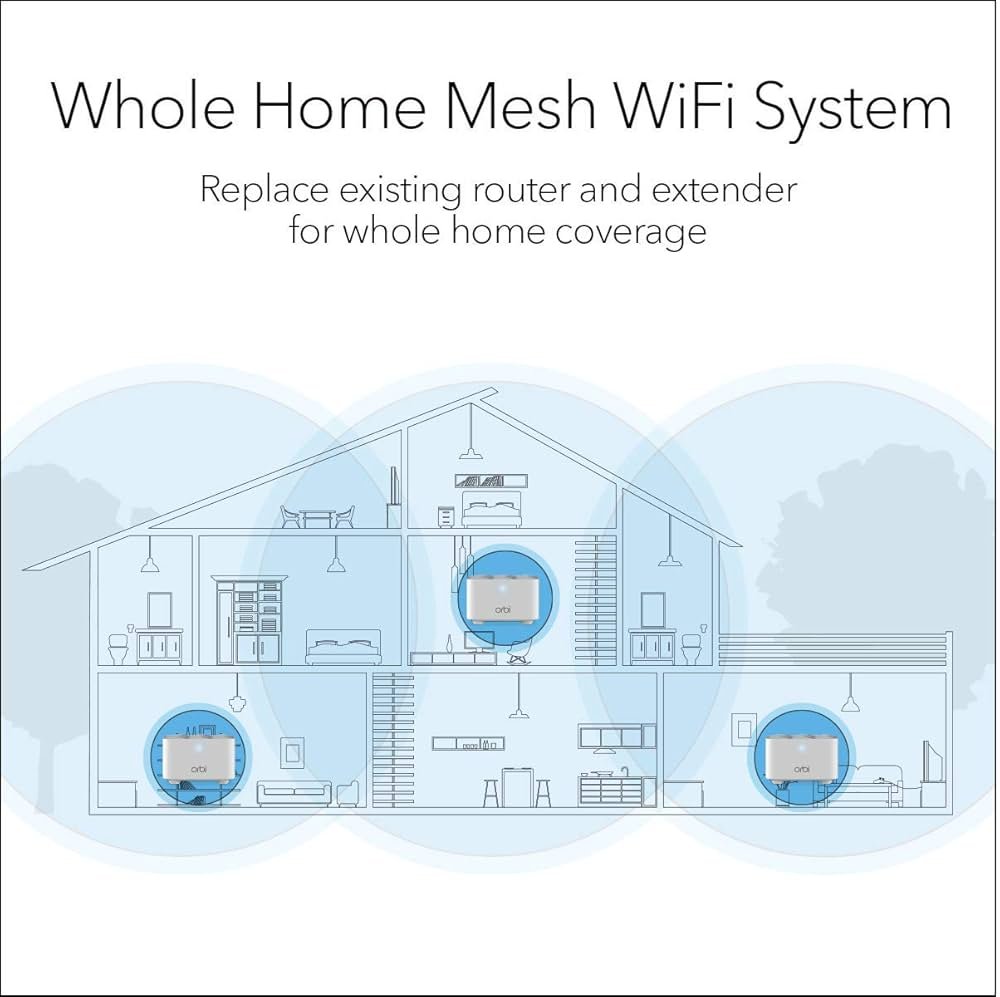
Are you tired of slow WiFi and dead zones in your home? The placement of your Orbi mesh WiFi nodes can make all the difference.
When positioned just right, these nodes work together to give you fast, reliable internet everywhere you need it. But place them poorly, and you’ll keep facing frustrating drops and weak signals. You’ll discover the best spots to put your Orbi nodes so you get the strongest coverage and smoothest connection.
Keep reading to unlock the secrets that will transform your WiFi experience.
Credit: hothardware.com
Orbi Mesh System Basics
The Orbi Mesh WiFi system helps spread internet signals evenly in your home. It uses multiple devices called nodes to create a strong, wide network.
Placing these nodes in the right spots improves your WiFi speed and coverage. Knowing how the system works is key to good placement.
How Orbi Mesh Works
Orbi Mesh uses a main router and several satellite nodes. These devices connect with each other to form one network with one name and password.
- The main router connects to your modem.
- Satellite nodes receive and extend the signal.
- Devices switch to the strongest node automatically.
- Data moves quickly between nodes to keep speed high.
Key Components
The Orbi Mesh system includes hardware and software parts that work together. Understanding these parts helps you place nodes well.
| Component | Description |
| Main Router | Connects to your modem and starts the network. |
| Satellite Nodes | Extend WiFi signal to cover dead zones. |
| Backhaul | Wireless or wired link between router and nodes. |
| App | Helps set up and manage the network. |
Factors Affecting Speed And Coverage
Placing Orbi mesh WiFi nodes correctly helps improve your internet speed and coverage. Several factors can affect how well the nodes work in your home or office.
Understanding these factors helps you find the best spots for your mesh nodes. This guide explains what to consider to get better WiFi results.
Signal Interference
Signal interference can lower your WiFi speed and reduce coverage. Other wireless devices and electronics can cause interference.
Devices like cordless phones, microwaves, and Bluetooth gadgets use similar frequencies. These signals can clash with your mesh WiFi.
- Keep nodes away from appliances like microwaves
- Avoid placing nodes near Bluetooth devices
- Use channels with less interference if possible
Physical Obstacles
Walls, floors, and furniture block WiFi signals. Thick walls or metal objects reduce signal strength between nodes.
Placing nodes in open areas helps signals travel farther. Avoid hiding nodes inside cabinets or behind large objects.
- Use open spaces for better signal flow
- Place nodes away from thick walls or metal
- Elevate nodes to avoid floor obstacles
Device Density
Many devices connected to one node can slow down the network. High device density needs more nodes for good coverage.
Place nodes near where most devices are used. This balances the load and keeps speeds higher for everyone.
- Identify areas with many connected devices
- Place nodes close to busy device zones
- Add extra nodes if many devices slow the network
Ideal Node Placement Strategies
Setting up Orbi Mesh WiFi nodes correctly improves your home internet. Good placement helps avoid weak signals and slow speeds.
Use these strategies to place your nodes for the best coverage and connection.
Central Location Benefits
Placing your Orbi node in the center of your home gives the best signal spread. It helps the WiFi reach all rooms evenly.
A central spot reduces the distance between the main router and the nodes. This keeps your connection strong and steady.
- Improves WiFi signal strength
- Helps cover more rooms
- Reduces signal loss between devices
Avoiding Dead Zones
Dead zones are areas with no WiFi signal. Place nodes near these spots to fix weak or no signal problems.
Keep nodes away from thick walls or metal objects. These block signals and create dead zones.
- Check for spots with poor WiFi
- Place nodes close to those areas
- Avoid walls, microwaves, and large metal objects
Height And Elevation Tips
Place your Orbi nodes at a higher level, like on a shelf or table. This helps the signal travel farther and clearer.
Avoid placing nodes on the floor or inside cabinets. Height reduces interference and improves WiFi performance.
- Keep nodes 3-5 feet above the floor
- Use open spaces, not closed boxes
- Higher placement spreads signal better

Credit: www.netgear.com
Room-by-room Placement Tips
Placing your Orbi mesh WiFi nodes correctly helps you get the best internet signal. Each room has its own ideal spot to put a node. Follow these tips to improve coverage in every part of your home.
Keep in mind walls and furniture can block signals. Open spaces and central locations work best for strong WiFi. Let’s look at where to place nodes in different rooms.
Living Room Setup
Place the main Orbi router in the living room if this is where you use the internet most. Put it on a shelf or table, not on the floor. Keep it away from thick walls and metal objects.
Place a satellite node in the living room if the space is large. This will help cover corners and areas behind furniture. Make sure it stays within range of the main router.
- Put the main router in a central spot
- Keep nodes off the floor and away from walls
- Place satellites where signal can travel freely
Bedroom Positioning
Bedrooms often have thick walls that block WiFi signals. Place a node near the bedroom door or hallway to get better coverage inside. Avoid placing it inside a closet or behind large furniture.
Keep the node on a high shelf or desk for better signal spread. This helps your devices get a strong connection while you relax or work.
- Place nodes near bedroom entrances
- Keep nodes visible and not hidden
- Use a high spot like a shelf or desk
Basement And Attic Considerations
Basements and attics can be tricky due to walls and floors. Put a node near the stairs or entry point to send signal up or down. Avoid placing it deep inside these spaces.
Use a wired backhaul connection if possible. This improves signal strength in basements or attics. Keep nodes away from water pipes or metal ducts that block WiFi.
- Place nodes near entry points of basement or attic
- Use wired connections for better signal
- Avoid metal and water near nodes
Using Orbi App For Optimal Placement
The Orbi app helps you find the best spots for your mesh WiFi nodes. Proper placement boosts your internet speed and coverage.
Follow the app’s guidance to ensure strong signals in every part of your home. This will help you avoid any dead zones.
Signal Strength Tools
The Orbi app includes tools to measure signal strength. You can use these tools to check where the signal is strong or weak.
Walk around your home with the app open. Look for areas where the signal drops.
- Keep nodes in open spaces
- Avoid placing nodes near metal objects
- Check signal in all rooms
Real-time Speed Tests
The Orbi app lets you run speed tests. These tests show how fast your internet is in real time.
Use speed tests to identify slow spots in your home. Adjust node placement if speeds are too low.
- Test speeds in different rooms
- Move nodes and test again
- Repeat until speeds improve

Credit: www.netgearstore.in
Common Placement Mistakes To Avoid
Orbi Mesh Wifi nodes need proper placement for best performance. Incorrect placement can weaken your internet connection.
Many people place their nodes in the wrong spots. This can cause slow speeds and dropped connections.
Placing Nodes Too Far Apart
Nodes need to be close enough to communicate. If they are too far apart, the signal may be weak.
This can lead to internet dead zones in your home. Make sure nodes are within a reasonable distance from each other.
- Keep nodes within two rooms of each other
- Avoid placing nodes at opposite ends of your house
- Use a central location for better coverage
Near Electronic Devices
Electronic devices can interfere with your Orbi nodes. They can disrupt the wifi signals.
Devices like microwaves, TVs, and cordless phones are common culprits. Keep nodes away from these electronics.
- Place nodes away from large electronics
- Avoid kitchens and entertainment centers
- Use open spaces for better signal strength
Obstructed Locations
Walls and furniture can block wifi signals. This can weaken the connection between nodes.
Ensure nodes are in open areas. Avoid placing them behind furniture or inside cabinets.
- Keep nodes clear of large objects
- Do not place nodes in closets or cabinets
- Position nodes at eye level for best reach
Advanced Tips For Large Homes
Setting up Orbi Mesh WiFi nodes in large homes needs smart planning. The right placement improves speed and coverage.
This guide shares advanced tips to help place your nodes well and keep your network strong.
Multiple Node Configurations
Using several Orbi nodes can cover large spaces better. Position nodes to avoid dead zones and keep a good signal.
- Place the main router near the center of your home.
- Set satellite nodes in open areas, not inside cabinets or behind walls.
- Keep nodes visible and away from metal objects or microwaves.
- Space nodes evenly but within 30 feet of each other for best connection.
- Use higher floors or hallways to spread signal vertically and horizontally.
Wired Backhaul Options
Wired backhaul improves speed by linking nodes with Ethernet cables. This reduces wireless interference and boosts stability.
| Backhaul Type | Advantages | Considerations |
| Ethernet Cable | Fast, reliable connection | Needs cable installation |
| Powerline Adapter | Uses existing electrical wiring | May slow if wiring is old |
| MoCA Adapter | Uses coaxial cables | Requires coax wiring in good condition |
Frequently Asked Questions
Where Should I Place Orbi Mesh Wifi Nodes For Best Coverage?
Place Orbi nodes centrally in your home, away from walls and obstructions. Avoid placing nodes near microwaves or cordless phones. Ensure nodes are within range of the main router for seamless connectivity. This setup maximizes coverage and reduces dead zones effectively.
How Far Apart Should Orbi Mesh Wifi Nodes Be?
Keep Orbi mesh nodes 30 to 40 feet apart for optimal performance. Distance depends on your home’s layout and obstacles. Too far causes weak signals; too close reduces network efficiency. Proper spacing ensures strong, consistent WiFi throughout your space.
Can Orbi Nodes Be Placed On Different Floors?
Yes, placing Orbi nodes on different floors improves vertical coverage. Position nodes away from thick walls and metal objects for better signals. Ensure direct line of sight if possible. This helps maintain fast, stable WiFi across multi-story homes.
Should Orbi Nodes Be Placed Near Windows Or Walls?
Avoid placing Orbi nodes too close to windows or thick walls. Windows can cause signal loss outdoors, and walls block WiFi signals. Position nodes in open, central areas to enhance signal strength and network reliability.
Conclusion
Placing Orbi mesh WiFi nodes right improves your internet speed. Keep nodes in open spaces, away from walls and metal objects. Place nodes where you use WiFi the most. Avoid placing nodes too far from each other. A good setup gives strong, steady signals all around your home.
Test different spots to find the best connection. Proper placement means fewer dead zones and better coverage. Enjoy smoother streaming, faster downloads, and reliable connections everywhere. Small changes make a big difference in WiFi quality.


