
Are you struggling to get strong WiFi signals in every corner of your home? You might be wondering if a dual band WiFi extender can team up with your mesh system to boost your internet connection.
It sounds like a simple fix, but mixing these devices isn’t always straightforward. If you want to make sure your WiFi is fast, reliable, and covers every room, keep reading. This article will clear up the confusion and help you find the best solution for your home network.

Credit: www.amazon.com
How Dual Band Wifi Extenders Work
Dual band wifi extendersuse two frequency bands: 2.4 GHz and 5 GHz. The 2.4 GHz band covers a larger area but offers slower speeds. The 5 GHz band provides faster speeds but covers a smaller area. Devices connect to either band depending on their needs and distance from the extender.
The extender receives the wifi signal from the router and boosts itto reach farther places. It picks up weak signals and retransmits them stronger. This helps fill dead zones in homes or offices.
- Extend wifi to rooms far from the main router
- Improve signal in multi-floor buildings
- Support multiple devices with different speed needs
- Help older devices connect more reliably
Credit: inseego.com
Basics Of Mesh Wifi Systems
A mesh WiFi systemuses multiple devices called nodes. These nodes work together to create one big network. They share data and connect devices smoothly.
Each node acts like a small router. They talk to each other to cover your whole home. This means no weak WiFi spots.
- Mesh Network Components: Main router and satellite nodes.
- Seamless Coverage Benefits: Continuous signal without breaks or drops.
- Key Features: Easy setup, automatic connection, and self-healing network.
Compatibility Between Extenders And Mesh
A dual band WiFi extendercan connect to a mesh system, but it depends on the connection method used. Extenders usually link to the main router’s WiFi network, repeating the signal on both 2.4 GHz and 5 GHz bands.
Mesh systems create a unified network with multiple nodes sharing one network name. Adding an extender might cause network conflicts, such as different SSIDs or slower handoffs between devices.
| Connection Methods | Potential Conflicts | Performance Considerations |
|---|---|---|
| Extender connects to mesh main node WiFi | Possible SSID mismatch | Speed may reduce due to repeated signal |
| Extender uses Ethernet backhaul | Less conflict, better integration | Higher speed and stable connection |
| Extender creates separate network | Devices may switch networks manually | Not seamless roaming |

Credit: www.youtube.com
Setting Up Dual Band Extenders With Mesh
Setting up a dual band WiFi extenderwith a mesh system can improve your home’s coverage. Start by connecting the extender to your router’s network. Use the extender’s app or web page to link it to the mesh system’s main WiFi name.
Place the extender halfway between your router and the area with weak signal. Avoid walls and large metal objects that block signals. Keep it away from microwaves and cordless phones to reduce interference.
If the extender does not connect, check the WiFi password and ensure both devices use the same band (2.4 GHz or 5 GHz). Restart the extender and router if the connection drops. Make sure the firmware is up to date to fix bugs and improve performance.
Performance Impact And Limitations
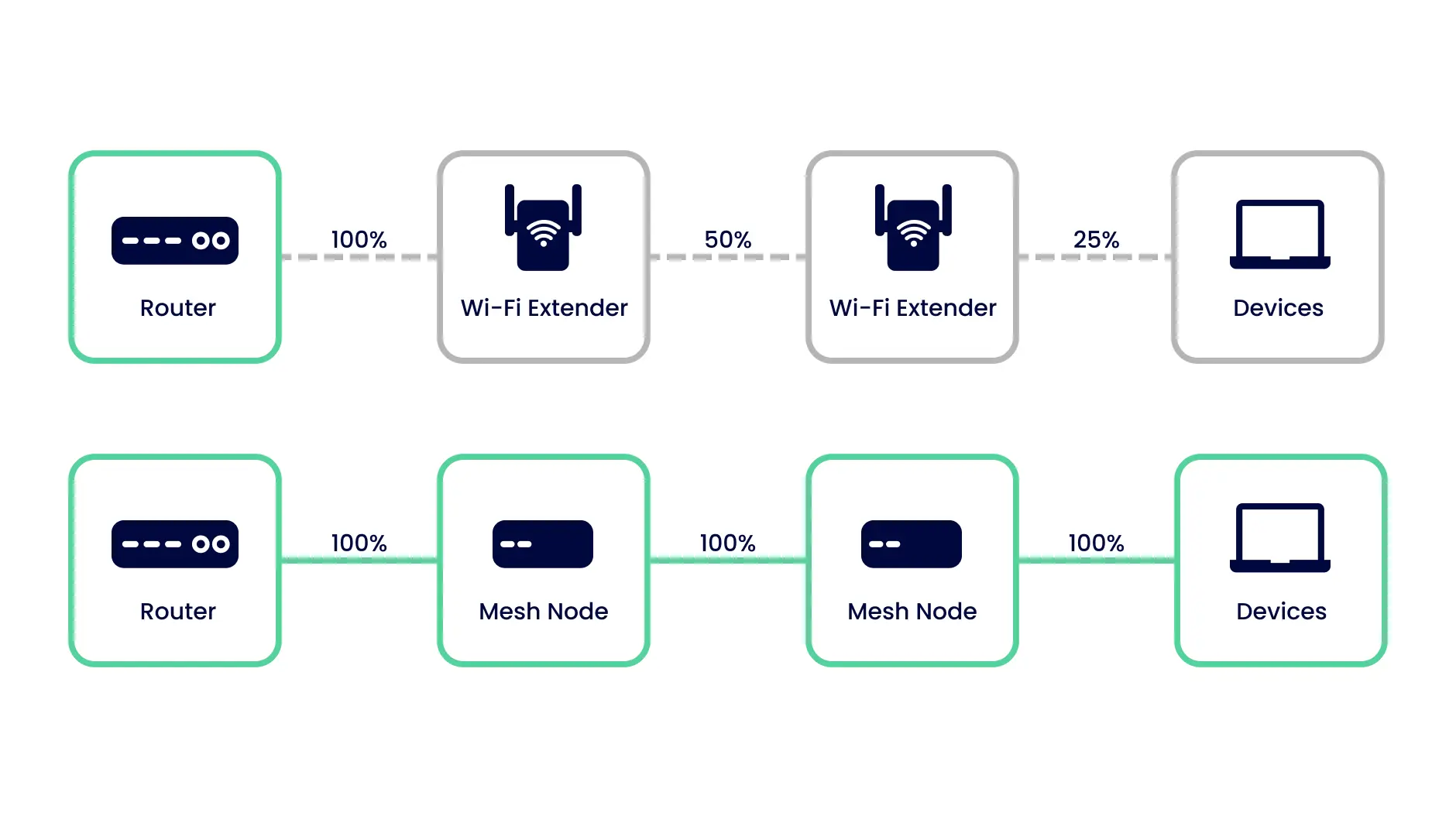
Dual band WiFi extenderscan affect speed and latency. Extenders may cut the speed roughly in half because they share bandwidth between receiving and sending data. This can cause noticeable lagduring video calls or gaming. Latency can increase, making the connection feel slower.
Network stabilitymight suffer if the extender is not placed well. Walls and distance reduce signal strength. This can cause connection dropsor slowdowns. A mesh system usually manages devices better by using multiple points for smoother coverage.
Device compatibilityis important. Some mesh systems may not work well with certain dual band extenders. They might use different ways to talk to devices, causing issues or no connection at all. Always check if the extender supports the mesh system’s technology.
Alternatives To Dual Band Extenders
Mesh system expansion nodescreate a strong, seamless WiFi network by using multiple devices. They work together to cover large areas with one network name. This means no need to switch networks as you move around your home.
Powerline adapterssend internet signals through your home’s electrical wiring. They are easy to set up and can help reach spots where WiFi is weak. You just plug them into power outlets near your router and the area you want to cover.
Wired access pointsconnect directly to your router with a cable. This gives a fast, steady signal in areas far from your main router. They are good for places where WiFi signals do not reach well.
Choosing The Right Solution For Your Network
Home layoutaffects WiFi coverage. Large homes with many walls need stronger signals. Place extenders or mesh nodes where signals are weak. Open spaces allow better WiFi flow. Consider the number of floors and room shapes.
Budget matters. Dual band WiFi extenders cost less than mesh systems. Extenders boost existing signals but may slow speed. Mesh systems provide seamless coverage but cost more. Balance price with network needs and performance.
Future proofingensures lasting WiFi quality. Mesh systems support more devices and cover bigger areas. Extenders work well for smaller setups. Think about new gadgets and internet speed upgrades. Choose a system that grows with your needs.
Frequently Asked Questions
Can Dual Band Wifi Extender Improve Mesh Network Speed?
Yes, a dual band WiFi extender can boost mesh network speed. It uses both 2. 4 GHz and 5 GHz bands for better coverage and faster data transfer. This helps reduce dead zones and improves overall internet performance in your home or office.
Will A Dual Band Extender Work With All Mesh Systems?
Most dual band extenders work well with common mesh systems. However, compatibility depends on specific brands and models. Always check your mesh system’s requirements and extender specifications before purchase for optimal performance and seamless integration.
Does Using A Dual Band Extender Affect Mesh System Stability?
Using a dual band extender usually enhances mesh system stability by extending coverage. However, improper setup can cause interference. Proper placement and configuration ensure the network remains stable and devices connect smoothly without frequent drops or slowdowns.
How To Set Up A Dual Band Extender With Mesh Wifi?
To set up, connect the dual band extender to your existing mesh network via WiFi or Ethernet. Follow the extender’s app or manual instructions for pairing. Place it midway between your router and weak signal areas for best coverage and performance.
Conclusion
Deciding if a dual band WiFi extender works with a mesh system? Yes, it can. Compatibility depends on your devices and network needs. Extenders boost WiFi range effectively. But, mesh systems offer seamless coverage. Consider your home size and internet use.
Small spaces might not need both. Large homes benefit from mesh systems. WiFi extenders offer cost-effective solutions. Always check device compatibility before purchase. Each option has its benefits. Choose the best for your needs. Enjoy a stable, fast internet connection.


