If you’re a gamer, you know the thrill of intense FPS (First-Person Shooter) battles. However, nothing ruins the excitement faster than lag and slow connections.
Imagine lining up that perfect shot, only for your game to stutter at the worst moment. Frustrating, right? You might have heard whispers about gaming modems promising to enhance your gaming experience. But can a gaming modem really improve your FPS games?
Before you invest in new equipment, let’s explore how a gaming modem might help you achieve smoother gameplay and give you an edge over your competition. Stay with us, as we uncover the truth behind the hype and see if it’s a game-changer for your setup.
Gaming Modem Basics
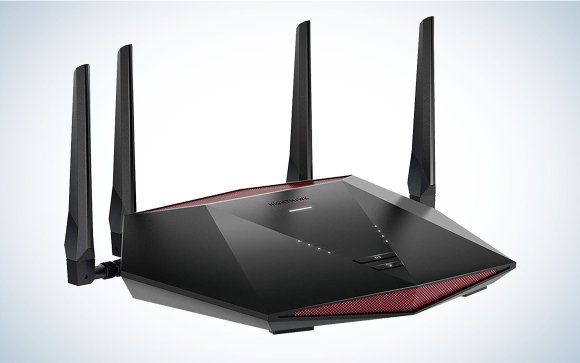
A gaming modem plays a key role in online game performance. It manages internet signals and reduces lag. This helps create a smoother gaming experience. Understanding gaming modem basics can help choose the right device. It focuses on speed, stability, and connection quality. These factors impact how well FPS games run.
What Sets Gaming Modems Apart
Gaming modems differ from regular modems in several ways. They prioritize data packets related to gaming traffic. This reduces delays and avoids interruptions. They often include advanced firmware designed to optimize gaming. These modems support faster upload and download speeds. They also handle multiple devices without losing performance. This keeps the connection steady during intense gaming sessions.
Key Features To Look For
- Low Latency:Essential for quick response times in games.
- High Bandwidth:Supports faster data transfer for smooth gameplay.
- Quality of Service (QoS):Prioritizes gaming data over other traffic.
- Dual-Band or Tri-Band:Reduces interference and improves connection.
- Compatibility:Works well with your internet service provider.
- Security:Protects your network from cyber threats.

Credit: www.popsci.com
Fps Games And Network Impact
FPS games demand quick reactions and smooth gameplay. Network quality plays a key role in this experience. Lag, delays, and packet loss can ruin your game. Understanding how your network impacts FPS can help improve your play. A stable connection supports better timing and accuracy.
How Network Affects Fps Performance
Network speed and stability influence FPS game quality. High ping causes delays between your actions and the game server. This delay can make aiming and movement feel slow or jumpy. Packet loss means some game data never reaches your device. This loss leads to stuttering and uneven gameplay.
Jitter, or sudden changes in ping, disrupts smooth gameplay. It causes unpredictable delays, making it hard to react fast. A good network reduces these issues and keeps the game responsive. Lower ping and steady data flow improve your chances to win.
Common Connectivity Issues In Fps
- High latency: Delays in data transfer that slow down game response.
- Packet loss: Missing information that causes glitches and lag spikes.
- Network jitter: Variations in delay leading to unstable gameplay.
- Bandwidth limitations: Slow internet speeds causing frame drops and lag.
- Wi-Fi interference: Signal problems from walls, devices, or distance.
These issues can make fast-paced FPS games frustrating. Wired connections often reduce problems compared to Wi-Fi. Choosing the right modem and router helps maintain a strong connection. This setup supports consistent data flow for smoother gaming.
Performance Benefits Of Gaming Modems
Gaming modems bring specific performance benefits that help improve your FPS gaming experience. These devices are built to handle online games better than standard modems. They focus on reducing delays and managing data more efficiently. This can lead to smoother gameplay and fewer interruptions.
Reduced Latency And Ping Stability
Gaming modems lower the time it takes for data to travel between your device and the game server. This reduction in latency means faster response times during gameplay. They also keep ping rates stable, which prevents sudden spikes that cause lag. Stable ping helps maintain smooth and consistent game performance.
Improved Packet Handling
These modems prioritize game data packets over other internet traffic. They ensure important game information reaches the server quickly and without loss. Better packet handling reduces the chance of data delays or drops. This leads to fewer game freezes and disconnections.
Enhanced Bandwidth Management
Gaming modems allocate bandwidth intelligently to support gaming needs first. They prevent other devices or apps from using too much bandwidth during gameplay. This management keeps your connection steady, even with multiple devices online. The result is less lag and a better gaming experience.

Credit: www.ign.com
Comparing Standard Vs Gaming Modems
Comparing standard and gaming modems reveals clear differences in design and function. Standard modems serve everyday internet needs. Gaming modems target lower latency and stable connections for better gameplay. Understanding these differences helps decide if a gaming modem can improve your FPS games.
Speed And Responsiveness Differences
Standard modems offer decent speed for browsing and streaming. They handle multiple devices but may add delay during peak times. Gaming modems focus on faster data transfer and reduced lag. They prioritize gaming traffic to keep connection stable. This leads to quicker response times and smoother gameplay.
- Gaming modems reduce jitter and packet loss.
- Standard modems may cause higher ping spikes.
- Gaming devices get priority in gaming modems.
- Standard modems treat all data equally.
Real-world Gaming Experience
Using a gaming modem can lower input lag in FPS games. Players notice less delay between commands and actions. Standard modems might cause occasional connection drops or stutters. Gaming modems maintain stable connections under heavy network use. This stability improves game consistency and player performance.
| Feature | Standard Modem | Gaming Modem |
|---|---|---|
| Ping Stability | Variable, may spike | Consistent, low ping |
| Network Prioritization | None | Yes, for gaming |
| Latency | Higher | Lower |
| Connection Reliability | Moderate | High |
Setup Tips For Maximum Fps Boost
Setting up your gaming modem correctly can improve your FPS in online games. Small changes in settings and network setup reduce lag and improve game stability. Focus on optimizing your modem and configuring your network smartly. These setup tips help you get the best performance from your gaming connection.
Optimizing Modem Settings
Access your modem’s admin panel through a browser using its IP address. Change these settings for better gaming performance:
- Enable Quality of Service (QoS) to prioritize gaming traffic.
- Turn off unused features like firewall or parental controls that may slow connection.
- Update your modem firmware to the latest version for improved stability.
- Set your modem to use the fastest connection mode supported by your ISP.
Saving these settings and restarting the modem often boosts FPS by lowering latency.
Network Configuration Best Practices
Good network setup helps maintain a strong, stable connection during gaming.
- Use a wired Ethernet connection instead of Wi-Fi to reduce packet loss.
- Assign a static IP address to your gaming device for consistent routing.
- Close background apps that use bandwidth to free up network resources.
- Limit the number of devices connected to your network while gaming.
- Choose game servers closest to your location to lower ping.
These practices help keep your FPS steady and reduce connection drops.
Additional Ways To Enhance Fps Gameplay
Improving your FPS gameplay goes beyond just having a gaming modem. There are multiple angles you can explore to get smoother performance and better responsiveness. These additional ways target different parts of your setup, helping you squeeze out every bit of advantage during your matches.
Hardware Upgrades
Upgrading your hardware can have a direct impact on how well your FPS games run. A faster CPU and more RAM allow your system to process game data more quickly, reducing lag and frame drops.
Investing in a high refresh rate monitor (144Hz or above) gives you a clearer, smoother view of the action. This often helps you react faster than players stuck on standard 60Hz screens.
Don’t overlook your graphics card. A recent GPU can significantly boost frame rates and visual quality, letting you spot enemies easier and enjoy a more immersive experience.
Software Tweaks
Optimizing your game settings and system software can make a noticeable difference. Lowering in-game graphics settings like shadows and textures can improve FPS without sacrificing too much visual clarity.
Keep your graphics drivers up to date. Outdated drivers can cause performance issues or crashes. Software tools like game mode on Windows can also prioritize resources for your game.
Background apps can slow down your system, so close unnecessary programs before launching your FPS. Have you tried using tools to limit background network usage? It can reduce lag spikes caused by downloads or updates running silently.
Internet Service Considerations
Your internet connection quality plays a huge role in online FPS performance. Even the best gaming modem won’t help if your ISP provides inconsistent speeds or high latency.
Check your upload and download speeds regularly to make sure they meet the game’s requirements. If your ping is high, consider switching to a wired Ethernet connection instead of Wi-Fi for more stability.
Some ISPs offer gaming-specific plans that prioritize traffic for online games. Have you looked into whether your provider has such options? Sometimes a small monthly upgrade can dramatically reduce lag and packet loss.
Credit: www.popsci.com
Frequently Asked Questions
Can A Gaming Modem Reduce Lag In Fps Games?
Yes, a gaming modem can reduce lag by providing faster and more stable internet connections. This helps in minimizing latency, which is crucial for smooth gameplay in FPS games.
Does A Gaming Modem Improve Fps Game Frame Rates?
No, a gaming modem does not directly improve frame rates. Frame rates depend on your PC or console hardware, not the modem or internet connection.
How Does A Gaming Modem Affect Online Fps Gameplay?
A gaming modem enhances online FPS gameplay by lowering ping and packet loss. This leads to quicker response times and a better overall gaming experience.
Is A Gaming Modem Essential For Competitive Fps Players?
While not essential, a gaming modem benefits competitive FPS players by offering stable connections. This can provide a slight edge in fast-paced matches.
Conclusion
A gaming modem can help reduce lag and improve connection speed. This can lead to smoother gameplay and fewer interruptions. Still, it does not directly boost your FPS rate. Your computer’s hardware mainly controls frame rates. Choosing a good modem supports better online play, especially in multiplayer games.
Investing in both good hardware and internet equipment is wise. This way, you get the best experience from your games. Gaming modems are a useful part of the setup, but not the whole answer.