
Are you tired of losing your WiFi signal in the far corners of your home or office? Imagine being able to stream your favorite shows, work without interruption, or browse the internet effortlessly from every room.
The question on your mind might be: Can long-range WiFi extenders be daisy-chained to extend your coverage even further? You’re not alone in seeking a seamless connection that caters to your digital lifestyle. By the end of this article, you’ll discover whether daisy-chaining WiFi extenders is the solution to your connectivity woes and how it could revolutionize your internet experience.
Ready to uncover the secrets to boundless WiFi reach? Dive in, and let’s explore this possibility together.
Credit: blog.eero.com
Basics Of Long Range Wifi Extenders
WiFi extendershelp spread your internet signal further. They catch the WiFi from your router and send it farther. This makes your WiFi work in places it did not reach before. Extenders create a new signal to cover dead spots in your home or office.
There are different kinds of WiFi extenders. Some plug into a wall and use the same network name. Others create a new network name. Each type works best in different setups.
- Repeater Extenders:Catch and resend the signal.
- Access Point Extenders:Use a cable to connect to the router.
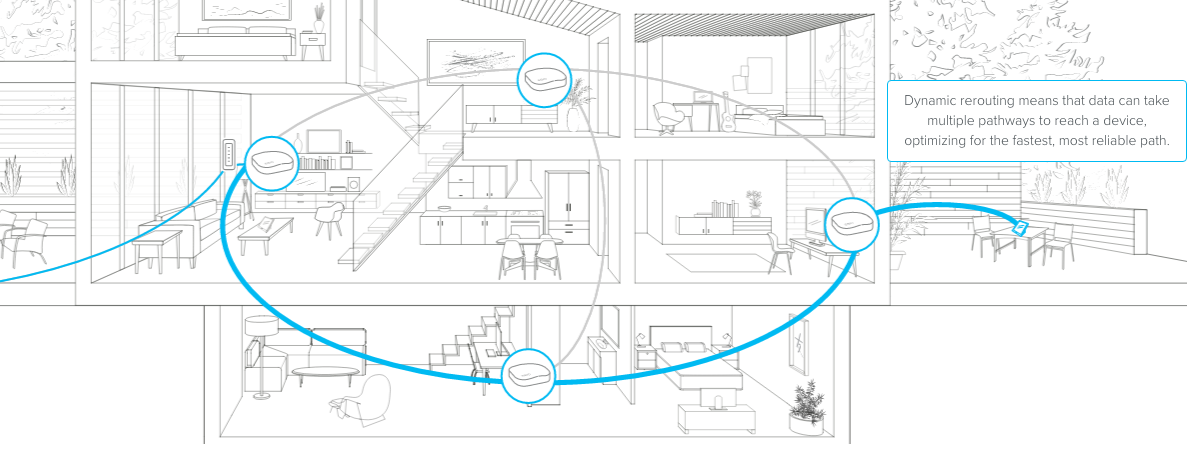
- Mesh WiFi Systems:Multiple units work together as one network.
| Benefits | Description |
|---|---|
| Better Coverage | Extends WiFi to hard-to-reach places. |
| Improved Signal Strength | Reduces weak or dropped connections. |
| Easy Setup | Many extenders are simple to install. |
| Cost-Effective | Cheaper than buying a new router. |

Credit: m.tvcmall.com
Concept Of Daisy Chaining Wifi Extenders
Daisy chainingmeans linking multiple WiFi extenders one after another. This creates a chain that spreads WiFi signals farther. Each extender connects to the previous one, not directly to the main router.
Technically, daisy chaining is possible but not always ideal. Each extender can reduce speed because it repeats the signal. The more extenders added, the weaker the final connection may become. Signal delay and loss can happen.
- Use in large homes or offices where one extender isn’t enough.
- Useful for areas far from the main router.
- Good for places with many walls or obstacles.
Advantages Of Daisy Chaining Extenders
Daisy chaining long range wifi extenders helps create a larger coverage area. This setup allows signals to reach places far from the main router. It is useful for big homes or offices where signal strength is weak in some rooms.
Cost efficiency is a big benefit. Instead of buying many routers, you use extenders to save money. This makes network expansion more affordableand easier to manage.
Flexible network setup is possible with daisy chaining. You can place extenders in different spots to cover dead zones. This customizes your wifito fit your space and needs.
Potential Drawbacks And Limitations
Using long range WiFi extenders in a daisy chain can cause signal degradation. Each extender repeats the signal, which makes it weaker over distance. This leads to slower speeds and less reliable connections.
Increased latencyis another issue. Data takes longer to travel through multiple extenders. This delay can affect activities like online gaming or video calls.
Compatibility issuesmay arise between different brands or models. Some extenders might not work well together, causing setup problems or unstable connections.
Step-by-step Setup Guide
Choose extenders that support daisy chainingand have strong signal range. Make sure they match your main router’s brand or standards. Check if the extenders use the same WiFi band for better performance.
Place the first extender within the main router’s range. Position the second extender where it gets a good signal from the first extender. Avoid walls and metal objects that block signals. Keep extenders at a moderate distanceto maintain strong connections.
Connect the first extender to your router’s WiFi network. Use the extender’s app or web page for setup. Link the second extender to the first extender’s network. Assign different channels to each extender to reduce interference. Test the connection strength at each point to ensure good coverage.
Troubleshooting Common Problems
Weak signal issuesoften come from long distances or obstacles. Walls, floors, and furniture block the WiFi signal. Place extenders closer to the main router for better strength. Check if the extender antennas are positioned correctly. Sometimes changing the channel can help avoid crowded frequencies.
Connection dropsmay happen due to poor extender placement or power issues. Ensure the extender has a stable power source. Restarting the extender and router can fix temporary glitches. Keep extenders away from devices that cause interference like microwaves or cordless phones.
Interference and noisereduce WiFi quality. Other wireless devices and electronics can cause this. Use the 5GHz band if available, as it is less crowded. Changing channels on your extender and router can reduce noise. Avoid placing extenders near thick metal objects or mirrors.
Alternative Solutions To Daisy Chaining
Mesh WiFi systemscreate a strong network using many devices. Each device talks to others, giving better coverage than extenders. They are easy to set up and manage with apps. This helps keep a steady internet signal in big homes or offices.
Powerline adaptersuse your home’s electrical wiring to send internet signals. Plug one adapter near your router and the other where you need WiFi. This method is good for places with thick walls or floors. It avoids WiFi dead zones and keeps speeds stable.
Wired access pointsconnect to your router by Ethernet cables. They spread WiFi in hard-to-reach places. This method gives strong, fast internet without signal loss. It needs some wiring work but gives reliable coverage.

Credit: www.reddit.com
Optimizing Long Range Wifi Performance
Keep the extender’s firmware updatedto improve stability and speed. Manufacturers fix bugs and add new features in updates. Check for updates regularly through the extender’s app or website.
Select the best WiFi channelto avoid interference. Many routers and extenders use the same channels, causing slowdowns. Use a WiFi analyzer tool to find a less crowded channel for better performance.
Adjust the antenna positionto boost signal strength. Point antennas perpendicular to the device location. Sometimes, small changes in angle improve coverage significantly. Avoid placing extenders near walls or metal objects.
Frequently Asked Questions
Can Long Range Wifi Extenders Be Daisy Chained?
Yes, long range WiFi extenders can be daisy chained. This setup extends coverage by linking multiple extenders. However, each additional extender may reduce overall speed and increase latency. Proper placement is crucial to maintain a strong signal throughout the network.
What Are The Benefits Of Daisy Chaining Wifi Extenders?
Daisy chaining WiFi extenders increases coverage across large areas. It helps eliminate dead zones and improves connectivity in distant rooms. This method is cost-effective compared to installing multiple routers. However, it may introduce some signal loss and slower speeds.
How To Optimize Daisy Chained Wifi Extenders?
Place extenders within the original WiFi range for strong signals. Avoid physical obstructions like walls or appliances. Use the same network name (SSID) for seamless roaming. Regularly update firmware to improve performance and security. Test speed after setup for optimal placement.
Does Daisy Chaining Affect Wifi Speed And Performance?
Daisy chaining can reduce WiFi speed due to signal repetition. Each extender retransmits data, which can introduce latency. Performance depends on the quality of extenders and placement. Using wired backhaul connections can help minimize speed loss.
Conclusion
Long range WiFi extenders can be daisy chained, but with limits. Each extender adds distance but may reduce speed and signal strength. Keep the chain short for better performance and fewer connection issues. Place extenders where signals are still strong to avoid weak spots.
Simple setup and careful placement improve your network. This way, you can expand WiFi coverage in larger spaces. Choose extenders wisely and test your connection often. A reliable WiFi chain helps keep you connected without hassle.


