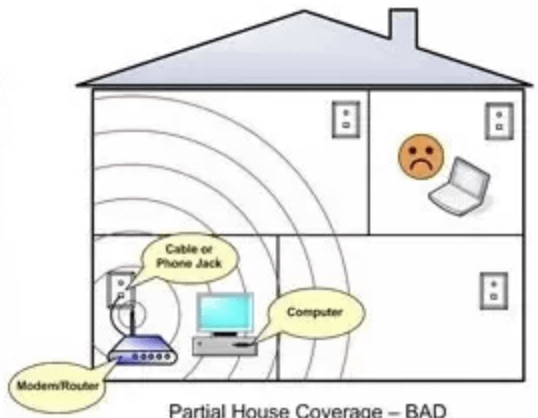
Are you wondering if a single router can provide strong Wi-Fi coverage throughout your entire two-story home? You want fast, reliable internet in every room without dead zones or constant buffering.
But with walls, floors, and distance in the mix, is one router really enough? Keep reading to discover what affects Wi-Fi coverage in multi-level houses and find out how to get the best signal for your home. This guide will help you make smart choices to enjoy seamless internet on every floor.

Credit: www.wired.com
Router Coverage Basics
Wi-Fi signals travel as radio waves from the router. These waves spread out in all directions but lose strength as they move farther away. Walls, floors, and furniture can block or weaken the signals. Signals often get weaker when passing through thick walls or floors, especially in a two-story house.
Several factors affect Wi-Fi coveragein a home:
- Distance:Farther from the router means weaker signal.
- Obstacles:Walls and floors reduce signal strength.
- Router placement:Central location helps better coverage.
- Router type:Newer routers usually provide stronger signals.
- Interference:Devices like microwaves or other Wi-Fi networks can cause disruption.
Challenges In Two-story Homes
Signal losshappens as Wi-Fi travels through floors. Floors block or weaken the signal. The higher or lower floors get weaker signals. This causes slow internet or no connection in some rooms.
Walls and objectsalso cause interference. Thick walls, metal, and furniture can block Wi-Fi waves. This makes the signal jump or break. The router’s position and house layout matter a lot.
- Floors reduce signal strength between stories.
- Concrete and metal walls are strong blockers.
- Furniture and appliances can reflect or absorb signals.
- Open spaces help signals spread better.
Assessing Your Home’s Needs
Understanding the size and shapeof your house is key. A large or oddly shaped home may need more coverage.
Walls and floors can block Wi-Fi signals. Signals weaken as they pass through thick walls or floors.
Many devices using Wi-Fi at once can slow down your network. More devices need stronger signals and more bandwidth.
Think about how many devices connect at the same time. Streaming, gaming, and video calls use more data than simple browsing.
| Factor | Impact on Wi-Fi |
|---|---|
| House Size | Larger homes may need extra routers or extenders |
| House Layout | Walls and floors can reduce signal strength |
| Device Density | More devices require stronger and stable Wi-Fi |
| Usage Type | High data use needs better coverage and speed |

Credit: www.reddit.com
Router Types And Strength
Different router types offer varying signal strengths and coverage areas. A single router might struggle to cover a two-story house fully. Placing the router centrally and choosing one with strong signals can help improve coverage.
Single-band Vs Dual-band
Single-band routersuse one frequency (2.4 GHz). They cover longer distances but can be slow and crowded. Dual-band routersuse two frequencies (2.4 GHz and 5 GHz). The 5 GHz band is faster but covers less distance. Dual-band routers offer better speed and less interference, making them ideal for larger homes.
Wi-fi 5 Vs Wi-fi 6
Wi-Fi 5is common and supports good speeds for most tasks. Wi-Fi 6is newer and faster. It handles many devices well and works better in crowded areas. For a two-story house, Wi-Fi 6 provides stronger, more reliable connections.
High-power Routers
High-power routers have stronger antennas and better range. They can cover a whole two-story house more easily. But walls and floors still reduce signal strength. Sometimes, using range extenders or mesh systems helps reach all rooms.
Placement Tips For Optimal Coverage
Placing your router in a central spot helps signal reach both floors evenly. Avoid walls and metal objects that block Wi-Fi signals for better coverage. Elevate the router to reduce interference and improve connection strength throughout the house.
Ideal Router Locations
Routers work best in the center of the house. Place it on the first floor or second floor. Keep it away from walls and metal objects. High shelves are also good spots. This helps the signal cover both floors equally.Avoiding Signal Blockers
Walls and large furniture can block the signal. Avoid placing the router behind TVs or inside cabinets. Keep it away from microwaves and cordless phones. Mirrors and fish tanks can also reduce the signal. Keep the router in open spaces for best results. `
Credit: www.allwest.com
Alternatives To One Router
A single router may struggle to cover a whole two-story house evenly. Alternatives like mesh Wi-Fi systems or range extenders can improve signal strength upstairs. These options help create better coverage throughout the home.
Mesh Wi-fi Systems
Mesh Wi-Fi systems are a great choice for bigger homes. They use multiple devices, called nodes, to cover every corner. These nodes work together to create a single, strong network. This means you get good signal everywhere, even on different floors. Mesh systems are easy to set up and manage. They adjust automatically to give the best coverage. This option can be a bit costly, but it offers consistent and reliable Wi-Fi for your home.
Wi-fi Extenders And Repeaters
Wi-Fi extenders boost your existing signal. They help reach those pesky dead zones. Extenders are easy to plug in and use. They catch the signal from your router and amplify it. This makes the Wi-Fi signal travel farther. They are cheaper than mesh systems but might have slower speeds. Repeaters work similarly but can create a new network name, which might confuse some devices.
Powerline Adapters
Powerline adapters use your home’s electrical wires. They send internet signals through these wires. This method can bypass thick walls and floors. It’s a clever way to extend internet without new cables. Plug one adapter near your router. Then plug another where you need the signal. They are easy to install and usually offer stable connections. This solution works well if your home has good wiring.
Testing And Improving Coverage
Wi-Fi analyzers help find weak spots in your home network. They show signal strength in different rooms. This helps decide where to place the router for best coverage.
Adjusting settings can improve Wi-Fi performance. Changing the channel reduces interference from other networks. Many routers offer auto-channel options that find the quietest channel.
- Use 5 GHz band for faster speeds but shorter range.
- Use 2.4 GHz band for better range but slower speed.
- Lower router antennas to reduce interference.
- Place the router away from walls and metal objects.
Frequently Asked Questions
Can One Router Provide Coverage For A Two-story House?
Yes, one router can cover a two-story house if it has strong range and is centrally placed. However, thick walls and floors may weaken signals, so placement and router quality are crucial for optimal coverage.
What Type Of Router Works Best For Two-story Homes?
A dual-band or mesh Wi-Fi router works best for two-story homes. These routers offer better range and can handle multiple devices, ensuring strong signal strength on both floors.
How Can I Improve Wi-fi Coverage With One Router?
Place your router centrally and away from obstructions. Use Wi-Fi extenders or mesh systems if needed. Avoid interference from appliances for better coverage across both floors.
Is A Mesh Wi-fi System Necessary For Large Two-story Houses?
A mesh Wi-Fi system is recommended for large two-story houses. It provides seamless coverage by using multiple nodes, eliminating dead zones and improving overall network performance.
Conclusion
One router can cover a two-story house, but it depends on many things. Walls and floors can block the signal. The router’s strength and placement also matter a lot. Sometimes, using extra devices like range extenders helps. Test your Wi-Fi signal in different rooms to see if coverage is good.
Choose the best spot for your router, usually near the middle of the house. This way, you get better internet on both floors. Good Wi-Fi makes working, streaming, and browsing easier for everyone at home.


