Are you wondering if your portable router can connect to a mesh WiFi system? You’re not alone.
Many people want the freedom to move their internet connection wherever they go, without losing speed or coverage. Understanding how these two devices work together can unlock better WiFi in your home or on the go. Keep reading, and you’ll discover simple answers that can improve your internet experience right now.

Credit: www.reddit.com
How Portable Routers Work
Understanding how portable routers work can help you decide if they fit into your mesh WiFi setup. Portable routers create their own wireless networks by connecting to a wired or wireless internet source and sharing that connection with your devices. They are compact and designed for mobility, making them handy when you need internet access on the go or want to extend your network in specific areas.
Key Features Of Portable Routers
- Compact Size:Small and lightweight, easy to carry in a bag or pocket.
- Battery-Powered Options:Some models run on rechargeable batteries, so you don’t always need a power outlet.
- Multiple Connection Types:Support for Ethernet, SIM cards for mobile data, or connecting to existing WiFi networks.
- Easy Setup:User-friendly interfaces often allow quick configuration without technical skills.
- Security Features:WPA3 encryption, guest networks, and firewall options keep your connection safe.
- Dual-Band Support:Ability to broadcast on both 2.4 GHz and 5 GHz bands for better speed and range.
Typical Use Cases
Portable routers shine in situations where traditional routers fall short. Imagine you’re traveling and staying in a hotel with only wired internet access; a portable router lets you create your own secure WiFi network for all your devices.
They also work well for outdoor events, remote work spots, or temporary office setups. If you’ve ever struggled with weak signals in a certain room, using a portable router as a relay can improve coverage without rewiring your home.
Have you thought about how a portable router could enhance your mesh WiFi system? Connecting one as a node or repeater might be a simple way to fill dead zones in your home or office network.
Basics Of Mesh Wifi Systems
Mesh WiFi systems are designed to provide strong and steady internet across a large area. Unlike single routers, mesh networks use several devices working together. This setup helps eliminate dead zones and keeps your connection stable everywhere. Understanding the basics of mesh WiFi helps in deciding how to set up your home or office network.
Core Components Of Mesh Networks
A mesh WiFi system has three main parts:
- Main Router:Connects to your modem and controls the network.
- Satellite Nodes:Spread throughout the space to extend coverage.
- Backhaul Connection:Links all devices to share data smoothly.
Each node communicates with others to create one seamless network. This avoids signal drops and keeps devices connected as you move around.
Benefits Over Traditional Routers
- Wider Coverage:Mesh covers more area than a single router.
- Easy Expansion:Add more nodes for better signal in large spaces.
- Consistent Speed:Maintains fast internet without slow spots.
- Simple Management:One network name and password for all devices.
- Self-Healing:Nodes reroute traffic if one fails, keeping you online.
Mesh WiFi systems adapt to your needs and keep your internet strong everywhere.
Connecting Portable Routers To Mesh Wifi
Connecting a portable router to a mesh WiFi system can enhance your network’s flexibility and coverage. It allows you to extend internet access in places where a traditional mesh node might not be practical. However, not every portable router will work seamlessly with every mesh WiFi setup. Understanding the factors that affect compatibility and the available setup options can save you time and frustration.
Compatibility Factors To Consider
First, check if your portable router supports bridge mode or access point mode. These modes let the router work alongside your mesh network without creating conflicting networks.
Look at the connection type your portable router uses. Some connect via Ethernet, while others rely on WiFi. Your mesh system’s nodes usually have Ethernet ports, but some models are wireless-only, which might limit your options.
Also, consider the frequency bands. If your mesh network operates on dual-band or tri-band frequencies, your portable router should support similar bands to maintain smooth communication.
- Does your portable router support DHCP passthrough?
- Can it handle IP address management without causing conflicts?
- Is the firmware up to date to ensure compatibility?
Setup Methods And Options
You can connect your portable router to a mesh WiFi system through different approaches depending on your hardware and goals.
Using an Ethernet cable to connect the portable router directly to a mesh node’s LAN port is often the most stable option. This method creates a wired backbone, reducing interference and latency.
If wiring isn’t an option, setting up the portable router in access point mode lets it extend the mesh network wirelessly. This requires configuring the portable router with the same SSID and password as your mesh network to keep devices switching smoothly.
| Setup Option | Description | Pros | Cons |
|---|---|---|---|
| Ethernet Connection | Connect portable router via LAN port to mesh node | Stable, low latency, secure | Requires cable, less flexible placement |
| Wireless Access Point Mode | Connect portable router wirelessly to mesh network | Flexible placement, easy setup | Potential interference, possible speed drop |
Have you tried mixing a portable router with your mesh system before? What challenges did you face? Sharing your experience can help others avoid common pitfalls and optimize their home network setup.
Common Challenges And Solutions
Connecting a portable router to a mesh WiFi system can bring many benefits. Yet, some common challenges may affect performance. These issues can cause slow speeds, dropped connections, or weak signals. Understanding these challenges helps solve them fast. The right solutions improve your network’s stability and speed.
Signal Interference Issues
Signal interference often disrupts wireless connections. Many devices like microwaves, cordless phones, and Bluetooth gadgets create interference. Thick walls and floors can also block signals between the router and mesh nodes.
- Place your portable router and mesh nodes away from electronic devices.
- Use the 5 GHz band for less interference than the 2.4 GHz band.
- Try changing the WiFi channel in your router settings to avoid crowded frequencies.
- Ensure mesh nodes have a clear line of sight for better signal strength.
Network Configuration Tips
Proper network setup ensures smooth communication between devices. Portable routers may need adjustments to work well with mesh WiFi systems.
- Set the portable router to Access Point mode to avoid IP conflicts.
- Use the same SSID and password across the mesh system for seamless roaming.
- Disable DHCP on the portable router if the mesh router handles IP addresses.
- Update firmware on all devices to fix bugs and improve compatibility.
- Restart devices after configuration changes to apply new settings effectively.
Popular Portable Routers Compatible With Mesh
Portable routers have become a staple for travelers and remote workers who need internet connectivity on the go. But did you know that some of these handy devices can also connect to mesh WiFi systems? This compatibility allows you to extend your network’s reach and keep your devices connected seamlessly. Below, let’s explore some popular portable routers that can integrate with mesh WiFi systems and help you stay online effortlessly.
Top Models To Consider
Several portable routers are designed with features that make them compatible with mesh networks. Here are a few models worth checking out:
- TP-Link M7350:Known for its robust performance, this router supports dual-band WiFi and can connect up to 10 devices. Its compatibility with mesh systems makes it a versatile choice for both home and travel.
- Netgear Nighthawk M1:This powerful router offers fast LTE speeds and seamless integration with mesh networks. It’s ideal for users who need high-speed connectivity in various locations.
- Huawei E5577:With a compact design and easy setup, this router provides reliable connectivity and works well with mesh systems to ensure a stable network wherever you go.
Pros And Cons
Integrating portable routers with mesh WiFi systems has its benefits and drawbacks. Let’s take a closer look:
- Pros:
- Flexibility:Portable routers allow you to extend your network beyond the walls of your home.
- Convenience:A seamless connection between the portable router and mesh system ensures uninterrupted internet access.
- Cost-Effective:Combining devices can save money compared to investing in separate systems for home and travel.
- Cons:
- Setup Complexity:Some users may find the initial setup and configuration challenging.
- Limited Range:While portable routers are handy, they might not cover large areas as effectively as a dedicated mesh network.
- Battery Life:Depending on usage, portable routers may require frequent charging, which could be inconvenient for some users.
Have you tried using a portable router with a mesh system? It might be the solution you need for both flexibility and connectivity. Consider your specific needs and the pros and cons before making a choice. After all, staying connected is crucial in today’s digital age.
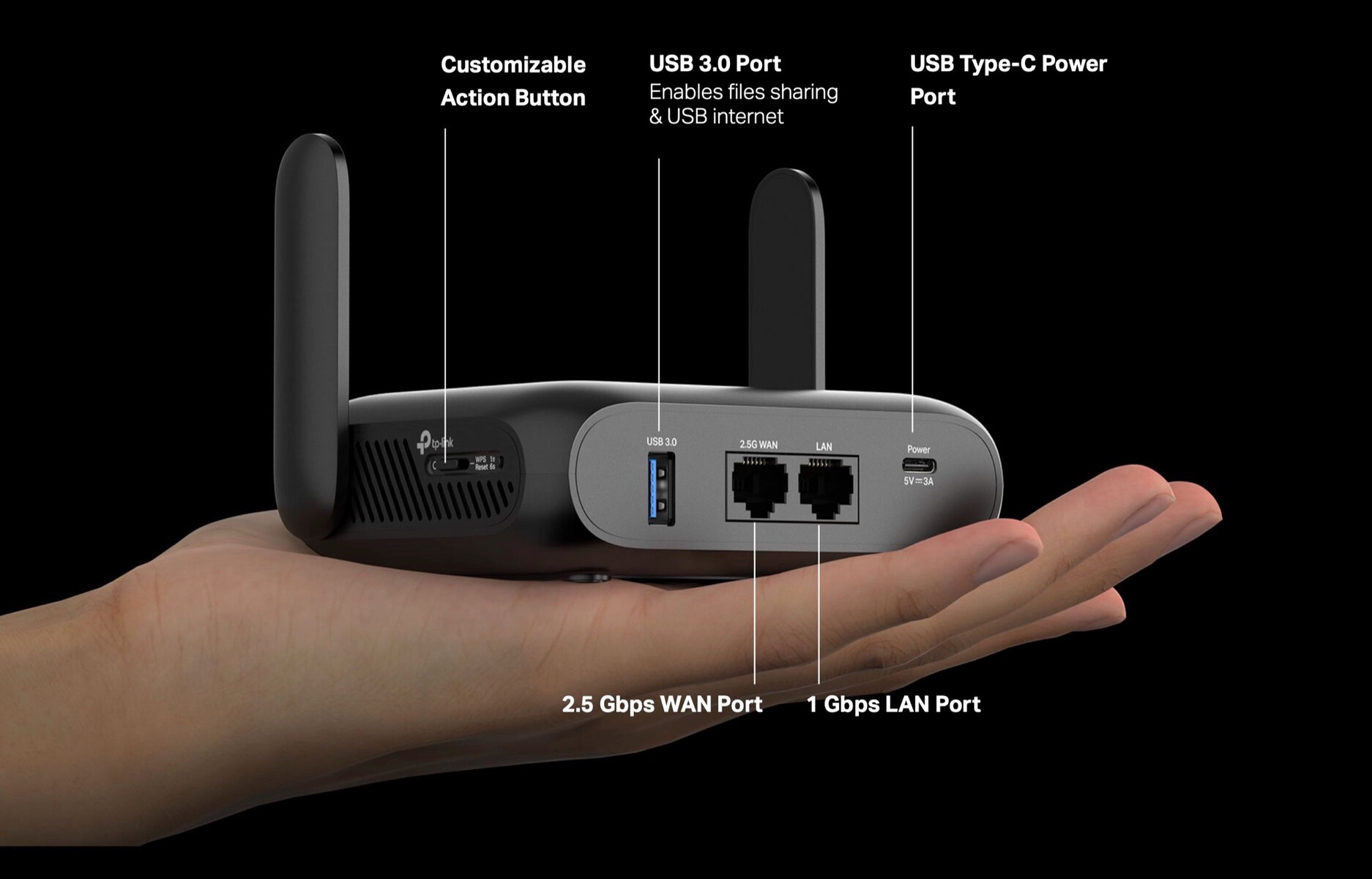
Credit: www.notebookcheck.net
Optimizing Performance
Optimizing the performance of a portable router connected to a mesh WiFi system requires careful attention. Small adjustments can greatly improve speed and reliability. Focus on placement and regular updates to keep your network running smoothly.
Placement Strategies
Position your portable router in an open area. Avoid placing it near thick walls or metal objects. These materials block WiFi signals and reduce coverage. Keep the router away from other electronics that may cause interference.
Try to place the router midway between the mesh nodes. This helps maintain a strong connection with all devices. Higher locations, like shelves, often provide better signal strength. Experiment with spots to find the best coverage.
Firmware Updates And Maintenance
Regularly update the router’s firmware. Updates fix bugs and improve security. They often include performance enhancements as well. Check the manufacturer’s website or app for new versions.
Restart the router occasionally to clear memory and refresh connections. Clean dust from vents to prevent overheating. Proper maintenance helps the router perform at its best over time.

Credit: www.youtube.com
Frequently Asked Questions
Can A Portable Router Work With Mesh Wifi Systems?
Yes, a portable router can connect to mesh WiFi systems. It can extend coverage or create a separate network. Compatibility depends on the router’s settings and mesh system protocols.
How Do I Connect A Portable Router To Mesh Wifi?
To connect, configure the portable router as a client or access point. Use Ethernet or WiFi settings to link it with the mesh network. Follow device manuals for exact steps.
Will A Portable Router Improve Mesh Wifi Coverage?
A portable router can help improve mesh WiFi coverage in certain areas. It acts as an additional access point, reducing dead zones and boosting signal strength.
Can Mesh Wifi And Portable Routers Cause Network Conflicts?
Yes, improper setup may cause IP conflicts or interference. Ensure correct IP addressing and channel selection to avoid network issues when combining both devices.
Conclusion
A portable router can work with a mesh WiFi system in many cases. It helps extend your internet reach, especially in tricky spots. Setting it up is usually simple and fast. Keep your devices updated to avoid connection problems. Remember, not all portable routers support mesh features fully.
Testing your setup before relying on it is smart. This way, you ensure smooth and steady internet at home or on the go. Portable routers add flexibility to your mesh WiFi network. A practical choice for better coverage and easy internet sharing.