Are you thinking about using a budget router with your satellite internet? It’s a smart question because your router plays a big role in how fast and reliable your connection feels at home.
You want to save money, but you also don’t want to end up with slow speeds or constant dropouts. This article will help you understand if a cheaper router can really handle satellite internet and what you need to watch out for.
Keep reading to make sure you get the best setup without wasting money or getting frustrated.
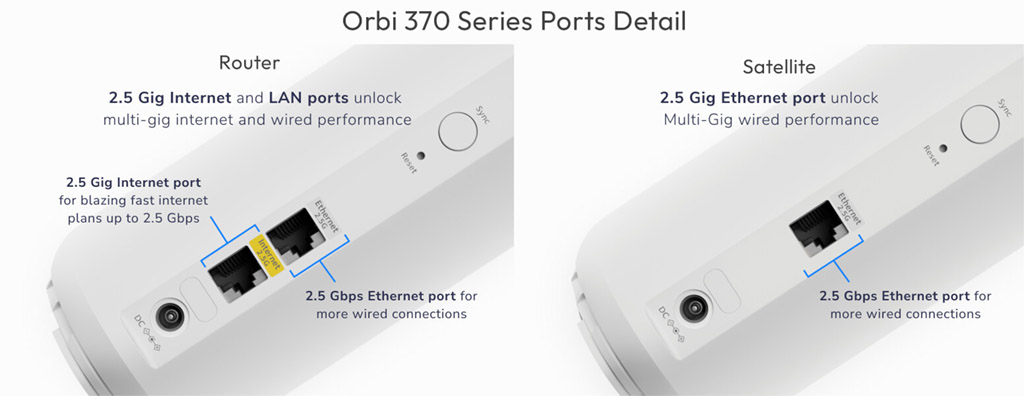
Credit: www.netgear.com
How Satellite Internet Works
Understanding how satellite internet works can help you decide if a budget router will meet your needs. Satellite internet relies on signals sent between your home and a satellite orbiting the Earth. This setup creates unique challenges and opportunities compared to traditional wired internet.
Satellite Connection Basics
Satellite internet sends data from your device to a satellite dish installed at your home. This dish communicates with a satellite in space, which then connects to a ground station linked to the internet. The entire process happens through radio waves, allowing access even in remote areas without cables.
Because the signal travels such a long distance—up to 22,000 miles to the satellite and back—it introduces some delays. Your home dish must have a clear view of the sky to maintain a strong connection. Trees, buildings, or bad weather can weaken the signal and affect your internet quality.
Latency And Speed Factors
Latency is the delay between sending a request and receiving a response. Satellite internet typically has higher latency than cable or fiber because of the long distance data must travel. This can impact activities like online gaming or video calls, where quick responses matter.
Speed varies based on your provider and plan but often ranges from 12 Mbps to over 100 Mbps. However, factors like network congestion, weather, and your equipment can reduce actual speeds. Have you noticed slower internet during storms or peak hours? That’s common with satellite connections.
Your choice of router can influence how well your satellite internet performs inside your home. Budget routers might handle basic browsing fine but could struggle with multiple devices or high-demand tasks. Knowing how satellite internet works helps you set realistic expectations for your setup.
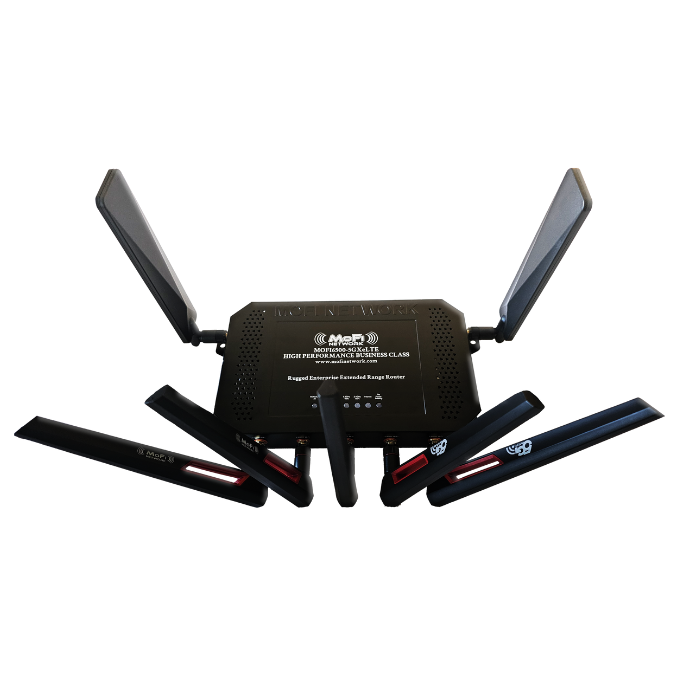
Credit: mofinetwork.com
Budget Routers Explained
Budget routers are a popular choice for many looking to save money while setting up home networks. These devices offer essential networking functions without the hefty price tag of premium models. But how well do they perform with satellite internet, which often has unique demands?
Common Features
Budget routers typically cover the basics you need for everyday internet use. They usually support Wi-Fi standards like 802.11n or 802.11ac, providing decent speeds for browsing, streaming, and light gaming. Most have multiple Ethernet ports, allowing you to connect wired devices like laptops or smart TVs.
Setup is often straightforward, with user-friendly interfaces that guide you through connecting to your internet service. Many budget routers include basic security features such as WPA2 encryption and a firewall to keep your network safe. Some even offer parental controls and guest networks, although these features might be more limited than on higher-end models.
Limitations To Consider
Budget routers come with trade-offs that could impact your satellite internet experience. Satellite connections often have higher latency, and cheaper routers might struggle with efficient traffic management, leading to slower response times. If you use multiple devices at once, a budget router might not handle the load well, causing drops or buffering.
Another point is the lack of advanced features like Quality of Service (QoS) settings that prioritize important traffic, which can be crucial for satellite internet users trying to optimize their connection. Range can also be an issue; budget routers usually have lower power antennas, which might leave parts of your home with weak Wi-Fi.
Have you noticed slowdowns or disconnects with your current setup? Understanding these limitations helps you decide if a budget router will meet your needs or if investing a bit more could save frustration in the long run.
Compatibility With Satellite Internet
Understanding the compatibility of budget routers with satellite internet is crucial before making a purchase. Satellite connections have unique requirements that not all routers meet. Knowing what to look for can save you from slow speeds or frequent disconnects.
Key Compatibility Requirements
Not every budget router works well with satellite internet. Your router must support the specific IP addressing and DNS settings provided by your satellite ISP. It should handle the higher latency typical of satellite connections without dropping packets.
Look for routers that support Quality of Service (QoS) features. These help prioritize traffic, which is vital when latency is high. Also, ensure the router can manage the bandwidth limits and data caps often associated with satellite plans.
- Supports Dynamic IP or static IP as required by your provider
- Has QoS features to prioritize important traffic
- Can handle higher latency without frequent timeouts
- Compatible with your satellite modem’s connection type (Ethernet, Wi-Fi bridge, etc.)
Common Issues With Budget Routers
Many budget routers struggle with satellite internet because they aren’t built to handle the connection’s quirks. One common issue is frequent disconnections caused by poor handling of high latency. This can interrupt your streaming or video calls unexpectedly.
Another problem is weak Wi-Fi signals, especially in larger homes. Budget routers often have limited range, which means you might need additional equipment to cover your space. Additionally, some routers lack advanced security features, leaving your network more vulnerable.
- Frequent dropouts due to inability to manage latency
- Limited Wi-Fi range causing dead zones in your home
- Insufficient security features for protecting your data
- Incompatibility with satellite modems requiring manual setup
Have you noticed slow or unstable internet after switching to satellite? It might be your router struggling rather than the satellite service itself. Choosing the right router is more than picking the cheapest option—think about long-term reliability and your specific internet habits.
Performance Expectations
When using satellite internet with a budget router, performance expectations can vary. Understanding the potential limitations helps manage expectations. Let’s explore key factors like speed, stability, and handling latency.
Speed And Stability
Budget routers offer basic speed and stability. They often support standard internet activities like browsing and streaming. Yet, they may not support high-speed tasks like online gaming. The router’s specifications, such as bandwidth and frequency bands, play a crucial role. Dual-band routers often provide better speed and connectivity. These routers can handle multiple devices with minimal interference. However, the distance from the router can affect speed and stability. A closer location enhances performance.
Handling Latency
Latency is a challenge with satellite internet. It refers to the delay in data transmission. Budget routers may not have advanced features to reduce latency. High latency affects real-time applications like video calls. Choosing a router with Quality of Service (QoS) can improve performance. QoS prioritizes certain types of traffic, reducing delays. Ensuring firmware updates can also help with latency issues.
Setup Tips For Budget Routers
Setting up a budget router with satellite internet can be simple and effective. Small changes improve speed and connection quality. Focus on key settings and router placement to get the best results.
Optimizing Router Settings
Access the router’s settings through its IP address on a web browser. Change the default username and password to secure your network. Enable WPA2 or WPA3 encryption for safety. Choose a less crowded Wi-Fi channel to reduce interference. Set the router to use the 5 GHz band if supported. This band offers faster speeds and less congestion. Disable features you don’t need to improve performance. Enable Quality of Service (QoS) to prioritize important traffic like video calls or gaming. Keep the router’s firmware updated to fix bugs and improve stability.
Placement For Better Signal
Place the router in a central spot in your home. Keep it away from thick walls and metal objects that block signals. Elevate the router on a shelf or table for better coverage. Avoid placing it near microwaves or cordless phones, which cause interference. Point the router’s antennas vertically for wider coverage. Open spaces work better than closed cabinets. Test signal strength in different rooms using a Wi-Fi analyzer app. Move the router slightly to find the strongest signal area.
When To Upgrade Your Router
Knowing when to upgrade your router can improve your satellite internet experience. A budget router might not always keep up with your needs. Upgrading ensures faster speeds and better connectivity. It also helps reduce frustration from slow or dropped connections.
Indicators Of Poor Performance
- Internet speed feels much slower than promised
- Frequent disconnections or dropped signals
- Wi-Fi signal does not reach all areas of your home
- Multiple devices struggle to stay connected simultaneously
- Router overheats or restarts often without reason
Choosing A Better Router
Select a router designed to handle satellite internet speeds. Look for models that support higher bandwidth and have strong antennas. Dual-band or tri-band routers help manage many devices better. Features like Quality of Service (QoS) can prioritize important traffic. Check for compatibility with your internet provider’s requirements.
Cost Vs. Performance Balance
Finding the right router for satellite internet means balancing cost and performance. Budget routers can offer basic functions but may struggle with satellite internet’s unique demands. Satellite connections often have higher latency and need stable signal handling. Choosing a router that manages these well without overspending is key.
Budget Options That Work Well
Some budget routers handle satellite internet better than others. Look for models with:
- Good range and signal strength
- Stable firmware updates
- Support for higher latency networks
- Basic QoS (Quality of Service) features
Brands like TP-Link, Netgear, and ASUS offer affordable models that meet these needs. These routers may not have all premium features but deliver reliable performance for everyday use.
Investing In Long-term Reliability
Spending more upfront on a quality router can save frustration later. A router designed for satellite internet can:
- Handle network delays smoothly
- Maintain steady connections for multiple devices
- Receive regular updates to fix bugs and improve speed
Think about how long you plan to use your satellite internet. A reliable router reduces connection drops and improves overall experience. Sometimes, paying a bit more ensures better value over time.

Credit: www.popularmechanics.com
Troubleshooting Common Issues
Troubleshooting common issues with budget routers and satellite internet helps improve user experience. Satellite internet can face unique challenges due to signal delays and weather interference. Budget routers might not handle these well, causing disruptions. Identifying and fixing these problems keeps the connection stable and speeds reasonable.
Connection Drops
Connection drops happen when the signal is weak or unstable. Budget routers may have limited range and weaker antennas. This causes frequent disconnections from the satellite modem.
- Place the router closer to the satellite modem.
- Avoid physical obstacles like walls and metal objects.
- Restart the router regularly to refresh the connection.
- Update the router’s firmware to fix known bugs.
- Check for interference from other wireless devices nearby.
Slow Speeds
Slow speeds can result from router limits or satellite internet’s inherent latency. Budget routers may lack powerful processors and advanced features to handle high traffic.
- Limit the number of devices connected at the same time.
- Use wired connections for devices that need faster speeds.
- Set Quality of Service (QoS) rules to prioritize important traffic.
- Clear cache and background apps on connected devices.
- Check for data caps with your satellite provider.
Frequently Asked Questions
Do Budget Routers Support Satellite Internet Connections?
Yes, budget routers can support satellite internet. However, they may lack advanced features like strong signal range and better security.
Can Budget Routers Handle Satellite Internet Speeds?
Budget routers can handle basic satellite speeds but might struggle with higher bandwidth needs or multiple devices.
Are There Compatibility Issues With Budget Routers And Satellite Internet?
Most budget routers are compatible with satellite modems, but always check your ISP’s recommended router list to avoid issues.
Will Using A Budget Router Affect Satellite Internet Performance?
Using a budget router can limit performance, causing slower speeds or weaker signals, especially in larger homes.
Conclusion
Budget routers can work well with satellite internet for everyday tasks. They offer basic features and good speeds for simple use. Some may face limits with heavy streaming or gaming. Choosing a router with strong signal and good range helps.
Keep software updated to avoid connection issues. Overall, budget routers provide a reliable option for many satellite internet users. Just match your needs with the router’s capabilities. Simple and smart choices make your internet experience better.