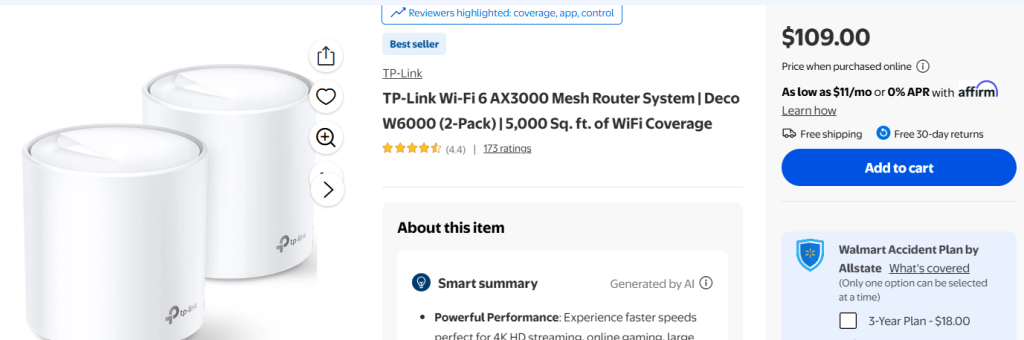
Are you tired of slow WiFi or dead zones in your 2000 sq ft house? You might be wondering if a mesh WiFi system is the solution you need.
Imagine seamless internet in every corner of your home, whether you’re streaming, working, or gaming. But is mesh WiFi really necessary for your space? Keep reading to find out how to get the best coverage and speed without wasting money or effort.
Your home deserves the strongest connection possible, and we’ll help you decide if mesh WiFi is the right choice for you.

Credit: dongknows.com
Wifi Challenges In Medium Homes
Medium-sized homes, such as a 2000 sq ft house, often face WiFi coverage issues. These problems can make internet use slow or spotty in some rooms.
Understanding common WiFi challenges helps homeowners decide if mesh WiFi is necessary. Let’s explore what affects WiFi signals in these homes.
Common Coverage Problems
WiFi signals may not reach every corner of a medium-sized house. Some areas might have weak or no signal. This happens because of distance and obstacles.
- Dead zones in far rooms
- Slow internet speeds in certain areas
- Unstable connections during movement
Impact Of Walls And Floors
Walls and floors block WiFi signals. Thick walls or multiple floors reduce signal strength. Materials like concrete, brick, and metal cause more interference.
| Material | Signal Impact |
| Drywall | Low |
| Wood | Moderate |
| Brick | High |
| Concrete | Very High |
| Metal | Very High |
Device Density Effects
Many devices connected at once can slow down WiFi. Each device uses part of the bandwidth. More devices mean less speed for each.
- Smartphones and tablets
- Laptops and desktops
- Smart home devices
- Streaming and gaming consoles

Credit: www.amazon.ca
Basics Of Mesh Wifi Systems
Mesh WiFi systems provide wireless coverage across your entire home. They use several devices to spread internet signals evenly.
This setup helps avoid weak spots and slow connections in large or multi-story houses.
How Mesh Networks Work
Mesh WiFi uses multiple nodes that work together. One node connects to your modem, and others spread the signal around your house.
Each node communicates with the others to create a single, strong network.
Benefits Over Traditional Routers
- Eliminates WiFi dead zones in your home
- Allows seamless movement without losing connection
- Easy to expand by adding more nodes
- Handles many devices better than a single router
- Simple setup and management through apps
Popular Mesh Brands
| Brand | Key Feature | Price Range |
| Google Nest Wifi | Easy to use and reliable | Mid |
| Netgear Orbi | High speed and coverage | High |
| TP-Link Deco | Affordable with good features | Low to Mid |
| Amazon Eero | Simple setup and good app | Mid |
Assessing Your Current Wifi Setup
Understanding your home’s WiFi needs is important. A 2000 sq ft house can have varying WiFi requirements. Let’s explore how to assess your current setup.
We will look into speed and coverage, identify dead zones, and evaluate your router’s placement.
Speed And Coverage Testing
Testing your WiFi speed and coverage helps find weak spots. Use online tools to check speed in different rooms.
- Test near the router for baseline speed
- Move to the farthest room and test again
- Note any significant drops in speed
Identifying Dead Zones
Dead zones are areas with little or no WiFi signal. Identifying them helps improve overall coverage.
Evaluating Router Placement
Router placement can affect WiFi performance. Place it in a central location for better distribution.
| Location | Signal Strength |
| Living Room | Strong |
| Bedroom | Moderate |
| Basement | Weak |
When Mesh Wifi Makes Sense
Mesh WiFi systems are designed to enhance wireless coverage. They are ideal for homes with unique needs. Let’s explore when mesh WiFi is beneficial.
For a 2000 sq ft house, certain conditions make mesh WiFi a smart choice. These include large areas, multiple devices, and smart home features.
Large Area Coverage Needs
If your home is large or has many rooms, WiFi coverage can be spotty. Mesh systems use multiple nodes to cover every corner.
- Nodes communicate with each other
- Coverage extends to every room
- No dead zones in the house
Multiple Devices And Users
Many devices can slow down a regular router. Mesh WiFi handles multiple connections smoothly. This is key for families or shared living spaces.
| Device | Number |
| Smartphones | 4+ |
| Laptops | 2+ |
| Tablets | 3+ |
| Smart TVs | 1-2 |
Smart Home Integration
Smart homes need stable WiFi. Mesh systems ensure devices like cameras and assistants stay connected. This is crucial for automation.
Alternatives To Mesh Wifi
If you have a 2000 sq ft house, mesh WiFi is one way to cover the space. You might want to try other options too. Some solutions can save money or be easier to set up.
Below are some alternatives to mesh WiFi. Each has pros and cons to consider for your home network.
Wifi Extenders And Boosters
WiFi extenders pick up your main WiFi signal and repeat it. Boosters increase the signal strength. These devices help cover dead zones in your house.
- Easy to install and usually affordable
- Can cause slower speeds at the far end
- Best for small to medium coverage gaps
- Works well if your router is in a central spot
Powerline Adapters
Powerline adapters send internet signals through your home’s electrical wiring. They plug into outlets and connect to your router and devices with cables.
| Feature | Details |
| Setup | Plug and play, no new wires needed |
| Speed | Good for streaming and gaming |
| Range | Depends on home wiring quality |
| Limitations | Works best on the same electrical circuit |
Upgrading To A Stronger Router
Sometimes your current router is not strong enough. A new router with better range and faster speeds might fix your problem.
Look for these features when choosing a new router:
- Dual-band or tri-band support
- Latest WiFi standards (WiFi 5 or WiFi 6)
- Good antenna design for wider coverage
- Easy setup and management options
Cost Considerations
Choosing the right wifi system for a 2000 sq ft house depends on cost. Understanding the expenses helps you decide if mesh wifi is worth it.
This section covers the price of mesh systems, installation and upkeep costs, and how value compares to other options.
Mesh System Pricing
Mesh wifi systems usually cost more than single routers. Prices vary based on brand and how many units you need.
A typical 2-3 unit mesh kit can range from $150 to $400. More units or advanced features increase the price.
- Basic mesh system: $150–$250
- Mid-range system with extra features: $250–$350
- High-end system with multiple nodes: $350 and up
Installation And Maintenance
Setting up mesh wifi is usually simple and can be done by most users. Many systems come with apps that guide installation.
Maintenance includes occasional firmware updates and repositioning nodes if needed to improve coverage.
- Installation time: 30–60 minutes
- Most updates happen automatically
- Minimal ongoing maintenance required
Value Compared To Alternatives
Mesh wifi offers better coverage and fewer dead zones than single routers. This is useful for bigger homes like 2000 sq ft.
Alternatives like range extenders cost less but may reduce speed and add complexity to your network.
- Mesh systems provide strong, seamless wifi
- Range extenders are cheaper but may cause slowdowns
- Mesh can save money by avoiding multiple internet plans
Optimizing Wifi In A 2000 Sq Ft Home
Having strong WiFi coverage in a 2000 square foot house can be challenging. Proper setup can help you get fast and reliable internet everywhere.
This guide explains easy ways to improve WiFi in your home. It covers where to place your router, using wired connections, and reducing interference.
Ideal Router Placement Tips
Placing your router in the right spot helps spread WiFi signals evenly. Aim for a central location, away from walls and metal objects.
- Put the router high, like on a shelf or table
- Keep it away from microwaves and cordless phones
- Avoid placing it inside cabinets or behind furniture
- Point the router antennas vertically for better coverage
Using Wired Backhaul
Wired backhaul connects mesh WiFi points using Ethernet cables. It gives faster and more stable connections than wireless links.
| Benefit | Description |
| Speed | Reduces wireless traffic, increasing speeds |
| Stability | Prevents signal drops between mesh units |
| Range | Allows placing mesh points far apart |
| Interference | Limits WiFi interference on backhaul link |
Managing Interference
WiFi signals can get weaker from interference by other devices. You can reduce this by choosing the right channels and keeping devices apart.
- Use 5 GHz band for less crowded signals
- Change router channel to avoid overlap with neighbors
- Keep cordless phones and baby monitors away from the router
- Limit walls and metal objects between router and devices

Credit: dongknows.com
Future-proofing Your Network
Setting up a strong WiFi network in a 2000 sq ft house is important. You want a system that works well today and still works well in the future.
Choosing the right technology helps you avoid problems as new devices and faster speeds arrive. Mesh WiFi can be part of a network that grows with your needs.
Wifi 6 And Beyond
WiFi 6 offers faster speeds and better connections for many devices at once. It uses new technology to reduce delays and improve battery life on devices.
New standards after WiFi 6 will keep improving speed and coverage. Choosing mesh systems that support WiFi 6 means your network will stay current longer.
Scalability Of Mesh Systems
Mesh WiFi systems let you add more units to cover bigger areas. This means your network can grow if you add rooms or have more devices.
- Start with a base unit for your 2000 sq ft house
- Add extra nodes to cover dead zones
- Expand easily when your space or needs increase
- Keep all units working together as one network
Preparing For More Devices
Homes now have many devices like phones, tablets, smart TVs, and smart home gadgets. Your network must handle all of them without slowing down.
| Device Type | Estimated Count | Network Need |
| Smartphones | 4-6 | High bandwidth, frequent use |
| Smart TVs | 1-2 | Streaming, high data use |
| Smart Home Devices | 5-10 | Low bandwidth, always connected |
| Laptops/Tablets | 2-4 | Work and play, moderate use |
Frequently Asked Questions
Do I Need Mesh Wifi For A 2000 Sq Ft House?
Mesh WiFi is ideal for 2000 sq ft homes with multiple rooms or thick walls. It ensures seamless coverage and eliminates dead zones. Traditional routers may struggle to cover large areas effectively. Mesh systems offer better speed and reliability across the house.
How Does Mesh Wifi Improve Home Coverage?
Mesh WiFi uses multiple nodes to spread the signal evenly. It extends coverage to hard-to-reach areas. This prevents weak signals and buffering during streaming or gaming. The system automatically connects devices to the best node for optimal speed.
Is Mesh Wifi Better Than A Single Router?
Mesh WiFi provides more consistent coverage than a single router. It reduces dead spots and maintains strong signals throughout the house. Single routers can lose strength over distance or through walls. Mesh systems adapt dynamically for better overall performance.
Can Mesh Wifi Handle Multiple Devices Simultaneously?
Yes, mesh WiFi systems are designed for multiple devices. They balance bandwidth efficiently to avoid slowdowns. This is beneficial for smart homes with many connected gadgets. Mesh networks maintain stable connections even during high traffic.
Conclusion
A 2000 sq ft house can benefit from mesh WiFi. It helps cover all rooms with strong signals. No more dead spots or slow internet areas. Mesh systems are easy to set up and manage. They work well if you have many devices.
Choose one based on your budget and needs. Good WiFi makes streaming, gaming, and browsing smoother. Think about your house layout before deciding. A mesh WiFi can improve your daily internet experience. Simple, steady internet is worth the investment.


