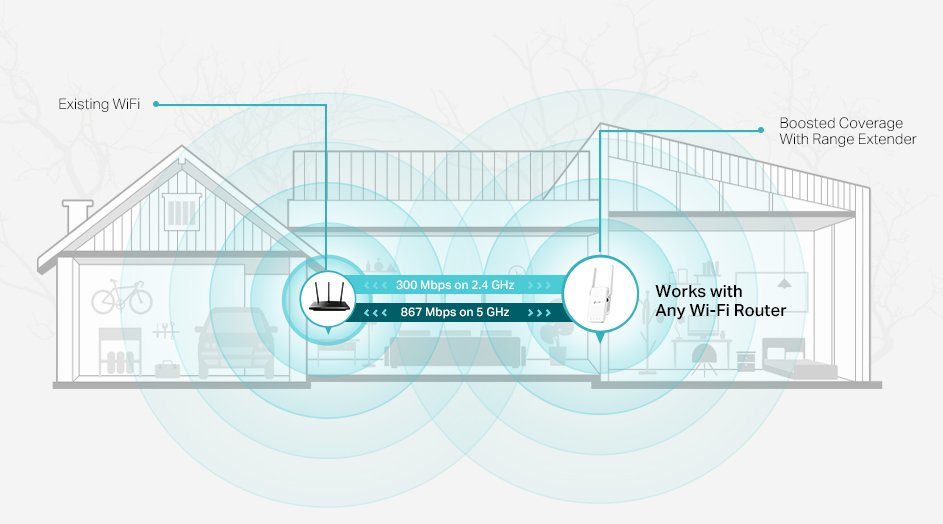
Are you struggling to boost your WiFi signal across long distances? You might have heard that long range WiFi extenders need a static IP to work properly.
But is that really true? Understanding whether your extender requires a static IP can save you time, avoid frustrating setup issues, and ensure your internet runs smoothly. You’ll discover the simple facts about static IPs and how they affect your WiFi extender’s performance.
Keep reading to find out exactly what you need to know to get the best connection possible.
How Long Range Wifi Extenders Work
Long range WiFi extendershelp spread your internet signal far from the main router. They catch the WiFi and send it further. This makes WiFi work in places far away or with walls in between.
These devices work by connecting wirelessly to your router. Then, they create a new WiFi signal to cover a larger area. This lets devices far from the router still get good internet.
- Reach distant rooms or floors with better WiFi
- Improve WiFi in outdoor spaces like gardens or patios
- Help devices that have weak signals get stronger connections
- Useful in large homes, offices, or buildings with many walls
Static Ip Vs Dynamic Ip
Static IPmeans your device always uses the same address on the network. It helps devices stay easy to find. Dynamic IPchanges each time a device connects. It is given by the router automatically.
Static IP is great for devices that need to be found all the time, like servers or security cameras. Dynamic IP is easier for most users because it needs less setup and changes often.
| Type | How it Works | Benefits |
|---|---|---|
| Static IP | Fixed address, never changes | Easier to access device remotely, better for network stability |
| Dynamic IP | Changes each time device connects | No setup needed, good for general home use |
Role Of Ip Address In Wifi Extenders
IP addresseshelp devices find each other on a network. Wifi extenders use IP addresses to connect to the main router and other devices. These addresses can be dynamicor static. Dynamic IPs change over time, assigned by the router automatically. Static IPs stay the same and are set manually.
Dynamic IPs are easy to use and work well for most users. Static IPs can help avoid connection issues because the extender always uses the same address. This can improve network stabilityand make it easier to manage devices.
| IP Assignment | Description | Effect on Connectivity |
|---|---|---|
| Dynamic IP | Router assigns IP automatically | Easy setup, may change IP often |
| Static IP | Manually set fixed IP address | Stable connection, less chance of conflicts |

Credit: www.reddit.com
When Static Ip Is Needed
Static IPhelps keep the network stable. It stops the IP address from changing. This is important for devices that need to connect all the time without interruptions.
For long range WiFi extenders, stability matters a lot. Changing IPs can cause the connection to drop. This can make the extender lose contact with the main router.
In some advanced setups, static IP is needed. For example, if you set up port forwarding or VPNs, fixed IPs help the network work right. It makes managing devices easier and safer.
Drawbacks Of Using Static Ip
Setting up a static IP can be complexfor many users. It requires extra steps to configure the device properly. This setup may need technical knowledge that is not easy for everyone.
Static IP addresses can cause conflictsin the network. If two devices share the same IP, connection issues occur. This can lead to network downtimeand frustration.
- Manual configuration needed for each device
- Risk of assigning duplicate IPs
- More difficult to change network settings
- Requires tracking of IP addresses
Credit: www.tp-link.com
Configuring Static Ip For Wifi Extenders
Assigning a static IPto a long range WiFi extender helps keep its address fixed. This makes it easier to manage and avoid conflicts with other devices.
Start by accessing the router’s settings page through a web browser. Find the extender’s current IP in the list of connected devices. Use this IP to log into the extender’s admin panel.
In the extender settings, locate the IP configurationsection. Switch from DHCP to Static IP mode. Enter an IP address outside the router’s DHCP range but within the same subnet.
Save the changes and restart the extender. It should now use the static IP address you assigned.
Troubleshooting Tips
- Check the IP address is not used by another device.
- Ensure the static IP is in the same subnet as the router.
- Restart both the router and extender if connection issues persist.
- Verify extender firmware is up to date.
- Reset extender to factory settings if problems continue.
Alternatives To Static Ip For Extenders
Long-range WiFi extenders often use dynamic IP addresses instead of static ones. Dynamic IPs simplify setup and reduce network conflicts. Some extenders also support DHCP reservation as a stable alternative to static IPs.
Using Dhcp Reservations
DHCP reservationsallow your router to assign the same IP address to your extender every time. This keeps the IP address fixedwithout needing a static IP setup. It is easy to set up through your router’s settings page. This method helps avoid IP conflicts and keeps your network stable. No special skills are needed, just access to your router.
Mesh Network Solutions
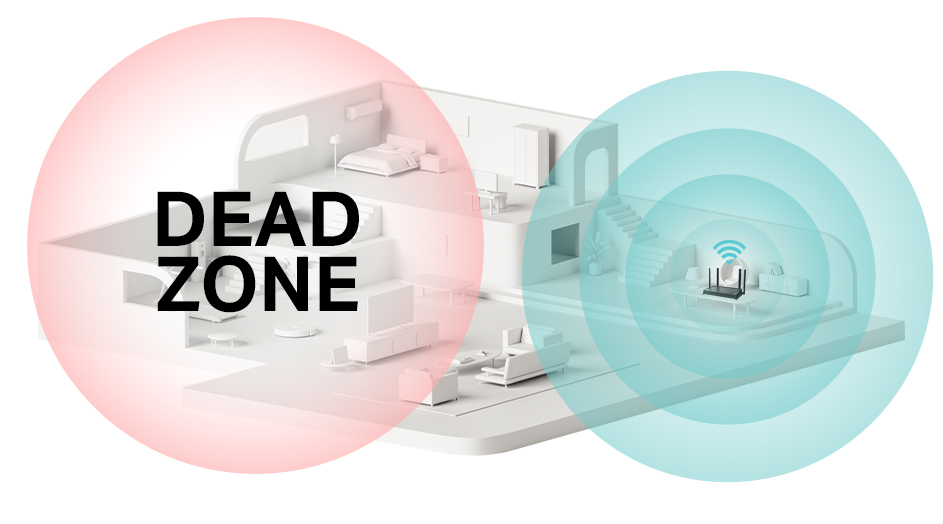
Mesh networksuse multiple devices to spread WiFi evenly. Extenders in a mesh system get IPs automatically and work well without static IPs. They provide stronger coverageand smoother connections across your home. Mesh systems are good for larger spaces and reduce dead zones.
Credit: wifiwavlink.net
Key Takeaways For Users
Static IPhelps keep your wifi extender’s address fixed. This stops IP conflicts and connection drops. Static IP is best when your network needs stable connections for devices like printers or security cameras.
Dynamic IP works fine for most users. It changes the IP address automatically, which is easier for simple setups. But for long-range extenders covering many devices, static IP can improve reliability.
Use static IP if you manage your network manually or require remote access. It helps avoid confusion and saves time troubleshooting.
- Assign static IP addresses outside the router’s DHCP range.
- Write down the IP, subnet mask, gateway, and DNS settings.
- Restart devices after setting static IP to apply changes.
- Keep firmware updated for best performance.
Frequently Asked Questions
Do Long Range Wifi Extenders Require A Static Ip?
Long range WiFi extenders usually do not need a static IP. They work with dynamic IPs assigned by your router. However, setting a static IP can improve stability and ease management, especially in complex networks or for advanced configurations.
Can A Static Ip Improve Wifi Extender Performance?
Yes, a static IP can improve performance by preventing IP conflicts. It ensures the extender keeps the same address, which helps maintain a stable connection and easier troubleshooting within your network.
How To Assign A Static Ip To A Wifi Extender?
To assign a static IP, access the extender’s admin panel via its current IP. Navigate to network settings and manually enter an IP address outside your router’s DHCP range. Save changes and reboot the extender for the settings to apply.
Will A Dynamic Ip Cause Issues With Long Range Extenders?
Dynamic IPs generally do not cause issues for extenders. However, IP changes can occasionally interrupt the connection or complicate remote management, which static IPs can help avoid.
Conclusion
Long-range WiFi extenders don’t always need a static IP. They can work well with dynamic IPs. Most home networks use dynamic IPs. It’s easier and less technical. Static IPs provide stability for advanced setups. They suit businesses or tech enthusiasts.
Always consider your network needs. Research and choose wisely. Your WiFi experience depends on it. Ensure compatibility with your devices. Consult your extender’s manual for guidance. Installation should be straightforward. Improve your connectivity with thoughtful planning. Stay connected, enjoy seamless browsing.


