Are you tired of weak WiFi signals when you step outside your home in a rural area? You’re not alone.
Many people living far from city centers struggle with slow internet or no connection at all once they leave their front door. But can outdoor WiFi extenders really fix this problem for you? Imagine having strong, reliable internet whether you’re in your garden, barn, or even out on the porch.
You’ll discover how outdoor WiFi extenders work, if they’re a good fit for rural settings, and what you need to know before buying one. Keep reading to find out how you can boost your internet and stay connected no matter where you are.
Outdoor Wifi Extenders Basics
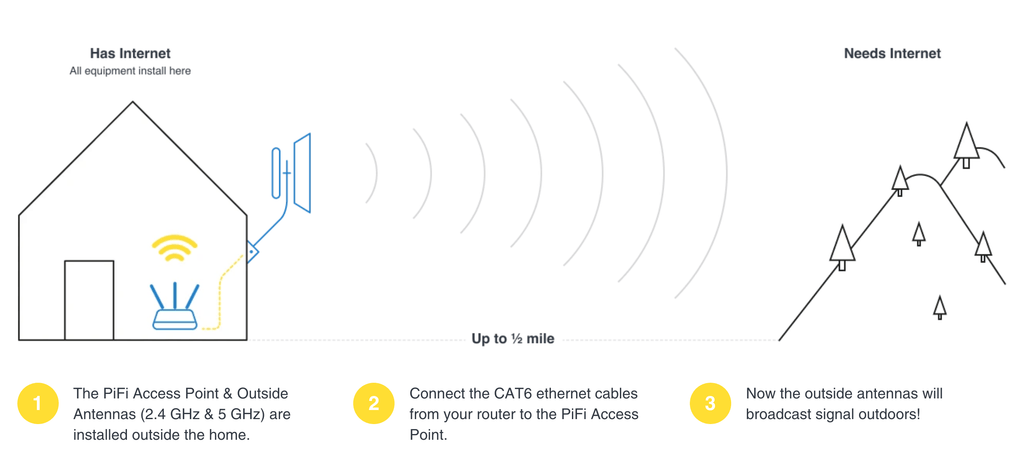
Outdoor WiFi extendersboost internet signals in open spaces. They catch the main WiFi signal and send it farther. This helps cover large yards or farms with better internet. The extenders work by linking to your home router wirelessly.
Types of outdoor WiFi extendersvary by design and use:
- Repeater:Catches and repeats the existing WiFi signal.
- Access Point:Connects to the router with a cable and creates a new WiFi zone.
- Mesh Extender:Works with mesh routers to spread WiFi evenly.
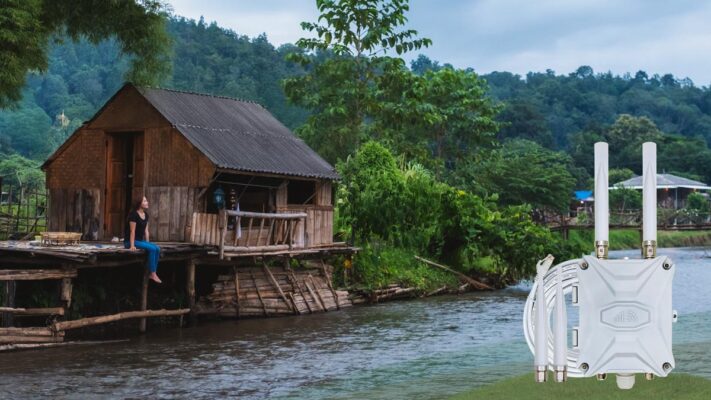
Credit: www.outdoorrouter.com
Challenges In Rural Areas
Outdoor WiFi extenders face major challenges in rural areas. The distancebetween the home and the router often causes signal loss. The farther the signal travels, the weaker it becomes.
Physical obstaclessuch as trees, hills, and buildings block the WiFi signal. These barriers make it hard for the extender to catch and send the signal properly.
- Distance:Signals weaken over long distances.
- Obstacles:Trees and hills can block signals.
- Interference:Other devices and weather can affect the signal.
Interference factorsinclude other wireless devices and electronic equipment. Weather conditions like rain or fog also reduce signal strength. These issues make it tricky for extenders to work well in rural spots.
Benefits Of Using Outdoor Extenders
Outdoor WiFi extendershelp boost signal in large, open spaces. They extend coveragefar beyond indoor routers. This means fewer dead zones in yards or farms. Better signal reach helps devices stay connected outside.
These extenders save money by avoiding costly new internet lines. They make full use of your current internet plan. No need to pay for extra services or devices.
Installation is simple and quick. Many models mount on walls or poles easily. No special tools or skills are needed. This saves time and hassle for rural users.

Credit: www.billboard.com
Choosing The Right Extender
Outdoor wifi extenders need strong rangeand powerto cover large rural areas. Devices with higher power can reach far distances and provide stable connections.
Extenders built for outdoors must have weather resistance. Look for models with waterproofand dustprooffeatures. They should work well in rain, wind, and sun without damage.
| Feature | What to Check |
|---|---|
| Range and Power | High signal strength, suitable for long distances |
| Weather Resistance | Waterproof, dustproof, able to handle extreme weather |
| Compatibility with Routers | Works with your current router brand and model |
Make sure the extender matches your router’s frequency bandsand standards. This avoids connection problems and slow speeds.
Installation Tips For Rural Settings
Place the extenderwhere it can get a clear signal from your main router. Avoid walls or metal objects that block signals. Higher spots like rooftops or poles work best.
Mount the extender firmly to withstand wind and rain. Use weatherproof mounts and enclosures for protection. Make sure the device stays stable and safe.
- Use a power source close to the extender location.
- Check cable lengths to avoid loose connections.
- Test the connection before final mounting.
| Setup Aspect | Tip |
|---|---|
| Placement | Choose a spot with clear line of sight to router and area. |
| Mounting | Use weatherproof hardware; secure tightly. |
| Power | Locate near power source; avoid long cable runs. |
| Connectivity | Test signal strength before final setup. |
Performance Expectations
Speedand latencycan vary greatly in rural areas. Outdoor WiFi extenders may boost signal range but might not always increase speed. Distance from the main router and obstacles like trees or hills affect performance.
Signal stabilitydepends on weather and physical barriers. Strong winds, rain, or thick walls can cause drops in connection. Extenders work best with a clear line of sight to the router or antenna.
Some limitationsto consider:
- Extenders repeat signals, which can reduce speed.
- Long distances can cause weak or lost signals.
- Power sources may be hard to find outdoors.
- Setup might be tricky without technical knowledge.
Alternative Solutions
Mesh WiFi systemscreate a network of devices that spread WiFi evenly. They work well in large or rural homes. Mesh nodes talk to each other to cover wide spaces. This helps avoid dead zones and weak signals.
Point-to-point bridgesuse two devices to send internet from one place to another over long distances. They work best when a clear line of sight exists. This setup connects buildings far apart without cables.
| Option | Description | Best for |
|---|---|---|
| Cellular | Uses mobile networks for internet access | Areas with good cell signal but no wired internet |
| Satellite | Internet from satellites, covering remote spots | Very rural or isolated locations |
Maintenance And Troubleshooting
Regular checks help keep outdoor WiFi extenders working well. Check the device for dirt and damage. Make sure it is not loose or tilted. Clean the antennas gently to avoid dust build-up. Verify that cables are connected tightly. Look for any signs of wear or corrosion. Power cycle the extender by unplugging and plugging it back in to reset it. Keep the firmware updated to improve performance and security.
Common issues include weak signals, slow speeds, and frequent disconnections. Weather conditions can cause problems. Obstructions like trees and buildings may block signals. Sometimes, WiFi channels overlap and cause interference. Power surges or outages can also disrupt service.
Fixing connectivity problems often involves repositioning the extender for better signal coverage. Try moving it closer to the main router but still outdoors. Change the WiFi channel to reduce interference. Restart both the router and extender. Check for firmware updates and install them if available. If problems persist, resetting the extender to factory settings can help. Make sure to follow the user manual for setup after reset.
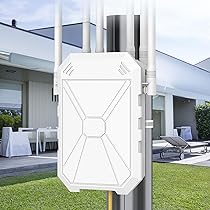
Credit: www.amazon.ca
Frequently Asked Questions
Do Outdoor Wifi Extenders Improve Rural Internet?
Yes, outdoor WiFi extenders boost signal strength in rural areas. They extend coverage across large open spaces and reduce dead zones effectively.
Are Outdoor Wifi Extenders Reliable In Rural Settings?
Outdoor extenders are reliable when placed correctly. Proper alignment and minimal physical obstructions ensure stable connections in rural environments.
Can Outdoor Wifi Extenders Handle Long Distances?
Yes, they can cover longer distances than indoor extenders. However, signal quality depends on terrain and environmental factors.
What Factors Affect Outdoor Wifi Extender Performance?
Terrain, weather, and physical obstacles impact performance. Clear line-of-sight and high-quality equipment improve rural signal reach and speed.
Conclusion
Outdoor WiFi extenders can help in rural areas. They extend the signal reach. This can improve internet access for remote locations. Installation is often simple. Choose the right model for your needs. Consider your area’s specific challenges. Look for a durable and weather-resistant option.
Check compatibility with your current setup. Some extenders work better over long distances. A stronger signal can lead to a smoother online experience. Make informed choices for better connectivity. A good extender may bridge the gap, bringing reliable internet closer to home.


